

- Posts: 15
- Thank you received: 0
Desperate - to change product title size
12 years 4 months ago #158312
by wild
Desperate - to change product title size was created by wild
www.a-cutabove.co.uk
-- HikaShop version -- :2.2.3 starter
-- Joomla version -- : 3.2,2
-- PHP version -- : 5.4.28
-- Browser(s) name and version -- : XXXXX x.x.x
-- Error-message(debug-mod must be tuned on) -- : Error_message
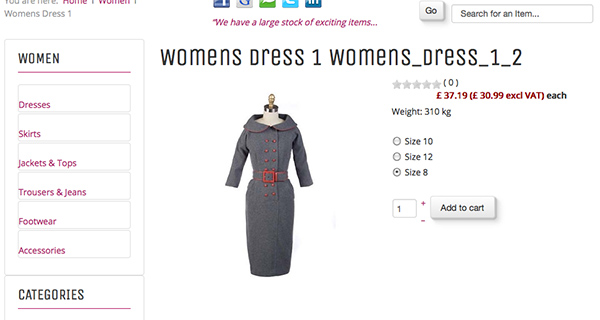
Hi I am desperate to adjust my product heading size and then possibly adjust the pricing and options to make more attractive..
I have been told this is simple and have been through all my Display Views files and also template files and am tearing my hair out.
Attached is a screenshot of what I mean.
Firebug tells me the following:
<div id="hikashop_product_top_part" class="hikashop_product_top_part">
<h1>
<span id="hikashop_product_name_main" class="hikashop_product_name_main"> Womens Dress 1 </span>
<span id="hikashop_product_code_main" class="hikashop_product_code_main"> Womens_Dress_1_2 </span>
</h1>
</div>
<div id="hikashop_product_Mens_Shirts_1_page" class="hikashop_product_page">
*All i want to do to begin with is simply adjust the <H1> to <H3> put for the life of me I cannot find the file to adjust!
PLEASE HELP...and thanks in advance..
-- HikaShop version -- :2.2.3 starter
-- Joomla version -- : 3.2,2
-- PHP version -- : 5.4.28
-- Browser(s) name and version -- : XXXXX x.x.x
-- Error-message(debug-mod must be tuned on) -- : Error_message
Hi I am desperate to adjust my product heading size and then possibly adjust the pricing and options to make more attractive..
I have been told this is simple and have been through all my Display Views files and also template files and am tearing my hair out.
Attached is a screenshot of what I mean.
Firebug tells me the following:
<div id="hikashop_product_top_part" class="hikashop_product_top_part">
<h1>
<span id="hikashop_product_name_main" class="hikashop_product_name_main"> Womens Dress 1 </span>
<span id="hikashop_product_code_main" class="hikashop_product_code_main"> Womens_Dress_1_2 </span>
</h1>
</div>
<div id="hikashop_product_Mens_Shirts_1_page" class="hikashop_product_page">
*All i want to do to begin with is simply adjust the <H1> to <H3> put for the life of me I cannot find the file to adjust!
PLEASE HELP...and thanks in advance..
Please Log in or Create an account to join the conversation.

12 years 4 months ago #158317
by lousyfool
Need help with customisations of layouts, style or other site development? PM me!
(Don't forget to turn on "E-mail notification of new messages" )
Replied by lousyfool on topic Desperate - to change product title size
With the views and HTML/PHP you determine the content on the page and where it goes. Not the style, the look of things.
That's CSS, and Firebug tells you that (and lets you simulate) in it's right pane next to the HTML you've been focusing on.
The other thing I need to tell you is: READ THE DOCUMENTATION! :sick:
What's wrong about that? You could have been done with it by now, if...
There's a whole large and rich collection on this site - don't tell me you can't find it!
This here is what you need short-termed for your header (and your head to grow the hair back): www.hikashop.com/support/support/documen.../84-css-styling.html
Now go, and don't come back with stylish stuff before you're done with it! :lol: :lol:
:lol:
That's CSS, and Firebug tells you that (and lets you simulate) in it's right pane next to the HTML you've been focusing on.
The other thing I need to tell you is: READ THE DOCUMENTATION! :sick:
What's wrong about that? You could have been done with it by now, if...
There's a whole large and rich collection on this site - don't tell me you can't find it!
This here is what you need short-termed for your header (and your head to grow the hair back): www.hikashop.com/support/support/documen.../84-css-styling.html
Now go, and don't come back with stylish stuff before you're done with it! :lol:
:lol: Need help with customisations of layouts, style or other site development? PM me!
(Don't forget to turn on "E-mail notification of new messages" )
The following user(s) said Thank You: wild
Please Log in or Create an account to join the conversation.
12 years 4 months ago #158324
by lousyfool
Need help with customisations of layouts, style or other site development? PM me!
(Don't forget to turn on "E-mail notification of new messages" )
Replied by lousyfool on topic Desperate - to change product title size
Now, since you're done with CSS (yes?), let me tell you where you find the <h1> tag you're looking for.
Assuming that you're using the "default" view for the product page, the view is indeed "show_default" under "product". In the views listing, make sure you choose HikaShop, frontend, and the frontend template you're using, then you should find the view fairly quickly and be able to edit it.
You're using a relatively old HikaShop version, so I can't tell which exact line the <h1> header is, but it's early in the file, and you have the class and ID's from Firebug.
Good luck!
Assuming that you're using the "default" view for the product page, the view is indeed "show_default" under "product". In the views listing, make sure you choose HikaShop, frontend, and the frontend template you're using, then you should find the view fairly quickly and be able to edit it.
You're using a relatively old HikaShop version, so I can't tell which exact line the <h1> header is, but it's early in the file, and you have the class and ID's from Firebug.
Good luck!
Need help with customisations of layouts, style or other site development? PM me!
(Don't forget to turn on "E-mail notification of new messages" )
Please Log in or Create an account to join the conversation.
12 years 4 months ago #158327
by wild
Replied by wild on topic Desperate - to change product title size
Thanks very much for your help... it will be tomorrow now when I get to follow your much needed info and any further help gratefully accepted.. martin
Please Log in or Create an account to join the conversation.
12 years 4 months ago #158448
by wild
Replied by wild on topic Desperate - to change product title size
Hi again.. you have been a great help - sorted everything apart from making badges work ? thanks again
Please Log in or Create an account to join the conversation.
12 years 4 months ago #158449
by lousyfool
Need help with customisations of layouts, style or other site development? PM me!
(Don't forget to turn on "E-mail notification of new messages" )
Replied by lousyfool on topic Desperate - to change product title size
Been through this document?
www.hikashop.com/support/support/documen...p-badge-listing.html
If so, and you still can't make them work, tell what the problem is as exactly as possible, and best post screenshots of your settings.
If so, and you still can't make them work, tell what the problem is as exactly as possible, and best post screenshots of your settings.
Need help with customisations of layouts, style or other site development? PM me!
(Don't forget to turn on "E-mail notification of new messages" )
Please Log in or Create an account to join the conversation.
12 years 4 months ago #158463
by wild
Replied by wild on topic Desperate - to change product title size
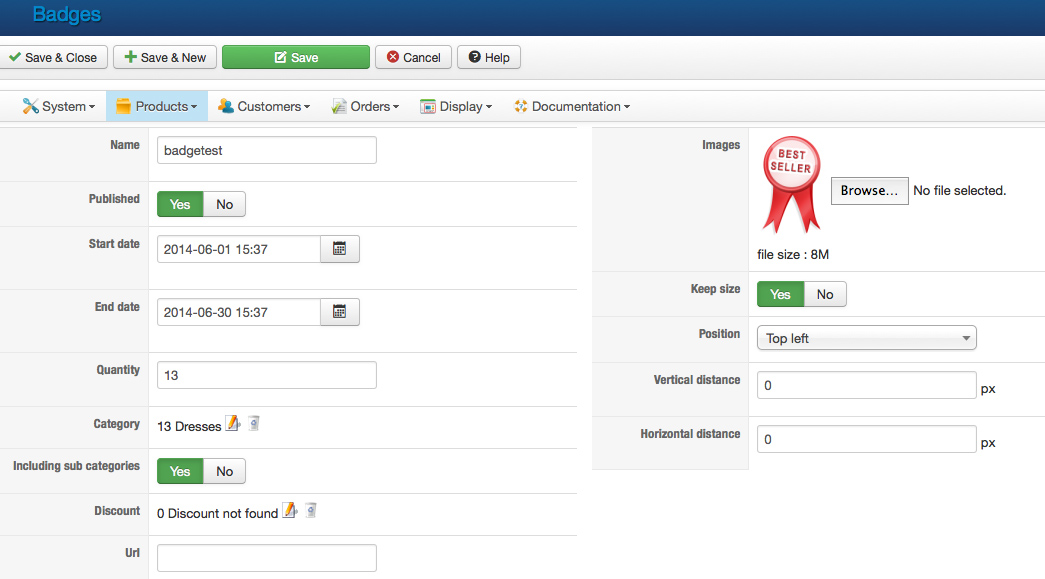
hi again - badge screenshot settings attached.... thanks
Please Log in or Create an account to join the conversation.
12 years 4 months ago - 12 years 4 months ago #158492
by lousyfool
Need help with customisations of layouts, style or other site development? PM me!
(Don't forget to turn on "E-mail notification of new messages" )
Replied by lousyfool on topic Desperate - to change product title size
Ok, doesn't look too bad. Should work.
But:
(1) Not that it's preventing all badges from showing, but why did you set "Qty" in the badge settings to "13"? "Qty" is not the same as "Category ID" - so much should be clear. Just wondering because strangely you put there the same quantity as the category ID happens to be. Despite the fact that you presently have 8 products in the category. In brief: leave the field "Qty" empty unless you want only a limited number of products to have badges.
(2) Did you enable badges in the menu/module settings? In the backend under Display, double-check if for at least the relevant menus and modules the parameter "Display badge" is set to "Yes". Particularly the menu with ID 156 and the module with ID 147... these are the ones for category "Dresses"...
But:
(1) Not that it's preventing all badges from showing, but why did you set "Qty" in the badge settings to "13"? "Qty" is not the same as "Category ID" - so much should be clear. Just wondering because strangely you put there the same quantity as the category ID happens to be. Despite the fact that you presently have 8 products in the category. In brief: leave the field "Qty" empty unless you want only a limited number of products to have badges.
(2) Did you enable badges in the menu/module settings? In the backend under Display, double-check if for at least the relevant menus and modules the parameter "Display badge" is set to "Yes". Particularly the menu with ID 156 and the module with ID 147... these are the ones for category "Dresses"...
Need help with customisations of layouts, style or other site development? PM me!
(Don't forget to turn on "E-mail notification of new messages" )
Last edit: 12 years 4 months ago by lousyfool. Reason: under display, not views
Please Log in or Create an account to join the conversation.
12 years 4 months ago #158571
by wild
Replied by wild on topic Desperate - to change product title size
hi again - i have done all the adjustment and checks - but still no badges on my dresses products?
Please Log in or Create an account to join the conversation.
12 years 4 months ago #158650
by lousyfool
Need help with customisations of layouts, style or other site development? PM me!
(Don't forget to turn on "E-mail notification of new messages" )
Replied by lousyfool on topic Desperate - to change product title size
If you swear all backend settings are correct but no glimpse of a badge in your HTML, my final question is if you have edited the listing_img_title view, or if your template includes a view where the code for badges is not included. You didn't say anything about this, and I'm not familiar with the template you're using.
Need help with customisations of layouts, style or other site development? PM me!
(Don't forget to turn on "E-mail notification of new messages" )
Please Log in or Create an account to join the conversation.
12 years 4 months ago #158666
by wild
Replied by wild on topic Desperate - to change product title size
Hi my template is:
www.favthemes.com/themes/product/show/1-...omla-3-template.html
I have only edited the "show_default" under "product" to adjust the product title and also the price colour so far?
I cannot see what would be stopping my badges from viewing?
I can send you my administrator login details to your email address?
www.favthemes.com/themes/product/show/1-...omla-3-template.html
I have only edited the "show_default" under "product" to adjust the product title and also the price colour so far?
I cannot see what would be stopping my badges from viewing?
I can send you my administrator login details to your email address?
Please Log in or Create an account to join the conversation.
12 years 4 months ago #158671
by wild
Replied by wild on topic to create a logout button
I am being a pain now... I have been experimenting on creating a logout button to registerred users and cant make the link return to the home page after log out.
I have tried this as an extermnal link on a hikashop menu item?
index.php?option=com_user&task=logout&return=Lw
I have tried this as an extermnal link on a hikashop menu item?
index.php?option=com_user&task=logout&return=Lw
Please Log in or Create an account to join the conversation.
12 years 4 months ago #158673
by lousyfool
True. :lol:
This is the third topic in one single thread, and this has nothing to do with HikaShop. No one will appreciate this.
Leave the thread where it is now.
Roger, over, and out.
Need help with customisations of layouts, style or other site development? PM me!
(Don't forget to turn on "E-mail notification of new messages" )
Replied by lousyfool on topic to create a logout button
wild wrote: I am being a pain now...
True. :lol:
This is the third topic in one single thread, and this has nothing to do with HikaShop. No one will appreciate this.
Leave the thread where it is now.
Roger, over, and out.
Need help with customisations of layouts, style or other site development? PM me!
(Don't forget to turn on "E-mail notification of new messages" )
Please Log in or Create an account to join the conversation.

Less
More
- Posts: 12953
- Thank you received: 1778
12 years 4 months ago #158614
by Mohamed Thelji
Replied by Mohamed Thelji on topic Desperate - to change product title size
Hello,
Can you tell me where do you exactly want to display your badges ?
- If it's on your product listing content menu/module you'll just have to set the "Display Badge" option to YES through your product listing content menu/module configuration page
- If it's on your product page you'll just have set the "Display Badge" option to "YES" through "Hikashop->System->Configuration->Display"
Can you tell me where do you exactly want to display your badges ?
- If it's on your product listing content menu/module you'll just have to set the "Display Badge" option to YES through your product listing content menu/module configuration page
- If it's on your product page you'll just have set the "Display Badge" option to "YES" through "Hikashop->System->Configuration->Display"
Please Log in or Create an account to join the conversation.
12 years 4 months ago #158731
by wild
Replied by wild on topic Badges not displaying on product pages
Thanks mohamed - attachments to show settings
Please Log in or Create an account to join the conversation.

12 years 4 months ago #158773
by Xavier
Replied by Xavier on topic Badges not displaying on product pages
Hi,
The quantity field in the badge settings restrict the display of the badge on the products where the quantity in stock is equal to the value set in the option.
So I think that removing "13" in your settings of the badge quantity will solve your issue.
The quantity field in the badge settings restrict the display of the badge on the products where the quantity in stock is equal to the value set in the option.
So I think that removing "13" in your settings of the badge quantity will solve your issue.
Please Log in or Create an account to join the conversation.
Time to create page: 0.601 seconds