
- Posts: 26
- Thank you received: 0
State Tax Module Not Working
- lightspeed
-
 Topic Author
- Offline
Less
More
12 years 3 months ago #162732
by lightspeed
State Tax Module Not Working was created by lightspeed
Hello Nicolas,
I set up my taxes for Texas, so only Texas State residents pay taxes, the rest of the US is tax free.
The module will not display the taxes.
I am attaching screenshots, so you can help me set it up correctly.
www.lightspeed-security-sanantonio.com/i...checkout/step/step-1
Thank you,
Rudy
I set up my taxes for Texas, so only Texas State residents pay taxes, the rest of the US is tax free.
The module will not display the taxes.
I am attaching screenshots, so you can help me set it up correctly.
www.lightspeed-security-sanantonio.com/i...checkout/step/step-1
Thank you,
Rudy
Please Log in or Create an account to join the conversation.

12 years 3 months ago #162748
by Xavier
Replied by Xavier on topic State Tax Module Not Working
Hi,
You have to create a tax rule in System > Taxes and restrict the tax to the Texas zone.
You have to create a tax rule in System > Taxes and restrict the tax to the Texas zone.
Please Log in or Create an account to join the conversation.
- lightspeed
-
Topic Author
- Offline
Less
More
- Posts: 26
- Thank you received: 0
12 years 3 months ago #162854
by lightspeed
Replied by lightspeed on topic State Tax Module Not Working
Hello Xavier,
I already set up the tax rule for texas along with the tax rate and am using the default tax category.
It will still not connect the tax rule to the products.
Also, the products when selected, show as excluded VAT and in the US we do not use VAT.
Can you tell me in more detail how to connect the rule to the products.
All the products will havve the same rule.
Thank you
Rudy
I already set up the tax rule for texas along with the tax rate and am using the default tax category.
It will still not connect the tax rule to the products.
Also, the products when selected, show as excluded VAT and in the US we do not use VAT.
Can you tell me in more detail how to connect the rule to the products.
All the products will havve the same rule.
Thank you
Rudy
Please Log in or Create an account to join the conversation.

12 years 3 months ago #162895
by nicolas
Replied by nicolas on topic State Tax Module Not Working
Hi,
If you had setup the tax rule correctly, the taxed price should display automatically.
Please provide a screenshot of the taxes listing of you backend so that we can see how you configured your tax rules.
If you had setup the tax rule correctly, the taxed price should display automatically.
Please provide a screenshot of the taxes listing of you backend so that we can see how you configured your tax rules.
Please Log in or Create an account to join the conversation.
- lightspeed
-
Topic Author
- Offline
Less
More
- Posts: 26
- Thank you received: 0
12 years 3 months ago #163001
by lightspeed
Replied by lightspeed on topic State Tax Module Not Working
Hello Xavier,
As per your request, I am attaching screenshots of the Tax General Config Set up, Category, Tax Rule, Tax Rate and Zone.
I hope this is enough info for you to be able to let me know what I need to do to get it working.
Thank you,
Rudy
As per your request, I am attaching screenshots of the Tax General Config Set up, Category, Tax Rule, Tax Rate and Zone.
I hope this is enough info for you to be able to let me know what I need to do to get it working.
Thank you,
Rudy
Please Log in or Create an account to join the conversation.
12 years 3 months ago #163003
by nicolas
Replied by nicolas on topic State Tax Module Not Working
Hi,
I don't see any screenshot of your tax rule.
Go in the menu System>Taxes. There, you have a listing of all the tax rules on your website.
Tax rules are what link zones, tax categories and tax rate together on your website.
If you don't have a tax rule, it's normal that it doesn't work and you should created one with your zone selected, the tax rate you created selected and the tax category selected and enable that tax rule.
I don't see any screenshot of your tax rule.
Go in the menu System>Taxes. There, you have a listing of all the tax rules on your website.
Tax rules are what link zones, tax categories and tax rate together on your website.
If you don't have a tax rule, it's normal that it doesn't work and you should created one with your zone selected, the tax rate you created selected and the tax category selected and enable that tax rule.
Please Log in or Create an account to join the conversation.
- lightspeed
-
Topic Author
- Offline
Less
More
- Posts: 26
- Thank you received: 0
12 years 3 months ago #163087
by lightspeed
Replied by lightspeed on topic State Tax Module Not Working
Hello Xavier,
I found out the problem, I did not set a Tax Category for my products.
Is there a way to set the Tax category for all the products I already have (175) in one step, or do I have to add the Tax Category one by One???
Another thinng I need help with is not having the VAT appear in the shopping cart.
Thank you,
Rudy
I found out the problem, I did not set a Tax Category for my products.
Is there a way to set the Tax category for all the products I already have (175) in one step, or do I have to add the Tax Category one by One???
Another thinng I need help with is not having the VAT appear in the shopping cart.
Thank you,
Rudy
Please Log in or Create an account to join the conversation.
12 years 3 months ago #163117
by nicolas
Replied by nicolas on topic State Tax Module Not Working
Hi,
Yes, you can use the mass actions system (menu System>Mass actions) for that.
Create a new mass action on products, and set an action "update the value" with the column "product_tax_id" and in the input field, enter the id of the tax category and that should do it once you press the "process" button.
Regarding the VAT in the cart, could you do a screenshot of what you're talking about ?
Yes, you can use the mass actions system (menu System>Mass actions) for that.
Create a new mass action on products, and set an action "update the value" with the column "product_tax_id" and in the input field, enter the id of the tax category and that should do it once you press the "process" button.
Regarding the VAT in the cart, could you do a screenshot of what you're talking about ?
Please Log in or Create an account to join the conversation.
- lightspeed
-
Topic Author
- Offline
Less
More
- Posts: 26
- Thank you received: 0
12 years 3 months ago #163258
by lightspeed
Replied by lightspeed on topic State Tax Module Not Working
Hello Xavier
Here is the screenshot, When you add a product to the cart, this is the way it shows in the side bar.
In the US we do not use VAT. Worst case scenario it should say without TAX instead of excluded VAT
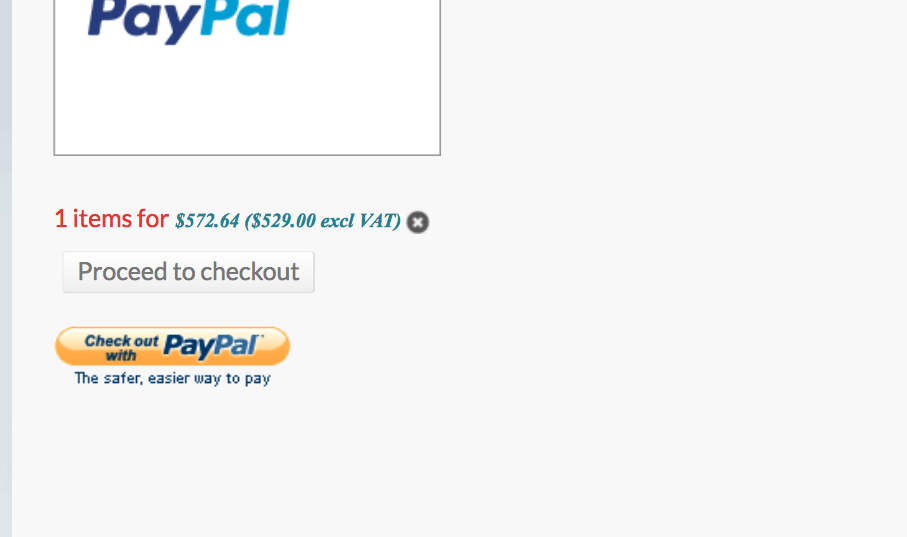
Here is the screenshot, When you add a product to the cart, this is the way it shows in the side bar.
In the US we do not use VAT. Worst case scenario it should say without TAX instead of excluded VAT
Please Log in or Create an account to join the conversation.
12 years 3 months ago #163269
by Xavier
Replied by Xavier on topic State Tax Module Not Working
Hi,
That's probably coming from a wrong tax rule. You seem to have a tax rule set for the US. (VAT just mean Tax).
So if you don't have tax rule for the US, but see this tax in the cart that's maybe because if you are logged in, the address used is out of the US, if you are not logged in, the default shop zone is out of the US.
That's probably coming from a wrong tax rule. You seem to have a tax rule set for the US. (VAT just mean Tax).
So if you don't have tax rule for the US, but see this tax in the cart that's maybe because if you are logged in, the address used is out of the US, if you are not logged in, the default shop zone is out of the US.
Please Log in or Create an account to join the conversation.
Time to create page: 0.326 seconds