
- Posts: 14
- Thank you received: 0
Description box not appearing in admin
- mindspyder
-
 Topic Author
- Offline
Less
More
12 years 3 months ago - 12 years 3 months ago #166056
by mindspyder
Description box not appearing in admin was created by mindspyder
-- url of the page with the problem -- :
oodlesofstrudel.com/administrator/index....roduct&task=edit&cid
[]=2
-- HikaShop version -- : 2.3.2
-- Joomla version -- : 3.3.3
-- PHP version -- : 5.3
Please see this image:
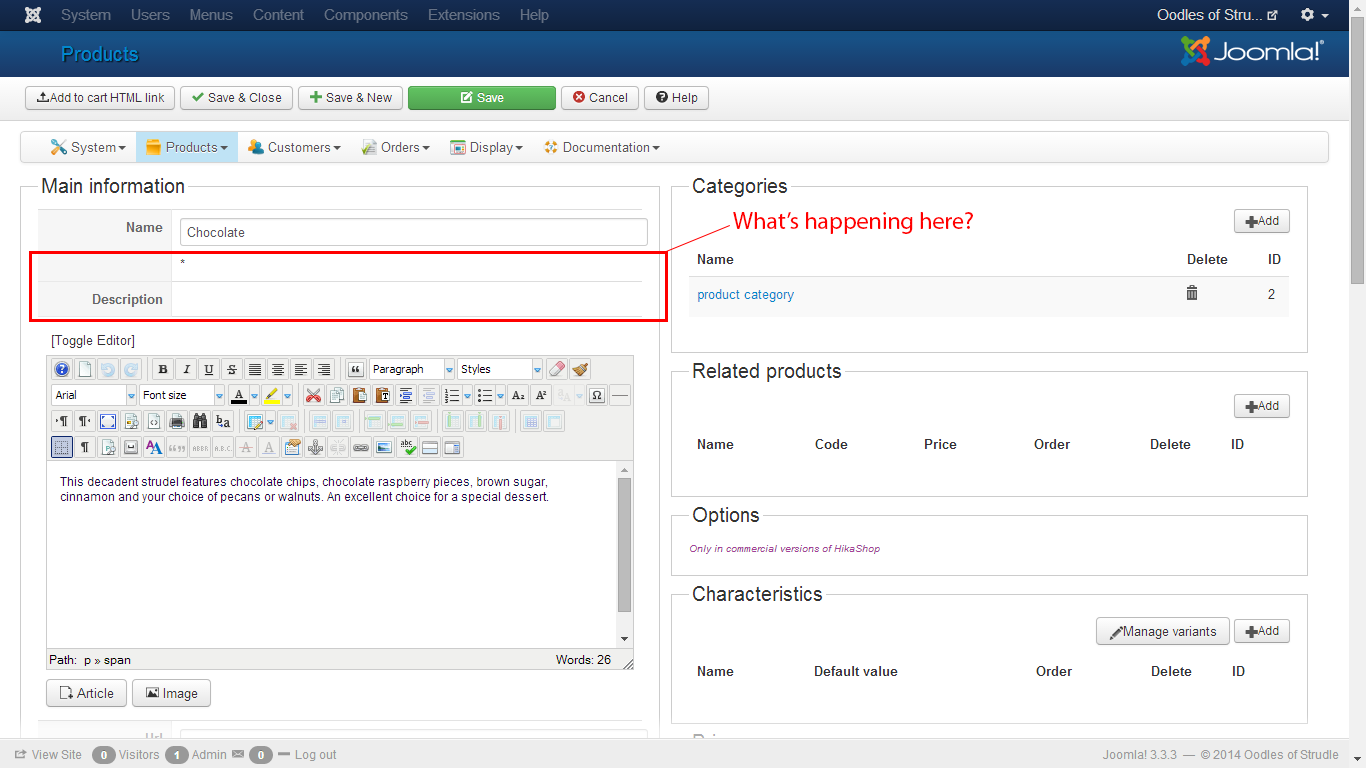
There is no box to enter Description.
-- HikaShop version -- : 2.3.2
-- Joomla version -- : 3.3.3
-- PHP version -- : 5.3
Please see this image:
There is no box to enter Description.
Last edit: 12 years 3 months ago by mindspyder.
Please Log in or Create an account to join the conversation.

12 years 3 months ago #166058
by Jerome
Jerome - Obsidev.com
HikaMarket & HikaSerial developer / HikaShop core dev team.
Replied by Jerome on topic Description box not appearing in admin
Hi,
The description box is just below, with the content "This decadent strudel...".
Regards,
The description box is just below, with the content "This decadent strudel...".
Regards,
Jerome - Obsidev.com
HikaMarket & HikaSerial developer / HikaShop core dev team.
Please Log in or Create an account to join the conversation.
- mindspyder
-
Topic Author
- Offline
Less
More
- Posts: 14
- Thank you received: 0
12 years 3 months ago #166091
by mindspyder
Replied by mindspyder on topic Description box not appearing in admin
Ahh... that's a tad confusing. What if I want a short description for the product listing page and a longer description for the product detail page?
Please Log in or Create an account to join the conversation.

12 years 3 months ago #166096
by Xavier
Replied by Xavier on topic Description box not appearing in admin
Hi,
You need to use the readmore button, a plugin needs to be enabled, the plugin "Button - Readmore" of the type "editors-xtd".
Then in the description, put your cursor at the desired place, and press the button "Readmore" this way the text will have a short part for the listings and a long part for the product detail page.
You need to use the readmore button, a plugin needs to be enabled, the plugin "Button - Readmore" of the type "editors-xtd".
Then in the description, put your cursor at the desired place, and press the button "Readmore" this way the text will have a short part for the listings and a long part for the product detail page.
Please Log in or Create an account to join the conversation.
Time to create page: 0.103 seconds