
- Posts: 6
- Thank you received: 1
Language overrides
- GeoSpectrum
-
 Topic Author
- Offline
Less
More
12 years 2 months ago - 12 years 2 months ago #168908
by GeoSpectrum
Language overrides was created by GeoSpectrum
-- url of the page with the problem -- :
www.easymounts.co.uk/index.php/hikashop-...y/41-standard-mounts
-- HikaShop version -- : Starter: 2.3.2
-- Joomla version -- : 3.3.3
-- PHP version -- : 5.5.9-1ubuntu4.3
-- Browser(s) name and version -- : Various
-- Error-message(debug-mod must be tuned on) -- : None
Hi, I'm configuring the language overrides for Price and need to add some text at the beginning of the price displayed in the products category listing. Each product has several variants so the price displayed here is the From price so I'd like it to say, for example 'From £ 1.00' each rather than just '£ 1.00 each'. I've tried the override PRICE_BEGINNING="" but this also changes the price displayed on the individual product pages where the price changes dynamically so I dont want the 'From'.
Is there a way of limiting an override to a particular page or view? or is there another way of doing this?
I hope I have explained that ok!
Thanks
-- HikaShop version -- : Starter: 2.3.2
-- Joomla version -- : 3.3.3
-- PHP version -- : 5.5.9-1ubuntu4.3
-- Browser(s) name and version -- : Various
-- Error-message(debug-mod must be tuned on) -- : None
Hi, I'm configuring the language overrides for Price and need to add some text at the beginning of the price displayed in the products category listing. Each product has several variants so the price displayed here is the From price so I'd like it to say, for example 'From £ 1.00' each rather than just '£ 1.00 each'. I've tried the override PRICE_BEGINNING="" but this also changes the price displayed on the individual product pages where the price changes dynamically so I dont want the 'From'.
Is there a way of limiting an override to a particular page or view? or is there another way of doing this?
I hope I have explained that ok!
Thanks
Last edit: 12 years 2 months ago by GeoSpectrum.
Please Log in or Create an account to join the conversation.

12 years 2 months ago #168917
by Xavier
Replied by Xavier on topic Language overrides
Hi,
Thanks to edit the view "product / listing_price" and add:
Just before:
This will restrict the display of this text only on the listings.
hikashop.com/support/support/documentati...ize-the-display.html
Thanks to edit the view "product / listing_price" and add:
Code:
if(JRequest::getCmd('layout') != 'show')
Code:
echo JText::_('PRICE_BEGINNING');
This will restrict the display of this text only on the listings.
hikashop.com/support/support/documentati...ize-the-display.html
The following user(s) said Thank You: GeoSpectrum
Please Log in or Create an account to join the conversation.
- GeoSpectrum
-
Topic Author
- Offline
Less
More
- Posts: 6
- Thank you received: 1
12 years 1 month ago - 12 years 1 month ago #169193
by GeoSpectrum
Replied by GeoSpectrum on topic Language overrides
Thanks! That has done it, just what I needed. Starting to LOVE Hikashop!
Edit. but see my next post!!!
Edit. but see my next post!!!
Last edit: 12 years 1 month ago by GeoSpectrum.
Please Log in or Create an account to join the conversation.
- GeoSpectrum
-
Topic Author
- Offline
Less
More
- Posts: 6
- Thank you received: 1
12 years 1 month ago - 12 years 1 month ago #169194
by GeoSpectrum
Replied by GeoSpectrum on topic Language overrides
Actually this didn't work, well it did for the individual products but I just noticed that it also changes the Price on the check out page in the in the Shopping basket! Not sure what to do now? How can I restrict Prices From to just the Category listing page. Can I edit the view for the cart and checkout pages in the same way?
Last edit: 12 years 1 month ago by GeoSpectrum.
Please Log in or Create an account to join the conversation.

12 years 1 month ago #169204
by nicolas
Replied by nicolas on topic Language overrides
You need to do the same change in the file "listing_price" of the view "checkout".
Please Log in or Create an account to join the conversation.
- GeoSpectrum
-
Topic Author
- Offline
Less
More
- Posts: 6
- Thank you received: 1
12 years 1 month ago #169462
by GeoSpectrum
Replied by GeoSpectrum on topic Language overrides
No luck, that didnt work. Sorry about this.
This is the code from line 16 and 17 of the file "listing_price" of the view "checkout".
if(JRequest::getCmd('layout') != 'show')
echo JText::_('PRICE_BEGINNING');
But is still get a cart showing Prices From that I have in the override PRICE_BEGINNING. Im sure Im doing something wrong oe editing the wrong place in the file?
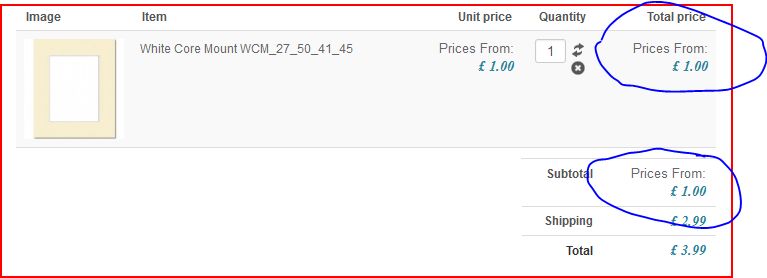
This is the code from line 16 and 17 of the file "listing_price" of the view "checkout".
if(JRequest::getCmd('layout') != 'show')
echo JText::_('PRICE_BEGINNING');
But is still get a cart showing Prices From that I have in the override PRICE_BEGINNING. Im sure Im doing something wrong oe editing the wrong place in the file?
Please Log in or Create an account to join the conversation.

12 years 1 month ago #169479
by Jerome
Jerome - Obsidev.com
HikaMarket & HikaSerial developer / HikaShop core dev team.
Replied by Jerome on topic Language overrides
Hi,
Yes, the checkout does not have any "show" layout ; it use the "step" layout.
Regards,
Yes, the checkout does not have any "show" layout ; it use the "step" layout.
Regards,
Jerome - Obsidev.com
HikaMarket & HikaSerial developer / HikaShop core dev team.
Please Log in or Create an account to join the conversation.
12 years 1 month ago - 12 years 1 month ago #169488
by lionel75
Replied by lionel75 on topic Language overrides
Hi
i read the documentation and all is well explain . but
1) available value for if(JRequest::getCmd('checkout') != 'step')
for checkout step i can see the directory path com_hikashop\views\checkout\tmpl\step.php
and the Jrequest can be : if(JRequest::getCmd('checkout') != 'step')
for i "layout" "show" duo i find no "layout" directory name inside views directory
views/product/tmpl/show.php
views/order/tmpl/show.php
views/adress/tmpl/show.php
2) accessibility of variable /value
can i know more about in which file i can call for example if(JRequest::getCmd('layout') != 'show') ? Does layout show are local or general variable refer to joomla ?, php ?
does thoses item zre accessible inside all files locate under com_hikashop ?
In a way in C/java and i think php , the value in some case can be access using location ( a pointer ) and acessible inside a function a file or all project or any project ( static) . I don't read such documentation about local global tempory variable in joomla . I could write wrong thing but understand joomla create a php layer on around php with specific syntax way to parse generate html code .
3) value manage by joomla BE html gui ?
does value "layout" and "show" are set using the HKS BackEnd GUI ?
I don't find where ?
4) Does the problem is about "From" label that is near "price" ?
@geospectrum , I want to understand the problem using capture image . Could you confirm my before after capture screen focus on your problem ?
5) checkout documentation
@jerome
I understand that product page call many sub layout php page when read the link for product page customization hikashop.com/support/support/documentati...ize-the-display.html . Is there documentation for checkout page customization another like this page that show sub layout like for product customization ? ( see below capture screen not finished)
I really begin to understand that joomla Extension like HKS is like css framework bootstrap : it is a starting point ( boilerplate) that can be easely customize
- show information or not
- manage different workflow ( real /virtual products , payment , shipping)
-send confirmation feedback information by mail or web account about billing
-manage pdf hikaserial ticket to print
the name of this post should not be language ( RTL EN DE ) override but content override ( merge data ).
regard's
i read the documentation and all is well explain . but
1) available value for if(JRequest::getCmd('checkout') != 'step')
for checkout step i can see the directory path com_hikashop\views\checkout\tmpl\step.php
and the Jrequest can be : if(JRequest::getCmd('checkout') != 'step')
for i "layout" "show" duo i find no "layout" directory name inside views directory
views/product/tmpl/show.php
views/order/tmpl/show.php
views/adress/tmpl/show.php
2) accessibility of variable /value
can i know more about in which file i can call for example if(JRequest::getCmd('layout') != 'show') ? Does layout show are local or general variable refer to joomla ?, php ?
does thoses item zre accessible inside all files locate under com_hikashop ?
In a way in C/java and i think php , the value in some case can be access using location ( a pointer ) and acessible inside a function a file or all project or any project ( static) . I don't read such documentation about local global tempory variable in joomla . I could write wrong thing but understand joomla create a php layer on around php with specific syntax way to parse generate html code .
3) value manage by joomla BE html gui ?
does value "layout" and "show" are set using the HKS BackEnd GUI ?
I don't find where ?
4) Does the problem is about "From" label that is near "price" ?
@geospectrum , I want to understand the problem using capture image . Could you confirm my before after capture screen focus on your problem ?
Attachment not found
5) checkout documentation
@jerome
I understand that product page call many sub layout php page when read the link for product page customization hikashop.com/support/support/documentati...ize-the-display.html . Is there documentation for checkout page customization another like this page that show sub layout like for product customization ? ( see below capture screen not finished)
Attachment not found
I really begin to understand that joomla Extension like HKS is like css framework bootstrap : it is a starting point ( boilerplate) that can be easely customize
- show information or not
- manage different workflow ( real /virtual products , payment , shipping)
-send confirmation feedback information by mail or web account about billing
-manage pdf hikaserial ticket to print
the name of this post should not be language ( RTL EN DE ) override but content override ( merge data ).
regard's
Last edit: 12 years 1 month ago by lionel75.
Please Log in or Create an account to join the conversation.
- GeoSpectrum
-
Topic Author
- Offline
Less
More
- Posts: 6
- Thank you received: 1
12 years 1 month ago #169540
by GeoSpectrum
Replied by GeoSpectrum on topic Language overrides
lionel75,
You asked me.
4) Does the problem is about "From" label that is near "price" ?
I was using;
if(JRequest::getCmd('layout') != 'show')
echo JText::_('PRICE_BEGINNING');
But it did not work so i used:
if(JRequest::getCmd('layout') != 'step')
echo JText::_('PRICE_BEGINNING');
Which worked and gave me this:
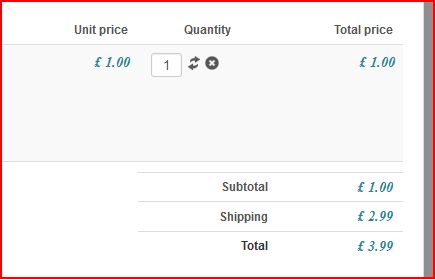
which is what i need.
Thanks.
You asked me.
4) Does the problem is about "From" label that is near "price" ?
I was using;
if(JRequest::getCmd('layout') != 'show')
echo JText::_('PRICE_BEGINNING');
But it did not work so i used:
if(JRequest::getCmd('layout') != 'step')
echo JText::_('PRICE_BEGINNING');
Which worked and gave me this:
which is what i need.
Thanks.
The following user(s) said Thank You: lionel75
Please Log in or Create an account to join the conversation.
12 years 1 month ago #169513
by nicolas
Replied by nicolas on topic Language overrides
Hi,
1. The code:
if(JRequest::getCmd('checkout') != 'step')
is not correct. It should be:
if(JRequest::getCmd('task') != 'step')
2. That's joomla things. You can use that code anywhere in HikaShop, or Joomla.
docs.joomla.org/API17:JRequest
3. I don't understand your question ? the name of the layouts/views is decided by us when we code our extensions. There is no option in the backend to change them.
4. Look at the view file checkout/cart.php
For some prices, we use the listing_price view file, for some we directly use the format function of the currencyHelper.
5. We didn't do it yet for the checkout, but that's a good idea.
1. The code:
if(JRequest::getCmd('checkout') != 'step')
is not correct. It should be:
if(JRequest::getCmd('task') != 'step')
2. That's joomla things. You can use that code anywhere in HikaShop, or Joomla.
docs.joomla.org/API17:JRequest
3. I don't understand your question ? the name of the layouts/views is decided by us when we code our extensions. There is no option in the backend to change them.
4. Look at the view file checkout/cart.php
For some prices, we use the listing_price view file, for some we directly use the format function of the currencyHelper.
5. We didn't do it yet for the checkout, but that's a good idea.
The following user(s) said Thank You: lionel75
Please Log in or Create an account to join the conversation.
12 years 1 month ago #169546
by lionel75
Replied by lionel75 on topic Language overrides
@jerome
what do you mean by " directly use the format function of the currencyHelper" ?
( which function in in which files ? )
regard's
what do you mean by " directly use the format function of the currencyHelper" ?
( which function in in which files ? )
Attachment not found
regard's
Please Log in or Create an account to join the conversation.
12 years 1 month ago #169549
by Jerome
Jerome - Obsidev.com
HikaMarket & HikaSerial developer / HikaShop core dev team.
Replied by Jerome on topic Language overrides
Hi,
@lionel75
Why to me ?
I did not write that...
If you have question on HikaShop, please create new topics, don't use topic of other for other problems.
You going in a total different subject that the original subject here. So I will highly recommend you to open a new threads for your question.
@GeoSpectrum
Good to know that your problem is solved
Regards,
@lionel75
Why to me ?
I did not write that...
If you have question on HikaShop, please create new topics, don't use topic of other for other problems.
You going in a total different subject that the original subject here. So I will highly recommend you to open a new threads for your question.
@GeoSpectrum
Good to know that your problem is solved
Regards,
Jerome - Obsidev.com
HikaMarket & HikaSerial developer / HikaShop core dev team.
Please Log in or Create an account to join the conversation.
12 years 1 month ago #169555
by nicolas
Replied by nicolas on topic Language overrides
Note : If you look in these four files, you'll see that only the classes/currency.php file has a function called format defined in it, so I'm talking about this one
The following user(s) said Thank You: lionel75
Please Log in or Create an account to join the conversation.
Time to create page: 0.357 seconds