
- Posts: 26
- Thank you received: 0
Why does there a random HKD xxx.xx appear ?
- silvesterho
-
 Topic Author
- Offline
Less
More
12 years 1 month ago #171903
by silvesterho
Why does there a random HKD xxx.xx appear ? was created by silvesterho
-- HikaShop version -- : 2.3.2
-- Joomla version -- : 3.3.1
-- PHP version -- : 5.4.7
Hi,
In my website, when we go to subscription menu, and buy a magazine, everything seems fine with payment by cheque, and pay pal. However, it comes to payment by credit card, there is a random value, HKD 212.93 appear, it takes twice to click the next button for the system to calculate the 3.5% of the purchased item.
It looks so weird and frightens my customers. Please urgently advise me the solution ASAP, as the site is on now.
Mr. Ho
-- Joomla version -- : 3.3.1
-- PHP version -- : 5.4.7
Hi,
In my website, when we go to subscription menu, and buy a magazine, everything seems fine with payment by cheque, and pay pal. However, it comes to payment by credit card, there is a random value, HKD 212.93 appear, it takes twice to click the next button for the system to calculate the 3.5% of the purchased item.
It looks so weird and frightens my customers. Please urgently advise me the solution ASAP, as the site is on now.
Mr. Ho
Please Log in or Create an account to join the conversation.
- silvesterho
-
Topic Author
- Offline
Less
More
- Posts: 26
- Thank you received: 0
12 years 1 month ago #171958
by silvesterho
Replied by silvesterho on topic Why does there a random HKD xxx.xx appear ?
I find out the problem : Credit card payment in two different currency.
1. We have use credit card payment plug-in.
In the generic configuration, the price is set at HKD. and 3.5%
2. Also, we have the USD Converter module installed. We have two options to choose, HKD and USD.
Customers are free to choose one currency at any time.
3. Local HK people buys and uses HKD currency. everything is fine.
Overseas customers comes on the site and set the currency at USD. ( which is opposite to Credit card price setup HKD.)
They start to buy the magazinees, they pass the login, address, and cart. At this point, it still showed the right price and shipping charges at USD.
Now, they go to Payment Selection, and problem starts here.
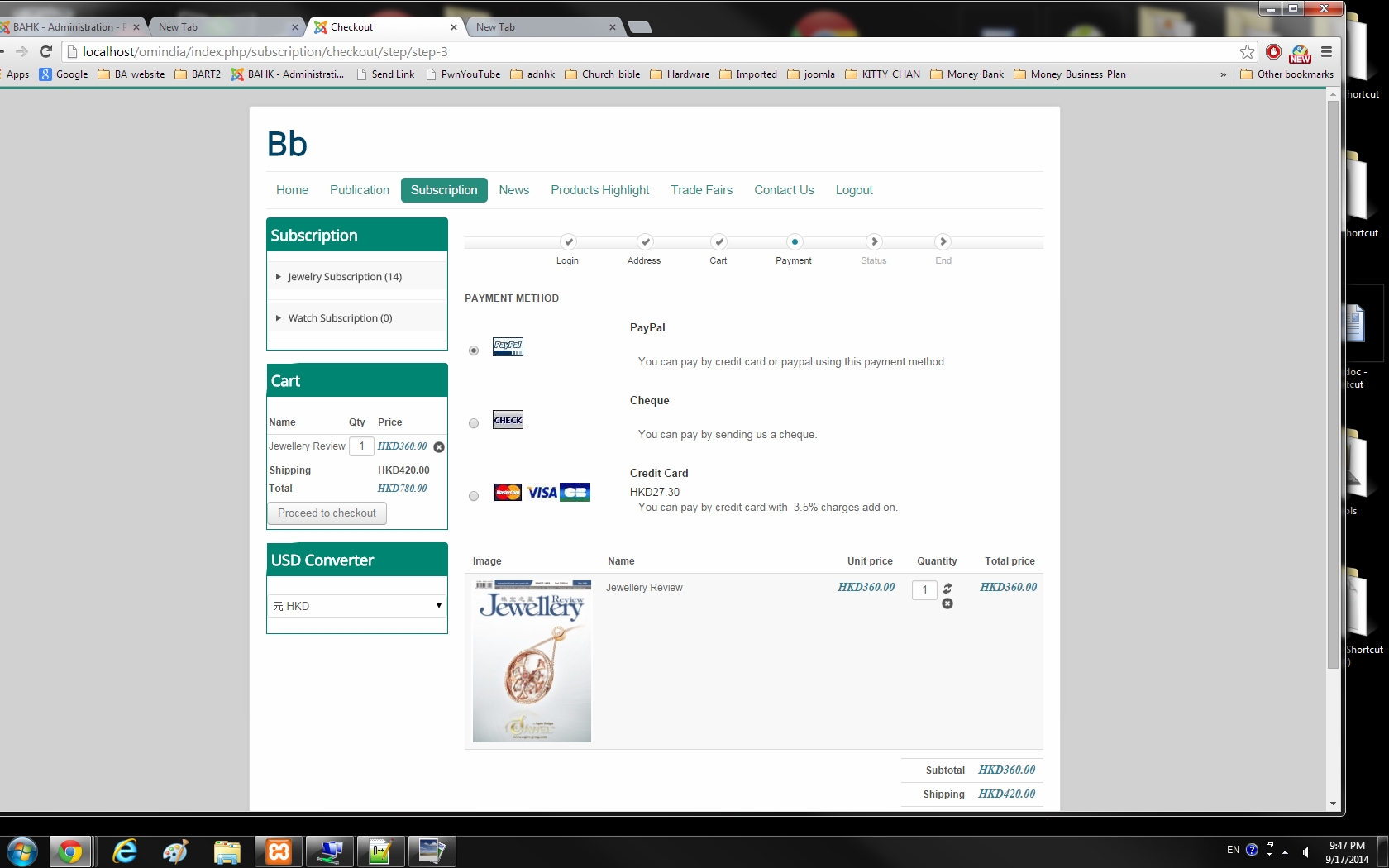
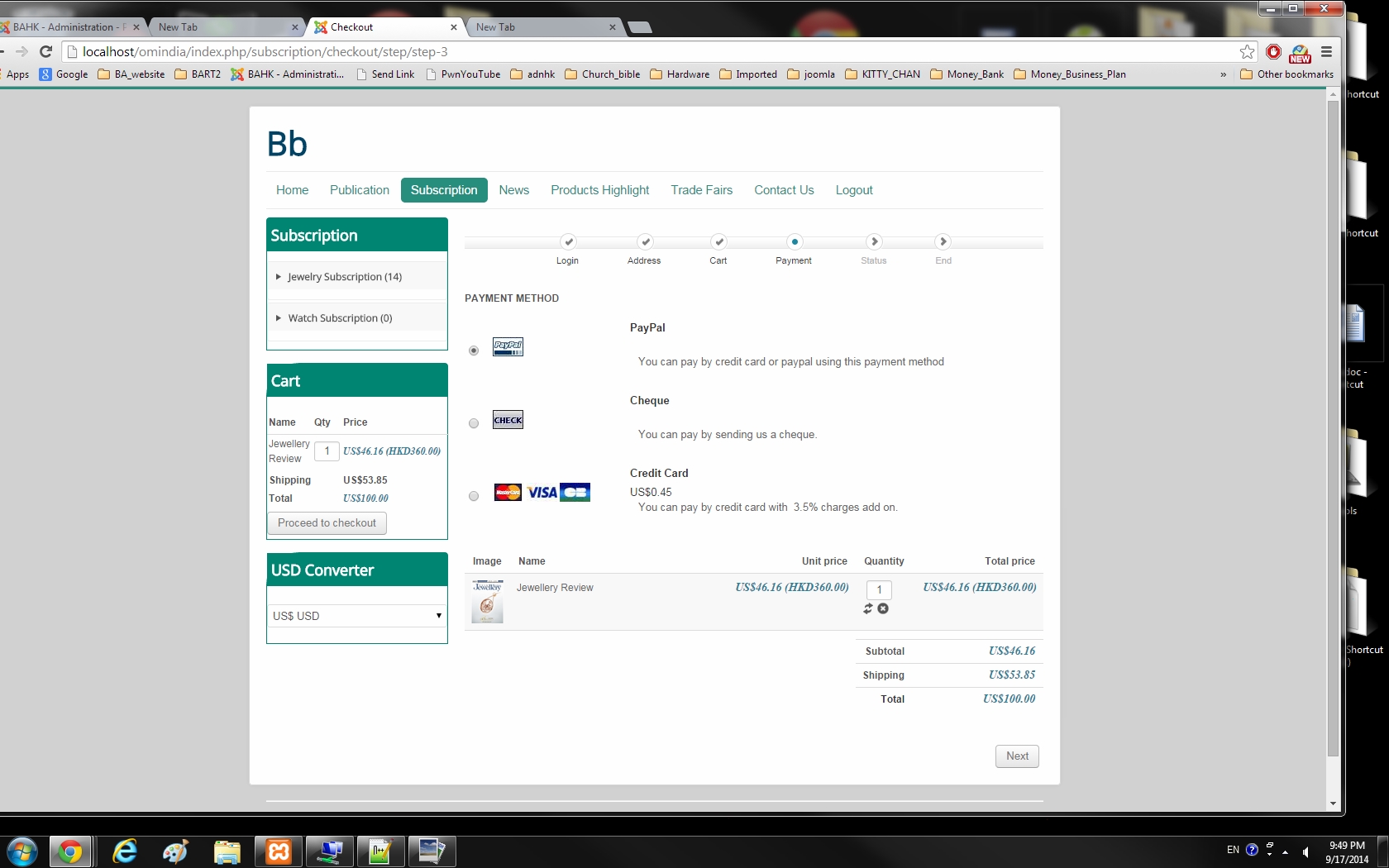
The Visa card show USD XXX. The value is wrong. I calulated the payment fee, which is HKD/7.8
They select the Visa card payment method, fill in the credit card information, and click NEXT button.
The payment fee is all wrong.
Please advise me how to correct the problem.
1. We have use credit card payment plug-in.
In the generic configuration, the price is set at HKD. and 3.5%
2. Also, we have the USD Converter module installed. We have two options to choose, HKD and USD.
Customers are free to choose one currency at any time.
3. Local HK people buys and uses HKD currency. everything is fine.
Overseas customers comes on the site and set the currency at USD. ( which is opposite to Credit card price setup HKD.)
They start to buy the magazinees, they pass the login, address, and cart. At this point, it still showed the right price and shipping charges at USD.
Now, they go to Payment Selection, and problem starts here.
The Visa card show USD XXX. The value is wrong. I calulated the payment fee, which is HKD/7.8
They select the Visa card payment method, fill in the credit card information, and click NEXT button.
The payment fee is all wrong.
Please advise me how to correct the problem.
Please Log in or Create an account to join the conversation.
- silvesterho
-
Topic Author
- Offline
Less
More
- Posts: 26
- Thank you received: 0
12 years 1 month ago #171963
by silvesterho
Replied by silvesterho on topic Why does there a random HKD xxx.xx appear ?
I print two screenshot to show the visa card payment fee in USD has been wrong
Please Log in or Create an account to join the conversation.

12 years 1 month ago #171993
by nicolas
Replied by nicolas on topic Why does there a random HKD xxx.xx appear ?
Hi,
Can you provide a screenshot of the options of your payment methods so that we can see how you configured them ?
Can you provide a screenshot of the options of your payment methods so that we can see how you configured them ?
Please Log in or Create an account to join the conversation.
- silvesterho
-
Topic Author
- Offline
Less
More
- Posts: 26
- Thank you received: 0
12 years 1 month ago - 12 years 1 month ago #172030
by silvesterho
Replied by silvesterho on topic Why does there a random HKD xxx.xx appear ?
Hi,
I configured that the price is in HKD at 3.5%.
This is for local Hong Kong Customers.
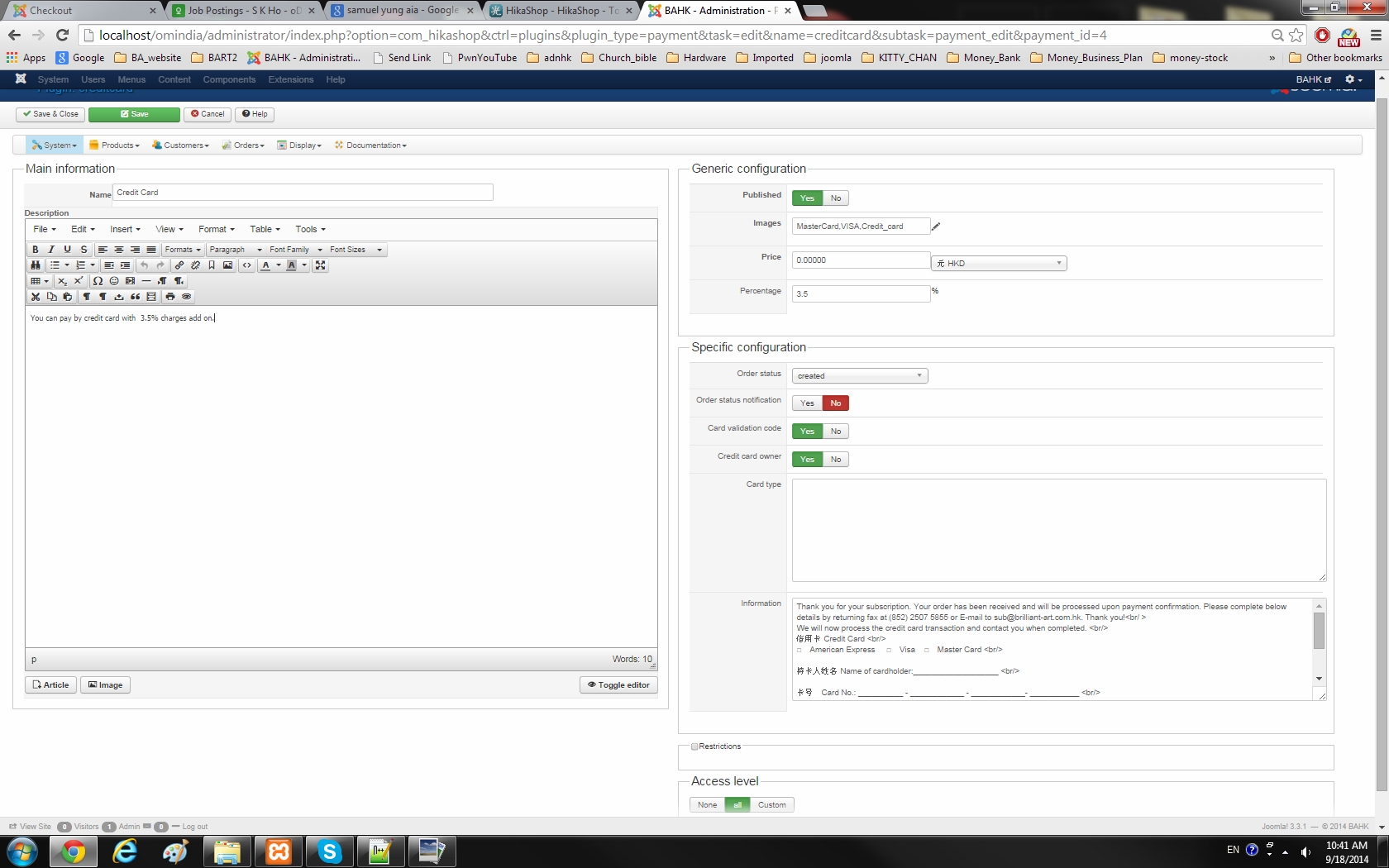
I configured that the price is in HKD at 3.5%.
This is for local Hong Kong Customers.
Last edit: 12 years 1 month ago by silvesterho.
Please Log in or Create an account to join the conversation.
- silvesterho
-
Topic Author
- Offline
Less
More
- Posts: 26
- Thank you received: 0
12 years 1 month ago #172031
by silvesterho
Replied by silvesterho on topic Why does there a random HKD xxx.xx appear ?
When I set the credit card payment plugin in USD at 3.5%, then the overseas customers are OK.
Then local Hong Kong customers, when they choose the USD , it is ok.
But 99% local H.K. customers will choose HKD in the currency converter, then credit card payment fee will be all wrong.
Something is wrong when combined use of credit card payment and currency converter.
Please solve the problem cause the site is on line now, people are starting placing order.
Then local Hong Kong customers, when they choose the USD , it is ok.
But 99% local H.K. customers will choose HKD in the currency converter, then credit card payment fee will be all wrong.
Something is wrong when combined use of credit card payment and currency converter.
Please solve the problem cause the site is on line now, people are starting placing order.
Please Log in or Create an account to join the conversation.
- silvesterho
-
Topic Author
- Offline
Less
More
- Posts: 26
- Thank you received: 0
12 years 1 month ago #172035
by silvesterho
Replied by silvesterho on topic Why does there a random HKD xxx.xx appear ?
Hi,
In which template view file should I start to investigate at?
Hikashop ---> display ---> Views ......
In which template view file should I start to investigate at?
Hikashop ---> display ---> Views ......
Please Log in or Create an account to join the conversation.

12 years 1 month ago #172047
by Xavier
Replied by Xavier on topic Why does there a random HKD xxx.xx appear ?
Hi,
Thanks to create two different payment method for credit card, one in USD and another one in HKD.
Restrict the one in USD to all zones but H.K and restrict the HKD one to H.K zone.
This way the correct amount should be displayed.
Thanks to create two different payment method for credit card, one in USD and another one in HKD.
Restrict the one in USD to all zones but H.K and restrict the HKD one to H.K zone.
This way the correct amount should be displayed.
Please Log in or Create an account to join the conversation.
- silvesterho
-
Topic Author
- Offline
Less
More
- Posts: 26
- Thank you received: 0
12 years 1 month ago #172177
by silvesterho
Replied by silvesterho on topic Why does there a random HKD xxx.xx appear ?
Hi, Xavier
Thank you for your advise.
Finally, I create a credit card payment HKD, and no restriction but shipping method include all zones and currency choose HKD.
and credit card payment USD, and no restriction but shipping method include all zones and currency choose USD.
When customers choose HKD, the system chooses HKD payment method. Likewise, for USD.
What a relief ! Since the website is on and customers are rolling in.
Now, how can I create a "BACK" button on the checkout pages.
Waiting for your expertise advise.
thanks
Thank you for your advise.
Finally, I create a credit card payment HKD, and no restriction but shipping method include all zones and currency choose HKD.
and credit card payment USD, and no restriction but shipping method include all zones and currency choose USD.
When customers choose HKD, the system chooses HKD payment method. Likewise, for USD.
What a relief ! Since the website is on and customers are rolling in.
Now, how can I create a "BACK" button on the checkout pages.
Waiting for your expertise advise.
thanks
Please Log in or Create an account to join the conversation.
12 years 1 month ago #172188
by Xavier
Replied by Xavier on topic Why does there a random HKD xxx.xx appear ?
Hi,
To create a "Back" button you can edit the view "checkout / step" and add a custom button like:
But be careful, as a form is sent between each step, using this kind of back button can potentially not work fine, the browser will potentially indicate that data was sent and it can't go back, etc.
To create a "Back" button you can edit the view "checkout / step" and add a custom button like:
Code:
<input type="button" onclick="history.back()" value="Back" class="btn button"/>
Please Log in or Create an account to join the conversation.
Time to create page: 0.390 seconds