

- Posts: 293
- Thank you received: 9
After Update to 2.3.3, Cannot Change Order Status
12 years 1 week ago - 12 years 1 week ago #172974
by MSTACE
After Update to 2.3.3, Cannot Change Order Status was created by MSTACE
-- HikaShop version -- : 2.3.3
-- Joomla version -- : 3.3.4
-- PHP version -- : 5.4.26
-- Browser(s) name and version -- : n/a
-- Error-message(debug-mod must be tuned on) -- : None
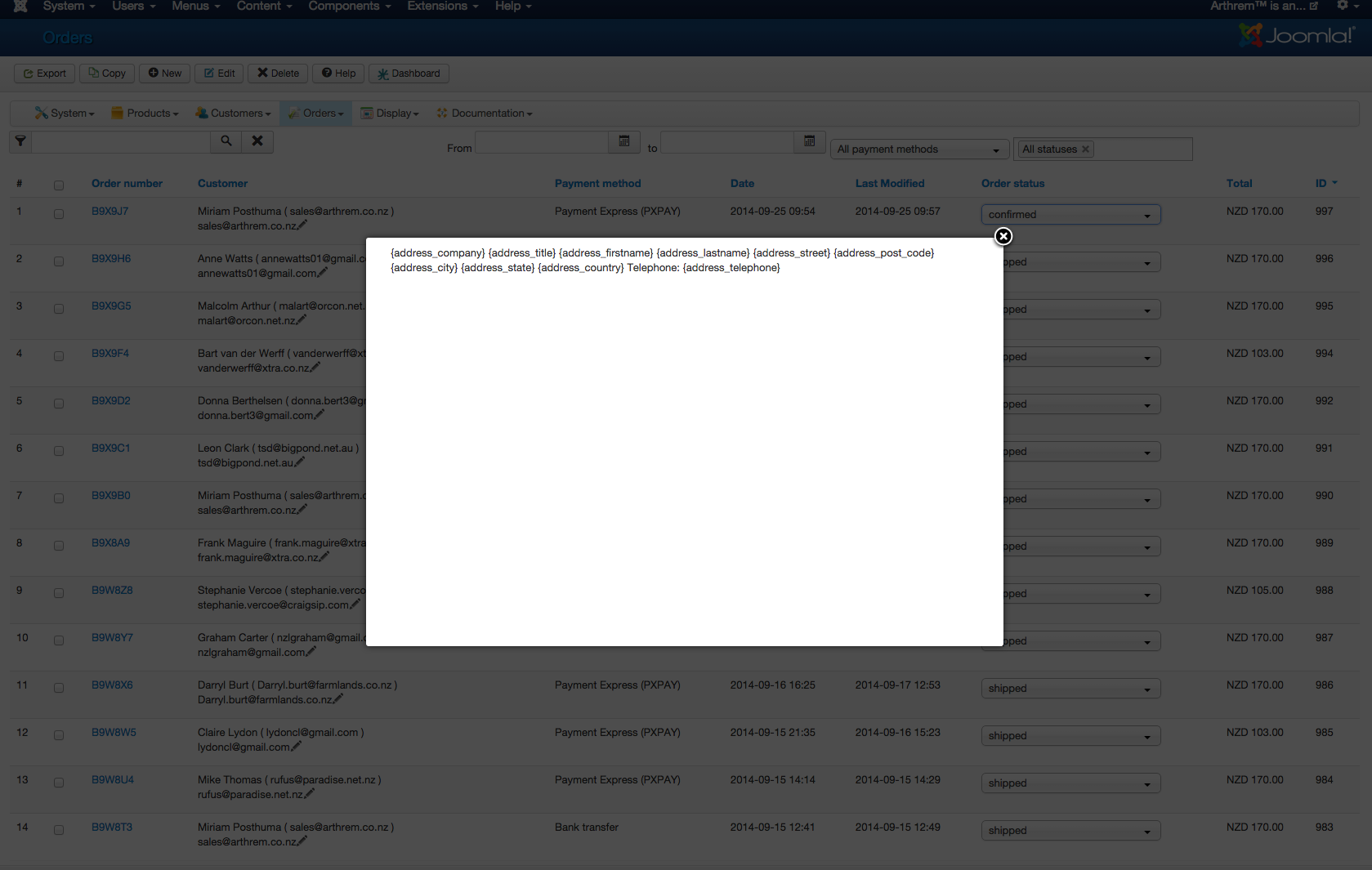
After Update to 2.3.3, Cannot Change the Order Status.
The pop-up window just gives gibberish instead of usual window.
See screenshot.
All caches have been cleared.
-- Joomla version -- : 3.3.4
-- PHP version -- : 5.4.26
-- Browser(s) name and version -- : n/a
-- Error-message(debug-mod must be tuned on) -- : None
After Update to 2.3.3, Cannot Change the Order Status.
The pop-up window just gives gibberish instead of usual window.
See screenshot.
All caches have been cleared.
Last edit: 12 years 1 week ago by MSTACE.
Please Log in or Create an account to join the conversation.

12 years 1 week ago #172976
by Jerome
Jerome - Obsidev.com
HikaMarket & HikaSerial developer / HikaShop core dev team.
Replied by Jerome on topic After Update to 2.3.3, Cannot Change Order Status
Hi,
1. See : www.hikashop.com/forum/orders-management...r-update.html#172850
2. Please re-download HikaShop 2.3.3 to get the Joomla 3.3.4 patch.
Regards,
1. See : www.hikashop.com/forum/orders-management...r-update.html#172850
2. Please re-download HikaShop 2.3.3 to get the Joomla 3.3.4 patch.
Regards,
Jerome - Obsidev.com
HikaMarket & HikaSerial developer / HikaShop core dev team.
Please Log in or Create an account to join the conversation.
12 years 1 week ago #172982
by MSTACE
Replied by MSTACE on topic After Update to 2.3.3, Cannot Change Order Status
Hi Jerome -
The updated install did NOT fix the issue.
The updated install did NOT fix the issue.
Please Log in or Create an account to join the conversation.
12 years 1 week ago #172983
by MSTACE
Replied by MSTACE on topic After Update to 2.3.3, Cannot Change Order Status
I did the manual patch as per your post.
That worked fine.
Thanks.
That worked fine.
Thanks.
Please Log in or Create an account to join the conversation.
- PolishedGeek
-

- Offline
- Official HikaShop Development Partner
12 years 1 week ago #172986
by PolishedGeek
~ Deb Cinkus, CEO
Polished Geek: more with monday․com
eCommerce Business Process Automation Experts
Replied by PolishedGeek on topic After Update to 2.3.3, Cannot Change Order Status
So if we download the latest version, it's been patched now to be compatible? Or do we need to still apply the patch manually?
~ Deb Cinkus, CEO
Polished Geek: more with monday․com
eCommerce Business Process Automation Experts
Please Log in or Create an account to join the conversation.
12 years 1 week ago #172987
by MSTACE
Replied by MSTACE on topic After Update to 2.3.3, Cannot Change Order Status
Downloading the latest version of HikaShop Business did NOT fix the problem for me.
I had to do the patch manually.
I had to do the patch manually.
Please Log in or Create an account to join the conversation.

12 years 1 week ago #173024
by nicolas
Replied by nicolas on topic After Update to 2.3.3, Cannot Change Order Status
Hi,
We did update the demo website with the latest build of the 2.3.3 and it works fine there without applying the patch so it means that the patch was correctly added in the latest build of the 2.3.3.
So you probably used the install package from before we added the patch in it.
We did update the demo website with the latest build of the 2.3.3 and it works fine there without applying the patch so it means that the patch was correctly added in the latest build of the 2.3.3.
So you probably used the install package from before we added the patch in it.
Please Log in or Create an account to join the conversation.

10 years 8 months ago #226525
by mardhiah
Replied by mardhiah on topic After Update to 2.3.3, Cannot Change Order Status
Hello!
I have updated hikashop to 2.6.1.
I was unable to change the order status.
Refer to the picture to see what it looks like when i change to any of the statuses.
I have updated hikashop to 2.6.1.
I was unable to change the order status.
Refer to the picture to see what it looks like when i change to any of the statuses.
Please Log in or Create an account to join the conversation.
10 years 8 months ago #226539
by Jerome
Jerome - Obsidev.com
HikaMarket & HikaSerial developer / HikaShop core dev team.
Replied by Jerome on topic After Update to 2.3.3, Cannot Change Order Status
Hi,
You're not in the right topic.
Your issue is related to a Joomla 3.4.4 - 3.4.8 bug.
You should use "vex" popup to fix that issue or patch your Joomla.
www.hikashop.com/support/documentation/3...-hikashop-2-6-1.html
Regards,
You're not in the right topic.
Your issue is related to a Joomla 3.4.4 - 3.4.8 bug.
You should use "vex" popup to fix that issue or patch your Joomla.
www.hikashop.com/support/documentation/3...-hikashop-2-6-1.html
Regards,
Jerome - Obsidev.com
HikaMarket & HikaSerial developer / HikaShop core dev team.
Please Log in or Create an account to join the conversation.
10 years 8 months ago #226646
by mardhiah
Replied by mardhiah on topic After Update to 2.3.3, Cannot Change Order Status
Hi. I'm using joomla 2.5.6. Is it still the same problem?
Please Log in or Create an account to join the conversation.
10 years 8 months ago #226648
by Jerome
Jerome - Obsidev.com
HikaMarket & HikaSerial developer / HikaShop core dev team.
Replied by Jerome on topic After Update to 2.3.3, Cannot Change Order Status
Hi,
Please re-download HikaShop 2.6.1 in order to get the patch for Joomla 2.5
Regards,
Please re-download HikaShop 2.6.1 in order to get the patch for Joomla 2.5
Regards,
Jerome - Obsidev.com
HikaMarket & HikaSerial developer / HikaShop core dev team.
Please Log in or Create an account to join the conversation.
10 years 8 months ago #226682
by mardhiah
Replied by mardhiah on topic After Update to 2.3.3, Cannot Change Order Status
It will not affect the changes I've made right? I have made many changes in there.
Please Log in or Create an account to join the conversation.
10 years 8 months ago #226687
by Jerome
Jerome - Obsidev.com
HikaMarket & HikaSerial developer / HikaShop core dev team.
Replied by Jerome on topic After Update to 2.3.3, Cannot Change Order Status
Hi,
Please explain the changes you made.
If we don't know what you're talking about, we are not able to give you a useful answer.
Regards,
Please explain the changes you made.
If we don't know what you're talking about, we are not able to give you a useful answer.
Regards,
Jerome - Obsidev.com
HikaMarket & HikaSerial developer / HikaShop core dev team.
Please Log in or Create an account to join the conversation.
Time to create page: 0.203 seconds