

- Posts: 22
- Thank you received: 0
Order Status creation error
12 years 4 days ago #173574
by s21rc
Order Status creation error was created by s21rc
-- url of the page with the problem -- : peak69.com
-- HikaShop version -- : 2.3.3
-- Joomla version -- : 3.3.4
-- PHP version -- : 5.4.32
-- Browser(s) name and version -- : CHROME
-- Error-message(debug-mod must be tuned on) -- : 1064 You have an error in your SQL syntax; check the manual that corresponds to your MySQL server version for the right syntax to use near '' at line 1 SQL=UPDATE aosa8_hikashop_category SET category_right = category_right + 2 WHERE category_right >=
Hi Nicolas,
Last week I have reported that the brand name has disapeared from the list but can be found using explore in product option.
Now I have just noticed I can not find the Order status such as created, confirmed, shipped etc under SYSTEM>ORDER STATUS. Only root is showing. WHile trying to create an entry, it gived error: 1064 You have an error in your SQL syntax; check the manual that corresponds to your MySQL server version for the right syntax to use near '' at line 1 SQL=UPDATE aosa8_hikashop_category SET category_right = category_right + 2 WHERE category_right >=
Later found the entry been created though.
But, the statuses are all there when I try to change the status of any existing order from Orders>Orders page.
Both screenshot attached.
I have re-installed the Hikashop business version again, no change.
I really am thinking there is something wrong, please have a look thoroughly, access credential has been sent before.
All this trouble started after I installed the business version (fresh installation), and imported joomla user (using extra tools), imported products using hikashop tools, imported user address using PHP Myadmin. At first everything was ok, later it started behaving like this. Also updated Joomla to 3.3.4.
PLease please have a good look.
Thanks.
-- HikaShop version -- : 2.3.3
-- Joomla version -- : 3.3.4
-- PHP version -- : 5.4.32
-- Browser(s) name and version -- : CHROME
-- Error-message(debug-mod must be tuned on) -- : 1064 You have an error in your SQL syntax; check the manual that corresponds to your MySQL server version for the right syntax to use near '' at line 1 SQL=UPDATE aosa8_hikashop_category SET category_right = category_right + 2 WHERE category_right >=
Hi Nicolas,
Last week I have reported that the brand name has disapeared from the list but can be found using explore in product option.
Now I have just noticed I can not find the Order status such as created, confirmed, shipped etc under SYSTEM>ORDER STATUS. Only root is showing. WHile trying to create an entry, it gived error: 1064 You have an error in your SQL syntax; check the manual that corresponds to your MySQL server version for the right syntax to use near '' at line 1 SQL=UPDATE aosa8_hikashop_category SET category_right = category_right + 2 WHERE category_right >=
Later found the entry been created though.
But, the statuses are all there when I try to change the status of any existing order from Orders>Orders page.
Both screenshot attached.
I have re-installed the Hikashop business version again, no change.
I really am thinking there is something wrong, please have a look thoroughly, access credential has been sent before.
All this trouble started after I installed the business version (fresh installation), and imported joomla user (using extra tools), imported products using hikashop tools, imported user address using PHP Myadmin. At first everything was ok, later it started behaving like this. Also updated Joomla to 3.3.4.
PLease please have a good look.
Thanks.
Please Log in or Create an account to join the conversation.

Less
More
- Posts: 12953
- Thank you received: 1778
12 years 3 days ago #173582
by Mohamed Thelji
Replied by Mohamed Thelji on topic Order Status creation error
Hello,
Can you use the "Rebuild" button through the "Hikashop->System->Order Statuses" and see if it solve your issue ?Now I have just noticed I can not find the Order status such as created, confirmed, shipped etc under SYSTEM>ORDER STATUS. Only root is showing. WHile trying to create an entry, it gived error: 1064 You have an error in your SQL syntax; check the manual that corresponds to your MySQL server version for the right syntax to use near '' at line 1 SQL=UPDATE aosa8_hikashop_category SET category_right = category_right + 2 WHERE category_right >=
Please Log in or Create an account to join the conversation.
12 years 3 days ago #173672
by s21rc
Replied by s21rc on topic Order Status creation error
Hi Mohamed,
Just tried, no luck. Here is screen shoot.
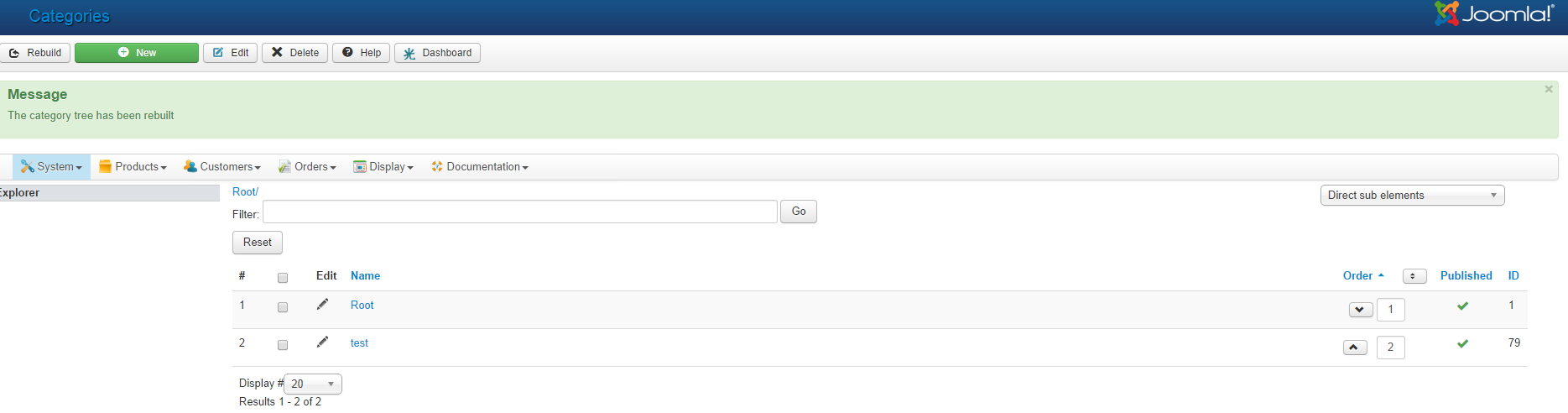
Just tried, no luck. Here is screen shoot.
Please Log in or Create an account to join the conversation.

12 years 2 days ago #173795
by Jerome
Jerome - Obsidev.com
HikaMarket & HikaSerial developer / HikaShop core dev team.
Replied by Jerome on topic Order Status creation error
Hi,
It looks like your "root" category has been modified.
Can you please check the content of your table "hikashop_category" ?
The fields "category_namekey", "category_type", "category_parent_id" are important.
Like the root should be "root", "root", 0
I see that you have a category named "test" which are not a child of root ; which should not be possible in HikaShop.
Regards,
It looks like your "root" category has been modified.
Can you please check the content of your table "hikashop_category" ?
The fields "category_namekey", "category_type", "category_parent_id" are important.
Like the root should be "root", "root", 0
I see that you have a category named "test" which are not a child of root ; which should not be possible in HikaShop.
Regards,
Jerome - Obsidev.com
HikaMarket & HikaSerial developer / HikaShop core dev team.
Please Log in or Create an account to join the conversation.
12 years 2 days ago #173824
by s21rc
Replied by s21rc on topic Order Status creation error
Hello Jeromi,
Please see attached screenshot. The root entry has type "category" instead of ROOT.
I also faced problem with Brand/Manufacturer view which has been reported in another thread and the solution was not to fix but workaround by changing view of DIV. Appreciate if you please please have a look in the system and fix the table (Cpanel, FTP, Joomla all access credential been sent last time, if you need I can sent again.)
Please advise or please fix. I am having difficulties as it is a live shop and now having problem.
Thanks.
Fazlay
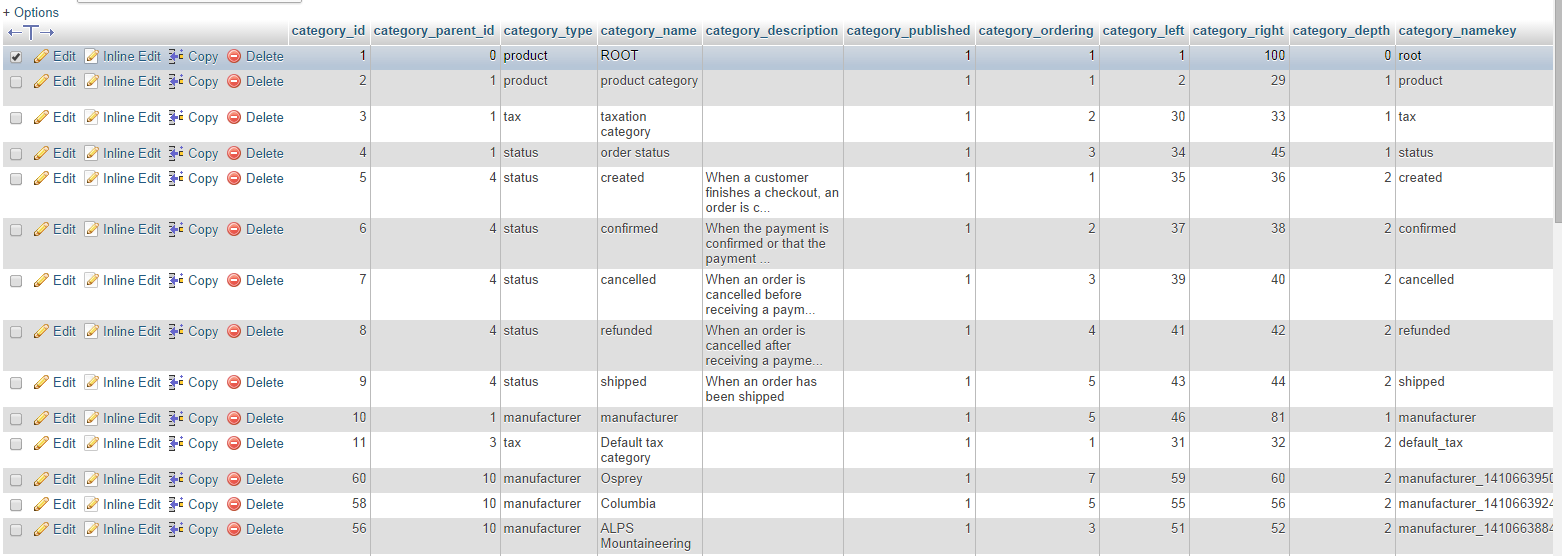
Please see attached screenshot. The root entry has type "category" instead of ROOT.
I also faced problem with Brand/Manufacturer view which has been reported in another thread and the solution was not to fix but workaround by changing view of DIV. Appreciate if you please please have a look in the system and fix the table (Cpanel, FTP, Joomla all access credential been sent last time, if you need I can sent again.)
Please advise or please fix. I am having difficulties as it is a live shop and now having problem.
Thanks.
Fazlay
Please Log in or Create an account to join the conversation.
12 years 1 day ago #173859
by Jerome
Jerome - Obsidev.com
HikaMarket & HikaSerial developer / HikaShop core dev team.
Replied by Jerome on topic Order Status creation error
Hi,
Please change the "category_type" of the category_id 1 (with the category_name ROOT).
It is currently "product" but it shouldn't, it should be "root".
I have found some credentials to another post, but there is the Joomla backend and the FTP, I do not see any Cpanel.
Regards,
Please change the "category_type" of the category_id 1 (with the category_name ROOT).
It is currently "product" but it shouldn't, it should be "root".
I have found some credentials to another post, but there is the Joomla backend and the FTP, I do not see any Cpanel.
Regards,
Jerome - Obsidev.com
HikaMarket & HikaSerial developer / HikaShop core dev team.
The following user(s) said Thank You: s21rc
Please Log in or Create an account to join the conversation.
12 years 1 day ago #174003
by s21rc
Replied by s21rc on topic Order Status creation error
Thanks a lot Jerome, now it not only solve current problem but also the previous brand problem as well. Again will poke you until the site is fully configured like before 
Thanks again.
Thanks again.
Please Log in or Create an account to join the conversation.
Time to create page: 0.185 seconds