

- Posts: 13
- Thank you received: 0
select quantity per option
11 years 10 months ago #183426
by microweb
select quantity per option was created by microweb
-- HikaShop version -- : 2.3.4
-- Joomla version -- : 3.3.6
-- PHP version -- : 5.4.35
-- Browser(s) name and version -- : firefox 35.0
Hi ...
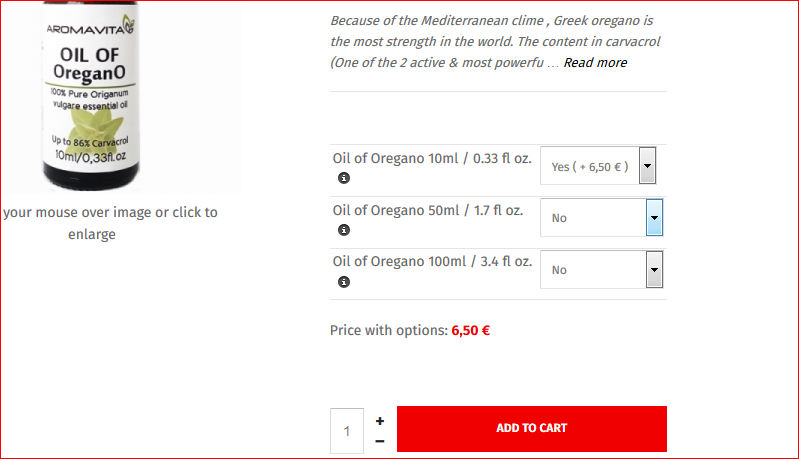
I want to select the quantity of each option within the the multiply selection....
For example 5 units of 10ml and 3 units of 50ml, and then add to cart..
But when I select 5 units of the 10ml I want it to give me the price of 3-5 units 5 eur/ item instead of 6,50 eur / item which is per unit
Best Regards
Goran
MICROweb
-- Joomla version -- : 3.3.6
-- PHP version -- : 5.4.35
-- Browser(s) name and version -- : firefox 35.0
Hi ...
I want to select the quantity of each option within the the multiply selection....
For example 5 units of 10ml and 3 units of 50ml, and then add to cart..
But when I select 5 units of the 10ml I want it to give me the price of 3-5 units 5 eur/ item instead of 6,50 eur / item which is per unit
Best Regards
Goran
MICROweb
Please Log in or Create an account to join the conversation.

11 years 10 months ago #183431
by nicolas
Replied by nicolas on topic select quantity per option
Hi,
What you want to use here is not options but a characteristic with three values (one for each bottle size) that you add to your product as characteristic and then set the prices of each variant of the product via the "manage variants" button.
Then, you set the "characteristics display method" option of the configuration to "list" and the "Display the quantity field on the product page" option "global on listings".
That will then display a table of the variants of the product on the product page, each one with a quantity box and a global add to cart button for them.
What you want to use here is not options but a characteristic with three values (one for each bottle size) that you add to your product as characteristic and then set the prices of each variant of the product via the "manage variants" button.
Then, you set the "characteristics display method" option of the configuration to "list" and the "Display the quantity field on the product page" option "global on listings".
That will then display a table of the variants of the product on the product page, each one with a quantity box and a global add to cart button for them.
Please Log in or Create an account to join the conversation.
Time to create page: 0.149 seconds