
2.3.5 Update Issues
- Dragon41673
-
 Topic Author
- Offline
Less
More
11 years 10 months ago - 11 years 10 months ago #184974
by Dragon41673
Owner - Aries Games & Miniatures
2.3.5 Update Issues was created by Dragon41673
-- url of the page with the problem -- :
www.ariesgamesandminis.com
-- HikaShop version -- : 2.3.5 Essentials
-- Joomla version -- : 3.3.6
-- Browser(s) name and version -- : Google Chrome
I just updated my HikaShop Essentials from 2.3.3 to 2.3.5, and I have 2 questions...
#1 - Please see images attached "Warning during Install" and "No Warnings after Install". I downloaded the new package, uploaded it via FTP to my site, unzipped it, then used the instructions as is normal to update using the "Install from Directory" option in the Extension Manager. When the file first started to update, I got the 2 warnings shown, but when it was all done...there were no warnings. Is there something I should be aware of based on those two XML file warnings?
#2 - Please see images attached "Menu Bar Color 1" and "Menu Bar Color 2". Prior to the update, my menu bar was easy to read. After the install, the menu bar is a light gray, and the wording is white. If I put my cursor over one of the options as shown in image titled "Menu Bar Color 2" ...you can see the option "Products" is now black...but ONLY when I place my cursor on it. Can someone please point me in the correct direction to fix this.
Thank you
-- HikaShop version -- : 2.3.5 Essentials
-- Joomla version -- : 3.3.6
-- Browser(s) name and version -- : Google Chrome
I just updated my HikaShop Essentials from 2.3.3 to 2.3.5, and I have 2 questions...
#1 - Please see images attached "Warning during Install" and "No Warnings after Install". I downloaded the new package, uploaded it via FTP to my site, unzipped it, then used the instructions as is normal to update using the "Install from Directory" option in the Extension Manager. When the file first started to update, I got the 2 warnings shown, but when it was all done...there were no warnings. Is there something I should be aware of based on those two XML file warnings?
#2 - Please see images attached "Menu Bar Color 1" and "Menu Bar Color 2". Prior to the update, my menu bar was easy to read. After the install, the menu bar is a light gray, and the wording is white. If I put my cursor over one of the options as shown in image titled "Menu Bar Color 2" ...you can see the option "Products" is now black...but ONLY when I place my cursor on it. Can someone please point me in the correct direction to fix this.
Thank you
Owner - Aries Games & Miniatures
Last edit: 11 years 10 months ago by Dragon41673.
Please Log in or Create an account to join the conversation.

Less
More
- Posts: 9
- Thank you received: 0
11 years 10 months ago #185015
by performance
Replied by performance on topic 2.3.5 Update Issues
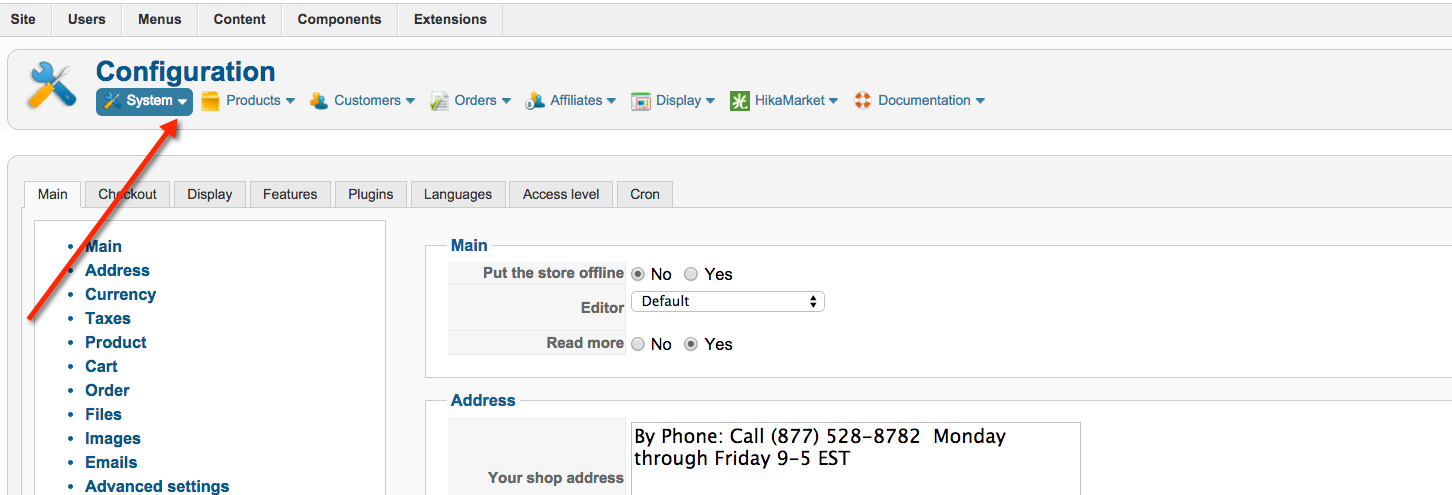
I am having issues with the menu bar in the backend after I upgraded to 2.3.5 - gives extra large text, and no links - see attached .
This attachment shows how 2.3.5 appears in Joomla 2.5 ----> I expected it to appear something like this.
Thanks
Hikashop Business 2.3.5
HikaMarket Frontedition: 1.5.1
Joomla 3.3.6
PHP version 5.3.28
MySQL version 5.5.40-cll
Apache version 2.4.9
This attachment shows how 2.3.5 appears in Joomla 2.5 ----> I expected it to appear something like this.
Thanks
Hikashop Business 2.3.5
HikaMarket Frontedition: 1.5.1
Joomla 3.3.6
PHP version 5.3.28
MySQL version 5.5.40-cll
Apache version 2.4.9
Please Log in or Create an account to join the conversation.
- Dragon41673
-
Topic Author
- Offline
11 years 10 months ago #185016
by Dragon41673
Owner - Aries Games & Miniatures
Replied by Dragon41673 on topic 2.3.5 Update Issues
Performance, please post your own thread and not hijack someone else's thread. Your issue is not the same as the one I've posted. Thank you
Owner - Aries Games & Miniatures
Please Log in or Create an account to join the conversation.

11 years 10 months ago #185032
by Jerome
Jerome - Obsidev.com
HikaMarket & HikaSerial developer / HikaShop core dev team.
Replied by Jerome on topic 2.3.5 Update Issues
Hi Dragon41673,
I can only recommend you to not display the menu on the title but to display the menu above the content ; as explained in our documentation.
Menu position : www.hikashop.com/support/support/documen...html#display_general
Regards,
I can only recommend you to not display the menu on the title but to display the menu above the content ; as explained in our documentation.
Menu position : www.hikashop.com/support/support/documen...html#display_general
Regards,
Jerome - Obsidev.com
HikaMarket & HikaSerial developer / HikaShop core dev team.
Please Log in or Create an account to join the conversation.
- Dragon41673
-
Topic Author
- Offline
11 years 10 months ago #185041
by Dragon41673
Owner - Aries Games & Miniatures
Replied by Dragon41673 on topic 2.3.5 Update Issues
Hey Jerome,
Thanks for the heads up. I honestly never looked in to the different menu's! I did however, after my son went to bed, found where I could change the font color within one of the css (if I remember correctly) files and was going to go that route if there wasn't a better suggestion.
Soon as I have a chance today, I'll try the other menu system. I always thought the menu I have is the standard one that came with HikaShop so I definitely appreciate this.
Any idea what's going on with those 2 initial errors during the first part of the install?
Thanks for the heads up. I honestly never looked in to the different menu's! I did however, after my son went to bed, found where I could change the font color within one of the css (if I remember correctly) files and was going to go that route if there wasn't a better suggestion.
Soon as I have a chance today, I'll try the other menu system. I always thought the menu I have is the standard one that came with HikaShop so I definitely appreciate this.
Any idea what's going on with those 2 initial errors during the first part of the install?
Owner - Aries Games & Miniatures
Please Log in or Create an account to join the conversation.
- Dragon41673
-
Topic Author
- Offline
11 years 10 months ago #185071
by Dragon41673
Owner - Aries Games & Miniatures
Replied by Dragon41673 on topic 2.3.5 Update Issues
Jerome, changing the Menu worked perfectly...and as a bonus, it looks much cleaner! Thank you
Owner - Aries Games & Miniatures
Please Log in or Create an account to join the conversation.

11 years 10 months ago #185173
by nicolas
Replied by nicolas on topic 2.3.5 Update Issues
Hi,
These messages usually appear when the installer of Joomla doesn't find the XML of the component and this leads to the component install to fail.
So I don't why the installer would display these messages if the installation succeeded.
Anyway, if the installation worked (and that's the case based on your screenshots), you can ignore them.
These messages usually appear when the installer of Joomla doesn't find the XML of the component and this leads to the component install to fail.
So I don't why the installer would display these messages if the installation succeeded.
Anyway, if the installation worked (and that's the case based on your screenshots), you can ignore them.
Please Log in or Create an account to join the conversation.
- Dragon41673
-
Topic Author
- Offline
11 years 10 months ago #185175
by Dragon41673
Owner - Aries Games & Miniatures
Replied by Dragon41673 on topic 2.3.5 Update Issues
Nicolas, thank you for the info, but it brings up another question...
If Joomla is trying to find this "XML" of the component during install...and it's currently not there, how do I fix this so there won't be issues in the future?
If Joomla is trying to find this "XML" of the component during install...and it's currently not there, how do I fix this so there won't be issues in the future?
Owner - Aries Games & Miniatures
Please Log in or Create an account to join the conversation.
11 years 10 months ago #185178
by Jerome
Jerome - Obsidev.com
HikaMarket & HikaSerial developer / HikaShop core dev team.
Replied by Jerome on topic 2.3.5 Update Issues
Hi,
When you install a component by FTP ; such warning could (might) be something else than HikaShop.
We are using a package software to create the HikaShop install ; I am quite confident that the packager is working fine and that we did not forget XML for the plugins.
So these warning are just small warnings and could not be reproduced in our tests environments.
Regards,
When you install a component by FTP ; such warning could (might) be something else than HikaShop.
We are using a package software to create the HikaShop install ; I am quite confident that the packager is working fine and that we did not forget XML for the plugins.
So these warning are just small warnings and could not be reproduced in our tests environments.
Regards,
Jerome - Obsidev.com
HikaMarket & HikaSerial developer / HikaShop core dev team.
Please Log in or Create an account to join the conversation.
- Dragon41673
-
Topic Author
- Offline
11 years 10 months ago #185294
by Dragon41673
Owner - Aries Games & Miniatures
Replied by Dragon41673 on topic 2.3.5 Update Issues
Hey Jerome,
Thanks for the info. Is there any way for me to check the package I downloaded, as well as the unzipped one on my server to see if the XML file is missing from my stuff?
If so...can you point me in the right direction/folder it would be in?
Thanks
Thanks for the info. Is there any way for me to check the package I downloaded, as well as the unzipped one on my server to see if the XML file is missing from my stuff?
If so...can you point me in the right direction/folder it would be in?
Thanks
Owner - Aries Games & Miniatures
Please Log in or Create an account to join the conversation.
11 years 10 months ago #185299
by nicolas
Replied by nicolas on topic 2.3.5 Update Issues
Hi,
No need to check. As I said, if the XML was really missing from the install package of HikaShop, you wouldn't be able to install HikaShop as the XML of the install package contains all the necessary information for Joomla to perform the installation.
Since the installation went through, these messages are not related to the XML in the package of HikaShop.
Believe, if the XML file was really missing, we would have seen it in your screenshots.
Just seeing the "Please wait" text on this screenshot www.hikashop.com/media/kunena/attachment...g_during_Install.png means that the installer found the XML file of HikaShop so that it could then call HikaShop's installation procedures which then display that message.
No need to check. As I said, if the XML was really missing from the install package of HikaShop, you wouldn't be able to install HikaShop as the XML of the install package contains all the necessary information for Joomla to perform the installation.
Since the installation went through, these messages are not related to the XML in the package of HikaShop.
Believe, if the XML file was really missing, we would have seen it in your screenshots.
Just seeing the "Please wait" text on this screenshot www.hikashop.com/media/kunena/attachment...g_during_Install.png means that the installer found the XML file of HikaShop so that it could then call HikaShop's installation procedures which then display that message.
Please Log in or Create an account to join the conversation.
- Dragon41673
-
Topic Author
- Offline
11 years 9 months ago #185411
by Dragon41673
Owner - Aries Games & Miniatures
Replied by Dragon41673 on topic 2.3.5 Update Issues
Ok great, thank you very much Nicolas!
Owner - Aries Games & Miniatures
Please Log in or Create an account to join the conversation.
Time to create page: 0.133 seconds