
- Posts: 5
- Thank you received: 0
Quantity Problem
- wemustdesign
-
 Topic Author
- Offline
Less
More
11 years 9 months ago #187010
by wemustdesign
Quantity Problem was created by wemustdesign
-- HikaShop version -- : Latest
-- Joomla version -- : Latest
I have just installed Hikashop (lastest) on the latest version of Joomla
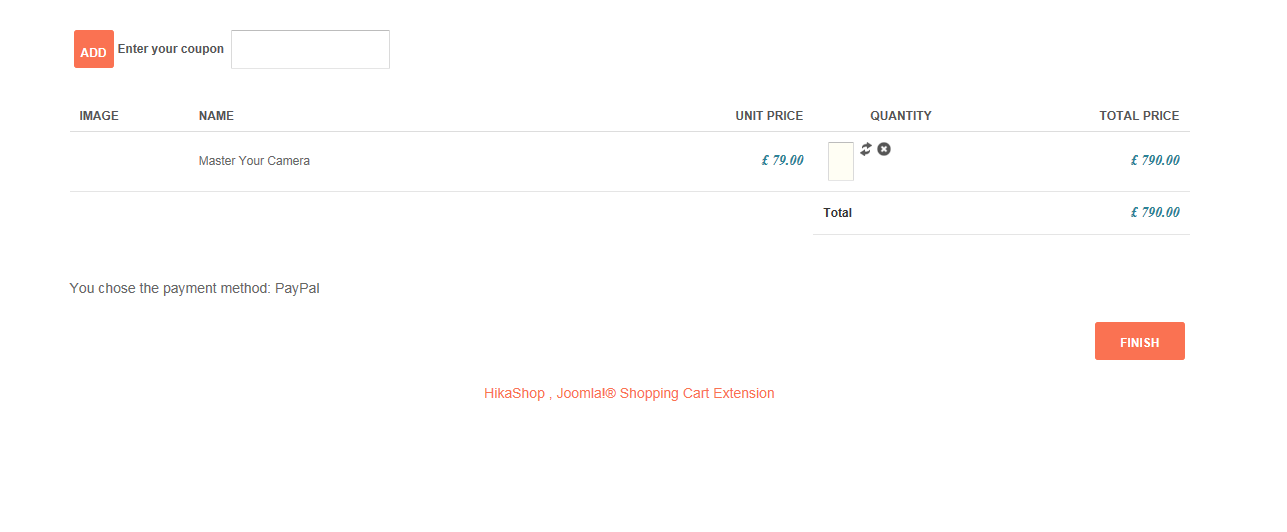
What I add to the cart I am unable to change the quantity. When I click on the box where you add the quantity it wont allow me to type in it or update the quantity in any way. This is the same for the widget.
Is there anyway of changing the quantity to a drop down list?
Any suggestions?
-- Joomla version -- : Latest
I have just installed Hikashop (lastest) on the latest version of Joomla
What I add to the cart I am unable to change the quantity. When I click on the box where you add the quantity it wont allow me to type in it or update the quantity in any way. This is the same for the widget.
Is there anyway of changing the quantity to a drop down list?
Any suggestions?
Please Log in or Create an account to join the conversation.

Less
More
- Posts: 12953
- Thank you received: 1778
11 years 9 months ago #187021
by Mohamed Thelji
Replied by Mohamed Thelji on topic Quantity Problem
Hello,
You have a CSS issue with your quantity field, you'll just have to increase the width of this field : www.hikashop.com/support/documentation/1...the-display.html#cssWhat I add to the cart I am unable to change the quantity. When I click on the box where you add the quantity it wont allow me to type in it or update the quantity in any way. This is the same for the widget.
Please Log in or Create an account to join the conversation.
Time to create page: 0.054 seconds