
error message

11 years 8 months ago #188635
by habusam
error message was created by habusam
-- HikaShop version -- : 2.3.5
-- Joomla version -- : 3.3.6
-- PHP version -- : 5.4.35
-- Browser(s) name and version -- : Firefox and Chrome
Hello every time i add new product comes with the following error or message
Message
The GD library for thumbnails creation is installed and activated on your website. However, it is not configured to support images. Please make sure that you're using a valid image extension and contact your hosting company or system administrator in order to make sure that the GD library on your web server supports the image extension
any ideas how to fix that?, thanks
-- Joomla version -- : 3.3.6
-- PHP version -- : 5.4.35
-- Browser(s) name and version -- : Firefox and Chrome
Hello every time i add new product comes with the following error or message
Message
The GD library for thumbnails creation is installed and activated on your website. However, it is not configured to support images. Please make sure that you're using a valid image extension and contact your hosting company or system administrator in order to make sure that the GD library on your web server supports the image extension
any ideas how to fix that?, thanks
Please Log in or Create an account to join the conversation.

11 years 8 months ago #188638
by Jerome
Jerome - Obsidev.com
HikaMarket & HikaSerial developer / HikaShop core dev team.
Replied by Jerome on topic error message
Hi,
Please check that the image you uploaded right have an extension (like ".jpg" or ".png")
Regards,
Please check that the image you uploaded right have an extension (like ".jpg" or ".png")
Regards,
Jerome - Obsidev.com
HikaMarket & HikaSerial developer / HikaShop core dev team.
Please Log in or Create an account to join the conversation.
11 years 8 months ago #188735
by habusam
Replied by habusam on topic error message
where i have to look into that?
Please Log in or Create an account to join the conversation.
11 years 8 months ago #188743
by Jerome
Jerome - Obsidev.com
HikaMarket & HikaSerial developer / HikaShop core dev team.
Replied by Jerome on topic error message
Hi,
Well, it's the file you tried to upload.
Regards,
Well, it's the file you tried to upload.
Regards,
Jerome - Obsidev.com
HikaMarket & HikaSerial developer / HikaShop core dev team.
Please Log in or Create an account to join the conversation.

11 years 8 months ago #189917
by Lynn
Replied by Lynn on topic error message
Im getting that message too, after upgrading to the newest version of Hikashop (but not before).
Please Log in or Create an account to join the conversation.
11 years 8 months ago #189918
by habusam
Replied by habusam on topic error message
Well, that is excactly what happen with me, when i upgraded it to the new version of Hikashop, however see the screen shot
the reason you had this issue because no picture
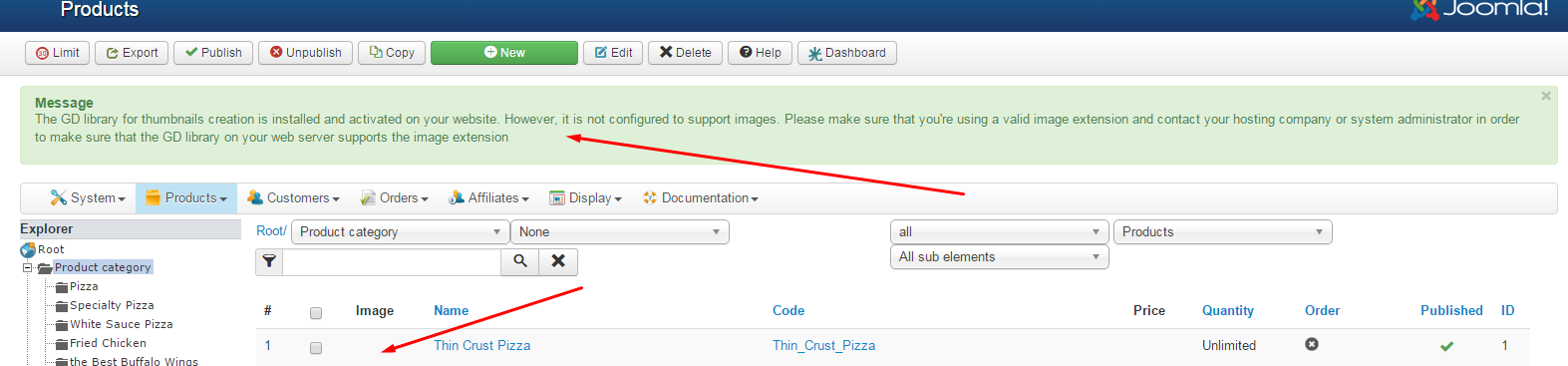
if you go to the product page like the screen shot below and add picture this msg will go away
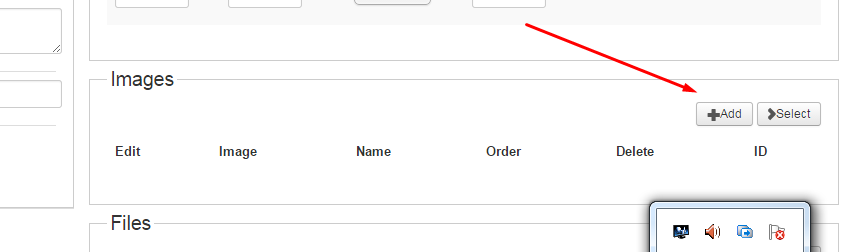
Thanks
Sammy
the reason you had this issue because no picture
if you go to the product page like the screen shot below and add picture this msg will go away
Thanks
Sammy
Please Log in or Create an account to join the conversation.
11 years 8 months ago #189925
by habusam
Replied by habusam on topic error message
I found a better solution
follow the steps
first download this file called barcode to your desktop

then go to hikashop click on products, like the following
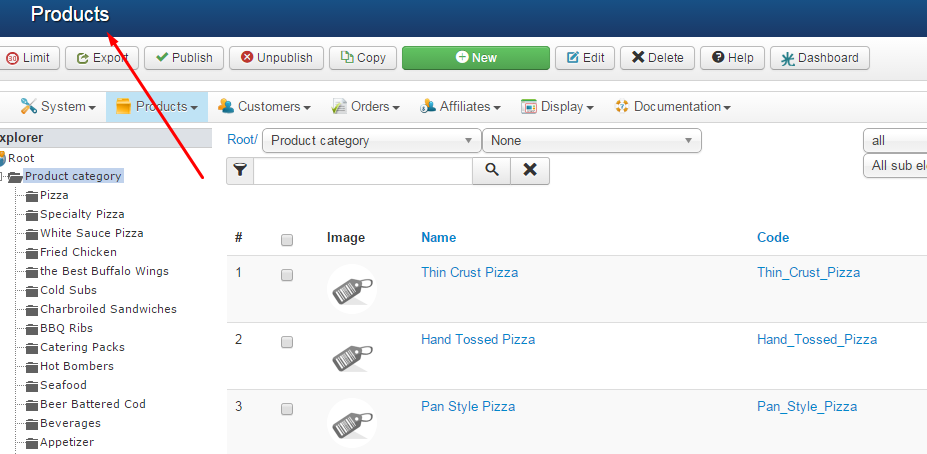
then click on any one of these products
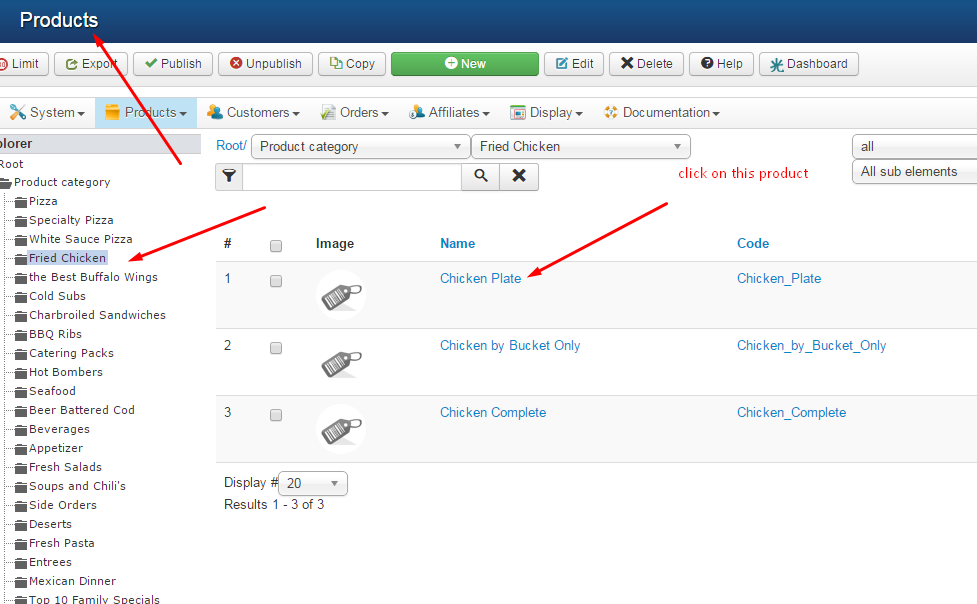
then add picture like the following see down
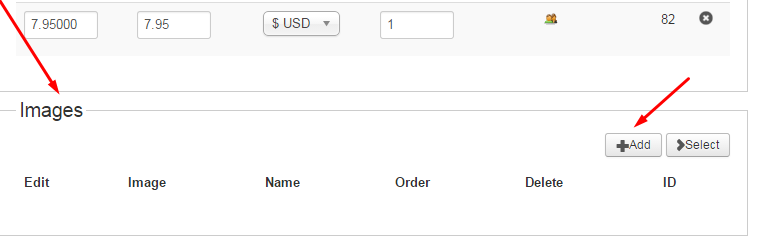
then save and close, it should be added to all, at least that what really happen with me
thanks again to all of you
follow the steps
first download this file called barcode to your desktop
then go to hikashop click on products, like the following
then click on any one of these products
then add picture like the following see down
then save and close, it should be added to all, at least that what really happen with me
thanks again to all of you
Please Log in or Create an account to join the conversation.
11 years 8 months ago #189931
by Jerome
Jerome - Obsidev.com
HikaMarket & HikaSerial developer / HikaShop core dev team.
Replied by Jerome on topic error message
Hi,
Please provide details about your HikaShop configuration for the "File" section.
We also need details about what you are doing in the last screen ; when you select the file to upload (the popup you have with the "save" button where you click on "OK").
If we are not able to reproduce your issue or understand what you are doing exactly ; we won't be able to fix it.
So, we need more details about your file configuration and the exact process your doing (and specially, the last step ; the other one are classical)
Regards,
Please provide details about your HikaShop configuration for the "File" section.
We also need details about what you are doing in the last screen ; when you select the file to upload (the popup you have with the "save" button where you click on "OK").
If we are not able to reproduce your issue or understand what you are doing exactly ; we won't be able to fix it.
So, we need more details about your file configuration and the exact process your doing (and specially, the last step ; the other one are classical)
Regards,
Jerome - Obsidev.com
HikaMarket & HikaSerial developer / HikaShop core dev team.
Please Log in or Create an account to join the conversation.
11 years 8 months ago #189977
by habusam
Replied by habusam on topic error message
Sure! I will work on that tomorrow, its Sunday and its my only off day,, So tomorrow Monday I will go with very deep details and show you with many screen shots how i was able to solve the problem, thanks
Please Log in or Create an account to join the conversation.
11 years 8 months ago - 11 years 8 months ago #189994
by habusam
Replied by habusam on topic error message
Ok here you go what i did
follow screenshots
first of all I went to check the path of this missing file
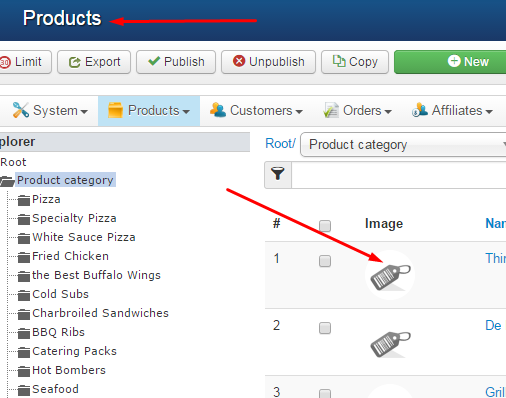
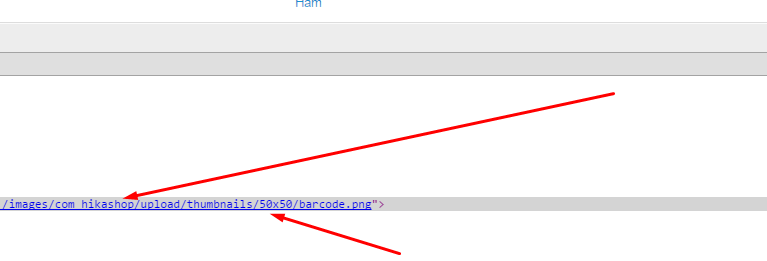
then you need to go to the following line in your Public HTML
public_html/yourdomain.com/images/com_hikashop/upload/thumbnails/50x50
then you need to upload the file there((( The barcode.png File)
that set you should be done, it seems the update did not include this file when it should uploaded to the folder 50X50
hope that help, im not sure if that going to work for everyone or not, but it works for me
Thanks
Sammy
follow screenshots
first of all I went to check the path of this missing file
then you need to go to the following line in your Public HTML
public_html/yourdomain.com/images/com_hikashop/upload/thumbnails/50x50
then you need to upload the file there((( The barcode.png File)
that set you should be done, it seems the update did not include this file when it should uploaded to the folder 50X50
hope that help, im not sure if that going to work for everyone or not, but it works for me
Thanks
Sammy
Last edit: 11 years 8 months ago by habusam.
Please Log in or Create an account to join the conversation.
11 years 8 months ago #192113
by menolo
Replied by menolo on topic error message
I ran in to this same error. Thanks for posting a detailed fix Habusam!
Please Log in or Create an account to join the conversation.
Time to create page: 0.375 seconds