
- Posts: 137
- Thank you received: 4
Upgrade to 2.4.0: Main product images shrunken
- simonkloostra
-
 Topic Author
- Offline
Less
More
11 years 7 months ago - 11 years 7 months ago #193256
by simonkloostra
Upgrade to 2.4.0: Main product images shrunken was created by simonkloostra
-- url of the page with the problem -- :
strassburg-sock.nl/bestellen/product
-- HikaShop version -- : 2.4.0
-- Joomla version -- : 3.4.0
-- PHP version -- : 5.4
-- Browser(s) name and version -- : All
-- Error-message(debug-mod must be tuned on) -- : None
I just upgraded Hikashop (Business) on 2 of my sites. On both these sites, the product images on the main product page have shrunk because of the update. I noticed it on the first site, so paid special attention that for the second site the problem was indeed caused by the Hikashop upgrade, and it was.
This is on strassburg-sock.nl/bestellen/product
See attached 2 screenprints of the before and after situation.
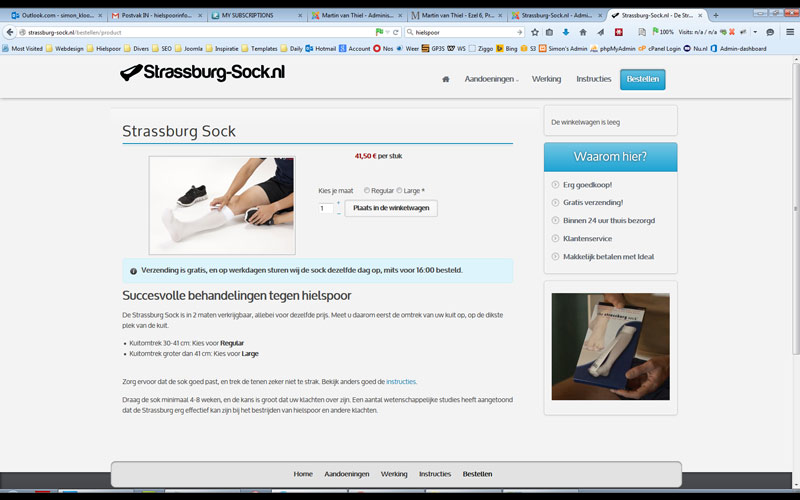
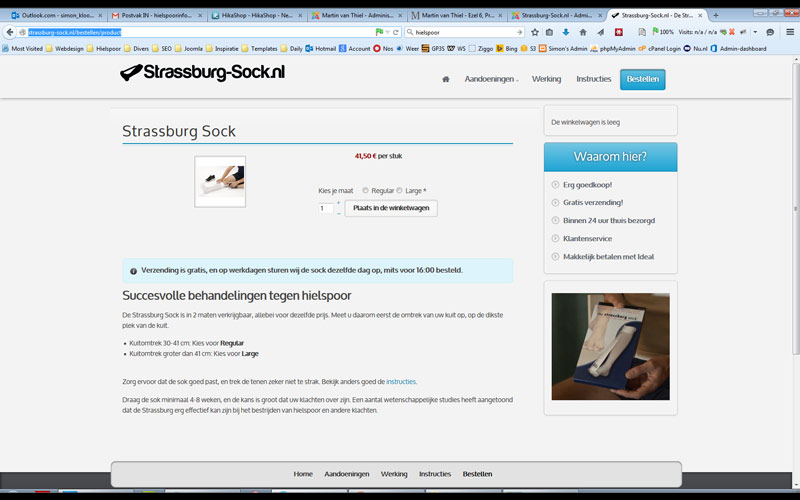
The same happened on martinvanthiel.nl/nl/fine-art/product/2041-ezel-6-print-20-30
-- HikaShop version -- : 2.4.0
-- Joomla version -- : 3.4.0
-- PHP version -- : 5.4
-- Browser(s) name and version -- : All
-- Error-message(debug-mod must be tuned on) -- : None
I just upgraded Hikashop (Business) on 2 of my sites. On both these sites, the product images on the main product page have shrunk because of the update. I noticed it on the first site, so paid special attention that for the second site the problem was indeed caused by the Hikashop upgrade, and it was.
This is on strassburg-sock.nl/bestellen/product
See attached 2 screenprints of the before and after situation.
The same happened on martinvanthiel.nl/nl/fine-art/product/2041-ezel-6-print-20-30
Last edit: 11 years 7 months ago by simonkloostra.
Please Log in or Create an account to join the conversation.
11 years 7 months ago - 11 years 7 months ago #193279
by Bruno
Replied by Bruno on topic Upgrade to 2.4.0: Main product images shrunken
I think this is the same problem I have in my two shops:
www.hikashop.com/forum/product-category-...-correct.html#193278
The list thumbnail image is shown as product image on the product page. If you change the thumbnail size of the list preview image the product image changes to the same size.
www.hikashop.com/forum/product-category-...-correct.html#193278
The list thumbnail image is shown as product image on the product page. If you change the thumbnail size of the list preview image the product image changes to the same size.
Last edit: 11 years 7 months ago by Bruno.
Please Log in or Create an account to join the conversation.
- simonkloostra
-
Topic Author
- Offline
Less
More
- Posts: 137
- Thank you received: 4
11 years 7 months ago #193280
by simonkloostra
Replied by simonkloostra on topic Upgrade to 2.4.0: Main product images shrunken
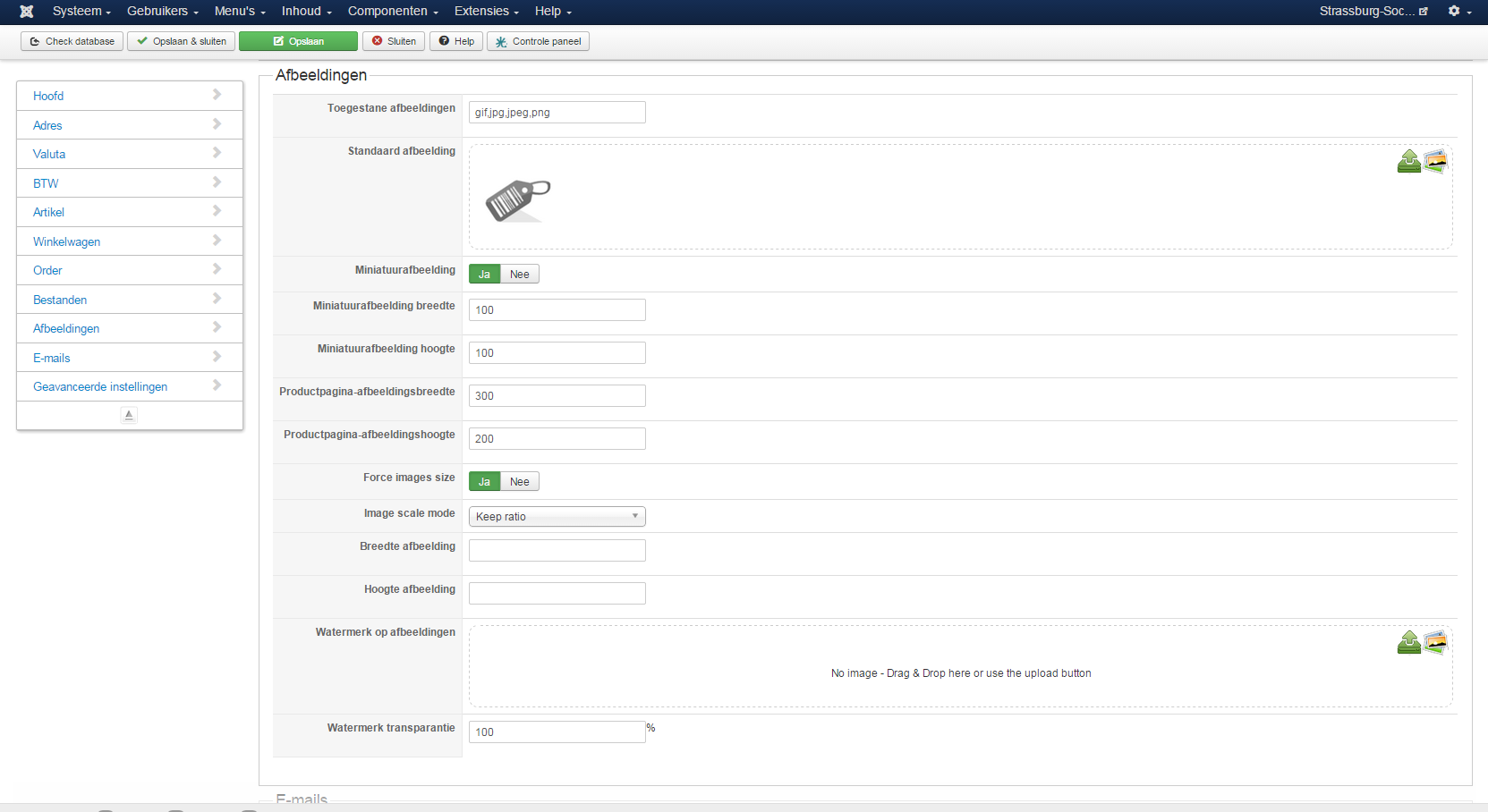
Yes, it seems the same issue. Here is my image configuration:
Please Log in or Create an account to join the conversation.

11 years 7 months ago #193281
by nicolas
Replied by nicolas on topic Upgrade to 2.4.0: Main product images shrunken
Hi,
The image size on the product page comes from the options "Product page image width/height" and the image size on the products listing comes from the options "Thumbnail width/height" of the HikaShop configuration.
If you get the same size, it means that you entered the same size in both settings, or that you left empty the size of the product page image settings (and so it uses the thumbnail size settings instead.
It should be the same with old versions of HikaShop, unless you had a really really old version of HikaShop where the "Product page image width/height" settings didn't exist.
Maybe it could also come from a view override that has been done in your template. Renaming temporarily the folder templates/YOUR_TEMPLATE/html/com_hikashop/product, if present, would make sure that you don't have any view override which could mess with these options.
The image size on the product page comes from the options "Product page image width/height" and the image size on the products listing comes from the options "Thumbnail width/height" of the HikaShop configuration.
If you get the same size, it means that you entered the same size in both settings, or that you left empty the size of the product page image settings (and so it uses the thumbnail size settings instead.
It should be the same with old versions of HikaShop, unless you had a really really old version of HikaShop where the "Product page image width/height" settings didn't exist.
Maybe it could also come from a view override that has been done in your template. Renaming temporarily the folder templates/YOUR_TEMPLATE/html/com_hikashop/product, if present, would make sure that you don't have any view override which could mess with these options.
Please Log in or Create an account to join the conversation.
- simonkloostra
-
Topic Author
- Offline
Less
More
- Posts: 137
- Thank you received: 4
11 years 7 months ago #193387
by simonkloostra
Replied by simonkloostra on topic Upgrade to 2.4.0: Main product images shrunken
I think the screenprint in my previous post clearly shows that I have different settings for product images and thumbnail images. Also I have never touched any of the override options in this site, and no override folder is present for hikashop.
This is not a very old site. It was built in Joomla 3.
This is not a very old site. It was built in Joomla 3.
Please Log in or Create an account to join the conversation.

11 years 7 months ago #193410
by Cattelan
Replied by Cattelan on topic Upgrade to 2.4.0: Main product images shrunken
Hi. Yes i upgraded right now from 2.3.5 to 2.4 and i have the exact same issue. i have 300px wide and 200 px height set in the config and the product page is showing 160x x 120 px
Please Log in or Create an account to join the conversation.
11 years 7 months ago #193411
by Bruno
Replied by Bruno on topic Upgrade to 2.4.0: Main product images shrunken
Hi Nicolas,
same issue on both of my sides as described in the other thread:
www.hikashop.com/forum/product-category-...ize-not-correct.html
I have no template overrides and the shop was set up on Joomla 3.3 with Hika Shop 2.3.4.
So there must be another reason for this issue.
same issue on both of my sides as described in the other thread:
www.hikashop.com/forum/product-category-...ize-not-correct.html
I have no template overrides and the shop was set up on Joomla 3.3 with Hika Shop 2.3.4.
So there must be another reason for this issue.
Please Log in or Create an account to join the conversation.
11 years 7 months ago #193413
by Cattelan
Replied by Cattelan on topic Upgrade to 2.4.0: Main product images shrunken
i have no override either. I'm on joomla 3.4 and hika 2.4
Please Log in or Create an account to join the conversation.
11 years 7 months ago #193416
by nicolas
Replied by nicolas on topic Upgrade to 2.4.0: Main product images shrunken
Hi,
Thanks everyone for your feedback.
The problem has been found and fixed. Download again the latest version via the menu My account>My susbcriptions on our website and install it on yours and that will fix it for you too.
Thanks everyone for your feedback.
The problem has been found and fixed. Download again the latest version via the menu My account>My susbcriptions on our website and install it on yours and that will fix it for you too.
Please Log in or Create an account to join the conversation.
11 years 7 months ago - 11 years 7 months ago #193418
by Cattelan
Replied by Cattelan on topic Upgrade to 2.4.0: Main product images shrunken
to Nicolas.
i changed the thumbnails size and it went right.
I wonder this: before update my thumnail settings where 160x120 and my image size was 300x200 and the image showed big.
after updating i had to change also the thumbnail size. Is this because you changed something in the new version ?
EDIT
Doing like this i get the same size of the thumbnails also on the mainpage of my shop big where i have a three row view. This was not like this before.
How can i set the image size for the product page independent from the shopwide thumbnail size?
i changed the thumbnails size and it went right.
I wonder this: before update my thumnail settings where 160x120 and my image size was 300x200 and the image showed big.
after updating i had to change also the thumbnail size. Is this because you changed something in the new version ?
EDIT
Doing like this i get the same size of the thumbnails also on the mainpage of my shop big where i have a three row view. This was not like this before.
How can i set the image size for the product page independent from the shopwide thumbnail size?
Last edit: 11 years 7 months ago by Cattelan.
Please Log in or Create an account to join the conversation.
11 years 7 months ago #193430
by Cattelan
Replied by Cattelan on topic Upgrade to 2.4.0: Main product images shrunken
OK ! downloaded new zip and installed it. Issues disappeared.
Great JOB - First class support like always !
Great JOB - First class support like always !
Please Log in or Create an account to join the conversation.
- simonkloostra
-
Topic Author
- Offline
Less
More
- Posts: 137
- Thank you received: 4
11 years 7 months ago #193489
by simonkloostra
Replied by simonkloostra on topic Upgrade to 2.4.0: Main product images shrunken
Problem fixed indeed, thanks for the swift support 
Please Log in or Create an account to join the conversation.
11 years 7 months ago #193493
by Bruno
Replied by Bruno on topic Upgrade to 2.4.0: Main product images shrunken
Fixed in both of my shops, thank you1
Please Log in or Create an account to join the conversation.
Time to create page: 0.463 seconds