

- Posts: 80
- Thank you received: 0
Updating hikashop release
11 years 7 months ago #194897
by leonora
Updating hikashop release was created by leonora
-- HikaShop version -- : 2.3.1
-- Joomla version -- : 3.4.0
HI:
I'm updating de Hikasop version from 2.3.1 to 2.4.0 in a testing directory: mysite.com/copia.
When I'm treating do that, the system shows a message that I haven't license for the copia directory.
How can I solve it?
-- Joomla version -- : 3.4.0
HI:
I'm updating de Hikasop version from 2.3.1 to 2.4.0 in a testing directory: mysite.com/copia.
When I'm treating do that, the system shows a message that I haven't license for the copia directory.
How can I solve it?
Please Log in or Create an account to join the conversation.
11 years 7 months ago #194907
by leonora
Replied by leonora on topic Updating hikashop release
Ohhh The same message is showed in te main site: mysite.com
Please, say me how to solve this
Thanks in advance
Leonora
Please, say me how to solve this
Thanks in advance
Leonora
Please Log in or Create an account to join the conversation.

11 years 7 months ago #194909
by Jerome
Jerome - Obsidev.com
HikaMarket & HikaSerial developer / HikaShop core dev team.
Replied by Jerome on topic Updating hikashop release
Hi,
You mean, haven't right permission to copy files and folders.
You should check the folder permissions in your Joomla backend. System > System Information > Directory permissions.
Regards,
You mean, haven't right permission to copy files and folders.
You should check the folder permissions in your Joomla backend. System > System Information > Directory permissions.
Regards,
Jerome - Obsidev.com
HikaMarket & HikaSerial developer / HikaShop core dev team.
Please Log in or Create an account to join the conversation.
11 years 7 months ago #194981
by leonora
Replied by leonora on topic Updating hikashop release
Hi,
Thanks, but when I go to Extensions -> Update I have the screenshot attached.
Where must I download the updating file and where must I copy the updating file downloaded?
Best regards
Leonora
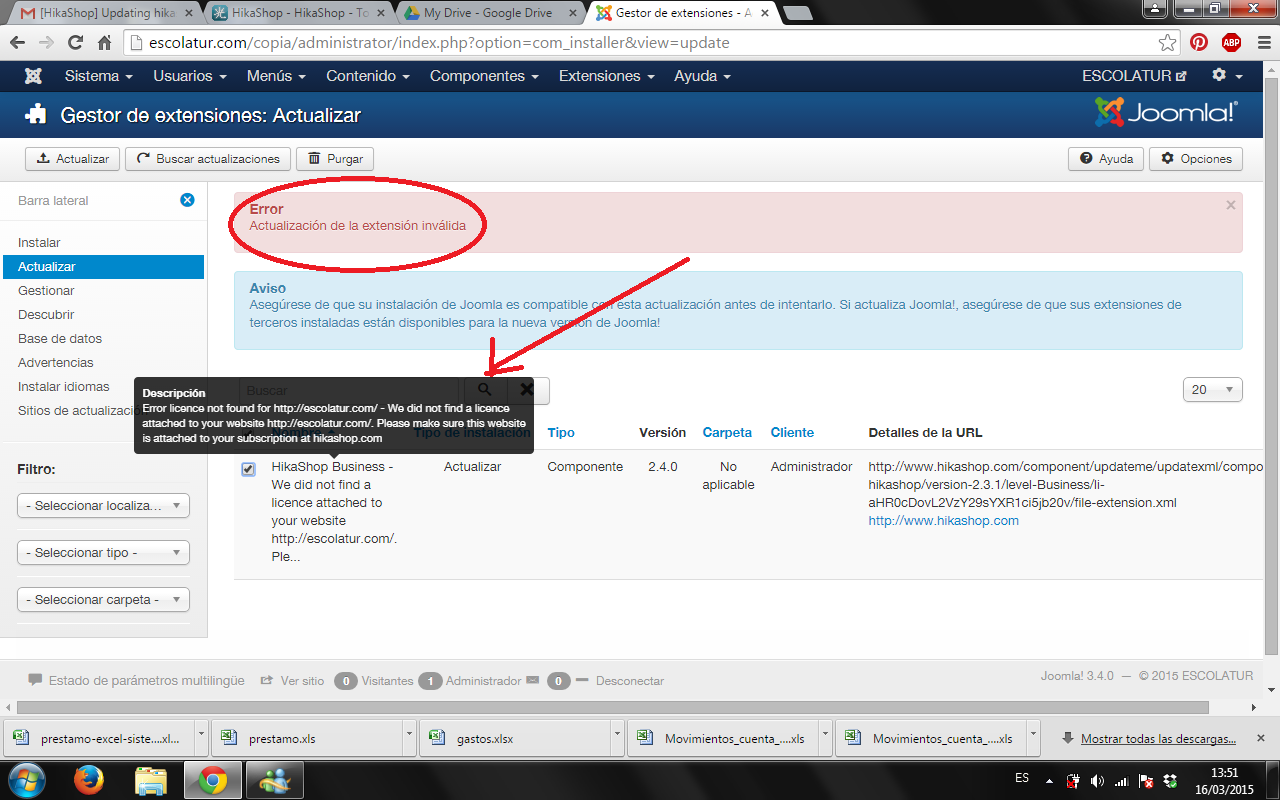
Thanks, but when I go to Extensions -> Update I have the screenshot attached.
Where must I download the updating file and where must I copy the updating file downloaded?
Best regards
Leonora
Please Log in or Create an account to join the conversation.
11 years 7 months ago #194985
by Jerome
Jerome - Obsidev.com
HikaMarket & HikaSerial developer / HikaShop core dev team.
Replied by Jerome on topic Updating hikashop release
Hi,
Please look at the text with the title "HikaShop Business" : "we did not find a licence attache to your website".
So please check your Hikashop licence to see to which website you attached it.
www.hikashop.com/my-account/your-subscriptions.html
We just provide automatic updates to one single website per licence.
Regards,
Please look at the text with the title "HikaShop Business" : "we did not find a licence attache to your website".
So please check your Hikashop licence to see to which website you attached it.
www.hikashop.com/my-account/your-subscriptions.html
We just provide automatic updates to one single website per licence.
Regards,
Jerome - Obsidev.com
HikaMarket & HikaSerial developer / HikaShop core dev team.
Please Log in or Create an account to join the conversation.
11 years 7 months ago #195473
by leonora
Replied by leonora on topic Updating hikashop release
Sorry, but I have a doubte:
Can I register my site (mysite.com) and actualize the hikashop from mysite.com/copia?
I have the production site in mysite.com and I have a copy in mysite.com/copia because I'm updating the joomla version.
After the upgrading is ok, I will copy the testing site (mysite.com/copia) to mysite.com
Thanks in advance
Leonora
Can I register my site (mysite.com) and actualize the hikashop from mysite.com/copia?
I have the production site in mysite.com and I have a copy in mysite.com/copia because I'm updating the joomla version.
After the upgrading is ok, I will copy the testing site (mysite.com/copia) to mysite.com
Thanks in advance
Leonora
Please Log in or Create an account to join the conversation.
11 years 7 months ago #195479
by Jerome
Jerome - Obsidev.com
HikaMarket & HikaSerial developer / HikaShop core dev team.
Replied by Jerome on topic Updating hikashop release
Hi,
Yes ; the HikaShop license is working on the domain name (and can include subdomains so you can have " www.mysite ", "preprod.mysite", "test.mysite")
Regards,
Yes ; the HikaShop license is working on the domain name (and can include subdomains so you can have " www.mysite ", "preprod.mysite", "test.mysite")
Regards,
Jerome - Obsidev.com
HikaMarket & HikaSerial developer / HikaShop core dev team.
The following user(s) said Thank You: leonora
Please Log in or Create an account to join the conversation.
Less
More
- Posts: 9
- Thank you received: 0
11 years 6 months ago #197332
by tatjanabinder
Replied by tatjanabinder on topic Updating hikashop release
Hi ,
i have a problem after update to business from essential.
i have had just downloaded the business zip to joomla installer. it had no problem within , but i see some message on my site and i still have no bussines version inside
what i have to do jet? it the update no pass?
thank you
i have a problem after update to business from essential.
i have had just downloaded the business zip to joomla installer. it had no problem within , but i see some message on my site and i still have no bussines version inside
what i have to do jet? it the update no pass?
thank you
Please Log in or Create an account to join the conversation.
Less
More
- Posts: 9
- Thank you received: 0
11 years 6 months ago #197338
by tatjanabinder
Replied by tatjanabinder on topic Updating hikashop release
and more one: all prices gone to free.
what is this?
what is this?
Please Log in or Create an account to join the conversation.
Less
More
- Posts: 9
- Thank you received: 0
11 years 6 months ago #197340
by tatjanabinder
Replied by tatjanabinder on topic Updating hikashop release
may be it also help you to understand what's happen: i can't save no more new articel and also old one can't save the changes
thank you
i hope you can help me
thank you
i hope you can help me
Please Log in or Create an account to join the conversation.
11 years 6 months ago #197342
by Jerome
Jerome - Obsidev.com
HikaMarket & HikaSerial developer / HikaShop core dev team.
Replied by Jerome on topic Updating hikashop release
Hi,
The error message you got means that you have a folder (the folder written in the message) which is not writtable.
So you have to check that the folder exists and right have write permission ; if the folder does not exist you have to check that the parent folder have the write right permission.
Regarding your screenshot and the "business" message ; are you sure that you right update your website ?
Maybe you have an upload limitation and the installation was not processed ; maybe you have some write permissions issues and the files were not updated..
Please try to install HikaShop business using the "ftp install" method and check that you do not have error messages while processing the update.
www.hikashop.com/support/support/documen...-install.html#errors
Regards,
The error message you got means that you have a folder (the folder written in the message) which is not writtable.
So you have to check that the folder exists and right have write permission ; if the folder does not exist you have to check that the parent folder have the write right permission.
Regarding your screenshot and the "business" message ; are you sure that you right update your website ?
Maybe you have an upload limitation and the installation was not processed ; maybe you have some write permissions issues and the files were not updated..
Please try to install HikaShop business using the "ftp install" method and check that you do not have error messages while processing the update.
www.hikashop.com/support/support/documen...-install.html#errors
Regards,
Jerome - Obsidev.com
HikaMarket & HikaSerial developer / HikaShop core dev team.
Please Log in or Create an account to join the conversation.
Time to create page: 0.329 seconds