
- Posts: 50
- Thank you received: 0
How to change size of thumbnail in cart?
- rjohnson1990
-
 Topic Author
- Offline
Less
More
11 years 6 months ago #197018
by rjohnson1990
How to change size of thumbnail in cart? was created by rjohnson1990
-- HikaShop version -- : 2.4.0
-- Joomla version -- : 2.5.28
-- PHP version -- : 5.4.36
-- Browser(s) name and version -- : Mozilla Firefox Developer Edition 38.0a2
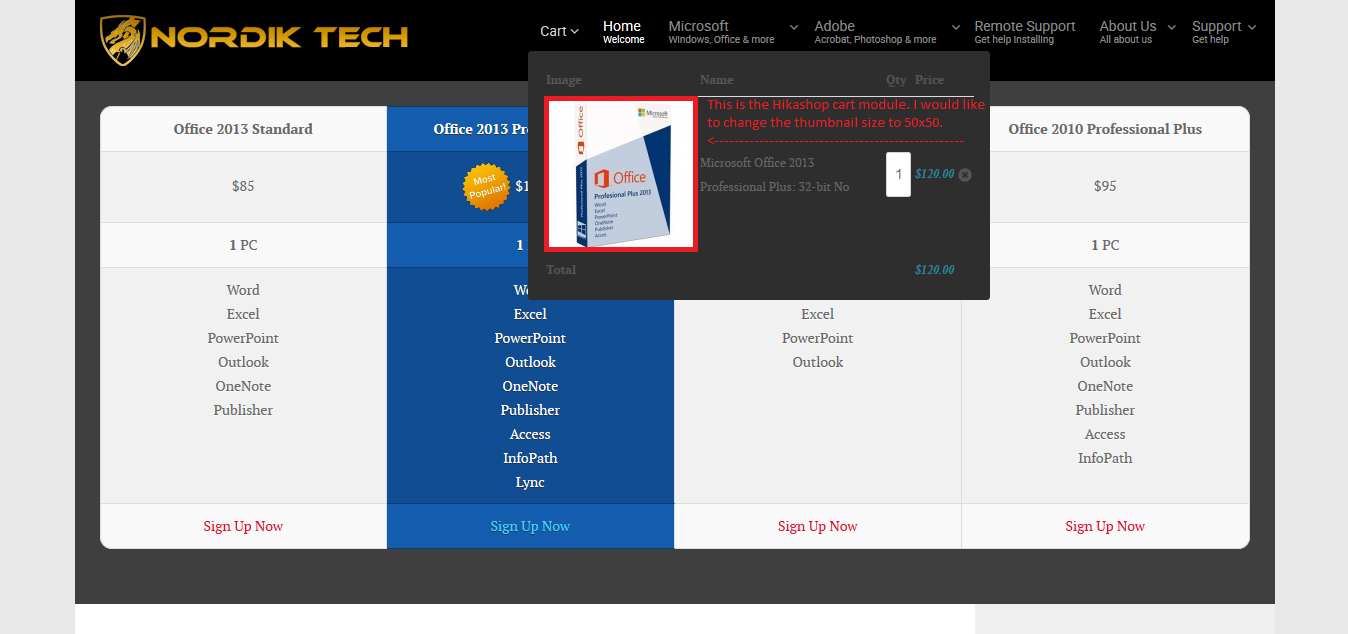
I've added a product to my cart to test it out to find any issues with the display. The thumbnail in the cart is too big. How can I make it smaller, roughly 50px for both width and height?
-- Joomla version -- : 2.5.28
-- PHP version -- : 5.4.36
-- Browser(s) name and version -- : Mozilla Firefox Developer Edition 38.0a2
I've added a product to my cart to test it out to find any issues with the display. The thumbnail in the cart is too big. How can I make it smaller, roughly 50px for both width and height?
Please Log in or Create an account to join the conversation.

11 years 6 months ago #197054
by nicolas
Replied by nicolas on topic How to change size of thumbnail in cart?
Hi,
I suppose that you're talking about the images of cart in the checkout and not in the cart module.
The size of the thumbnails there come from the thumbnails width/height settings of the HikaShop configuration.
These also control the size of the thumbnails in the products/categories listings, unless you edit them via the menu Display->Content menus/modules and set the images width/height you want for the listings there.
I suppose that you're talking about the images of cart in the checkout and not in the cart module.
The size of the thumbnails there come from the thumbnails width/height settings of the HikaShop configuration.
These also control the size of the thumbnails in the products/categories listings, unless you edit them via the menu Display->Content menus/modules and set the images width/height you want for the listings there.
Please Log in or Create an account to join the conversation.
- rjohnson1990
-
Topic Author
- Offline
Less
More
- Posts: 50
- Thank you received: 0
11 years 6 months ago #197118
by rjohnson1990
Replied by rjohnson1990 on topic How to change size of thumbnail in cart?
Thank you for the reply. I apologize, I did mean the cart module. I would like to make the thumbnail smaller because it's pushing the cart module off the side of my page.
Please Log in or Create an account to join the conversation.
11 years 6 months ago #197125
by nicolas
Replied by nicolas on topic How to change size of thumbnail in cart?
I've checked the code for the cart module and it's actually the same as for the checkout for the images display. So the answer is in fact the same:
The size of the thumbnails there come from the thumbnails width/height settings of the HikaShop configuration.
These also control the size of the thumbnails in the products/categories listings, unless you edit them via the menu Display->Content menus/modules and set the images width/height you want for the listings there.
The size of the thumbnails there come from the thumbnails width/height settings of the HikaShop configuration.
These also control the size of the thumbnails in the products/categories listings, unless you edit them via the menu Display->Content menus/modules and set the images width/height you want for the listings there.
Please Log in or Create an account to join the conversation.
- rjohnson1990
-
Topic Author
- Offline
Less
More
- Posts: 50
- Thank you received: 0
11 years 6 months ago #197415
by rjohnson1990
Replied by rjohnson1990 on topic How to change size of thumbnail in cart?
Thank you for the response. I'm not 100% familiar with how to do this. I've edited a few things in Hikashop but what exactly do I do to change the thumbnail size in the cart module only to 50x50?
Please Log in or Create an account to join the conversation.
11 years 6 months ago #197451
by nicolas
Replied by nicolas on topic How to change size of thumbnail in cart?
Set the "thumbnails height" and "thumbnails width" settings of the Images section of the HikaShop configuration to 50, as I tried to explain you in my last message.
Please Log in or Create an account to join the conversation.
- rjohnson1990
-
Topic Author
- Offline
Less
More
- Posts: 50
- Thank you received: 0
11 years 6 months ago #197526
by rjohnson1990
Replied by rjohnson1990 on topic How to change size of thumbnail in cart?
I read your previous message again but what I want is to change the thumbnail size in the cart module only and leave the product page thumbnail, category thumbnail etc. the same size as they are now. I just need to change the thumbnails in the cart module to 50x50.
Please Log in or Create an account to join the conversation.

11 years 6 months ago #197542
by Xavier
Replied by Xavier on topic How to change size of thumbnail in cart?
Hi,
To resize only the image in the cart module, you can use CSS rules like:
www.hikashop.com/support/support/documen...ize-the-display.html
To resize only the image in the cart module, you can use CSS rules like:
Code:
.hikashop_cart_module .hikashop_product_cart_image{
width: 50px !important;
}
www.hikashop.com/support/support/documen...ize-the-display.html
The following user(s) said Thank You: rjohnson1990
Please Log in or Create an account to join the conversation.
- rjohnson1990
-
Topic Author
- Offline
Less
More
- Posts: 50
- Thank you received: 0
11 years 6 months ago #197617
by rjohnson1990
Replied by rjohnson1990 on topic How to change size of thumbnail in cart?
Exactly what I needed. Thank you!
Please Log in or Create an account to join the conversation.
- rjohnson1990
-
Topic Author
- Offline
Less
More
- Posts: 50
- Thank you received: 0
11 years 6 months ago #198413
by rjohnson1990
Replied by rjohnson1990 on topic How to change size of thumbnail in cart?
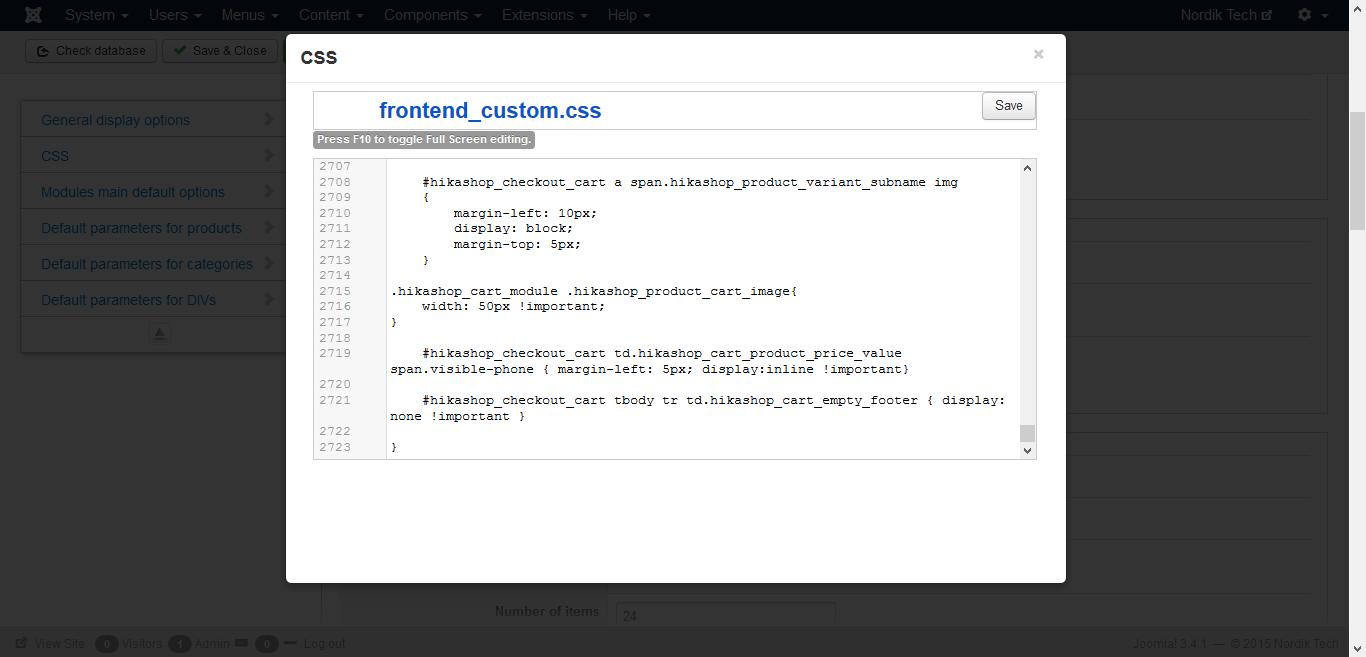
For some reason, the thumbnail in my cart module is no longer 50px. I have not changed any configuration or CSS since I added the above CSS. It was working before and now is not working at all.
Please Log in or Create an account to join the conversation.
11 years 6 months ago #198455
by nicolas
Replied by nicolas on topic How to change size of thumbnail in cart?
Hi,
The "shop now" link on your website do not seem to work anymore on your website so we couldn't check on the problem.
Please provide a valid link so that we an add a product to the cart and check on the cart module.
The "shop now" link on your website do not seem to work anymore on your website so we couldn't check on the problem.
Please provide a valid link so that we an add a product to the cart and check on the cart module.
Please Log in or Create an account to join the conversation.
Time to create page: 0.376 seconds