
- Posts: 50
- Thank you received: 0
Cannot change Add to cart image
- rjohnson1990
-
 Topic Author
- Offline
Less
More
11 years 6 months ago #198151
by rjohnson1990
Cannot change Add to cart image was created by rjohnson1990
-- HikaShop version -- : 2.4.0
-- Joomla version -- : 2.5.28
-- PHP version -- : 5.4.36
-- Browser(s) name and version -- : Firefox 37.0.1
I've done all I can think of. The latest thing I've found was adding this to the CSS:
Everything I've done, it does not change the add to cart button. I've even cleaned the cache many times and never saw a change. What else can I do?
-- Joomla version -- : 2.5.28
-- PHP version -- : 5.4.36
-- Browser(s) name and version -- : Firefox 37.0.1
I've done all I can think of. The latest thing I've found was adding this to the CSS:
Code:
.hikashop_cart_input_button{
background: url('http://mywebsite.com/images/addtocart.png') !important;
}
Everything I've done, it does not change the add to cart button. I've even cleaned the cache many times and never saw a change. What else can I do?
Please Log in or Create an account to join the conversation.

11 years 6 months ago #198167
by nicolas
Replied by nicolas on topic Cannot change Add to cart image
Hi,
You've changed the buttons style option of the configuration from "normal" to "css", and in that case, it's not the class hikashop_cart_input_button that you want to use but the class hikashop_cart_button so you want to do such CSS code instead:
.hikashop_cart_button{
background: url(' mywebsite.com/images/addtocart.png ') !important;
}
You've changed the buttons style option of the configuration from "normal" to "css", and in that case, it's not the class hikashop_cart_input_button that you want to use but the class hikashop_cart_button so you want to do such CSS code instead:
.hikashop_cart_button{
background: url(' mywebsite.com/images/addtocart.png ') !important;
}
Please Log in or Create an account to join the conversation.
- rjohnson1990
-
Topic Author
- Offline
Less
More
- Posts: 50
- Thank you received: 0
11 years 6 months ago - 11 years 6 months ago #198222
by rjohnson1990
Replied by rjohnson1990 on topic Cannot change Add to cart image
I've done what you said. Button style is CSS and I've added the following to my Front-end CSS file:
The button now looks like this:
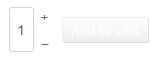
I did change the URL to the image URL I would like to use. I've even checked to make sure the URL was correct.
Code:
.hikashop_cart_button{
background: url('mywebsite.com/images/addtocart.png') !important;
}
The button now looks like this:
I did change the URL to the image URL I would like to use. I've even checked to make sure the URL was correct.
Last edit: 11 years 6 months ago by rjohnson1990.
Please Log in or Create an account to join the conversation.
11 years 6 months ago #198233
by nicolas
Replied by nicolas on topic Cannot change Add to cart image
Hi,
I tried to look at your product page in order to analyze the issue but the links to the product page on your website do not seem to work anymore.
Could you provide a link to a product page so that we can see that ?
I tried to look at your product page in order to analyze the issue but the links to the product page on your website do not seem to work anymore.
Could you provide a link to a product page so that we can see that ?
Please Log in or Create an account to join the conversation.
- rjohnson1990
-
Topic Author
- Offline
Less
More
- Posts: 50
- Thank you received: 0
11 years 6 months ago #198426
by rjohnson1990
Replied by rjohnson1990 on topic Cannot change Add to cart image
After some time, the image for my add to cart button appeared but now looks like this:

Please Log in or Create an account to join the conversation.

11 years 6 months ago #198427
by Jerome
Jerome - Obsidev.com
HikaMarket & HikaSerial developer / HikaShop core dev team.
Replied by Jerome on topic Cannot change Add to cart image
Hi,
You might had a browser cache issue for the CSS.
Regards,
You might had a browser cache issue for the CSS.
Regards,
Jerome - Obsidev.com
HikaMarket & HikaSerial developer / HikaShop core dev team.
Please Log in or Create an account to join the conversation.
- rjohnson1990
-
Topic Author
- Offline
Less
More
- Posts: 50
- Thank you received: 0
11 years 6 months ago #198644
by rjohnson1990
Replied by rjohnson1990 on topic Cannot change Add to cart image
I got it working somewhat. I changed the code a little.
FROM:
TO
It's working great now but I would like to remove the Add to cart text which I can probably just delete from the language file and I would also like to remove the border around the Add to cart button.
Also, I have it set up so when an item is added to cart, the popup appears and both the Continue Shopping and Proceed to Cart buttons are the same as my add to cart button.
FROM:
Code:
.hikashop_cart_button{
background: url('mywebsite.com/images/addtocart.png') !important;
}
TO
Code:
.hikashop_cart_button{
background: url('mywebsite.com/images/addtocart.png') !important; width: 50px !important; height: 50px !important; background-repeat: no-repeat !important;
}
It's working great now but I would like to remove the Add to cart text which I can probably just delete from the language file and I would also like to remove the border around the Add to cart button.
Also, I have it set up so when an item is added to cart, the popup appears and both the Continue Shopping and Proceed to Cart buttons are the same as my add to cart button.
Please Log in or Create an account to join the conversation.
Time to create page: 0.240 seconds