
- Posts: 515
- Thank you received: 22
migrating site to other domain
- jouwnaambord.nl
-
 Topic Author
- Offline
Less
More
11 years 5 months ago #199616
by jouwnaambord.nl
migrating site to other domain was created by jouwnaambord.nl
-- HikaShop version -- : 2.4.0
-- Joomla version -- : 3.4.0
-- PHP version -- : 5.4.36-1
-- Error-message(debug-mod must be tuned on) -- : Undefined
Hi,
I'm trying to migrate my complete shop to another domain (currently a testdomain). I exported the complete mpw_hikashop_** database and first installed Hikashop on the testdomain and then imported the SQL exportfile into the new database.
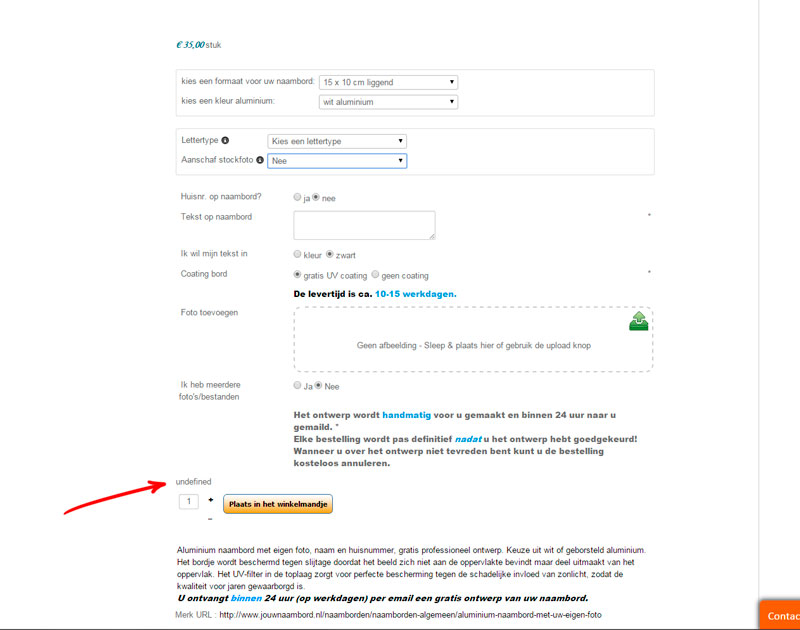
Everything looks fine, but on the productpage the "hikashop_product_price_with_options_main" returns "undefined".
I can't figure out what's causing this error.
Can you help me out?
B.R.
Michel
-- Joomla version -- : 3.4.0
-- PHP version -- : 5.4.36-1
-- Error-message(debug-mod must be tuned on) -- : Undefined
Hi,
I'm trying to migrate my complete shop to another domain (currently a testdomain). I exported the complete mpw_hikashop_** database and first installed Hikashop on the testdomain and then imported the SQL exportfile into the new database.
Everything looks fine, but on the productpage the "hikashop_product_price_with_options_main" returns "undefined".
I can't figure out what's causing this error.
Can you help me out?
B.R.
Michel
Please Log in or Create an account to join the conversation.

11 years 5 months ago #199623
by Xavier
Replied by Xavier on topic migrating site to other domain
Hi,
Are you sure that the database tables and columns collations are correct ?
Don't you have any entries before the import which could cause an issue on the ids ?
Are you sure that the database tables and columns collations are correct ?
Don't you have any entries before the import which could cause an issue on the ids ?
Please Log in or Create an account to join the conversation.
- jouwnaambord.nl
-
Topic Author
- Offline
Less
More
- Posts: 515
- Thank you received: 22
11 years 5 months ago #199676
by jouwnaambord.nl
Replied by jouwnaambord.nl on topic migrating site to other domain
Hi Xavier,
I removed all the database tables for Hikashop after installing the plug-in and after that imported the complete database. So this is an exact copy from the original database. Are there maybe non _hikashop_tables related?
Michel.
I removed all the database tables for Hikashop after installing the plug-in and after that imported the complete database. So this is an exact copy from the original database. Are there maybe non _hikashop_tables related?
Michel.
Please Log in or Create an account to join the conversation.

11 years 5 months ago #199693
by nicolas
Replied by nicolas on topic migrating site to other domain
Hi,
It seems to be a problem with your server configure which sends a 404 status instead of a 200 status when no status is specified by the application. That should normally not be the case and that's what is creating the problem.
Edit the file "option_price" for your frontend template via the menu Display>Views and change the line:
header('Content-Type: text/css; charset=utf-8');
to:
header('Content-Type: text/css; charset=utf-8', true, 200);
and that should hopefully be enough to force a 200 (success) response code from your server for the price with options.
An alternative could also be to hide the price with options with such CSS:
#hikashop_product_price_with_options_main{ display:none; }
but I suppose that you want to display it.
It seems to be a problem with your server configure which sends a 404 status instead of a 200 status when no status is specified by the application. That should normally not be the case and that's what is creating the problem.
Edit the file "option_price" for your frontend template via the menu Display>Views and change the line:
header('Content-Type: text/css; charset=utf-8');
to:
header('Content-Type: text/css; charset=utf-8', true, 200);
and that should hopefully be enough to force a 200 (success) response code from your server for the price with options.
An alternative could also be to hide the price with options with such CSS:
#hikashop_product_price_with_options_main{ display:none; }
but I suppose that you want to display it.
Please Log in or Create an account to join the conversation.
- jouwnaambord.nl
-
Topic Author
- Offline
Less
More
- Posts: 515
- Thank you received: 22
11 years 5 months ago #199813
by jouwnaambord.nl
Replied by jouwnaambord.nl on topic migrating site to other domain
Hi Nicolas,
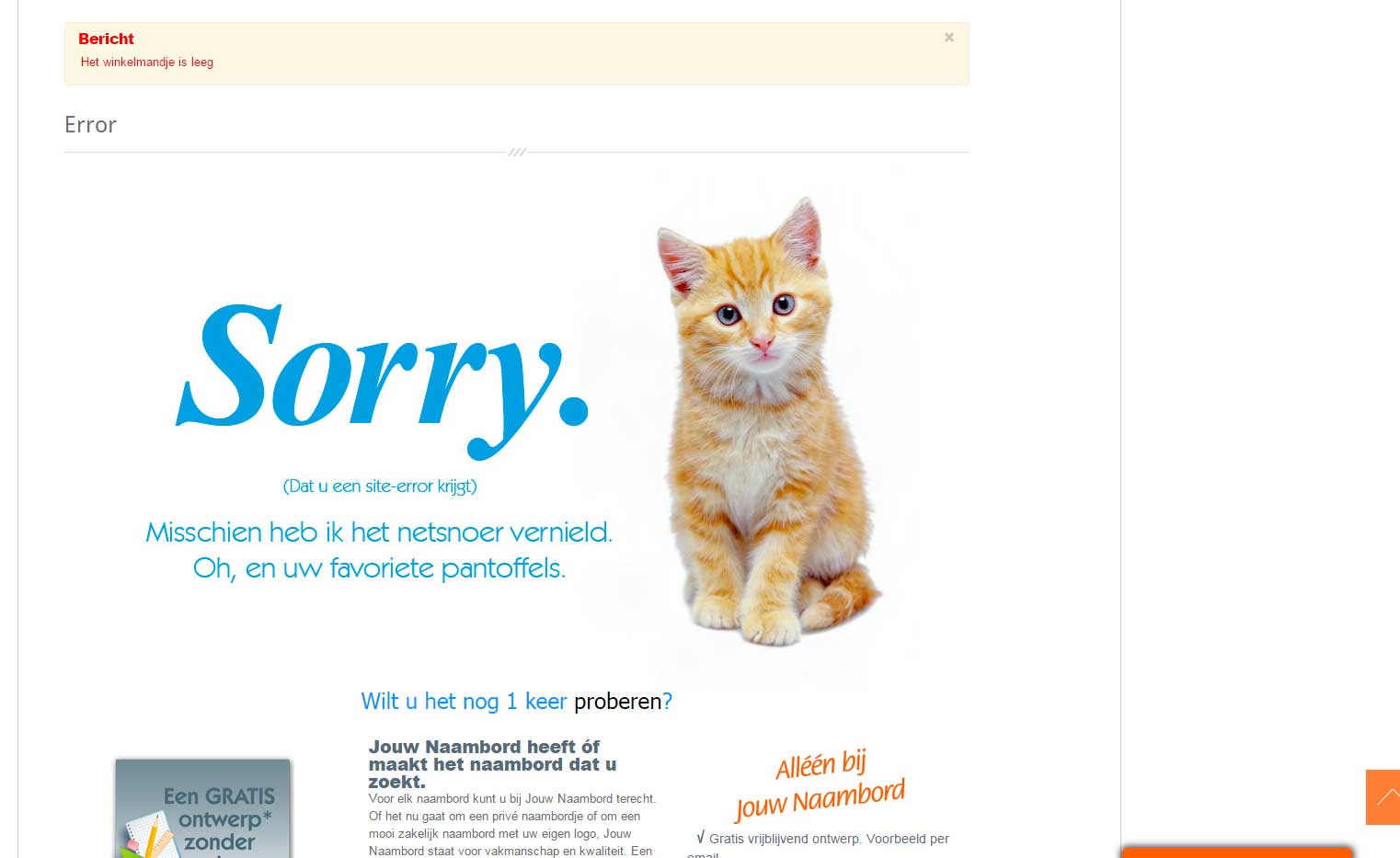
Yes, that indeed does remove the undefined error and displays the price with options. But then in the next step instead of forwarding to ..index.php/component/hikashop/checkout?Itemid=156 it returns ..client-login/my-orders/user page with the Message: cart is empty
Michel.
Yes, that indeed does remove the undefined error and displays the price with options. But then in the next step instead of forwarding to ..index.php/component/hikashop/checkout?Itemid=156 it returns ..client-login/my-orders/user page with the Message: cart is empty
Michel.
Please Log in or Create an account to join the conversation.
11 years 5 months ago #199886
by nicolas
Replied by nicolas on topic migrating site to other domain
Hi,
This means that the system added the products to the cart and then redirected to the checkout, but on the checkout page, the system couldn't find the cart anymore and thus redirected there with that error message.
This will happen if the server can't keep the user session data.
Try to change the "session handler" setting of the joomla configuration. It can sometimes help in such cases.
This means that the system added the products to the cart and then redirected to the checkout, but on the checkout page, the system couldn't find the cart anymore and thus redirected there with that error message.
This will happen if the server can't keep the user session data.
Try to change the "session handler" setting of the joomla configuration. It can sometimes help in such cases.
Please Log in or Create an account to join the conversation.
- jouwnaambord.nl
-
Topic Author
- Offline
Less
More
- Posts: 515
- Thank you received: 22
11 years 4 months ago #201398
by jouwnaambord.nl
Replied by jouwnaambord.nl on topic migrating site to other domain
Hi Nicolas,
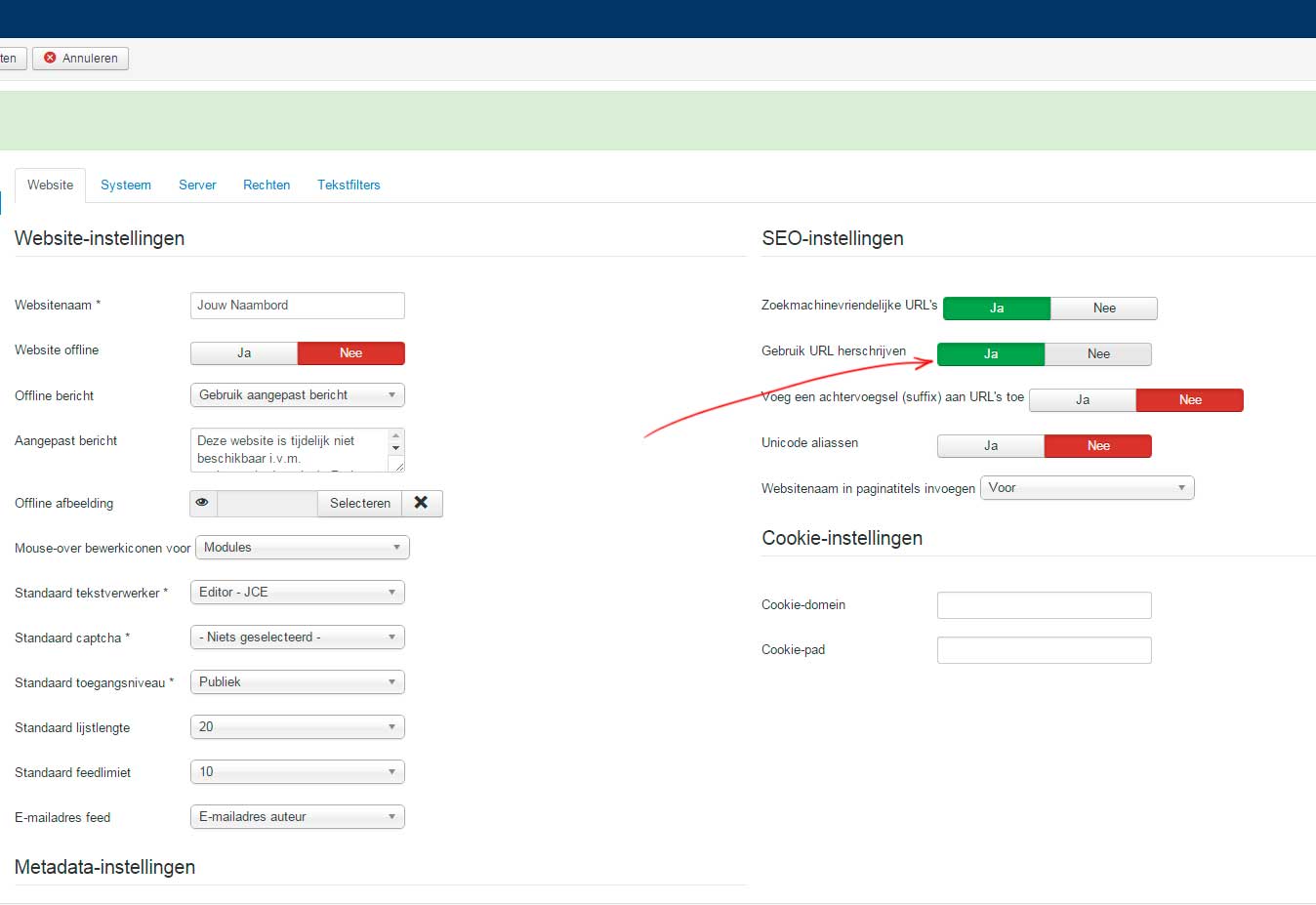
After very much trial and error I found out the cause of this problem. In Joomla default settings I have the SEO setting "Use URL rewrite" on "Yes", so the "index.php" is removed from the url. This is causing the error on the product page. When I change the setting to "No", the productprice with options is shown correctly. Off course I would like to keep the SEO setting to "Yes".
Michel.
After very much trial and error I found out the cause of this problem. In Joomla default settings I have the SEO setting "Use URL rewrite" on "Yes", so the "index.php" is removed from the url. This is causing the error on the product page. When I change the setting to "No", the productprice with options is shown correctly. Off course I would like to keep the SEO setting to "Yes".
Michel.
Please Log in or Create an account to join the conversation.
11 years 4 months ago #201402
by nicolas
Replied by nicolas on topic migrating site to other domain
That setting just changes the way the safe system of Joomla is triggered when a page is called by using the htaccess of your Joomla.
So the problem is either coming from your server configuration or the htaccess file itself.
That would have to be something to check with your hosting company or server administrator.
So the problem is either coming from your server configuration or the htaccess file itself.
That would have to be something to check with your hosting company or server administrator.
Please Log in or Create an account to join the conversation.
- jouwnaambord.nl
-
Topic Author
- Offline
Less
More
- Posts: 515
- Thank you received: 22
11 years 4 months ago #201542
by jouwnaambord.nl
Replied by jouwnaambord.nl on topic migrating site to other domain
Hi Nicolas,
I 'm not sure if I understand what you mean by that. When enabled (see screenshot) all the "normal" article pages on the website are shown correctly without the "/index.php/. The only occurring error is in the productprice with options on the product page. The htacces file is ok, my other websites (without Hikashop) are working correctly with this setting. So why should this be something the hosting comp. can solve? Do they have to change something on the serverside?
B.R. Michel
I 'm not sure if I understand what you mean by that. When enabled (see screenshot) all the "normal" article pages on the website are shown correctly without the "/index.php/. The only occurring error is in the productprice with options on the product page. The htacces file is ok, my other websites (without Hikashop) are working correctly with this setting. So why should this be something the hosting comp. can solve? Do they have to change something on the serverside?
B.R. Michel
Please Log in or Create an account to join the conversation.
11 years 4 months ago #201549
by nicolas
Replied by nicolas on topic migrating site to other domain
Hi,
I thought that the option price issue was now fixed thanks to the code modification I gave you, and that the problem you had now was with the redirection to the checkout, when the product is added to the cart.
But now it seems that you're talking about the options price, saying that it is the only error, even thought I already provided a fix for that.
So I'm not following you. What is your problem now ?
I thought that the option price issue was now fixed thanks to the code modification I gave you, and that the problem you had now was with the redirection to the checkout, when the product is added to the cart.
But now it seems that you're talking about the options price, saying that it is the only error, even thought I already provided a fix for that.
So I'm not following you. What is your problem now ?
Please Log in or Create an account to join the conversation.
- jouwnaambord.nl
-
Topic Author
- Offline
Less
More
- Posts: 515
- Thank you received: 22
11 years 4 months ago #201621
by jouwnaambord.nl
Replied by jouwnaambord.nl on topic migrating site to other domain
Hi Nicolas,
Yes. Sorry that I took you in the wrong direction. Indeed the fix you provided didn't do the job. That's why I kept searching for a cause myself and found out about the SEO setting.
When the setting is activated the price with options shows "undefined" and when it's disabled the price with options is shown correctly.
Yes. Sorry that I took you in the wrong direction. Indeed the fix you provided didn't do the job. That's why I kept searching for a cause myself and found out about the SEO setting.
When the setting is activated the price with options shows "undefined" and when it's disabled the price with options is shown correctly.
Please Log in or Create an account to join the conversation.
11 years 4 months ago #201655
by nicolas
Replied by nicolas on topic migrating site to other domain
Hi,
I tried to access again the page of the product you provided in order to check again the problem but it seems that it changed:
monosnap.com/file/8UCfNgYHkgv6xKuaf4SOYvzOnB26i5
Would you be able to provide a link again ?
Could you provide a backend access so that we could check your settings ?
I tried to access again the page of the product you provided in order to check again the problem but it seems that it changed:
monosnap.com/file/8UCfNgYHkgv6xKuaf4SOYvzOnB26i5
Would you be able to provide a link again ?
Could you provide a backend access so that we could check your settings ?
Please Log in or Create an account to join the conversation.
- jouwnaambord.nl
-
Topic Author
- Offline
Less
More
- Posts: 515
- Thank you received: 22
11 years 4 months ago #201871
by jouwnaambord.nl
Replied by jouwnaambord.nl on topic migrating site to other domain
OK, I will send you a PM
Please Log in or Create an account to join the conversation.
- jouwnaambord.nl
-
Topic Author
- Offline
Less
More
- Posts: 515
- Thank you received: 22
11 years 4 months ago #202284
by jouwnaambord.nl
Replied by jouwnaambord.nl on topic migrating site to other domain
Hello Nicolas,
Did you get the chance to take a look in the back-end?
Did you get the chance to take a look in the back-end?
Please Log in or Create an account to join the conversation.
- jouwnaambord.nl
-
Topic Author
- Offline
Less
More
- Posts: 515
- Thank you received: 22
11 years 4 months ago #202959
by jouwnaambord.nl
Replied by jouwnaambord.nl on topic migrating site to other domain
Hi Nicolas,
I would like to continue with the migration of the website. Can you please take a look at the backend to see whats causing the problem for the price with option? The access info was send by PM to you 10 days ago.
I would like to continue with the migration of the website. Can you please take a look at the backend to see whats causing the problem for the price with option? The access info was send by PM to you 10 days ago.
Please Log in or Create an account to join the conversation.
- jouwnaambord.nl
-
Topic Author
- Offline
Less
More
- Posts: 515
- Thank you received: 22
11 years 3 months ago #203867
by jouwnaambord.nl
Replied by jouwnaambord.nl on topic migrating site to other domain
Nicolas,
Can you please take a look at this problem again. I would like to continue.
www.bookaroo.nl/schooljaaralbum/index.ph...mbord-met-eigen-foto
Can you please take a look at this problem again. I would like to continue.
www.bookaroo.nl/schooljaaralbum/index.ph...mbord-met-eigen-foto
Please Log in or Create an account to join the conversation.
11 years 3 months ago #203915
by nicolas
Replied by nicolas on topic migrating site to other domain
Hi,
Sorry for the delay. I was travelling and didn't had the time to debug.
I tried to access your backend with the access you provided but I'm redirected to the frontpage automatically. It seems that you have some kind of security extension preventing us from accessing it.
Sorry for the delay. I was travelling and didn't had the time to debug.
I tried to access your backend with the access you provided but I'm redirected to the frontpage automatically. It seems that you have some kind of security extension preventing us from accessing it.
Please Log in or Create an account to join the conversation.
- jouwnaambord.nl
-
Topic Author
- Offline
Less
More
- Posts: 515
- Thank you received: 22
11 years 3 months ago #203917
by jouwnaambord.nl
Replied by jouwnaambord.nl on topic migrating site to other domain
Hi,
No problem, hope you had a good trip. Securety could be the issue. Please provide me your IP, than I can put you on the whitelist.
No problem, hope you had a good trip. Securety could be the issue. Please provide me your IP, than I can put you on the whitelist.
Please Log in or Create an account to join the conversation.
11 years 3 months ago #203947
by nicolas
Replied by nicolas on topic migrating site to other domain
Hi,
Part of the message is hidden for the guests. Please log in or register to see it.
Part of the message is hidden for the guests. Please log in or register to see it.
Please Log in or Create an account to join the conversation.
- jouwnaambord.nl
-
Topic Author
- Offline
Less
More
- Posts: 515
- Thank you received: 22
11 years 3 months ago #203954
by jouwnaambord.nl
Replied by jouwnaambord.nl on topic migrating site to other domain
Hi Nicolas,
IP addresses are on the whitelist.
IP addresses are on the whitelist.
Please Log in or Create an account to join the conversation.
Time to create page: 0.296 seconds