

- Posts: 177
- Thank you received: 4
Upgrade to 2.5.0 - Problems
11 years 3 months ago - 11 years 3 months ago #206762
by kchahine
Upgrade to 2.5.0 - Problems was created by kchahine
-- HikaShop version -- : 2.5.0
-- Joomla version -- : 3.4.1
Hi,
There is a major issue with my website after my recent upgrade to Hikashop 2.5.0. It seems that the naming of the products is messed up. Some products are returning "Page not found" as in the link below:
morenadancewear.com.au/sales-specials/on...uct/175-160805-.html
Other products have totally the wrong links, for example:
morenadancewear.com.au/kids/kids-leotard...uct/192-167102-.html
The above link should be under a different category/link.
In addition, the website is now running at much slower pace.
Help is urgently needed.
-- Joomla version -- : 3.4.1
Hi,
There is a major issue with my website after my recent upgrade to Hikashop 2.5.0. It seems that the naming of the products is messed up. Some products are returning "Page not found" as in the link below:
morenadancewear.com.au/sales-specials/on...uct/175-160805-.html
Other products have totally the wrong links, for example:
morenadancewear.com.au/kids/kids-leotard...uct/192-167102-.html
The above link should be under a different category/link.
In addition, the website is now running at much slower pace.
Help is urgently needed.
Last edit: 11 years 3 months ago by kchahine.
Please Log in or Create an account to join the conversation.

Less
More
- Posts: 12953
- Thank you received: 1778
11 years 3 months ago - 11 years 3 months ago #206766
by Mohamed Thelji
Replied by Mohamed Thelji on topic Upgrade to 2.5.0 - Problems
Hello,
Try to turn off the "force canonical URLs on listings" setting in the HikaShop configuration.
If that doesn't help, clear your Joomla cache.
If that still doesn't help, please provide a screenshot of the SEF settings of the HikaShop configuration.
Try to turn off the "force canonical URLs on listings" setting in the HikaShop configuration.
If that doesn't help, clear your Joomla cache.
If that still doesn't help, please provide a screenshot of the SEF settings of the HikaShop configuration.
Last edit: 11 years 3 months ago by Jerome.
Please Log in or Create an account to join the conversation.
11 years 3 months ago - 11 years 3 months ago #206867
by kchahine
Replied by kchahine on topic Upgrade to 2.5.0 - Problems
I did your first suggestion and it seems to be working as expected now!
I have attached a copy of SEF settings, please let me know if anything else to be done.
Also,opening the product seems to be slow, would this be caused by the number of variants I have or something else? How do I make navigating products faster? AS far as I am aware, my server is good enough for other pages!
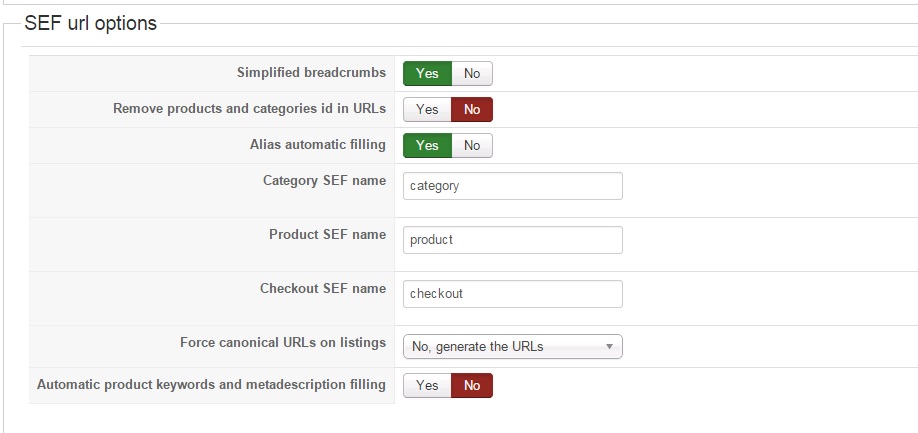
I have attached a copy of SEF settings, please let me know if anything else to be done.
Also,opening the product seems to be slow, would this be caused by the number of variants I have or something else? How do I make navigating products faster? AS far as I am aware, my server is good enough for other pages!
Last edit: 11 years 3 months ago by kchahine.
Please Log in or Create an account to join the conversation.

11 years 3 months ago #206901
by nicolas
Replied by nicolas on topic Upgrade to 2.5.0 - Problems
Hi,
The problem is indeed the amount of variants you have in your products.
For example on this page:
morenadancewear.com.au/shoes-for-her/sal...uct/178-160936-.html
The heel dropdown has 7 choices. The size dropdown has 15 choices. The sole dropdown has 2 choices.
That's 7*15*2= 210 variants data loaded on the page.
It's as if you're displaying a listing of 210 products, and if you do that, you'll see that it's about the same slow speed.
The variants system allows you to configure different images, description, price, quantity, etc for each variant of a product. That's why it takes so much resources.
In your case, no information changes on the page regardless of what is selected in the dropdowns. So you actually don't need variants. Instead of characteristics, you could create custom fields of the table "item" via the menu Display>Custom fields.
You'll get the same look, and the pages would display fast since no variants would need to be loaded.
The problem is indeed the amount of variants you have in your products.
For example on this page:
morenadancewear.com.au/shoes-for-her/sal...uct/178-160936-.html
The heel dropdown has 7 choices. The size dropdown has 15 choices. The sole dropdown has 2 choices.
That's 7*15*2= 210 variants data loaded on the page.
It's as if you're displaying a listing of 210 products, and if you do that, you'll see that it's about the same slow speed.
The variants system allows you to configure different images, description, price, quantity, etc for each variant of a product. That's why it takes so much resources.
In your case, no information changes on the page regardless of what is selected in the dropdowns. So you actually don't need variants. Instead of characteristics, you could create custom fields of the table "item" via the menu Display>Custom fields.
You'll get the same look, and the pages would display fast since no variants would need to be loaded.
The following user(s) said Thank You: kchahine
Please Log in or Create an account to join the conversation.
Time to create page: 0.175 seconds