
Struggling to understand the product image sizes
- buffdownunder
-
 Topic Author
- Offline
Less
More
11 years 4 months ago - 11 years 4 months ago #206868
by buffdownunder
Regards,
Edward
Struggling to understand the product image sizes was created by buffdownunder
-- url of the page with the problem -- :
www.mybuff.com.au/test/
-- HikaShop version -- : Latest
-- Joomla version -- : Latest
-- PHP version -- : 5.3 and 5.6
-- Browser(s) name and version -- : Chrome and Firefox latest
Hi everybody,
I'm simply trying to re-create the product image sizes I am using on my current website. Here is an example of the listing
www.mybuff.com.au/index.php?page=shop.br..._virtuemart&Itemid=5
and here is the example of the product page
www.mybuff.com.au/index.php?page=shop.pr..._virtuemart&Itemid=5
It's very simple. Thumbnails for product listings have a width of 100 px and main images for product pages have a width of 230 px.
The height varies as the products are not uniform but it is also a few pixel up and down.
On my new (test) website I have gone a slightly different way. 243 px image height for thumbnails so the product listing looks uniform in grid view. 230 px in width for the main product image so that I don't get some weird responsive behaviour.
The settings are in Attachement 1.
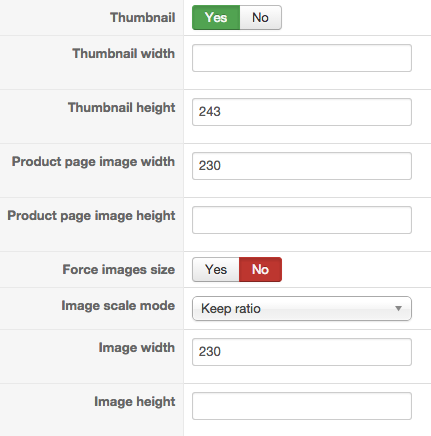
I do not get this on my test site and I suspect it to be the template. The zoom effect on the template seems to stuff up things badly.
Before I bother the template designers I would like to have clarified that I am doing the right thing on the Hikashop side of things. I am worried that the funny thumbnail directories indicate me doing something wrong. (Attachment 2).
Are my settings okay or am I misunderstanding things?
Are all those thumbnail/thumbnails directories okay?
In regards to the template css. What is the best way to define the image size correctly so that the template remains responsive
? 100%, height and width specified,...
-- HikaShop version -- : Latest
-- Joomla version -- : Latest
-- PHP version -- : 5.3 and 5.6
-- Browser(s) name and version -- : Chrome and Firefox latest
Hi everybody,
I'm simply trying to re-create the product image sizes I am using on my current website. Here is an example of the listing
www.mybuff.com.au/index.php?page=shop.br..._virtuemart&Itemid=5
and here is the example of the product page
www.mybuff.com.au/index.php?page=shop.pr..._virtuemart&Itemid=5
It's very simple. Thumbnails for product listings have a width of 100 px and main images for product pages have a width of 230 px.
The height varies as the products are not uniform but it is also a few pixel up and down.
On my new (test) website I have gone a slightly different way. 243 px image height for thumbnails so the product listing looks uniform in grid view. 230 px in width for the main product image so that I don't get some weird responsive behaviour.
The settings are in Attachement 1.
I do not get this on my test site and I suspect it to be the template. The zoom effect on the template seems to stuff up things badly.
Before I bother the template designers I would like to have clarified that I am doing the right thing on the Hikashop side of things. I am worried that the funny thumbnail directories indicate me doing something wrong. (Attachment 2).
Are my settings okay or am I misunderstanding things?
Are all those thumbnail/thumbnails directories okay?
In regards to the template css. What is the best way to define the image size correctly so that the template remains responsive
? 100%, height and width specified,...
Regards,
Edward
Last edit: 11 years 4 months ago by buffdownunder. Reason: Didn't upload attachment
Please Log in or Create an account to join the conversation.

11 years 4 months ago #206898
by Xavier
Replied by Xavier on topic Struggling to understand the product image sizes
Hi,
Your settings are correct regarding what you need.
The thumbnails directories are okay but the 250x250, 50x50 and 100x100, I think they was created based on the default settings before you set it up this way. So correct.
You can add css properties to set a width of 100% on your thumbnails this way it will fill the container div.
Your settings are correct regarding what you need.
The thumbnails directories are okay but the 250x250, 50x50 and 100x100, I think they was created based on the default settings before you set it up this way. So correct.
You can add css properties to set a width of 100% on your thumbnails this way it will fill the container div.
Please Log in or Create an account to join the conversation.
Time to create page: 0.052 seconds