

- Posts: 7
- Thank you received: 0
I got this error after install and first step conf
11 years 2 months ago #211014
by louisrui
I got this error after install and first step conf was created by louisrui
-- HikaShop version -- : HikaShop Starter 2.5.0
-- Joomla version -- : Joomla! 3.4.3 Stable [ Ember ] 2-July-2015 16:00 GMT
-- PHP version -- : 5.5.26
-- Error-message(debug-mod must be tuned on) -- : Warning: fopen(../tmp/dataexample/script.sql): failed to open stream: No such file or directory in /(..)/administrator/components/com_hikashop/controllers/update.php on line 432
Can't open file
Hi everybody, I'm new here
I got this error after install and first step configuration:
Warning: fopen(../tmp/dataexample/script.sql): failed to open stream: No such file or directory in /(..)/administrator/components/com_hikashop/controllers/update.php on line 432
Can't open file
Site seems to be running okay, I was just wondering if it was okay to continue this way?
Regards,
Louis
-- Joomla version -- : Joomla! 3.4.3 Stable [ Ember ] 2-July-2015 16:00 GMT
-- PHP version -- : 5.5.26
-- Error-message(debug-mod must be tuned on) -- : Warning: fopen(../tmp/dataexample/script.sql): failed to open stream: No such file or directory in /(..)/administrator/components/com_hikashop/controllers/update.php on line 432
Can't open file
Hi everybody, I'm new here
I got this error after install and first step configuration:
Warning: fopen(../tmp/dataexample/script.sql): failed to open stream: No such file or directory in /(..)/administrator/components/com_hikashop/controllers/update.php on line 432
Can't open file
Site seems to be running okay, I was just wondering if it was okay to continue this way?
Regards,
Louis
Please Log in or Create an account to join the conversation.

11 years 2 months ago #211022
by Jerome
Jerome - Obsidev.com
HikaMarket & HikaSerial developer / HikaShop core dev team.
Replied by Jerome on topic I got this error after install and first step conf
Hi,
You choose the install the "sample data" in the HikaShop wizard but it looks like the script couldn't download or extract the sample data zip file.
It could be a permission issue with your "tmp" folder or some restrictions in your server which refuse the download.
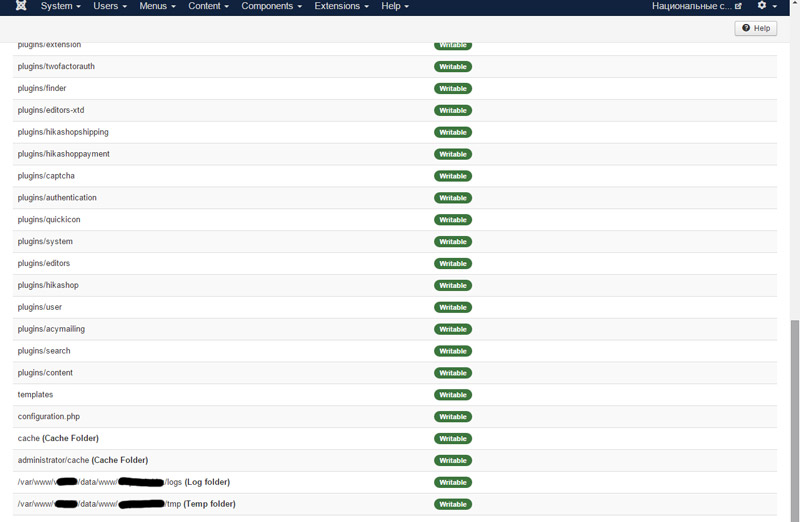
First, you should check the permissions in your Joomla System Information > Directory Permissions.
Regards,
You choose the install the "sample data" in the HikaShop wizard but it looks like the script couldn't download or extract the sample data zip file.
It could be a permission issue with your "tmp" folder or some restrictions in your server which refuse the download.
First, you should check the permissions in your Joomla System Information > Directory Permissions.
Regards,
Jerome - Obsidev.com
HikaMarket & HikaSerial developer / HikaShop core dev team.
Please Log in or Create an account to join the conversation.
11 years 4 weeks ago #215407
by conte64
Replied by conte64 on topic I got this error after install and first step conf
Hi, I have the same problem on J3.4.4 and hikashop_starter_v2.6.0 (Can't open file /tmp/dataexample/script.sql).
The permissions are ok (all green).
After the error page, in the tmp folder there is a file dataexample.zip, but it's empty (0 kb).
Any other suggestion?
Thank you!
The permissions are ok (all green).
After the error page, in the tmp folder there is a file dataexample.zip, but it's empty (0 kb).
Any other suggestion?
Thank you!
Please Log in or Create an account to join the conversation.

11 years 4 weeks ago #215411
by nicolas
Replied by nicolas on topic I got this error after install and first step conf
Hi,
As we're not able to reproduce the problem, it must be something specific to your websites.
If dataexample.zip is 0, it means that your server was not able to download the file from our website.
Manually download the file here:
Then, upload it via FTP in your website's tmp folder.
Then, edit the file administrator/components/com_hikashop/controllers/update.php and change the line:
to:
And finally, open the URL
with your browser and that will skip the download of the sample data package and directly extract its files and hopefully, it should work.
As we're not able to reproduce the problem, it must be something specific to your websites.
If dataexample.zip is 0, it means that your server was not able to download the file from our website.
Manually download the file here:
Code:
http://www.hikashop.com/sampledata/dataexample.zip
Then, edit the file administrator/components/com_hikashop/controllers/update.php and change the line:
Code:
$this->modify[] = 'process_data_save';
Code:
$this->display[] = 'process_data_save';
Code:
http://mywebsite.com/administrator/index.php?option=com_hikashop&ctrl=update&task=process_data_save&step=2
Please Log in or Create an account to join the conversation.
11 years 4 weeks ago #215455
by conte64
Replied by conte64 on topic I got this error after install and first step conf
Hi! Thank you for your quick reply!
As soon as I posted here, I tried to download the zip and manually expand it in tmp folder before to run the wizard.
Then I run the wizard again, it found the dataexample folder and completed succesfully.
If you want to try to reproduce the problem, please note that I'm using xampp on my PC for tests.
Thank you very much.
Regards
As soon as I posted here, I tried to download the zip and manually expand it in tmp folder before to run the wizard.
Then I run the wizard again, it found the dataexample folder and completed succesfully.
If you want to try to reproduce the problem, please note that I'm using xampp on my PC for tests.
Thank you very much.
Regards
Please Log in or Create an account to join the conversation.

10 years 11 months ago #219892
by alikon1
Got error Can't open file /tmp/dataexample/script.sql
What can I do?
Replied by alikon1 on topic I got this error after install and first step conf
Got error Can't open file /tmp/dataexample/script.sql
What can I do?
Please Log in or Create an account to join the conversation.
10 years 11 months ago #219893
by alikon1
Replied by alikon1 on topic I got this error after install and first step conf
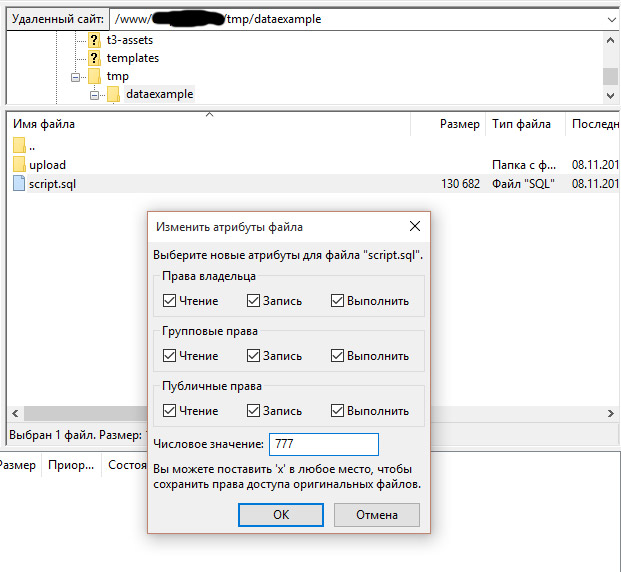
Chang File Permissions of Dataexample folder to 777 and it works.
But there is no category or product images now, only one barcode image.
But there is no category or product images now, only one barcode image.
Please Log in or Create an account to join the conversation.
10 years 11 months ago #219915
by nicolas
Replied by nicolas on topic I got this error after install and first step conf
Hi,
You probably have a similar issue with the folder /images/com_hikashop/upload/ where the images are supposed to be stored in.
You can manually copy them from the dataexample/upload folder to there.
You probably have a similar issue with the folder /images/com_hikashop/upload/ where the images are supposed to be stored in.
You can manually copy them from the dataexample/upload folder to there.
Please Log in or Create an account to join the conversation.
Less
More
- Posts: 1
- Thank you received: 1
10 years 8 months ago #228090
by techimaging
Replied by techimaging on topic I got this error after install and first step conf
I got the same error. Seems the server storing the zip file is running incredibly slow. I have a 150Mbps connection and I was getting about 100KB/s.
dataexample.zip 4%[ ] 952.78K 97.5KB/s eta 3m 11s
If I change this line
to
with the dataexample.zip downloaded to my other http server, it completes just fine. There is clearly a speed issue with "hikashop.com".
dataexample.zip 4%[ ] 952.78K 97.5KB/s eta 3m 11s
If I change this line
Code:
$urlsrc = "http://www.hikashop.com/sampledata/dataexample.zip"; //server URL
Code:
$urlsrc = "http://<my other http server>/sampledata/dataexample.zip"; //server URL
with the dataexample.zip downloaded to my other http server, it completes just fine. There is clearly a speed issue with "hikashop.com".
The following user(s) said Thank You: pouyan
Please Log in or Create an account to join the conversation.
10 years 8 months ago #228096
by nicolas
Replied by nicolas on topic I got this error after install and first step conf
Hi,
We're currently working on migrating our server on a new one and it will be way more faster in the future. Thank you for your report.
We're currently working on migrating our server on a new one and it will be way more faster in the future. Thank you for your report.
Please Log in or Create an account to join the conversation.
Time to create page: 0.323 seconds