

- Posts: 58
- Thank you received: 2
404 Error when clicking on product or options
11 years 2 months ago - 11 years 2 months ago #211197
by rcadmin
404 Error when clicking on product or options was created by rcadmin
-- HikaShop version -- : 2.5.2
-- Joomla version -- : 3.4.3
If you go to www.rosmini.school.nz/community/shop and click on options for my product you will see my error.
I did notice it doing the same thing once when I clicked on the actual product for more details.
-- Joomla version -- : 3.4.3
If you go to www.rosmini.school.nz/community/shop and click on options for my product you will see my error.
I did notice it doing the same thing once when I clicked on the actual product for more details.
Last edit: 11 years 2 months ago by rcadmin.
Please Log in or Create an account to join the conversation.
Less
More
- Posts: 3
- Thank you received: 0
11 years 2 months ago #211205
by info@cheops.dk
Replied by info@cheops.dk on topic 404 Error when clicking on product or options
I have the same problem with this shop!
When you click on a product image the site returns a 404 error
Try the first product on the left...
www.danskblokart.dk/index.php/web-shop/b.../category/25-diverse
Cheers
/Claus
When you click on a product image the site returns a 404 error
Try the first product on the left...
www.danskblokart.dk/index.php/web-shop/b.../category/25-diverse
Cheers
/Claus
Please Log in or Create an account to join the conversation.

11 years 2 months ago #211199
by Jerome
Jerome - Obsidev.com
HikaMarket & HikaSerial developer / HikaShop core dev team.
Replied by Jerome on topic 404 Error when clicking on product or options
Hi,
The link for the product is
But when you try to open the page, you're redirected to
That redirection is not something provided by HikaShop.
Please check your SEF settings and youor SEF extension or any plugin which can generate redirection.
Please also check that you do not have any canonical URL configured for your product.
Regards,
The link for the product is
Code:
https://www.rosmini.school.nz/shop/product/1-1st-xv-training-camp
Code:
https://www.rosmini.school.nz/index.php?option=com_content&view=article&id=1458
Please check your SEF settings and youor SEF extension or any plugin which can generate redirection.
Please also check that you do not have any canonical URL configured for your product.
Regards,
Jerome - Obsidev.com
HikaMarket & HikaSerial developer / HikaShop core dev team.
Please Log in or Create an account to join the conversation.
11 years 2 months ago #211308
by rcadmin
Replied by rcadmin on topic 404 Error when clicking on product or options
Ouch this is going to be difficulty for me to resolve so I would be greatfull for some pointers.
The only SEO that I know I am using is the system settings:
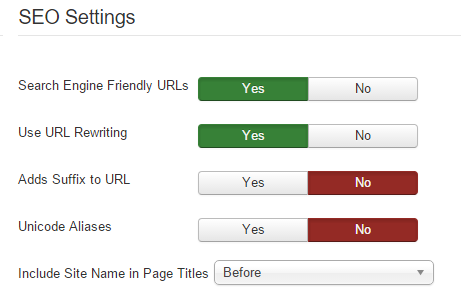
Further the custom 404 error was set up following: docs.joomla.org/Creating_a_Custom_404_Error_Page (if I remember correctly).
Any suggestions how I proceed?
The only SEO that I know I am using is the system settings:
Further the custom 404 error was set up following: docs.joomla.org/Creating_a_Custom_404_Error_Page (if I remember correctly).
Any suggestions how I proceed?
Please Log in or Create an account to join the conversation.

11 years 2 months ago #211310
by nicolas
Replied by nicolas on topic 404 Error when clicking on product or options
@rcadmin:
Try to turn off the "force canonical URLs on listings" setting of your HikaShop configuration page.
@info@cheops.dk:
It works fine:
take.ms/8ElS6
take.ms/emFLj
Try to turn off the "force canonical URLs on listings" setting of your HikaShop configuration page.
@info@cheops.dk:
It works fine:
take.ms/8ElS6
take.ms/emFLj
The following user(s) said Thank You: rcadmin
Please Log in or Create an account to join the conversation.
11 years 2 months ago #211334
by rcadmin
Replied by rcadmin on topic 404 Error when clicking on product or options
That did it... sorry I missed it earlier. What doe I loose by not using that?
Please Log in or Create an account to join the conversation.
Less
More
- Posts: 3
- Thank you received: 0
11 years 2 months ago #211370
by info@cheops.dk
Replied by info@cheops.dk on topic 404 Error when clicking on product or options
I found it myself 
Tanx for super support
Tanx for super support
Please Log in or Create an account to join the conversation.
11 years 2 months ago #211372
by Jerome
Jerome - Obsidev.com
HikaMarket & HikaSerial developer / HikaShop core dev team.
Replied by Jerome on topic 404 Error when clicking on product or options
Hi,
@rcadmin
The URL of the product page might not always be the same based on the location from where you're accessing it.
But that's not really a problem since the canonical URL will still be provided to crawlers.
@info@cheops.dk
Good to know that your problem is solved.
Regards,
@rcadmin
The URL of the product page might not always be the same based on the location from where you're accessing it.
But that's not really a problem since the canonical URL will still be provided to crawlers.
@info@cheops.dk
Good to know that your problem is solved.
Regards,
Jerome - Obsidev.com
HikaMarket & HikaSerial developer / HikaShop core dev team.
Please Log in or Create an account to join the conversation.
11 years 2 months ago - 11 years 2 months ago #211666
by rcadmin
Replied by rcadmin on topic 404 Error when clicking on product or options
With reference to the above I am noticing this behavour in my backend too. I went to edit a view but when I tried to save, I got redirected and the data was not saved.
Just tired editing the language file and the same thing happened too
Just tired editing the language file and the same thing happened too
Last edit: 11 years 2 months ago by rcadmin.
Please Log in or Create an account to join the conversation.
11 years 2 months ago #211681
by nicolas
Replied by nicolas on topic 404 Error when clicking on product or options
Hi,
The SEF system is not used on the backend.
So even if the result is the same, the cause is bound to be totally different.
This is probably caused by a security module of your web server which prevents you from sending PHP code/ini file code in your requests.
Turn off that web server module or configure it to not check on that and it will work.
Or directly edit the files via FTP to circumvent the problem.
The SEF system is not used on the backend.
So even if the result is the same, the cause is bound to be totally different.
This is probably caused by a security module of your web server which prevents you from sending PHP code/ini file code in your requests.
Turn off that web server module or configure it to not check on that and it will work.
Or directly edit the files via FTP to circumvent the problem.
Please Log in or Create an account to join the conversation.
11 years 2 months ago #211736
by rcadmin
Replied by rcadmin on topic 404 Error when clicking on product or options
I now realise that this has nothing to do with the Hika products and so won't continue with a post after this but just to ask one more question. It has now also started happening when I try and edit a particular article. Could it maybe be a virus?
Please Log in or Create an account to join the conversation.
11 years 2 months ago #211745
by nicolas
Replied by nicolas on topic 404 Error when clicking on product or options
No, I don't think a virus would do that.
Here is a thread talking about the same problem you're having (as far as I can see):
www.hikashop.com/forum/2-general-talk-ab...74-saving-views.html
Here is a thread talking about the same problem you're having (as far as I can see):
www.hikashop.com/forum/2-general-talk-ab...74-saving-views.html
The following user(s) said Thank You: rcadmin
Please Log in or Create an account to join the conversation.
11 years 2 months ago #211765
by rcadmin
Replied by rcadmin on topic 404 Error when clicking on product or options
Thanks for that. I have just come to the same conclusion 30 min earlier. I build a plain Joomla site without any extensions and then added an article. If the article was above a certain length the issue then raised it's head.
Please Log in or Create an account to join the conversation.
11 years 2 months ago #211848
by rcadmin
Replied by rcadmin on topic 404 Error when clicking on product or options
Yip is was "modsecurity" ... all sorted Thanks again
Thanks again Please Log in or Create an account to join the conversation.
Time to create page: 0.370 seconds