

- Posts: 6
- Thank you received: 0
How to change the placement of zip code in shippin
11 years 1 month ago #215277
by m980
How to change the placement of zip code in shippin was created by m980
-- url of the page with the problem -- :
slcst.com
-- HikaShop version -- : 1509231716
-- Joomla version -- : 3.4.4
-- PHP version -- : 5.6.10
-- Browser(s) name and version -- : Chrome 45.0.2454.93 m
-- Error-message(debug-mod must be tuned on) -- : No error.
I installed HikaShop Starter and demo data.
The zip code is placed at the beginning of the address line instead of being placed at the back of the line.
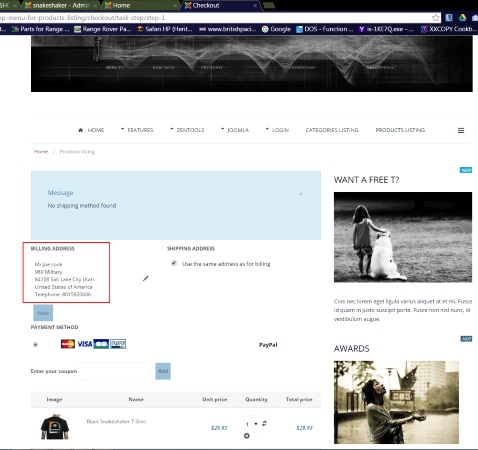
How/where can this be corrected?
Thank you.
-- HikaShop version -- : 1509231716
-- Joomla version -- : 3.4.4
-- PHP version -- : 5.6.10
-- Browser(s) name and version -- : Chrome 45.0.2454.93 m
-- Error-message(debug-mod must be tuned on) -- : No error.
I installed HikaShop Starter and demo data.
The zip code is placed at the beginning of the address line instead of being placed at the back of the line.
How/where can this be corrected?
Thank you.
Please Log in or Create an account to join the conversation.

11 years 1 month ago #215286
by Xavier
Replied by Xavier on topic How to change the placement of zip code in shippin
Hi,
You have to edit the order of the elements by editing the view "address / address_template" (frontend template) and "order / address_template" (backend template).
www.hikashop.com/support/documentation/1...ize-the-display.html
You have to edit the order of the elements by editing the view "address / address_template" (frontend template) and "order / address_template" (backend template).
www.hikashop.com/support/documentation/1...ize-the-display.html
Please Log in or Create an account to join the conversation.
Time to create page: 0.162 seconds