

- Posts: 251
- Thank you received: 2
Categories Options and Products Options Update
11 years 1 month ago #215488
by Nello
Categories Options and Products Options Update was created by Nello
-- HikaShop version -- : 2.6.0
-- Joomla version -- : 3.4.3
Hi,
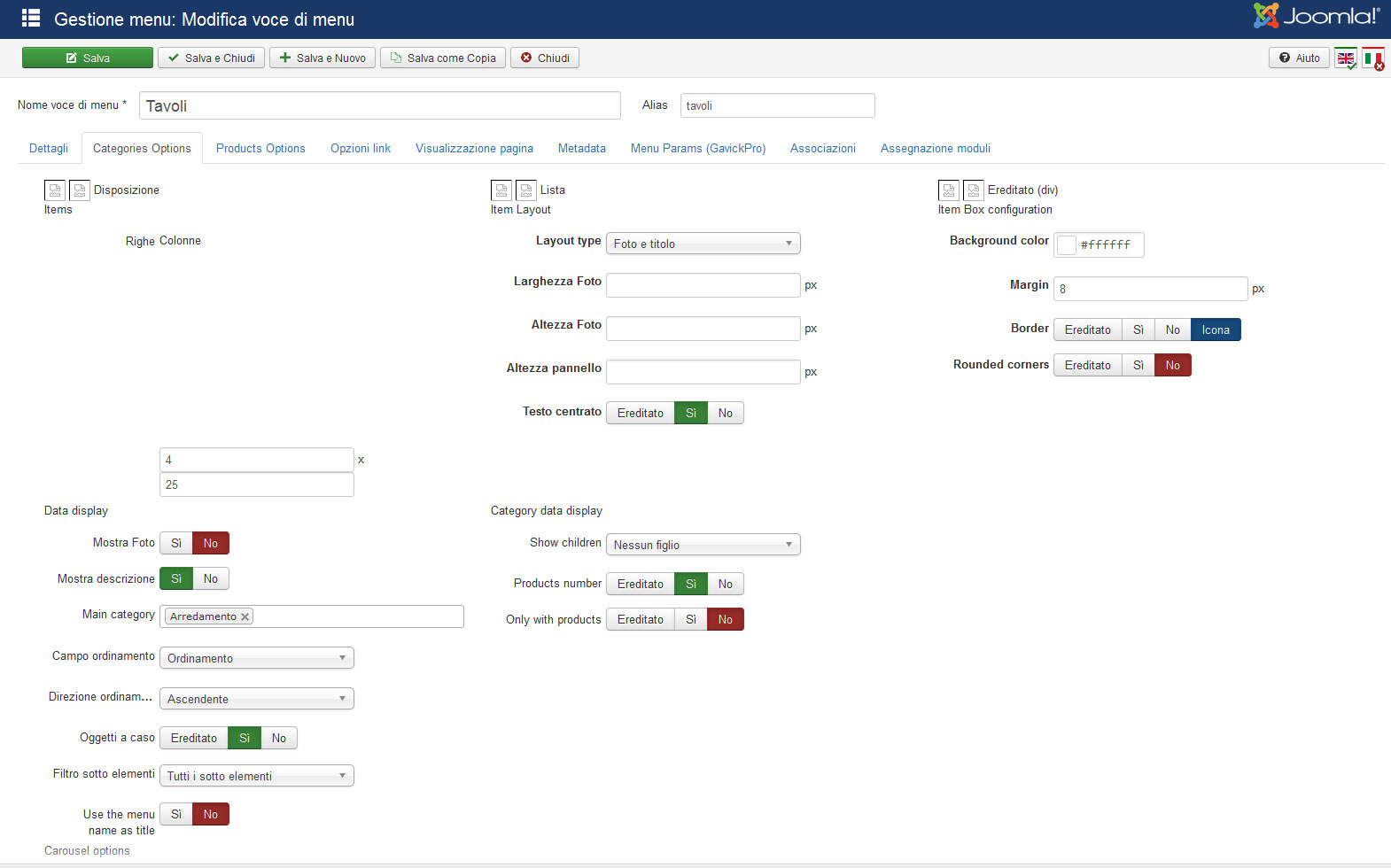
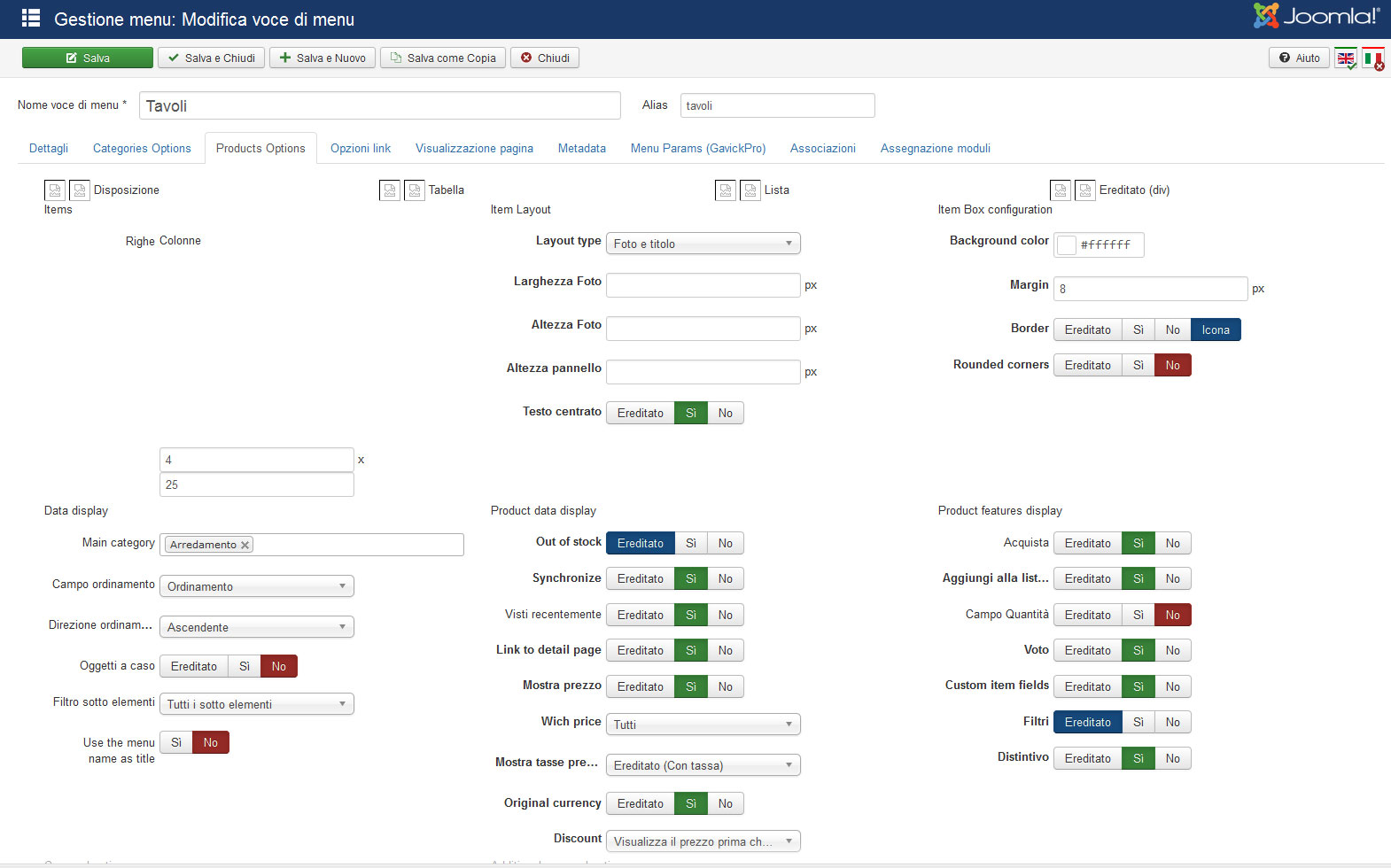
after the update to the version 2.6.0 the tabs Categories Options and Products Options, in menu items are shown as in the pictures below
-- Joomla version -- : 3.4.3
Hi,
after the update to the version 2.6.0 the tabs Categories Options and Products Options, in menu items are shown as in the pictures below
Please Log in or Create an account to join the conversation.

11 years 1 month ago #215489
by Jerome
Jerome - Obsidev.com
HikaMarket & HikaSerial developer / HikaShop core dev team.
Replied by Jerome on topic Categories Options and Products Options Update
Hi,
Do you have a custom css file or "hikashop backend" ?
Regards,
Do you have a custom css file or "hikashop backend" ?
Regards,
Jerome - Obsidev.com
HikaMarket & HikaSerial developer / HikaShop core dev team.
Please Log in or Create an account to join the conversation.
11 years 1 month ago - 11 years 4 weeks ago #215535
by Nello
Replied by Nello on topic Categories Options and Products Options Update
Not for the backend, only for the frontend.
I also noted that there's an error in the path of icons, a double slash after the base url. Furthermore the name of icon files are translated in italian like /media/com_hikashop/images//icons/icon-24-Disposizione-selected.png instead of icon-24-div-selected.png.
I also noted that there's an error in the path of icons, a double slash after the base url. Furthermore the name of icon files are translated in italian like /media/com_hikashop/images//icons/icon-24-Disposizione-selected.png instead of icon-24-div-selected.png.
Last edit: 11 years 4 weeks ago by Nello.
Please Log in or Create an account to join the conversation.
11 years 4 weeks ago #215557
by Nello
Replied by Nello on topic Categories Options and Products Options Update
I reloaded the default.css in my backend and now it seems to be shown correctly, but still remain an issue on the name and the path of the icons.
Moreover I have to set again all the parameters for every items of menu, because on the website live fortunately I see all correctly, but in backend, the category and product options shows the default parameters.
Moreover I have to set again all the parameters for every items of menu, because on the website live fortunately I see all correctly, but in backend, the category and product options shows the default parameters.
Please Log in or Create an account to join the conversation.
11 years 4 weeks ago #215558
by Jerome
Jerome - Obsidev.com
HikaMarket & HikaSerial developer / HikaShop core dev team.
Replied by Jerome on topic Categories Options and Products Options Update
Hi,
I think that your issue is related to a third party plugin. In your screenshot we can see two flags in the toolbar.
It might be related to your display issue, if the content is modified dynamically by a plugin, the CSS or the images might not feet to the original display and provide a bad result.
Regards,
I think that your issue is related to a third party plugin. In your screenshot we can see two flags in the toolbar.
It might be related to your display issue, if the content is modified dynamically by a plugin, the CSS or the images might not feet to the original display and provide a bad result.
Regards,
Jerome - Obsidev.com
HikaMarket & HikaSerial developer / HikaShop core dev team.
Please Log in or Create an account to join the conversation.
11 years 4 weeks ago #215589
by Nello
Replied by Nello on topic Categories Options and Products Options Update
Anyway, this is not very important because it not affect any functionality, but this happens only in this tab...
Please Log in or Create an account to join the conversation.
11 years 3 weeks ago #216249
by curlz
Replied by curlz on topic Categories Options and Products Options Update
Hi I also have trouble with the categories and products options. There is a double forward slash between images and icons. /tasty2/media/com_hikashop/images//icons/icon-24-table-selected.png
I have no third party hikashop plugins installed. I have uploaded a new copy of the default.css with no change
The icon images do not show and this causes the page to display down the screen instead of across, the site is in a subdirectory as I am building a new one to replace a current installation.
Is there a table or file that might be adjusted so as to not show the double directory //
Thank you
I have no third party hikashop plugins installed. I have uploaded a new copy of the default.css with no change
The icon images do not show and this causes the page to display down the screen instead of across, the site is in a subdirectory as I am building a new one to replace a current installation.
Is there a table or file that might be adjusted so as to not show the double directory //
Thank you
Please Log in or Create an account to join the conversation.

11 years 3 weeks ago #216281
by Xavier
Replied by Xavier on topic Categories Options and Products Options Update
Hi,
Thanks for the report, we just fixed this issue and uploaded a package with these fixes.
So please download the latest version from our website and install it over your current version.
That will solve your issue.
Thanks for the report, we just fixed this issue and uploaded a package with these fixes.
So please download the latest version from our website and install it over your current version.
That will solve your issue.
The following user(s) said Thank You: curlz
Please Log in or Create an account to join the conversation.
11 years 2 weeks ago #216665
by curlz
Replied by curlz on topic Categories Options and Products Options Update
Fixed thanks
Please Log in or Create an account to join the conversation.
Time to create page: 0.334 seconds