

- Posts: 27
- Thank you received: 0
Some odd problems after updating to 2.6.0
11 years 1 week ago #217703
by rouben618
Some odd problems after updating to 2.6.0 was created by rouben618
-- url of the page with the problem -- :
nature2u.co.nz/
-- HikaShop version -- : 2.6.0
-- Joomla version -- : 3.2.2
-- PHP version -- : 5.3.29
-- Browser(s) name and version -- : Chrome/45.0.2454.93
-- Error-message(debug-mod must be tuned on) -- : Teething problems after update
Hi,
I updated to 2.6.0 yesterday and found some problems.
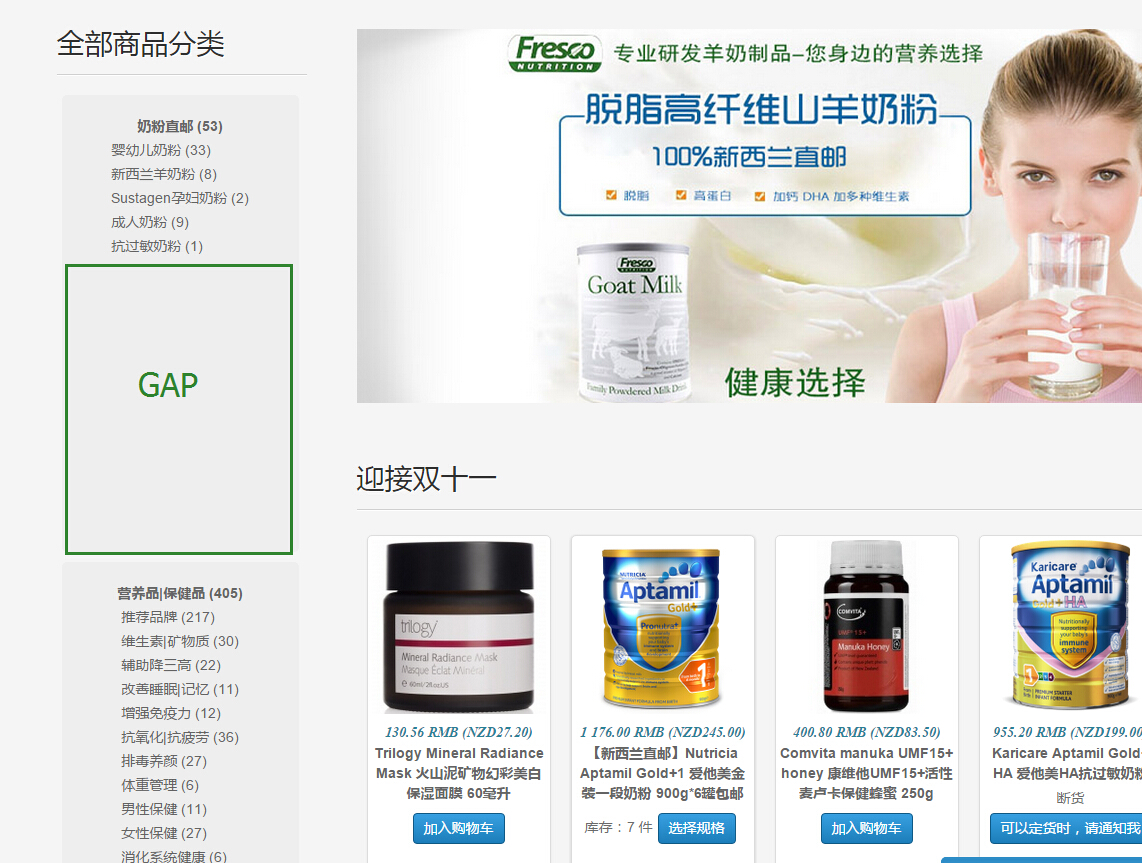
1. How to delete the big gap under the categories listing in front end, see file S3.
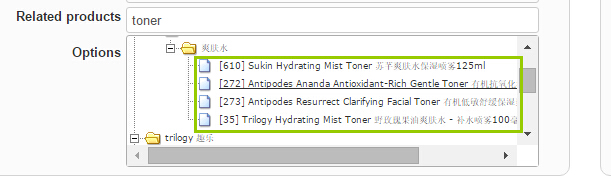
2. How to choose multi related products from the list. see file S2
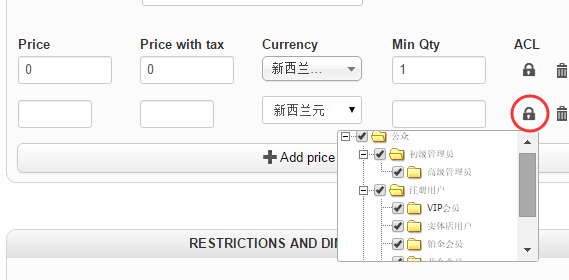
3. The price access level, it checks all boxes by default for new prices, but I only need to check one box for each new price.
How could I change it to uncheck all boxes by default? see S1.
Thank you!
-- HikaShop version -- : 2.6.0
-- Joomla version -- : 3.2.2
-- PHP version -- : 5.3.29
-- Browser(s) name and version -- : Chrome/45.0.2454.93
-- Error-message(debug-mod must be tuned on) -- : Teething problems after update
Hi,
I updated to 2.6.0 yesterday and found some problems.
1. How to delete the big gap under the categories listing in front end, see file S3.
2. How to choose multi related products from the list. see file S2
3. The price access level, it checks all boxes by default for new prices, but I only need to check one box for each new price.
How could I change it to uncheck all boxes by default? see S1.
Thank you!
Please Log in or Create an account to join the conversation.

Less
More
- Posts: 12953
- Thank you received: 1778
11 years 6 days ago #217720
by Mohamed Thelji
Replied by Mohamed Thelji on topic Some odd problems after updating to 2.6.0
Hello,
1. Using some CSS code like this will probably do the job :
2. In your case you'll have to select your product related products one by one.
3. By default prices won't have any group restriction, so every group will be checked, so there is no option to do that.
1. Using some CSS code like this will probably do the job :
Code:
#hikashop_category_information_module_157 .hikashop_category_row_1 .hikashop_subcontainer {
height: 200px !important;
}
2. In your case you'll have to select your product related products one by one.
3. By default prices won't have any group restriction, so every group will be checked, so there is no option to do that.
Please Log in or Create an account to join the conversation.
11 years 6 days ago #217786
by rouben618
Replied by rouben618 on topic Some odd problems after updating to 2.6.0
Thanks for quick reply.
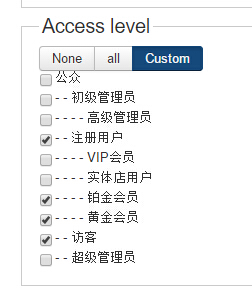
2 and 3, int the previous version 2.4.0, it was possible to do that. but the new version made it complex.
Like the file attached.
2 and 3, int the previous version 2.4.0, it was possible to do that. but the new version made it complex.
Like the file attached.
Please Log in or Create an account to join the conversation.
Less
More
- Posts: 11
- Thank you received: 0
11 years 6 days ago #217788
by chelsea_lim
Replied by chelsea_lim on topic Some odd problems after updating to 2.6.0
If multi cart is disabled, I get this error when i go to cart display:
Notice: Trying to get property of non-object in ..(url)..\components\com_hikashop\views\cart\view.html.php on line 119
Notice: Trying to get property of non-object in ..(url)..\components\com_hikashop\views\cart\view.html.php on line 122
Notice: Trying to get property of non-object in ..(url)..\components\com_hikashop\views\cart\view.html.php on line 123
Notice: Undefined property: stdClass::$user_id in ..(url)..\components\com_hikashop\views\cart\view.html.php on line 137
Notice: Undefined property: stdClass::$user_id in ..(url)..\components\com_hikashop\views\cart\tmpl\showcart.php on line 30
I * replaced the url with ..(url)..
Please help, thanks
Notice: Trying to get property of non-object in ..(url)..\components\com_hikashop\views\cart\view.html.php on line 119
Notice: Trying to get property of non-object in ..(url)..\components\com_hikashop\views\cart\view.html.php on line 122
Notice: Trying to get property of non-object in ..(url)..\components\com_hikashop\views\cart\view.html.php on line 123
Notice: Undefined property: stdClass::$user_id in ..(url)..\components\com_hikashop\views\cart\view.html.php on line 137
Notice: Undefined property: stdClass::$user_id in ..(url)..\components\com_hikashop\views\cart\tmpl\showcart.php on line 30
I * replaced the url with ..(url)..
Please help, thanks
Please Log in or Create an account to join the conversation.
Less
More
- Posts: 11
- Thank you received: 0
11 years 6 days ago #217789
by chelsea_lim
Replied by chelsea_lim on topic Some odd problems after updating to 2.6.0
I just noticed, i think this line:
$cartVal = $database->loadObject();
sometimes work and sometimes doesn't work. I'm not sure why.
Please help. thanks
$cartVal = $database->loadObject();
sometimes work and sometimes doesn't work. I'm not sure why.
Please help. thanks
Please Log in or Create an account to join the conversation.

11 years 6 days ago #217830
by nicolas
Replied by nicolas on topic Some odd problems after updating to 2.6.0
Hi,
1. Yes, the new interface is a bit different and thus we had to adapt the ACL system to the new design. We'll of course work to improve its design in the future. Thank you for your feedback.
2. Thank you for your feedback on these notices. We'll fix them for the next release. They aren't critical. In fact you shouldn't display them on a live website. Turn off the "error reporting" setting of the Joomla configuration and you won't get them anymore.
1. Yes, the new interface is a bit different and thus we had to adapt the ACL system to the new design. We'll of course work to improve its design in the future. Thank you for your feedback.
2. Thank you for your feedback on these notices. We'll fix them for the next release. They aren't critical. In fact you shouldn't display them on a live website. Turn off the "error reporting" setting of the Joomla configuration and you won't get them anymore.
Please Log in or Create an account to join the conversation.
11 years 5 days ago #217888
by rouben618
Replied by rouben618 on topic Some odd problems after updating to 2.6.0
Thank you for answering my questions, Mohamed Thelji.
Re question 1: If I change the CSS file like what you said, it will become a fixed area to display those sub categories and that's not what I need. because I update the categories frequently. It should adjust the height automatically according to the height of the content. I remember it did this before I updated to version 2.6.0
Could you have another look and let me know how to change it please? Many thanks.
Re question 1: If I change the CSS file like what you said, it will become a fixed area to display those sub categories and that's not what I need. because I update the categories frequently. It should adjust the height automatically according to the height of the content. I remember it did this before I updated to version 2.6.0
Could you have another look and let me know how to change it please? Many thanks.
Please Log in or Create an account to join the conversation.

11 years 5 days ago #217920
by Xavier
Replied by Xavier on topic Some odd problems after updating to 2.6.0
Hi,
You can simply use: height: auto !important; instead of forcing a value in pixels.
You can simply use: height: auto !important; instead of forcing a value in pixels.
Please Log in or Create an account to join the conversation.
Time to create page: 0.330 seconds