

- Posts: 25
- Thank you received: 2
Amending categories
10 years 11 months ago #221486
by substance
Amending categories was created by substance
-- HikaShop version -- : 2..6.0 business
-- Joomla version -- : 3.4
How do we move, change the name of, or delete categories?
On the attached image it shows 'Substance Resource Shop". When we create a category menu for that category it displays the categories, as it should, but underneath that category it also displays all of the items in that category.
If we create a menu using your Categories, this doesn't happen. So we want to move the 'Substance resource Shop' category inside the top categories folder.
Can you point us to the documentation which enables this.
Thanks
Ian
-- Joomla version -- : 3.4
How do we move, change the name of, or delete categories?
On the attached image it shows 'Substance Resource Shop". When we create a category menu for that category it displays the categories, as it should, but underneath that category it also displays all of the items in that category.
If we create a menu using your Categories, this doesn't happen. So we want to move the 'Substance resource Shop' category inside the top categories folder.
Can you point us to the documentation which enables this.
Thanks
Ian
Please Log in or Create an account to join the conversation.

10 years 11 months ago #221496
by nicolas
Replied by nicolas on topic Amending categories
Hi,
1. On your screenshot, you can see the edit icon for each category of your listing next to the checkboxes.
Click on edit to edit the category. There you can change its name, and move it to somewhere else thanks to the "parent" option.
And you can delete the categories by selecting them with the checkbox and then clicking on the "delete" button at the top.
2. Having the products of the sub categories displaying or not on the main category of the menu item simply depends on how you configure your menu item. When you edit it via the Joomla menus manager, you can change the "sub element filter" of the "products options" tab in order to change that behavior.
1. On your screenshot, you can see the edit icon for each category of your listing next to the checkboxes.
Click on edit to edit the category. There you can change its name, and move it to somewhere else thanks to the "parent" option.
And you can delete the categories by selecting them with the checkbox and then clicking on the "delete" button at the top.
2. Having the products of the sub categories displaying or not on the main category of the menu item simply depends on how you configure your menu item. When you edit it via the Joomla menus manager, you can change the "sub element filter" of the "products options" tab in order to change that behavior.
Please Log in or Create an account to join the conversation.
10 years 11 months ago #221611
by substance
Replied by substance on topic Amending categories
Sorry Nicolas,
Still a bit confused over moving and deleting cats.
See attached image
Still a bit confused over moving and deleting cats.
See attached image
Please Log in or Create an account to join the conversation.
10 years 11 months ago #221613
by nicolas
Replied by nicolas on topic Amending categories
Hi,
There is no attachment in your last message.
There is no attachment in your last message.
Please Log in or Create an account to join the conversation.
10 years 11 months ago #221774
by substance
Replied by substance on topic Amending categories
Sorry Nicolas,
Keep forgetting to click 'insert"
Image attached
Keep forgetting to click 'insert"
Image attached
Please Log in or Create an account to join the conversation.
10 years 11 months ago #221775
by substance
Replied by substance on topic Amending categories
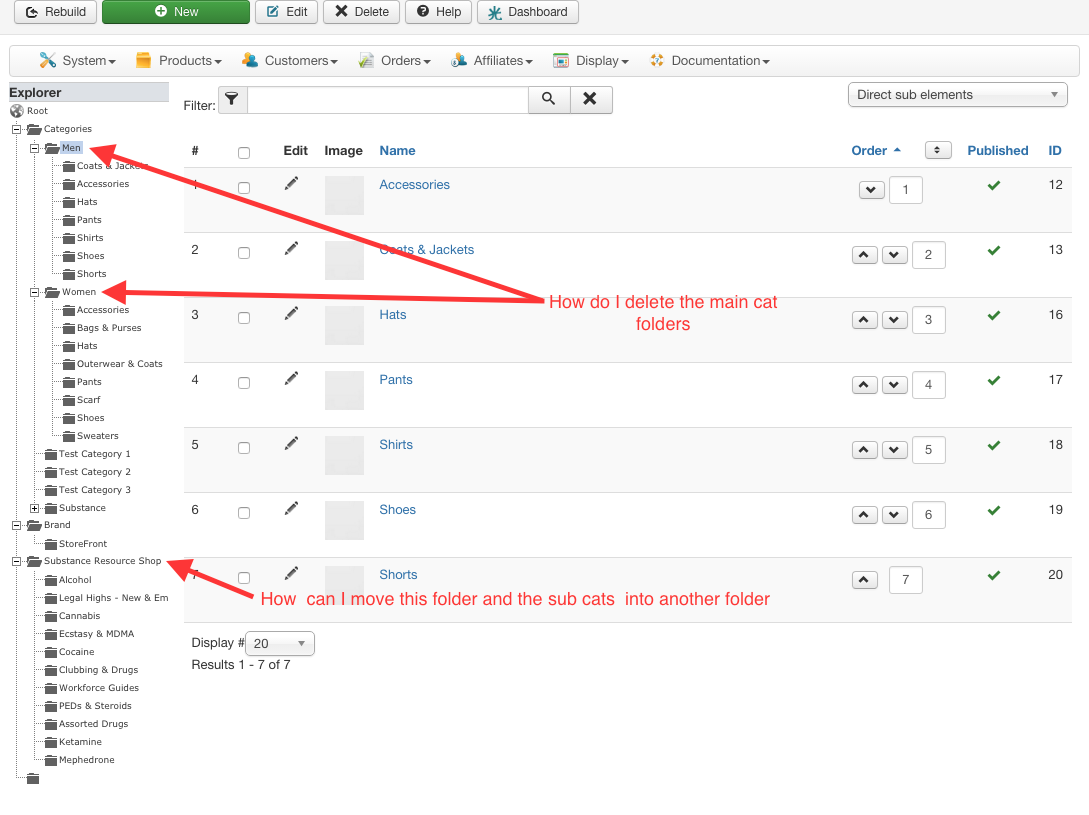
file attached
Please Log in or Create an account to join the conversation.
10 years 11 months ago #221792
by nicolas
Replied by nicolas on topic Amending categories
Hi,
Here is the procedure:
-click on the "categories" link on the left explorer.
-click on the checkbox of the men and women categories on the main listing
- click on the "delete" button at the top
-click on the "root" link on the left explorer
-click on the "edit" icon of the "substance resource shop" category on the main listing
- change the "parent" option to the other category where you want to move it
- save
Here is the procedure:
-click on the "categories" link on the left explorer.
-click on the checkbox of the men and women categories on the main listing
- click on the "delete" button at the top
-click on the "root" link on the left explorer
-click on the "edit" icon of the "substance resource shop" category on the main listing
- change the "parent" option to the other category where you want to move it
- save
Please Log in or Create an account to join the conversation.
10 years 11 months ago #221952
by substance
Replied by substance on topic Amending categories
OK got that, thanks.
Ian
Ian
Please Log in or Create an account to join the conversation.
Time to create page: 0.300 seconds