

- Posts: 61
- Thank you received: 0
Responsive Update
10 years 11 months ago #221510
by anlicor
Responsive Update was created by anlicor
-- HikaShop version -- : 2.6.0
-- Joomla version -- : 3.4.5
-- PHP version -- : 5.5.19
-- Browser(s) name and version -- : All
-- Error-message(debug-mod must be tuned on) -- : None
What do I need to make hikashop responsive after the latest upgrade.
I have converted the rest of the template to use bootstrap. however hikashop appears to still be using fixed layout.
-- Joomla version -- : 3.4.5
-- PHP version -- : 5.5.19
-- Browser(s) name and version -- : All
-- Error-message(debug-mod must be tuned on) -- : None
What do I need to make hikashop responsive after the latest upgrade.
I have converted the rest of the template to use bootstrap. however hikashop appears to still be using fixed layout.
Please Log in or Create an account to join the conversation.

10 years 11 months ago - 10 years 11 months ago #221560
by Philip
Replied by Philip on topic Responsive Update
Hello,
You must check something in:
- Components -> HikaShop -> Configuration
- Click on Display tab (under Products drop-down)
- Define "Use bootsrap design" on Yes
Regards,
You must check something in:
- Components -> HikaShop -> Configuration
- Click on Display tab (under Products drop-down)
- Define "Use bootsrap design" on Yes
Regards,
Last edit: 10 years 11 months ago by Philip.
Please Log in or Create an account to join the conversation.
10 years 11 months ago #221636
by anlicor
Replied by anlicor on topic Responsive Update
Thanks for the reply, that helped.
1)
I have enabled bootstrap and that seems to be working. However it does not use up to the 12 columns but instead displays all products and categories in one column. How do I make it use more than one column?
2)
The popup gallery on the product detail page. When I click on the image to make it large, I have to close it before I can see another.
There is no left or right navigation or preview of another image. How can I add a preview or change the popup gallery?
1)
I have enabled bootstrap and that seems to be working. However it does not use up to the 12 columns but instead displays all products and categories in one column. How do I make it use more than one column?
2)
The popup gallery on the product detail page. When I click on the image to make it large, I have to close it before I can see another.
There is no left or right navigation or preview of another image. How can I add a preview or change the popup gallery?
Please Log in or Create an account to join the conversation.
10 years 11 months ago - 10 years 11 months ago #221645
by Philip
Replied by Philip on topic Responsive Update
Hello,
1) To define the way to display elements go here:
- Menus -> HikaShop default menus
- here select the required item menu, click on Categories Options OR Products Options
- Click on desired layout type tab.
- See the Items part? This where you can define 1, 2 or more column etc...
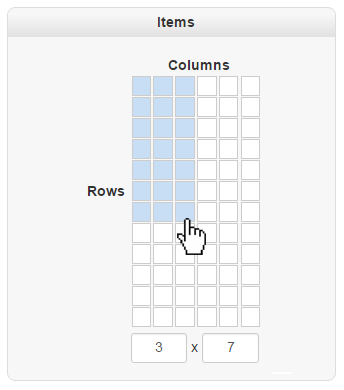
As usual don't forget to save your changes!
2) For this point there is a tutorial to switch on this function: here
P.S: note for the future, that you must open on subject for one issue, and here obviously the 2 question isn't linked to initial subject.
Regards,
1) To define the way to display elements go here:
- Menus -> HikaShop default menus
- here select the required item menu, click on Categories Options OR Products Options
- Click on desired layout type tab.
- See the Items part? This where you can define 1, 2 or more column etc...
As usual don't forget to save your changes!
2) For this point there is a tutorial to switch on this function: here
P.S: note for the future, that you must open on subject for one issue, and here obviously the 2 question isn't linked to initial subject.
Regards,
Last edit: 10 years 11 months ago by Philip.
Please Log in or Create an account to join the conversation.
10 years 11 months ago #221733
by anlicor
Replied by anlicor on topic Responsive Update
In the module and menu its set to 4x5 and I still see one column.
If you check the entire site, since I enabled bootstrap everything is one column.
What could I be doing wrong?
[ps. I was enable to enable shadowbox]
If you check the entire site, since I enabled bootstrap everything is one column.
What could I be doing wrong?
[ps. I was enable to enable shadowbox]
Please Log in or Create an account to join the conversation.
10 years 11 months ago - 10 years 11 months ago #221738
by Philip
Replied by Philip on topic Responsive Update
Hello,
I just take a look on your website and use inspector element, and it's seems that your template works with bootstrap 3, whereas HikaShop is bootsrap 2 compatible.
So, follow this link, here to convert your template to bootstrap 2, more directly you must add in your template, selector class that fit with bootstrap 2.
Note: that this link explain how move to bootstrap 3 from bootstrap 2, but that will give you class value to add in your template.
And so, CSS can works and match with HikaShop display options.
Regards,
I just take a look on your website and use inspector element, and it's seems that your template works with bootstrap 3, whereas HikaShop is bootsrap 2 compatible.
So, follow this link, here to convert your template to bootstrap 2, more directly you must add in your template, selector class that fit with bootstrap 2.
Note: that this link explain how move to bootstrap 3 from bootstrap 2, but that will give you class value to add in your template.
And so, CSS can works and match with HikaShop display options.
Regards,
Last edit: 10 years 11 months ago by Philip.
Please Log in or Create an account to join the conversation.
10 years 11 months ago #221864
by anlicor
Replied by anlicor on topic Responsive Update
Thank you for the help I was able to get it working.
Please Log in or Create an account to join the conversation.
Time to create page: 0.334 seconds