

- Posts: 58
- Thank you received: 0
Delete all products in one move
10 years 5 months ago #236341
by marcoboni
Delete all products in one move was created by marcoboni
Hi all,
It's possible delete all products in one move...
Thanks in advance
Marco
It's possible delete all products in one move...
Thanks in advance
Marco
Please Log in or Create an account to join the conversation.

10 years 5 months ago - 10 years 5 months ago #236377
by Philip
Replied by Philip on topic Delete all products in one move
Hello,
There is several response to your question, the best way will depends from your number of product :
- The most simple, go to Components => HikaShop => Products, on the down of the page set the dropdown to "ALL" find the checkbox on the top of the listing.
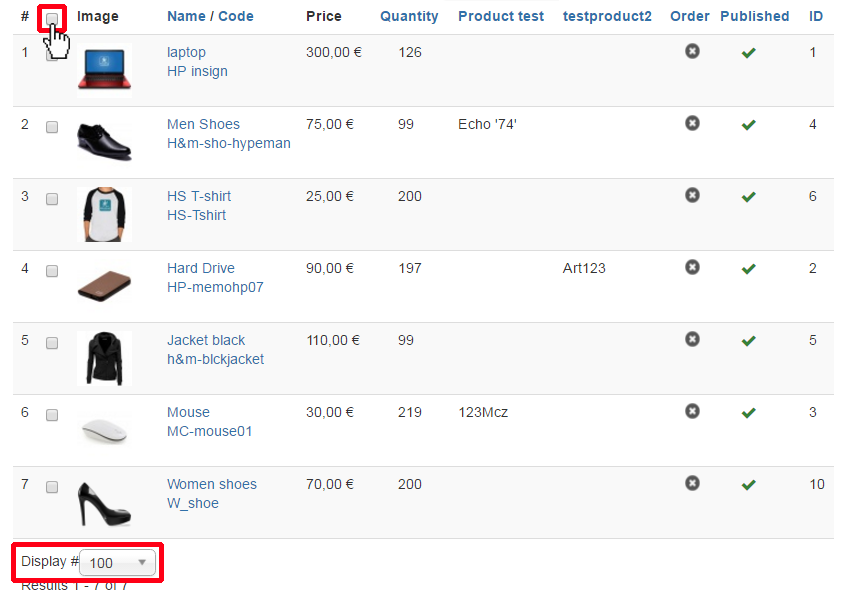
Like this you can deleted by clicking on delete button at each time more than 100 products, so if you have much more products that can be repetitive and not really fitted your needs.
- In this last case, the most effective for lots of products, use the Massaction, so check this tutorial, here .
To guide you a little, be aware with this that you can create an automatic task to delete products, but with Massaction you mustn't delete more than 200 products per process because otherwise it may crash.
But, you can set your massaction with Cron parameter to automatically repeat the process (one process per minute by example) and at the end delete ALL products automatically, so have a look on this Cron tutorial, here .
Hope this will help you.
Regards,
There is several response to your question, the best way will depends from your number of product :
- The most simple, go to Components => HikaShop => Products, on the down of the page set the dropdown to "ALL" find the checkbox on the top of the listing.
Like this you can deleted by clicking on delete button at each time more than 100 products, so if you have much more products that can be repetitive and not really fitted your needs.
- In this last case, the most effective for lots of products, use the Massaction, so check this tutorial, here .
To guide you a little, be aware with this that you can create an automatic task to delete products, but with Massaction you mustn't delete more than 200 products per process because otherwise it may crash.
But, you can set your massaction with Cron parameter to automatically repeat the process (one process per minute by example) and at the end delete ALL products automatically, so have a look on this Cron tutorial, here .
Hope this will help you.
Regards,
Last edit: 10 years 5 months ago by Philip.
Please Log in or Create an account to join the conversation.
10 years 5 months ago #236483
by marcoboni
Replied by marcoboni on topic Delete all products in one move
Hi Philip,
thank you for awnser, i will try the massaction because i have 15000 product...
Have a nice day
thank you for awnser, i will try the massaction because i have 15000 product...
Have a nice day
Please Log in or Create an account to join the conversation.
Time to create page: 0.188 seconds