

- Posts: 5
- Thank you received: 0
URL rewriting not OK after installing HikaShop
10 years 5 months ago - 10 years 5 months ago #238305
by dzseti
URL rewriting not OK after installing HikaShop was created by dzseti
For menu items being added after installing HikaShop URL rewriting is not working properly.
Eg a menu item with the alias 'paypal-query', which should be rewritten to www.example.com/paypal-query , is actually rewritten to www.example.com/Products/paypal-query
Eg a menu item with the alias 'paypal-query', which should be rewritten to www.example.com/paypal-query , is actually rewritten to www.example.com/Products/paypal-query
Last edit: 10 years 5 months ago by dzseti. Reason: typo
Please Log in or Create an account to join the conversation.

10 years 5 months ago - 10 years 5 months ago #238349
by Philip
Replied by Philip on topic URL rewriting not OK after installing HiakShop
Hello,
did you configure your HikaShop SEF options ?
Go to :
- Components => HikaShop => Configuration
- Click on Features tab, and go on SEF url options part
For follow your Url example, see the screenshot on below :
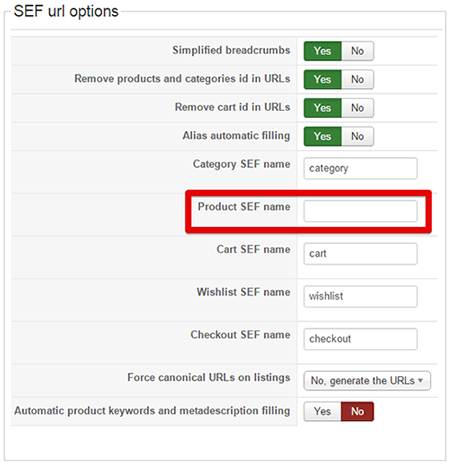
Simply remove Product SEF name as on this screenshot, must be enough to have what you want in your precise example.
Hope this will help you.
Regards,
did you configure your HikaShop SEF options ?
Go to :
- Components => HikaShop => Configuration
- Click on Features tab, and go on SEF url options part
For follow your Url example, see the screenshot on below :
Simply remove Product SEF name as on this screenshot, must be enough to have what you want in your precise example.
Hope this will help you.
Regards,
Last edit: 10 years 5 months ago by Philip.
Please Log in or Create an account to join the conversation.
10 years 5 months ago #238420
by dzseti
Replied by dzseti on topic URL rewriting not OK after installing HikaShop
No it doesn't solve the problem - '/Product/' still appears in the middle of the URL
This must be a more fundamental problem, because URL rewriting for all menu items prior to installation works perfectly - it is only recent menu items that don't work - I wonder whether it is something to do with processing order?
This must be a more fundamental problem, because URL rewriting for all menu items prior to installation works perfectly - it is only recent menu items that don't work - I wonder whether it is something to do with processing order?
Please Log in or Create an account to join the conversation.

10 years 5 months ago #238441
by nicolas
Replied by nicolas on topic URL rewriting not OK after installing HikaShop
Hi,
Hard to say. We don't know how your menu items are configured and what structure they have.
A link to a product page is constructed like that:
http(s) / yourwebsite.com / the alias of the current menu item (and potentially the alias of its parent menu items) unless it's the homepage / the product SEF name if specified / the alias of the product
So if Product doesn't come from your product SEF name, it must come from the alias of the current menu item and that's added automatically by Joomla because you're accessing the product through a menu item with that alias which is not the homepage.
Hard to say. We don't know how your menu items are configured and what structure they have.
A link to a product page is constructed like that:
http(s)
/ yourwebsite.com / the alias of the current menu item (and potentially the alias of its parent menu items) unless it's the homepage / the product SEF name if specified / the alias of the productSo if Product doesn't come from your product SEF name, it must come from the alias of the current menu item and that's added automatically by Joomla because you're accessing the product through a menu item with that alias which is not the homepage.
Please Log in or Create an account to join the conversation.
10 years 5 months ago - 10 years 5 months ago #238950
by dzseti
Replied by dzseti on topic URL rewriting not OK after installing HikaShop
I have narrowed the problem down to the wrong path being added to the Joomla table __menu whenever a new menu item is created (after the installation of HikaShop).
I have checked $table data in the save function from /administrator/components/com_menus/models/item.php, which shows no problems: item name, alias and path are all the same (no '/Products/' in path).
To test whether HikaShop might be doing something I manually changed the menu item linking to index.php?option=com_hikashop&ctrl=product in the __menu table: alias changed from 'Products' to 'ProductsXX' Then whenever I create a new menu item I get '/ProductsXX/' in the path - see screen shot:
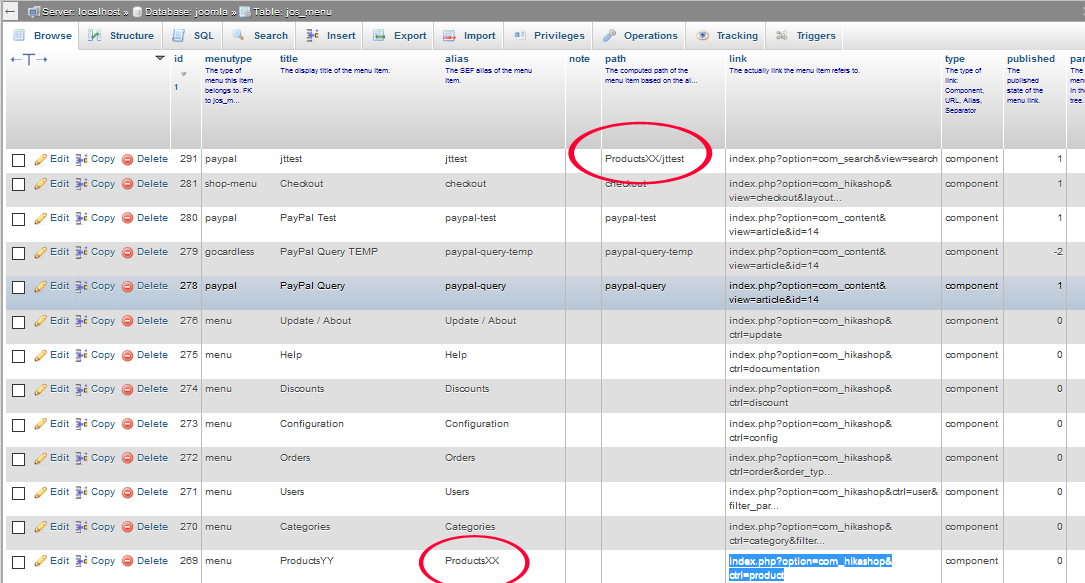
Can't work out what is going on, but it does seem to be an override from HikaShop that is causing this - and having paid almost EURO 100 to buy the business version, it would be good to get this sorted out!
I have checked $table data in the save function from /administrator/components/com_menus/models/item.php, which shows no problems: item name, alias and path are all the same (no '/Products/' in path).
To test whether HikaShop might be doing something I manually changed the menu item linking to index.php?option=com_hikashop&ctrl=product in the __menu table: alias changed from 'Products' to 'ProductsXX' Then whenever I create a new menu item I get '/ProductsXX/' in the path - see screen shot:
Can't work out what is going on, but it does seem to be an override from HikaShop that is causing this - and having paid almost EURO 100 to buy the business version, it would be good to get this sorted out!
Last edit: 10 years 5 months ago by dzseti. Reason: typo
Please Log in or Create an account to join the conversation.
Time to create page: 0.319 seconds