
- Posts: 52
- Thank you received: 1
How to change starting point for order numbers?
- NanoPlanet
-
 Topic Author
- Offline
Less
More
10 years 5 months ago #240069
by NanoPlanet
How to change starting point for order numbers? was created by NanoPlanet
-- url of the page with the problem -- :
ojostore.digitaldemo.net
-- HikaShop version -- : 2.6.3
-- Joomla version -- : 3.4.8
Hello there -
I have a client who wants their order numbers to START at 8000. So the first order would be 8000, the second would be 8001 and so forth and so on.
How do I do that?
Best,
Leslie
-- HikaShop version -- : 2.6.3
-- Joomla version -- : 3.4.8
Hello there -
I have a client who wants their order numbers to START at 8000. So the first order would be 8000, the second would be 8001 and so forth and so on.
How do I do that?
Best,
Leslie
Please Log in or Create an account to join the conversation.

10 years 5 months ago #240081
by KelsoUSMC
Replied by KelsoUSMC on topic How to change starting point for order numbers?
Hi Leslie,
Maybe this link will help.
Number Formatting
This option is only available in the Commercial Version (Essentials/Business)
Otherwise, if you have the ability to connect to the database table via phpMyAdmin or Navicat (I use Navicat), you can set the auto increment value to 8000 in the table #___hikashop_order on fields order_number and order_invoice_number
Depending on your business rules, they do not have to be the same values.
The formatting is found under table #___hikashop_config on the field order_number_format.
My format is set for SUM-{id size="5"}-{date format="Ymd"} which will result in something like this: SUM-01019-20160511
Hope that helps,
Kelso
Maybe this link will help.
Number Formatting
This option is only available in the Commercial Version (Essentials/Business)
Otherwise, if you have the ability to connect to the database table via phpMyAdmin or Navicat (I use Navicat), you can set the auto increment value to 8000 in the table #___hikashop_order on fields order_number and order_invoice_number
Depending on your business rules, they do not have to be the same values.
The formatting is found under table #___hikashop_config on the field order_number_format.
My format is set for SUM-{id size="5"}-{date format="Ymd"} which will result in something like this: SUM-01019-20160511
Hope that helps,
Kelso
Please Log in or Create an account to join the conversation.
- NanoPlanet
-
Topic Author
- Offline
Less
More
- Posts: 52
- Thank you received: 1
10 years 5 months ago #240082
by NanoPlanet
Replied by NanoPlanet on topic How to change starting point for order numbers?
We have the Business edition, but while I see the area to define the order numbering format in the configuration,
I can't figure out how to get the order sequence to begin at 8000.
I can't figure out how to get the order sequence to begin at 8000.
Please Log in or Create an account to join the conversation.
10 years 5 months ago #240089
by KelsoUSMC
Replied by KelsoUSMC on topic How to change starting point for order numbers?
The AutoIncrement field will need changed to 8000.
Here is a screen shot from phpMyAdmin. Do you have direct access to your database?
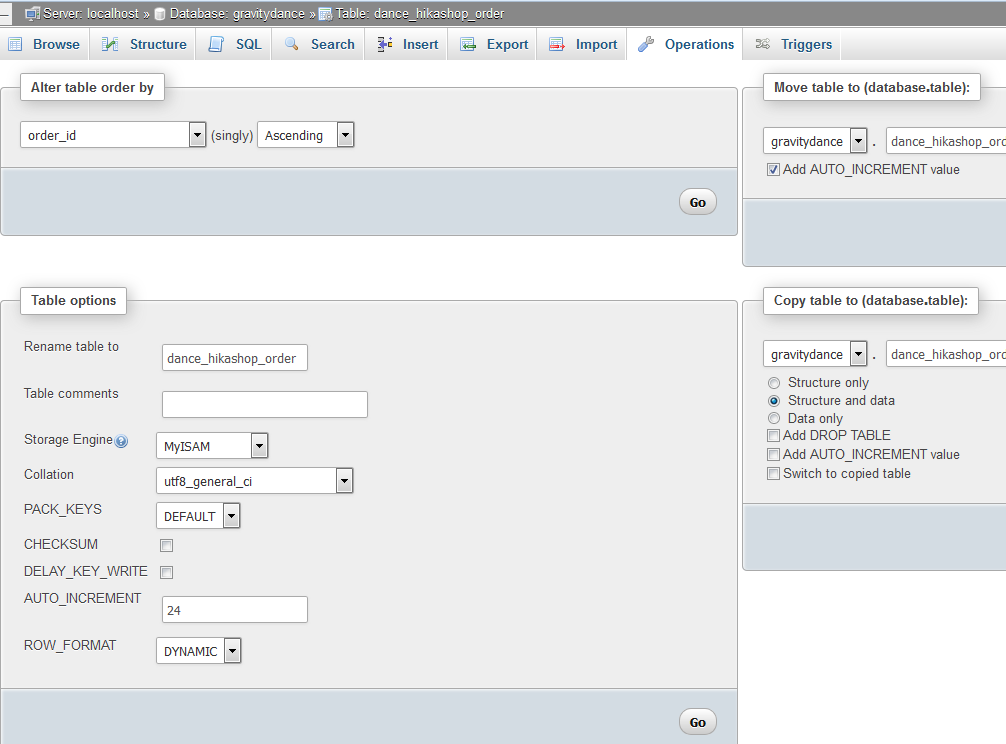
Kelso
Here is a screen shot from phpMyAdmin. Do you have direct access to your database?
Kelso
Please Log in or Create an account to join the conversation.

10 years 5 months ago - 10 years 5 months ago #240108
by Jerome
Jerome - Obsidev.com
HikaMarket & HikaSerial developer / HikaShop core dev team.
Replied by Jerome on topic How to change starting point for order numbers?
Hi,
See AUTO_INCREMENT setting in your screenshot
Regards,
See AUTO_INCREMENT setting in your screenshot
Regards,
Jerome - Obsidev.com
HikaMarket & HikaSerial developer / HikaShop core dev team.
Last edit: 10 years 5 months ago by Jerome.
Please Log in or Create an account to join the conversation.
10 years 5 months ago #240143
by KelsoUSMC
Replied by KelsoUSMC on topic How to change starting point for order numbers?
Yes, Jerome.
That message I sent to Nano as he was the OP.
That message I sent to Nano as he was the OP.
Please Log in or Create an account to join the conversation.
Time to create page: 0.279 seconds