

- Posts: 147
- Thank you received: 6
What is the current image processing method?
10 years 2 months ago #247771
by maujbigo
What is the current image processing method? was created by maujbigo
Hi,
Can anyone explain to me how the images are handled in the current latest version?
I mean, lets say my design display the product images in the product page in a square format.
When I upload the images via administrator I either have portrait or landscape image (no square image).
How is it going to be handled when uploaded?
Is it going to:
- Fit?
- Crop?
- Stretch?
Take for example an image that is 156 x 200 pixels and I want it to place in a div that is 100x100px
- In fit mode the final resized image will be 77x100px leaving 33px empty/white space
- In Crop mode the final image will be 100x100 cropping some of the image to fit in box
- In Stretch mode it will stretch to fit
Also, can the images be accessed from on single folder? Or is it going to create folder within folder and so on...
Thanks
Can anyone explain to me how the images are handled in the current latest version?
I mean, lets say my design display the product images in the product page in a square format.
When I upload the images via administrator I either have portrait or landscape image (no square image).
How is it going to be handled when uploaded?
Is it going to:
- Fit?
- Crop?
- Stretch?
Take for example an image that is 156 x 200 pixels and I want it to place in a div that is 100x100px
- In fit mode the final resized image will be 77x100px leaving 33px empty/white space
- In Crop mode the final image will be 100x100 cropping some of the image to fit in box
- In Stretch mode it will stretch to fit
Also, can the images be accessed from on single folder? Or is it going to create folder within folder and so on...
Thanks
Please Log in or Create an account to join the conversation.

10 years 2 months ago #247780
by lousyfool
Need help with customisations of layouts, style or other site development? PM me!
(Don't forget to turn on "E-mail notification of new messages" )
Replied by lousyfool on topic What is the current image processing method?
Hi,
As usual, the documentation here explains your options and the results: www.hikashop.com/support/documentation/5...fig.html#main_images
Only, for new installs since 2.3.5 it's not the folder media/com_hikashop/upload/thumbnails anymore, but instead images/com_hikashop/upload/thumbnails.
As usual, the documentation here explains your options and the results: www.hikashop.com/support/documentation/5...fig.html#main_images
Only, for new installs since 2.3.5 it's not the folder media/com_hikashop/upload/thumbnails anymore, but instead images/com_hikashop/upload/thumbnails.
Need help with customisations of layouts, style or other site development? PM me!
(Don't forget to turn on "E-mail notification of new messages" )
The following user(s) said Thank You: Jerome
Please Log in or Create an account to join the conversation.
10 years 2 months ago #247782
by maujbigo
Replied by maujbigo on topic What is the current image processing method?
Thanks,
I still not quite sure if it will fit or crop.
I mean it mentions that bigger image will be resized, that I know. I need to know about the resizing mode.
Please tell me if you know.
Thanks
I still not quite sure if it will fit or crop.
I mean it mentions that bigger image will be resized, that I know. I need to know about the resizing mode.
Please tell me if you know.
Thanks
Please Log in or Create an account to join the conversation.
10 years 2 months ago #247787
by lousyfool
Need help with customisations of layouts, style or other site development? PM me!
(Don't forget to turn on "E-mail notification of new messages" )
Replied by lousyfool on topic What is the current image processing method?
Well, a short trip to your own main configuration page would show you this:
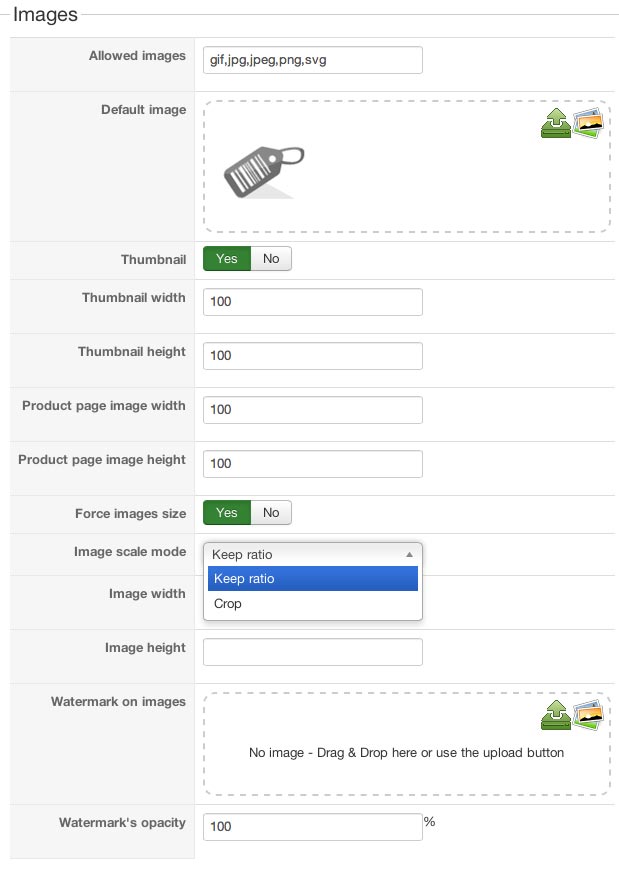
See the "Image scale mode" dropdown? Yup, you can do either:
- Keep ratio = what you call "fit".
- Or crop.
The best of all: trying the different options costs nothing but very few minutes...
And as you know now, you can safely delete the subfolders of "thumbnails", they'll be recreated on the fly. So, no "traces" left after trying.
See the "Image scale mode" dropdown? Yup, you can do either:
- Keep ratio = what you call "fit".
- Or crop.
The best of all: trying the different options costs nothing but very few minutes...
And as you know now, you can safely delete the subfolders of "thumbnails", they'll be recreated on the fly. So, no "traces" left after trying.
Need help with customisations of layouts, style or other site development? PM me!
(Don't forget to turn on "E-mail notification of new messages" )
Please Log in or Create an account to join the conversation.
10 years 2 months ago #247905
by maujbigo
Replied by maujbigo on topic What is the current image processing method?
Perfect!
It is great to be able to ask the more experienced.
Thanks a lot
It is great to be able to ask the more experienced.
Thanks a lot
Please Log in or Create an account to join the conversation.
10 years 2 months ago #248366
by maujbigo
Replied by maujbigo on topic What is the current image processing method?
Hi all,
Just following up on this, how are you dealing with responsive images?
I mean, it adds an inline height: to the div. I know I can override it with !important. But I am just checking if anyone is doing it in a different way that does not require setting up the height for multiple media queries.
As an alternative I could create a template override and remove the inline height style.
What ware is the recommended way?
Also, when I delete the 'thumbnails' folder as suggested above the browser cached products wont load the images. I know I can clear the browser cache but expecting all the users to do the same is not an option, they will just leave and go somewhere else.
Any suggestion for this?
Thanks again
Just following up on this, how are you dealing with responsive images?
I mean, it adds an inline height: to the div. I know I can override it with !important. But I am just checking if anyone is doing it in a different way that does not require setting up the height for multiple media queries.
As an alternative I could create a template override and remove the inline height style.
What ware is the recommended way?
Also, when I delete the 'thumbnails' folder as suggested above the browser cached products wont load the images. I know I can clear the browser cache but expecting all the users to do the same is not an option, they will just leave and go somewhere else.
Any suggestion for this?
Thanks again
Please Log in or Create an account to join the conversation.

10 years 2 months ago #248370
by nicolas
Replied by nicolas on topic What is the current image processing method?
Hi,
1. We usually recommend using CSS with !important and media queries.
Using !important is not a problem on custom CSS code.
2. Why it that a problem ?
Why a user would leave and go somewhere else if they see the old image of a product instead of the new one ? Their browser cache will expire eventually.
But anyways, you can't, from your server, ask the browser to clear its cache of images, if you want to control the caching time of images of browsers, you can do that on your web server for example: metaskills.net/2006/02/19/how-to-control...ching-with-apache-2/
1. We usually recommend using CSS with !important and media queries.
Using !important is not a problem on custom CSS code.
2. Why it that a problem ?
Why a user would leave and go somewhere else if they see the old image of a product instead of the new one ? Their browser cache will expire eventually.
But anyways, you can't, from your server, ask the browser to clear its cache of images, if you want to control the caching time of images of browsers, you can do that on your web server for example: metaskills.net/2006/02/19/how-to-control...ching-with-apache-2/
Please Log in or Create an account to join the conversation.
10 years 2 months ago #248439
by maujbigo
Replied by maujbigo on topic What is the current image processing method?
Hi Nicolas,
Yes, css and media queries is what I ma currently using.
Thanks for the link I will have a look at that. It is not that it show old images, if I delete the thumbnail folder it doesn't show images at all. But I think I figure that one out. It might've been because I changed the image size in the backend.
But anyway, I quit the browser came back to it today and the new thumbnails appeared fine.
Thanks
Yes, css and media queries is what I ma currently using.
Thanks for the link I will have a look at that. It is not that it show old images, if I delete the thumbnail folder it doesn't show images at all. But I think I figure that one out. It might've been because I changed the image size in the backend.
But anyway, I quit the browser came back to it today and the new thumbnails appeared fine.
Thanks
Please Log in or Create an account to join the conversation.
Time to create page: 0.098 seconds