

- Posts: 86250
- Thank you received: 14236
Customize email "order shipped"
9 years 8 months ago #260490
by nicolas
Replied by nicolas on topic Customize email "order shipped"
Hi,
If you get the URL " www.laputea.com/www.laputea.com/it/negoz...bottiglia-olio-fiore " it means that you're missing http:// in the link and the browser/email client completes it automatically with the root URL of the website so that it is valid.
Normally, in your products, the canonical URL should be like that: "/it/negozio/prodotti-per-la-cucina/prodotto/bottiglia-olio-fiore" without the domain name of your website, and in the email, you are supposed to add it yourself:
in the preload or:
as a tag int he HTML version.
If you get the URL " www.laputea.com/www.laputea.com/it/negoz...bottiglia-olio-fiore " it means that you're missing http:// in the link and the browser/email client completes it automatically with the root URL of the website so that it is valid.
Normally, in your products, the canonical URL should be like that: "/it/negozio/prodotti-per-la-cucina/prodotto/bottiglia-olio-fiore" without the domain name of your website, and in the email, you are supposed to add it yourself:
Code:
"http://www.laputea.com".$product->product_canonical;
Code:
http://www.laputea.com{VAR:product.product_canonical}
Please Log in or Create an account to join the conversation.

9 years 8 months ago #261221
by gioxd
Replied by gioxd on topic Customize email "order shipped"
hello Nicolas,
here is the code I added to preload version:
The link works, but only for some products! As I said in the past, in some cases it does not work, or is it the product variants or different products ...
For some products, the link works, not for others!
Look at the pictures:
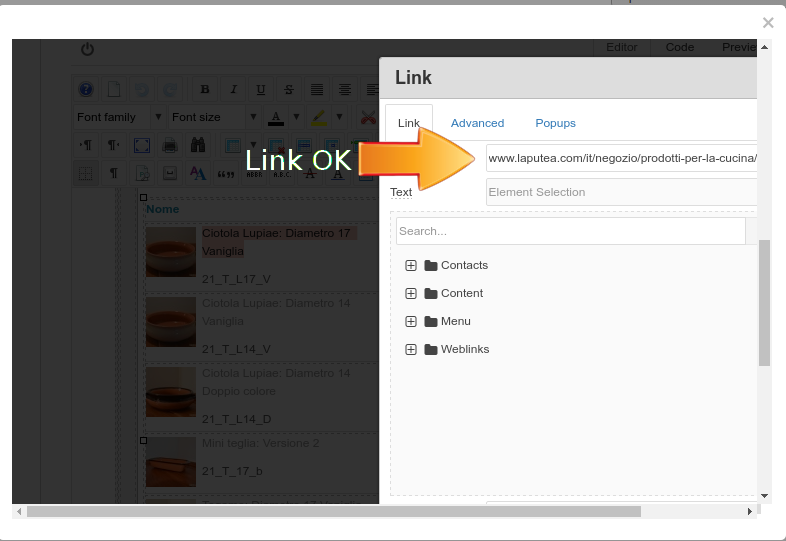
Product 1: link works
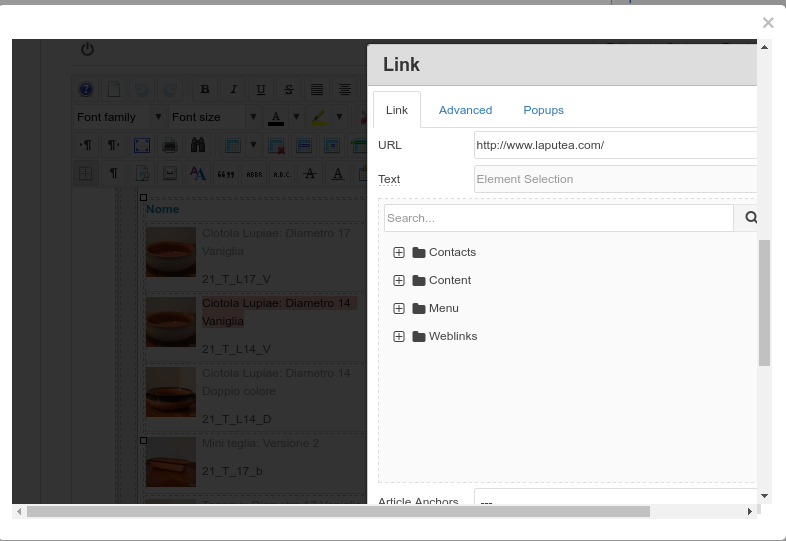
Product 2 (variant of the same product): link do not work
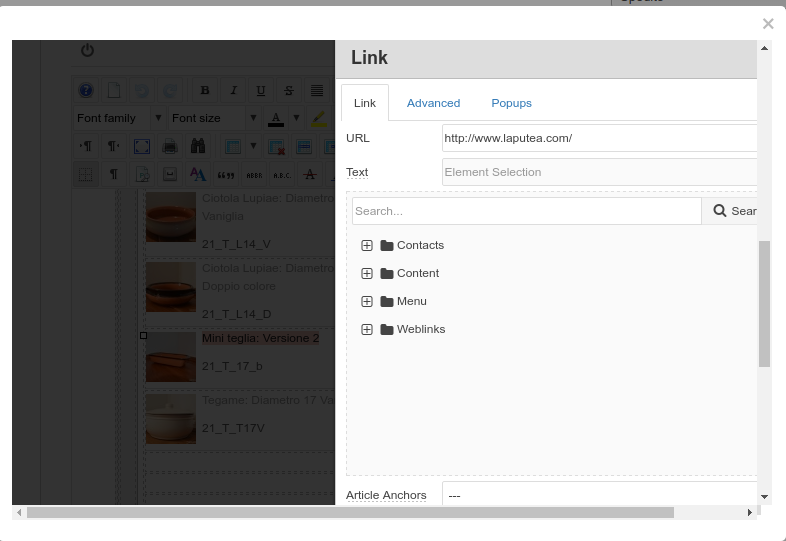
Product 3: (different product): link do not work
I still can not understand why! Yet for some products the link works! Usually this happens when the customer buys more products. You only buy one, the link works. All the products have filled the canonical URL. I checked two times and each canonical URL is correct.
There will be an explanation?
here is the code I added to preload version:
Code:
if($product->product_parent_id){
$productClass = hikashop_get('class.product');
$main = $productClass->get($product->product_parent_id);
$product->product_canonical = $main->product_canonical;
}
$t = '<p><a href=" ' .$product->product_canonical.'">' . $item->order_product_name.'</a>';
The link works, but only for some products! As I said in the past, in some cases it does not work, or is it the product variants or different products ...
For some products, the link works, not for others!
Look at the pictures:
Product 1: link works
Product 2 (variant of the same product): link do not work
Product 3: (different product): link do not work
I still can not understand why! Yet for some products the link works! Usually this happens when the customer buys more products. You only buy one, the link works. All the products have filled the canonical URL. I checked two times and each canonical URL is correct.
There will be an explanation?
Please Log in or Create an account to join the conversation.

9 years 8 months ago #261228
by Jerome
Jerome - Obsidev.com
HikaMarket & HikaSerial developer / HikaShop core dev team.
Replied by Jerome on topic Customize email "order shipped"
Hi,
It's not that we don't trust you but your issue is not logical.
So if you can provide concret details about the product which do not have correct link in your email and their associated configuration.. We could be able to find a clue.
Otherwise, I'm afraid that we won't be able to help you more than we already did.
Regards,
Please provide real details.Of course, all products have set the canonical url.
It's not that we don't trust you but your issue is not logical.
So if you can provide concret details about the product which do not have correct link in your email and their associated configuration.. We could be able to find a clue.
Otherwise, I'm afraid that we won't be able to help you more than we already did.
Regards,
Jerome - Obsidev.com
HikaMarket & HikaSerial developer / HikaShop core dev team.
Please Log in or Create an account to join the conversation.
9 years 8 months ago #261331
by gioxd
Replied by gioxd on topic Customize email "order shipped"
In fact the problem is not logical, because if you look the first two images of the last post, you see that there is a product with two variants: The first variant has the link properly inserted, the second variant no. But the canonical URL is the same for both variant of the same product. Because the first works, and the second not? :huh:
Please Log in or Create an account to join the conversation.
9 years 8 months ago #261342
by Jerome
Jerome - Obsidev.com
HikaMarket & HikaSerial developer / HikaShop core dev team.
Replied by Jerome on topic Customize email "order shipped"
Hi,
It does not answer to my request.
Regards,
It does not answer to my request.
Regards,
Jerome - Obsidev.com
HikaMarket & HikaSerial developer / HikaShop core dev team.
Please Log in or Create an account to join the conversation.
9 years 7 months ago #261580
by gioxd
Replied by gioxd on topic Customize email "order shipped"
as I have said before, the problem occurs only when the customer order 2 or more products. The first product is linked correctly, others not. So it's not a product configuration problem.
Please Log in or Create an account to join the conversation.

9 years 7 months ago - 9 years 7 months ago #261656
by Philip
Replied by Philip on topic Customize email "order shipped"
Hello,
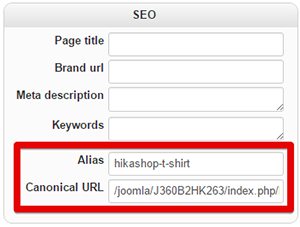
Can you provide (as ask by jerome) details about concerned products, more precisely, we needs product configuration page of :
- Product with correct link AND product without correct link.
We want see this :
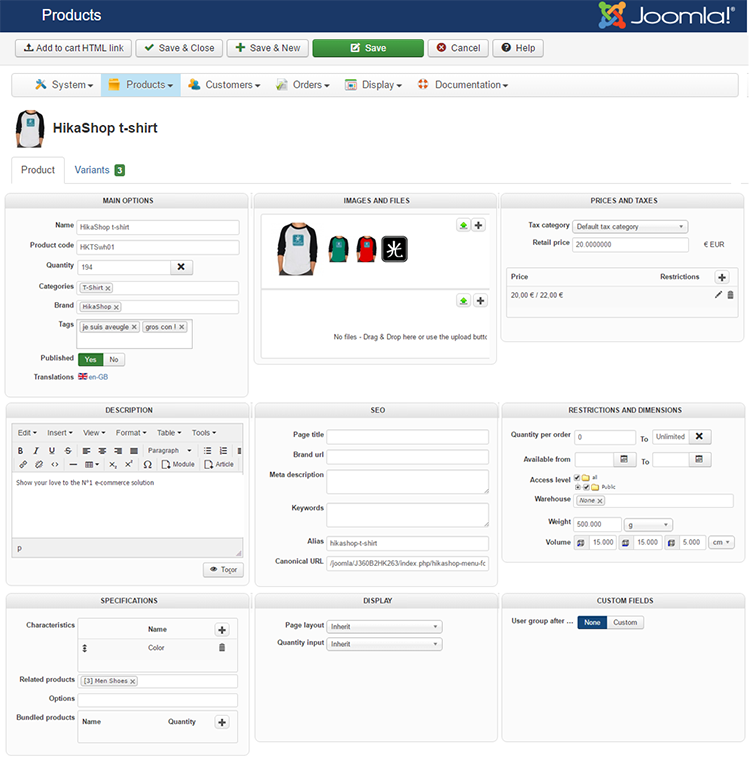
Plus, provide this :
Alias: hikashop-t-shirt
Canonical URL: /joomla/J360B2HK263/index.php/hikashop-menu-for-categories-listing/product/hikashop-t-shirt
Awaiting details from you.
Regards
Can you provide (as ask by jerome) details about concerned products, more precisely, we needs product configuration page of :
- Product with correct link AND product without correct link.
We want see this :
Plus, provide this :
Alias: hikashop-t-shirt
Canonical URL: /joomla/J360B2HK263/index.php/hikashop-menu-for-categories-listing/product/hikashop-t-shirt
Awaiting details from you.
Regards
Last edit: 9 years 7 months ago by Philip.
Please Log in or Create an account to join the conversation.
9 years 7 months ago #261792
by gioxd
Replied by gioxd on topic Customize email "order shipped"
Hello, thanks for the answer.
I attach screenshots of the product, but, as I said, the problem also occurs on the same product if it has other models. So if the customer orders:
1 red dish
1 white dish
the first model has the correct link, the second model is no link. But it is the same product.
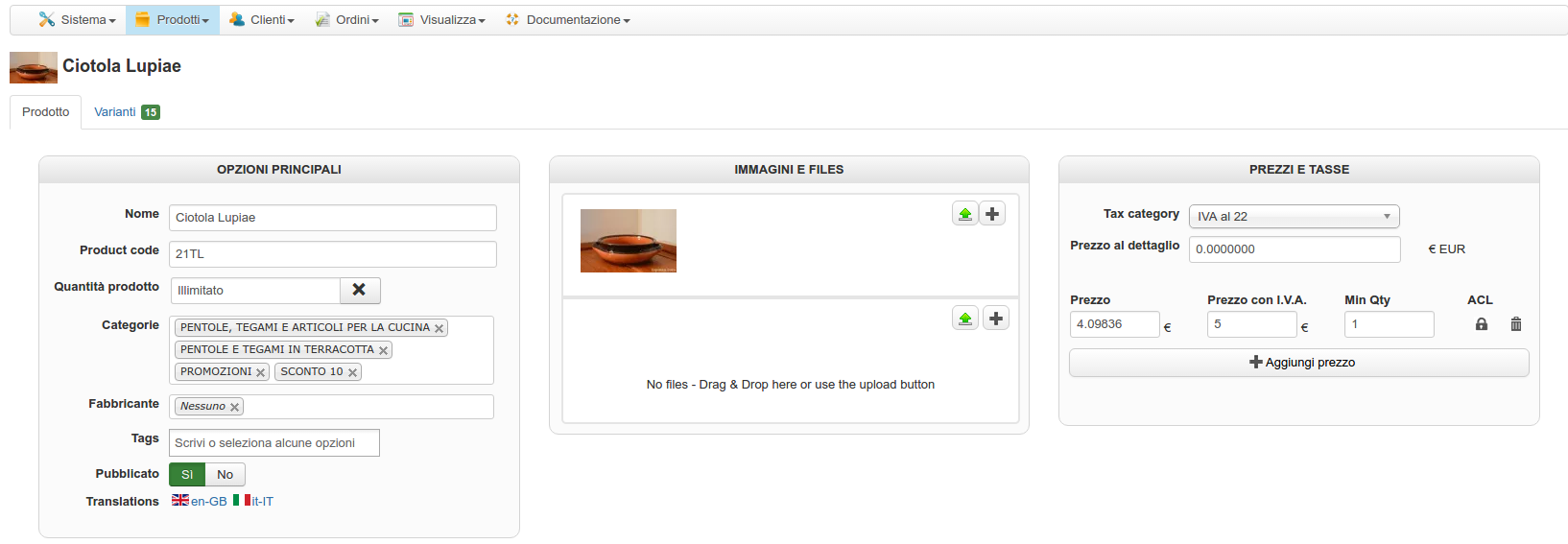
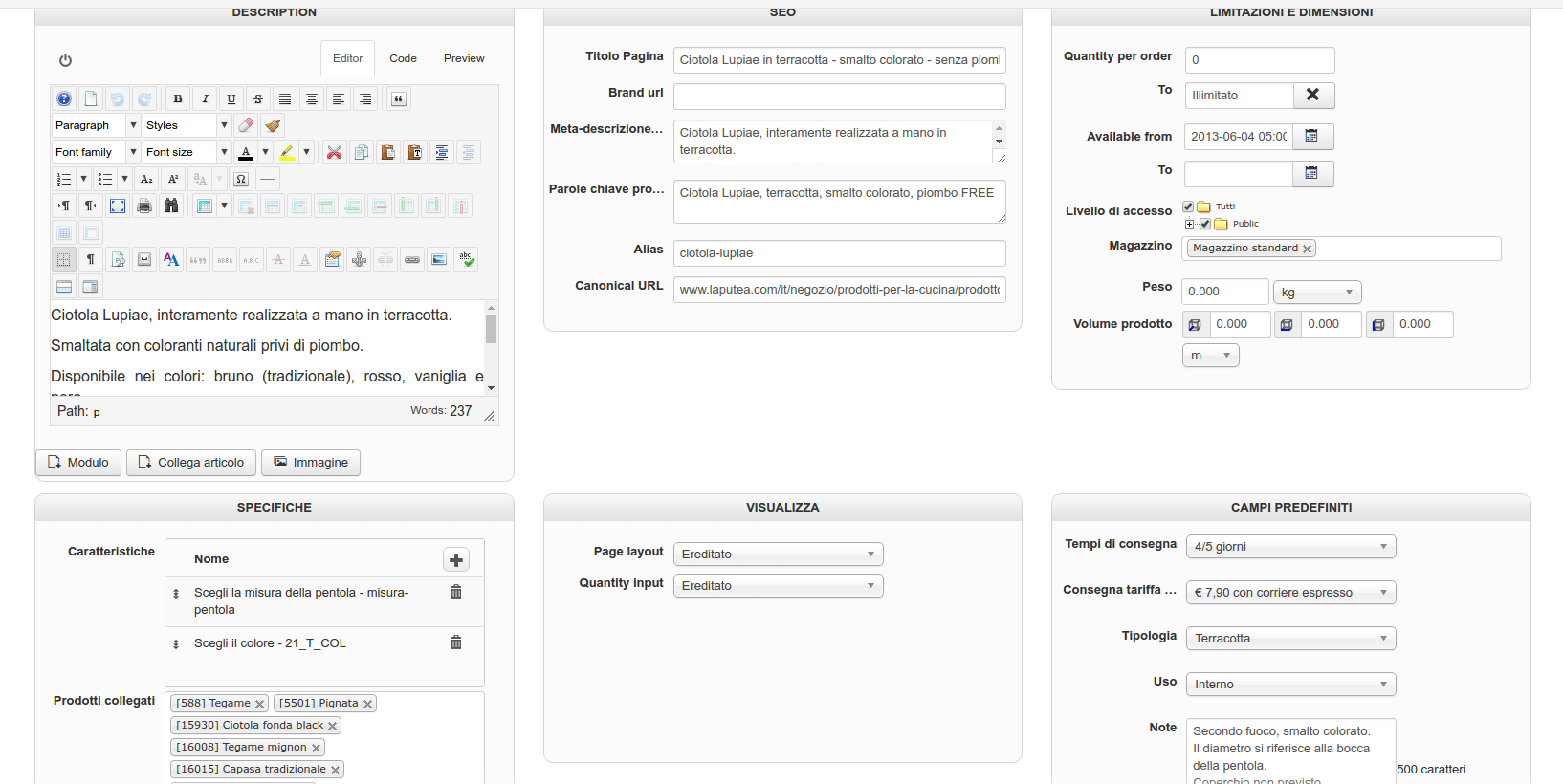

I attach screenshots of the product, but, as I said, the problem also occurs on the same product if it has other models. So if the customer orders:
1 red dish
1 white dish
the first model has the correct link, the second model is no link. But it is the same product.
Please Log in or Create an account to join the conversation.
9 years 7 months ago #261837
by nicolas
Replied by nicolas on topic Customize email "order shipped"
Hi,
It looks like your canonical URL is wrong.
It should normally be a relative link starting at the root of the website, like in the screenshot of Philippe.
I suspect this might be why the system doesn't behave properly.
Could you please try again with valid canonical URLs for the products of the order ?
It looks like your canonical URL is wrong.
It should normally be a relative link starting at the root of the website, like in the screenshot of Philippe.
I suspect this might be why the system doesn't behave properly.
Could you please try again with valid canonical URLs for the products of the order ?
Please Log in or Create an account to join the conversation.
9 years 7 months ago #261996
by gioxd
Replied by gioxd on topic Customize email "order shipped"
Nicolas hello, thanks for the reply. Can I change the canonical URL with mass action?
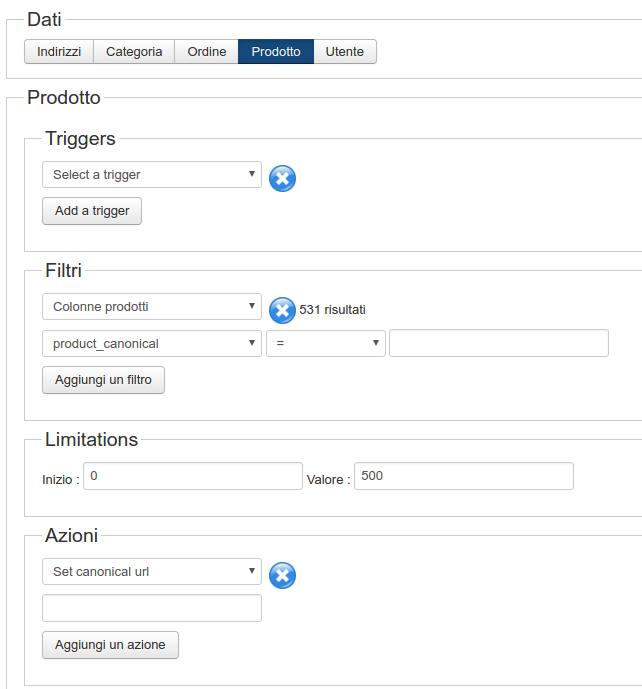
in "set canonical url" What should I enter?
thank you!
in "set canonical url" What should I enter?
thank you!
Please Log in or Create an account to join the conversation.
9 years 7 months ago #261997
by nicolas
Replied by nicolas on topic Customize email "order shipped"
Hi,
Well, you could have:
"/it/negozio/prodotti-per-la-cucina/prodotto/{product_alias}"
Supposing that all your products aliases are filled with the product's alias used in the URLs.
Also, this means that all the products links will be in the menu item negozio/prodotti-per-la-cucina
If you want to have different menu items for different categories of products, you would have to run the mass action with a filter on the category and run several times the mass action, once for each category, after changing the filter on the category and the menu item alias in the URL.
Well, you could have:
"/it/negozio/prodotti-per-la-cucina/prodotto/{product_alias}"
Supposing that all your products aliases are filled with the product's alias used in the URLs.
Also, this means that all the products links will be in the menu item negozio/prodotti-per-la-cucina
If you want to have different menu items for different categories of products, you would have to run the mass action with a filter on the category and run several times the mass action, once for each category, after changing the filter on the category and the menu item alias in the URL.
The following user(s) said Thank You: gioxd
Please Log in or Create an account to join the conversation.
Time to create page: 0.257 seconds