

- Posts: 281
- Thank you received: 3
field is filled up but empty in back end
9 years 8 months ago - 9 years 8 months ago #261635
by francota
field is filled up but empty in back end was created by francota
-- HikaShop version -- : 2.6.4
-- Joomla version -- : 3.6.5
Hello
I have a problem with 2 fields, they depend on what the user chose by a select field, I mean If I a select "fattura" it shows below the field "partita iva" while if I select "ricevuta" it shows "codice fiscale"
To be honest I did all my test chosing "fattura" so I used always the field "partita iva" and it was ok, now I did a new test using "codice fiscale" field and the problem is during the registration I fill it but after registration in back end the field is empty
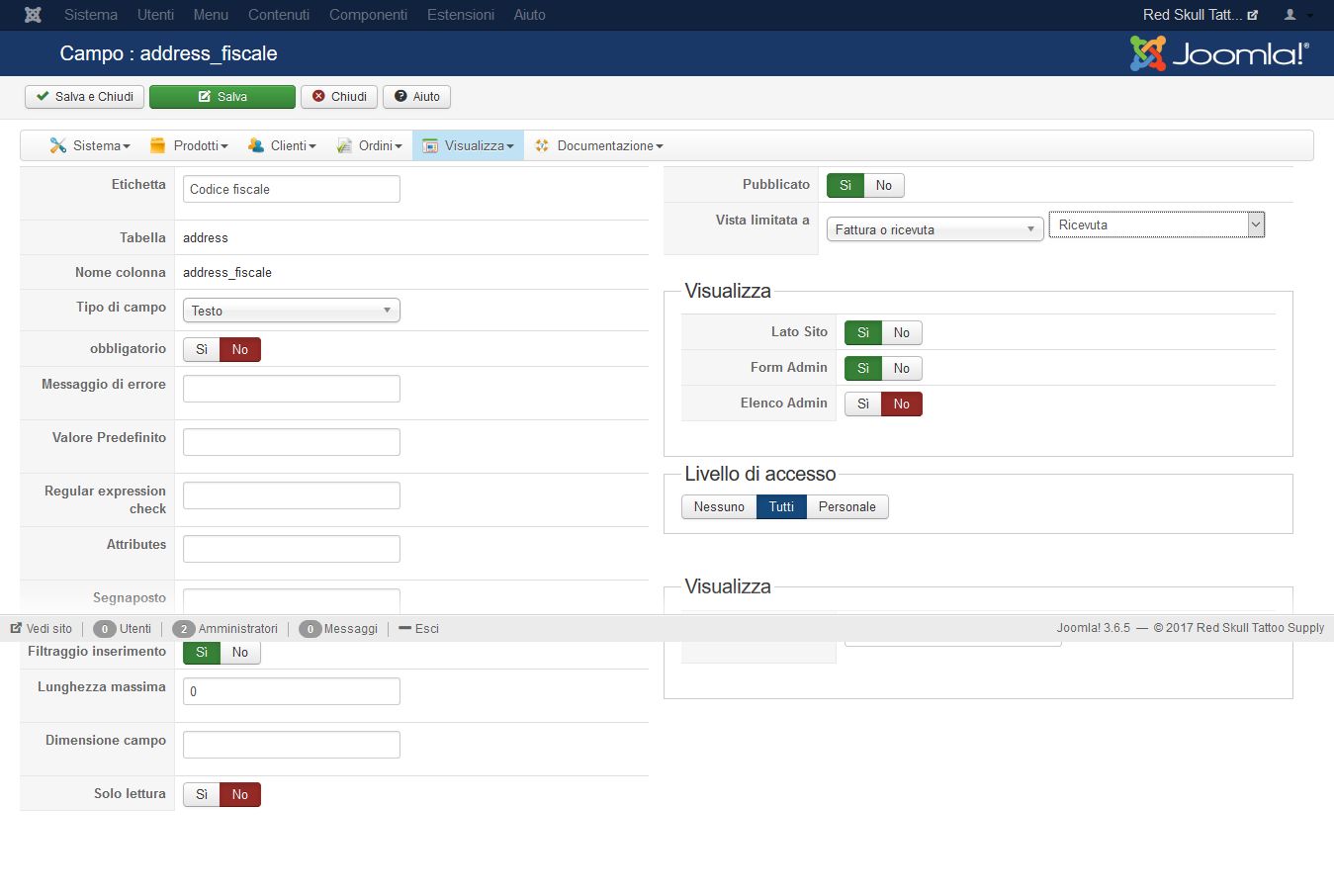
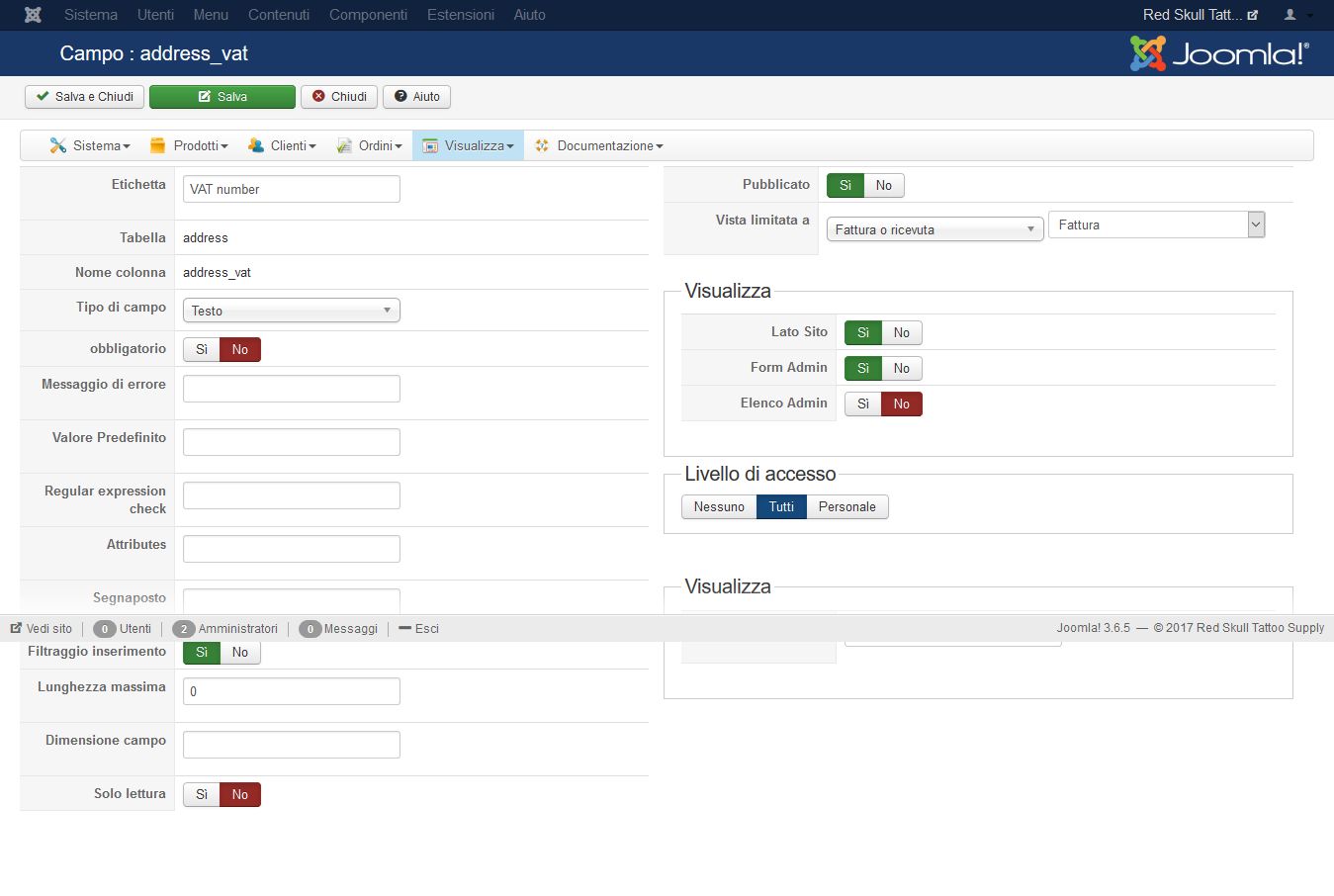
I attache the screen shot of 2 setting fields, but they are identica so i dont know why one is ok and other one not
Thanks
Frank
-- Joomla version -- : 3.6.5
Hello
I have a problem with 2 fields, they depend on what the user chose by a select field, I mean If I a select "fattura" it shows below the field "partita iva" while if I select "ricevuta" it shows "codice fiscale"
To be honest I did all my test chosing "fattura" so I used always the field "partita iva" and it was ok, now I did a new test using "codice fiscale" field and the problem is during the registration I fill it but after registration in back end the field is empty
I attache the screen shot of 2 setting fields, but they are identica so i dont know why one is ok and other one not
Thanks
Frank
Last edit: 9 years 8 months ago by francota.
Please Log in or Create an account to join the conversation.
9 years 8 months ago #261640
by francota
Replied by francota on topic field is filled up but empty in back end
I tryed to fill up the "codice fiscale" field by back end, and there is the same problem it doesnìt keep the value :S
Thanks
Frank
Thanks
Frank
Please Log in or Create an account to join the conversation.

9 years 8 months ago #261650
by nicolas
Replied by nicolas on topic field is filled up but empty in back end
Hi,
Could you provide a link to your shop so that we could have a look at the problem ?
Could you provide a link to your shop so that we could have a look at the problem ?
Please Log in or Create an account to join the conversation.
9 years 8 months ago #261762
by francota
Replied by francota on topic field is filled up but empty in back end
Please Log in or Create an account to join the conversation.
9 years 8 months ago #261848
by nicolas
Replied by nicolas on topic field is filled up but empty in back end
Hi,
Please make sure that you added the corresponding tag for the address_fiscale custom field in the "address_template" view file for both your frontend and backend template via the menu Display>Views:
www.hikashop.com/support/documentation/1...ize-the-display.html
Please make sure that you added the corresponding tag for the address_fiscale custom field in the "address_template" view file for both your frontend and backend template via the menu Display>Views:
www.hikashop.com/support/documentation/1...ize-the-display.html
Please Log in or Create an account to join the conversation.
9 years 8 months ago #261904
by francota
Replied by francota on topic field is filled up but empty in back end
Hello
I checked the code as you sayd and I didn't see anything wrong, moreover if I had some problem in template I should have problem with those fields now too.
Infact in the production site I just disabled the fields with select menu and the fields"codice fiscale" and "partita IVA" are always visible and i dont have any problem with them.
Howeever I attach here the code of back-end and front-end, maybe your eyes are better than mine
thanks
Frank
Back-end order / address_template.php
Front-end address / address_template.php
I checked the code as you sayd and I didn't see anything wrong, moreover if I had some problem in template I should have problem with those fields now too.
Infact in the production site I just disabled the fields with select menu and the fields"codice fiscale" and "partita IVA" are always visible and i dont have any problem with them.
Howeever I attach here the code of back-end and front-end, maybe your eyes are better than mine
thanks
Frank
Back-end order / address_template.php
Code:
<?php
/**
* @package HikaShop for Joomla!
* @version 2.6.4
* @author hikashop.com
* @copyright (C) 2010-2016 HIKARI SOFTWARE. All rights reserved.
* @license GNU/GPLv3 http://www.gnu.org/licenses/gpl-3.0.html
*/
defined('_JEXEC') or die('Restricted access');
?>{address_company}
<?php echo 'Nome: ';?>{address_title} {address_firstname} {address_lastname}
<?php echo 'Ragione Sociale: ';?>{address_middle_name}
<?php echo 'Indirizzo: ';?>{address_street}
<?php echo 'Città: ';?>{address_city} {address_state} {address_post_code}
{address_country}
<?php echo JText::sprintf('TELEPHONE_IN_ADDRESS','{address_telephone}');?>
<br/><?php echo 'Codice Fiscale: ';?>{address_fiscale}
<?php echo 'Partita IVA: ';?>{address_vat}
Front-end address / address_template.php
Code:
<?php
/**
* @package HikaShop for Joomla!
* @version 2.6.4
* @author hikashop.com
* @copyright (C) 2010-2016 HIKARI SOFTWARE. All rights reserved.
* @license GNU/GPLv3 http://www.gnu.org/licenses/gpl-3.0.html
*/
defined('_JEXEC') or die('Restricted access');
?>{address_company}
<?php echo 'Nome: ';?>{address_title} {address_firstname} {address_lastname}
<?php echo 'Ragione Sociale: ';?>{address_middle_name}
<?php echo 'Indirizzo: ';?>{address_street}
<?php echo 'Città: ';?>{address_city} {address_state} {address_post_code}
{address_country}
<?php echo JText::sprintf('TELEPHONE_IN_ADDRESS','{address_telephone}');?>
<br/><?php echo 'Codice Fiscale: ';?>{address_fiscale}
<?php echo 'Partita IVA: ';?>{address_vat}
Please Log in or Create an account to join the conversation.

9 years 8 months ago #262201
by Jerome
Jerome - Obsidev.com
HikaMarket & HikaSerial developer / HikaShop core dev team.
Replied by Jerome on topic field is filled up but empty in back end
Hi,
The address template is just a template in the way that HikaShop will replace the tags with the field value (if the field and the value are available).
You do not need to perform an "echo" of a fixed value. You can just put the text directly in the view.
For the telephone, there is the usage of an "echo" because it is using the translation system, so you can configure how to display the telephone (and if you want to) just by changing a translation.
Regards,
The address template is just a template in the way that HikaShop will replace the tags with the field value (if the field and the value are available).
You do not need to perform an "echo" of a fixed value. You can just put the text directly in the view.
For the telephone, there is the usage of an "echo" because it is using the translation system, so you can configure how to display the telephone (and if you want to) just by changing a translation.
Regards,
Jerome - Obsidev.com
HikaMarket & HikaSerial developer / HikaShop core dev team.
Please Log in or Create an account to join the conversation.
9 years 8 months ago #262204
by francota
Replied by francota on topic field is filled up but empty in back end
So you mean that for "address_fiscale is enought this code:
Codice Fiscale: {address_fiscale}
But I wonder why "address_vet" works perfectlly??
Thanks
Frank
Codice Fiscale: {address_fiscale}
But I wonder why "address_vet" works perfectlly??
Thanks
Frank
Please Log in or Create an account to join the conversation.
9 years 8 months ago #262208
by Jerome
Jerome - Obsidev.com
HikaMarket & HikaSerial developer / HikaShop core dev team.
Replied by Jerome on topic field is filled up but empty in back end
Hi,
Without details about the context (the order and his address), it will be very difficult for us to tell you more.
Regards,
Without details about the context (the order and his address), it will be very difficult for us to tell you more.
Regards,
Jerome - Obsidev.com
HikaMarket & HikaSerial developer / HikaShop core dev team.
Please Log in or Create an account to join the conversation.
9 years 8 months ago #262283
by francota
Replied by francota on topic field is filled up but empty in back end
Sorry but I dont understand you :blush:
You sayd in the post before:
"You do not need to perform an "echo" of a fixed value. You can just put the text directly in the view."
So I thought that the problem was in it.
I just wondered why the field "codice fiascale" after the user fills up it looks empty in back-end in the order and in dettail of the user.
Please exaplain me where could be the problem?
Thanks
Frank
You sayd in the post before:
"You do not need to perform an "echo" of a fixed value. You can just put the text directly in the view."
So I thought that the problem was in it.
I just wondered why the field "codice fiascale" after the user fills up it looks empty in back-end in the order and in dettail of the user.
Please exaplain me where could be the problem?
Thanks
Frank
Please Log in or Create an account to join the conversation.
9 years 8 months ago #262285
by Jerome
Jerome - Obsidev.com
HikaMarket & HikaSerial developer / HikaShop core dev team.
Replied by Jerome on topic field is filled up but empty in back end
Hi,
Your topic is : "field is filled up but empty in back end".
But I'm afraid that, at any moment, you gave you details about the data in the field or the display of the address.
You're saying that there is a problem but you do not show us what is the problem and why there is a problem.
Regards,
Your topic is : "field is filled up but empty in back end".
But I'm afraid that, at any moment, you gave you details about the data in the field or the display of the address.
You're saying that there is a problem but you do not show us what is the problem and why there is a problem.
Regards,
Jerome - Obsidev.com
HikaMarket & HikaSerial developer / HikaShop core dev team.
Please Log in or Create an account to join the conversation.
9 years 8 months ago #262394
by francota
Replied by francota on topic field is filled up but empty in back end
I try to explain me better.
In the registration form there is a select field, where if a user selects "fattura" it shows below the field "partita iva" while if the user selects "ricevuta" it shows "codice fiscale".
Now If the user choses "ricevuta" and He fills that field with his data,after the registration if I check the data of registration or his order that field will seem empty, with no data inside just that field!
If you see old message I attached also the screen shot of the setting and the last message of nicolas sayd:
For that reason I copyed the code of address_template.php to show that I added the corresponding tag for the address_fiscale custom field in the "address_template" view file for both your frontend and backend template.
I hope the issue is clear now:blush:
Thanks
Frank
In the registration form there is a select field, where if a user selects "fattura" it shows below the field "partita iva" while if the user selects "ricevuta" it shows "codice fiscale".
Now If the user choses "ricevuta" and He fills that field with his data,after the registration if I check the data of registration or his order that field will seem empty, with no data inside just that field!
If you see old message I attached also the screen shot of the setting and the last message of nicolas sayd:
Please make sure that you added the corresponding tag for the address_fiscale custom field in the "address_template" view file for both your frontend and backend template via the menu Display>Views:
www.hikashop.com/support/documentation/1...ize-the-display.html
For that reason I copyed the code of address_template.php to show that I added the corresponding tag for the address_fiscale custom field in the "address_template" view file for both your frontend and backend template.
I hope the issue is clear now:blush:
Thanks
Frank
Please Log in or Create an account to join the conversation.
9 years 8 months ago #262446
by Jerome
Jerome - Obsidev.com
HikaMarket & HikaSerial developer / HikaShop core dev team.
Replied by Jerome on topic field is filled up but empty in back end
Hi,
It does not change my previous message and my request.
Regards,
It does not change my previous message and my request.
Regards,
Jerome - Obsidev.com
HikaMarket & HikaSerial developer / HikaShop core dev team.
Please Log in or Create an account to join the conversation.
9 years 8 months ago #262528
by francota
Replied by francota on topic field is filled up but empty in back end
So I dont know...tell me what could be the problem please
Or tell me what information you need to understand the problem
For now I attach 2 images, maybe I am not clear to exaplain
The first is what I am using now with no problem.
The secondo is the problem
Look everything is the same, in the first I just disabled the field with select
Thanks
Frank
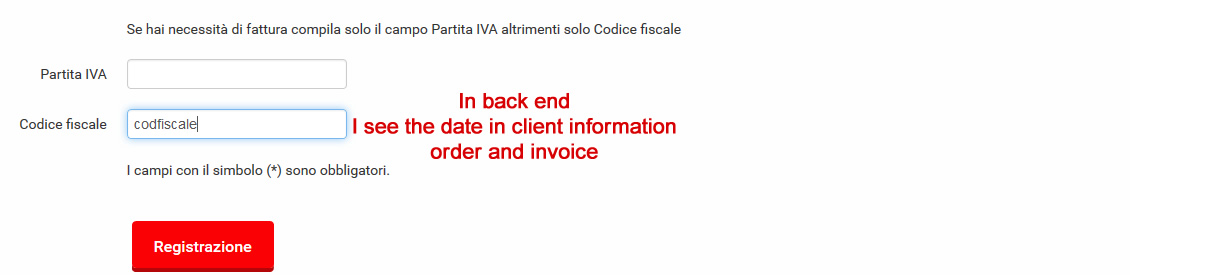

Or tell me what information you need to understand the problem
For now I attach 2 images, maybe I am not clear to exaplain
The first is what I am using now with no problem.
The secondo is the problem
Look everything is the same, in the first I just disabled the field with select
Thanks
Frank
Please Log in or Create an account to join the conversation.
9 years 8 months ago #262567
by Jerome
Jerome - Obsidev.com
HikaMarket & HikaSerial developer / HikaShop core dev team.
Replied by Jerome on topic field is filled up but empty in back end
Hi,
Like I wrote previously ; we need to have the details of the order in the backend !
Show us the order details with the address, in the backend !
Show us the content in your database.
Show us that there is really an information stored somewhere ; otherwise if there is nothing stored, for sure, nothing will be displayed.
So ; we need real proof !
Regards,
Like I wrote previously ; we need to have the details of the order in the backend !
Show us the order details with the address, in the backend !
Show us the content in your database.
Show us that there is really an information stored somewhere ; otherwise if there is nothing stored, for sure, nothing will be displayed.
So ; we need real proof !
Regards,
Jerome - Obsidev.com
HikaMarket & HikaSerial developer / HikaShop core dev team.
Please Log in or Create an account to join the conversation.
9 years 8 months ago #262659
by francota
Replied by francota on topic field is filled up but empty in back end
Ok Jerome
So I made e order test and I attach here some screen of the registration and back end order dettail and db address, however the field addess_fiscale is always empty
thanks
Frank
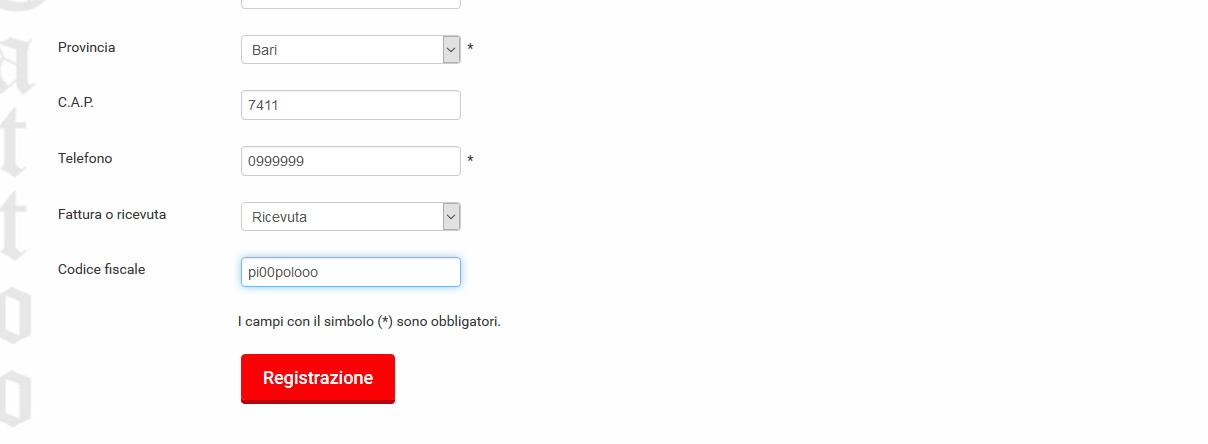
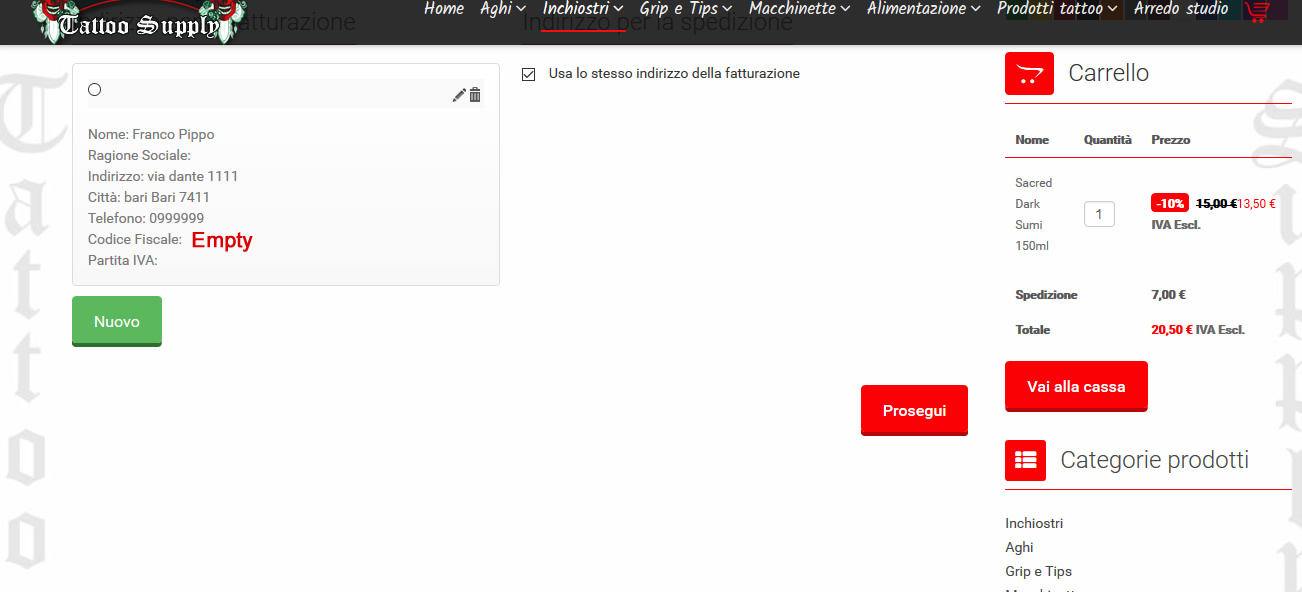
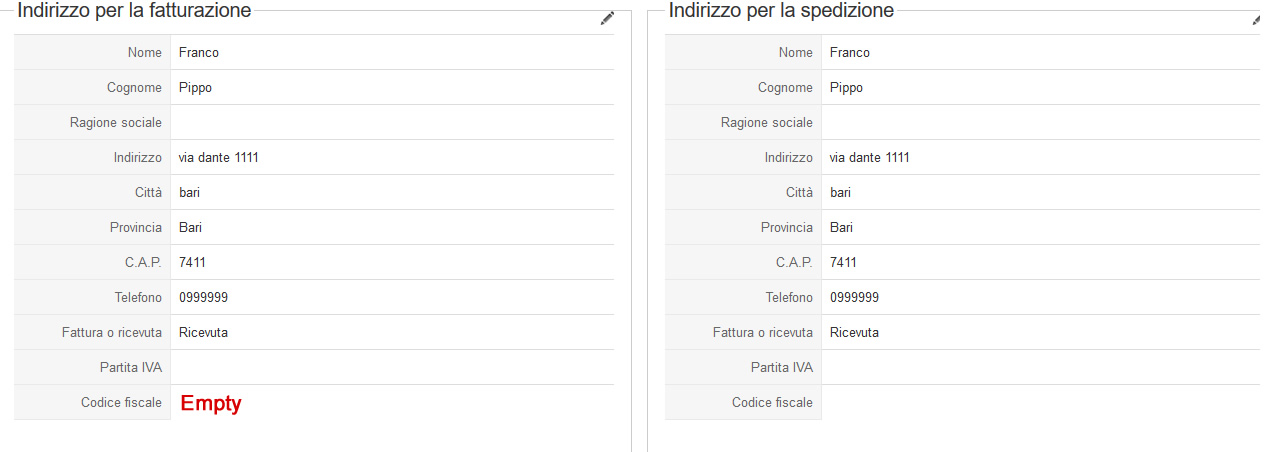
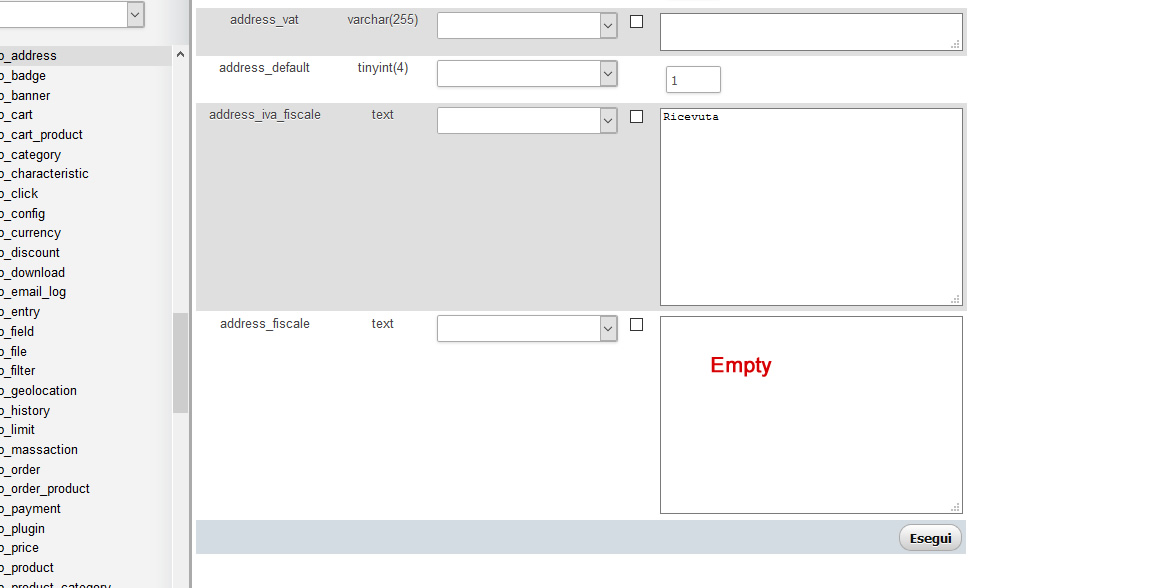
So I made e order test and I attach here some screen of the registration and back end order dettail and db address, however the field addess_fiscale is always empty
thanks
Frank
Please Log in or Create an account to join the conversation.
9 years 8 months ago #262695
by nicolas
Replied by nicolas on topic field is filled up but empty in back end
Hi,
Thanks, that's clear now.
I've tried the same thing on our end and couldn't reproduce the problem.
Could you provide a backend and FTP access as well as a link to this thread via our contact form so that we can look at the problem on your website ?
Thanks, that's clear now.
I've tried the same thing on our end and couldn't reproduce the problem.
Could you provide a backend and FTP access as well as a link to this thread via our contact form so that we can look at the problem on your website ?
Please Log in or Create an account to join the conversation.
9 years 8 months ago #262874
by francota
Replied by francota on topic field is filled up but empty in back end
ok I did right now
Thanks
Frank
Thanks
Frank
Please Log in or Create an account to join the conversation.
9 years 8 months ago #262956
by nicolas
Replied by nicolas on topic field is filled up but empty in back end
Hi,
I would recommend updating to HikaShop 3. We've fixed that issue with the new checkout and this won't happen with it.
I would recommend updating to HikaShop 3. We've fixed that issue with the new checkout and this won't happen with it.
Please Log in or Create an account to join the conversation.
9 years 8 months ago #263084
by francota
Replied by francota on topic field is filled up but empty in back end
Mmmm I wuold like to update Hika but I already tested that with my template, and it is not really compatible with hika3 also if it is one that you have in your suggest templates
Frank
Frank
Please Log in or Create an account to join the conversation.
Time to create page: 0.165 seconds