

- Posts: 7
- Thank you received: 0
Using Select for Quantity Input problem
9 years 5 months ago #270688
by ctcpfi
Using Select for Quantity Input problem was created by ctcpfi
-- HikaShop version -- : 3.1.0
-- Joomla version -- : 3.7.2
-- PHP version -- : 5.6.30
-- Browser(s) name and version -- : Multiple
-- Error-message(debug-mod must be tuned on) -- : no error message
Hi,
I use select for the quantity input and I've noticed an issue with the new update.
Previously when you clicked the qty select box the dropdown would allow the user to select as much as we have. (ex. We have 50 in stock, they can select 50 in the dropdown. Likewise, if there's only 2 then 2 is the most you can select.)
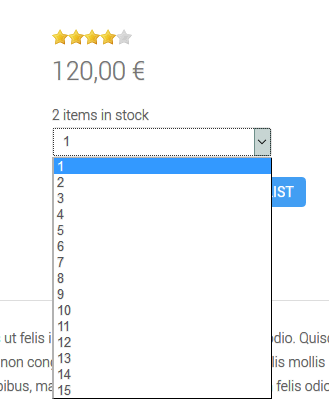
With the Hikashop 3 update, by default the user can select 15 no matter what. If there's only 2 in stock, they can select 15. If there's 100 in stock, 15 is still all it shows.
I've recreated this situation on a hikashop demo store page to confirm.
-- Joomla version -- : 3.7.2
-- PHP version -- : 5.6.30
-- Browser(s) name and version -- : Multiple
-- Error-message(debug-mod must be tuned on) -- : no error message
Hi,
I use select for the quantity input and I've noticed an issue with the new update.
Previously when you clicked the qty select box the dropdown would allow the user to select as much as we have. (ex. We have 50 in stock, they can select 50 in the dropdown. Likewise, if there's only 2 then 2 is the most you can select.)
With the Hikashop 3 update, by default the user can select 15 no matter what. If there's only 2 in stock, they can select 15. If there's 100 in stock, 15 is still all it shows.
I've recreated this situation on a hikashop demo store page to confirm.
Please Log in or Create an account to join the conversation.

9 years 5 months ago #270692
by Jerome
Jerome - Obsidev.com
HikaMarket & HikaSerial developer / HikaShop core dev team.
Replied by Jerome on topic Using Select for Quantity Input problem
Hello,
In the view "product / show_quantity" please replace
By
It would use the product stock to limit the internal variable used by the quantity selector.
Please let us know your feedback about that patch so we can integrate it into HikaShop and use the same kind of patch for others quantity selector views.
Regards,
In the view "product / show_quantity" please replace
Code:
$html = $this->params->get('html');
Code:
if(isset($this->row) && isset($this->row->product_quantity) && (int)$this->row->product_quantity > 0 && (int)$this->row->product_quantity < $max_quantity)
$max_quantity = (int)$this->row->product_quantity;
$html = $this->params->get('html');
Please let us know your feedback about that patch so we can integrate it into HikaShop and use the same kind of patch for others quantity selector views.
Regards,
Jerome - Obsidev.com
HikaMarket & HikaSerial developer / HikaShop core dev team.
Please Log in or Create an account to join the conversation.
9 years 5 months ago #270779
by Jerome
Jerome - Obsidev.com
HikaMarket & HikaSerial developer / HikaShop core dev team.
Replied by Jerome on topic Using Select for Quantity Input problem
Feedback.
That patch won't be integrated into HikaShop because it is incompatible with the wishlist system.
Even if there is a stock of "2" ; the customer have the right to add more than 2 items in his wishlist.
Regards,
That patch won't be integrated into HikaShop because it is incompatible with the wishlist system.
Even if there is a stock of "2" ; the customer have the right to add more than 2 items in his wishlist.
Regards,
Jerome - Obsidev.com
HikaMarket & HikaSerial developer / HikaShop core dev team.
Please Log in or Create an account to join the conversation.
9 years 5 months ago - 9 years 5 months ago #270794
by ctcpfi
Replied by ctcpfi on topic Using Select for Quantity Input problem
Hi Jerome,
I've tried the modification but nothing seems to change. I set up a test environment with a fresh Joomla install and only installed Hikashop to make sure nothing else was affecting it. Cache disabled. Am I missing something?
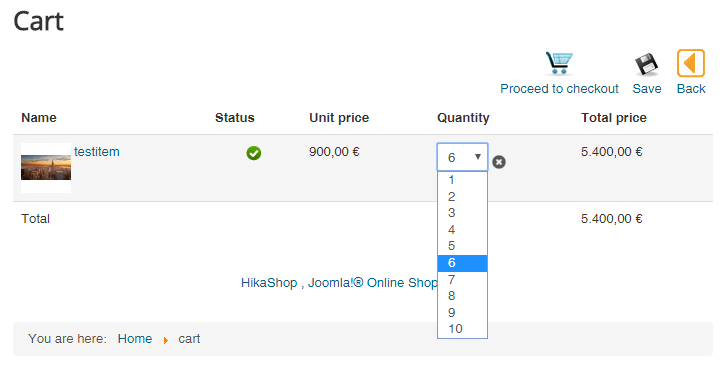
Also, I've noticed on the cart page the quantities behave like I want them to.
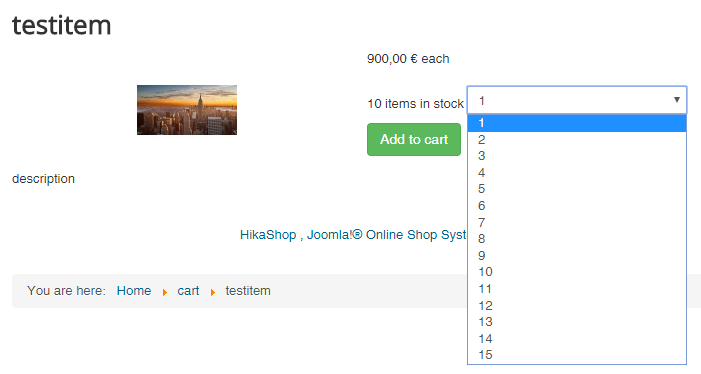
Below are images of my fresh test store with your modification. The product is an item with a QTY of 10.
Item example:
Cart example (note* it functions like this without the modification also):
I've tried the modification but nothing seems to change. I set up a test environment with a fresh Joomla install and only installed Hikashop to make sure nothing else was affecting it. Cache disabled. Am I missing something?
Also, I've noticed on the cart page the quantities behave like I want them to.
Below are images of my fresh test store with your modification. The product is an item with a QTY of 10.
Item example:
Cart example (note* it functions like this without the modification also):
Last edit: 9 years 5 months ago by ctcpfi.
Please Log in or Create an account to join the conversation.
9 years 5 months ago #270827
by ctcpfi
Replied by ctcpfi on topic Using Select for Quantity Input problem
After a little testing, i found that modifying the code snip like below works.
I'm not sure what problems removing the last part of the if statement will cause.
Code:
if(isset($this->row) && isset($this->row->product_quantity) && (int)$this->row->product_quantity > 0)
$max_quantity = (int)$this->row->product_quantity;
$html = $this->params->get('html');
I'm not sure what problems removing the last part of the if statement will cause.
Please Log in or Create an account to join the conversation.
9 years 5 months ago #270828
by Jerome
Jerome - Obsidev.com
HikaMarket & HikaSerial developer / HikaShop core dev team.
Replied by Jerome on topic Using Select for Quantity Input problem
Hello,
Like I wrote in my previous message, the reason why there is no restriction on the product page is that you can add the product into the wishlist.
So the current behavior in HikaShop is the right one ; it was the point that I forgot in my first reply.
Afterwards, if you want to patch HikaShop in the view, you can. But you should continue to handle the max quantity
Regards,
Like I wrote in my previous message, the reason why there is no restriction on the product page is that you can add the product into the wishlist.
So the current behavior in HikaShop is the right one ; it was the point that I forgot in my first reply.
Afterwards, if you want to patch HikaShop in the view, you can. But you should continue to handle the max quantity
Code:
if(isset($this->row) && isset($this->row->product_quantity) && (int)$this->row->product_quantity > 0 && ((int)$this->row->product_quantity < $max_quantity || $max_quantity <= 0))
$max_quantity = (int)$this->row->product_quantity;
Regards,
Jerome - Obsidev.com
HikaMarket & HikaSerial developer / HikaShop core dev team.
Please Log in or Create an account to join the conversation.
Time to create page: 0.080 seconds