
- Posts: 98
- Thank you received: 7
After upgrad on 3.1.1. customer adress fields are mixed up
- Markus Schnier
-
 Topic Author
- Offline
Less
More
9 years 4 months ago #271013
by Markus Schnier
-- url of the page with the problem -- :
www.2-rad-schwede.de
-- HikaShop version -- : 3.1.1. business
-- Joomla version -- : 3.7.2
-- PHP version -- : 7.0.16
-- Browser(s) name and version -- : mozilla latest version
Hi,
after the upgrade on 3.1.1 the structure of the adress filelds in the Cart is mixed up. Im using the guest mode and some text overwrites..
thanks and best regards
Markus
-- HikaShop version -- : 3.1.1. business
-- Joomla version -- : 3.7.2
-- PHP version -- : 7.0.16
-- Browser(s) name and version -- : mozilla latest version
Hi,
after the upgrade on 3.1.1 the structure of the adress filelds in the Cart is mixed up. Im using the guest mode and some text overwrites..
thanks and best regards
Markus
Please Log in or Create an account to join the conversation.

9 years 4 months ago #271018
by Jerome
Jerome - Obsidev.com
HikaMarket & HikaSerial developer / HikaShop core dev team.
Replied by Jerome on topic After upgrad on 3.1.1. customer adress fields are mixed up
Hello,
In hikashop.css file ; please replace
By
And it would fix your issue (please clean your browser cache in order to be sure to load the CSS file with the modification and not the old version from your browser cache).
Regards,
In hikashop.css file ; please replace
Code:
.clearfix:before,
.clearfix:after,
.hk-container:before,
.hk-container:after,
.hk-container-fluid:before,
.hk-container-fluid:after,
.hk-row:before,
.hk-row:after,
.hk-row-fluid:before,
.hk-row-fluid:after,
.hkform-group:after,
.hk-thumbnails:before,
.hk-thumbnails:after {
content:" ";
display:table;
-webkit-box-sizing:border-box;
-moz-box-sizing:border-box;
box-sizing:border-box;
}
.clearfix:after,
.hk-container:after,
.hk-container-fluid:after,
.hk-row:after,
.hk-row-fluid:after,
.hk-thumbnails:before,
.hk-thumbnails:after {
clear:both;
}
Code:
.clearfix:before,
.clearfix:after,
.hk-container:before,
.hk-container:after,
.hk-container-fluid:before,
.hk-container-fluid:after,
.hk-row:before,
.hk-row:after,
.hk-row-fluid:before,
.hk-row-fluid:after,
.hkform-group:before,
.hkform-group:after,
.hk-thumbnails:before,
.hk-thumbnails:after {
content:" ";
display:table;
-webkit-box-sizing:border-box;
-moz-box-sizing:border-box;
box-sizing:border-box;
}
.clearfix:after,
.hk-container:after,
.hk-container-fluid:after,
.hk-row:after,
.hk-row-fluid:after,
.hkform-group:after,
.hk-thumbnails:before,
.hk-thumbnails:after {
clear:both;
}
Regards,
Jerome - Obsidev.com
HikaMarket & HikaSerial developer / HikaShop core dev team.
The following user(s) said Thank You: Markus Schnier
Please Log in or Create an account to join the conversation.
- Markus Schnier
-
Topic Author
- Offline
Less
More
- Posts: 98
- Thank you received: 7
9 years 4 months ago #271316
by Markus Schnier
Replied by Markus Schnier on topic After upgrad on 3.1.1. customer adress fields are mixed up
Fantastic!
Solved
best regards
Markus
Solved
best regards
Markus
Please Log in or Create an account to join the conversation.
- Markus Schnier
-
Topic Author
- Offline
Less
More
- Posts: 98
- Thank you received: 7
9 years 4 months ago #271798
by Markus Schnier
Replied by Markus Schnier on topic After upgrad on 3.1.1. customer adress fields are mixed up
Thanks that works great!
best regards
Markus
best regards
Markus
Please Log in or Create an account to join the conversation.
9 years 2 months ago #275052
by patoushka
Replied by patoushka on topic After upgrad on 3.1.1. customer adress fields are mixed up
Where exactly is this hikashop.css file? Should I hack Hikashop or can I make this modification into the view section?
Thanks
Thanks
Please Log in or Create an account to join the conversation.

Less
More
- Posts: 12953
- Thank you received: 1778
9 years 2 months ago #275054
by Mohamed Thelji
Replied by Mohamed Thelji on topic After upgrad on 3.1.1. customer adress fields are mixed up
Hello,
Note that you'll be able to edit the code of your Hikashop CSS file via "Hikashop->System->Configuration->Display->Front-end CSS File"
www.hikashop.com/support/documentation/1...the-display.html#css
Note that you'll be able to edit the code of your Hikashop CSS file via "Hikashop->System->Configuration->Display->Front-end CSS File"
www.hikashop.com/support/documentation/1...the-display.html#css
Please Log in or Create an account to join the conversation.
9 years 1 month ago #277618
by sapunov
Replied by sapunov on topic After upgrad on 3.1.1. customer adress fields are mixed up
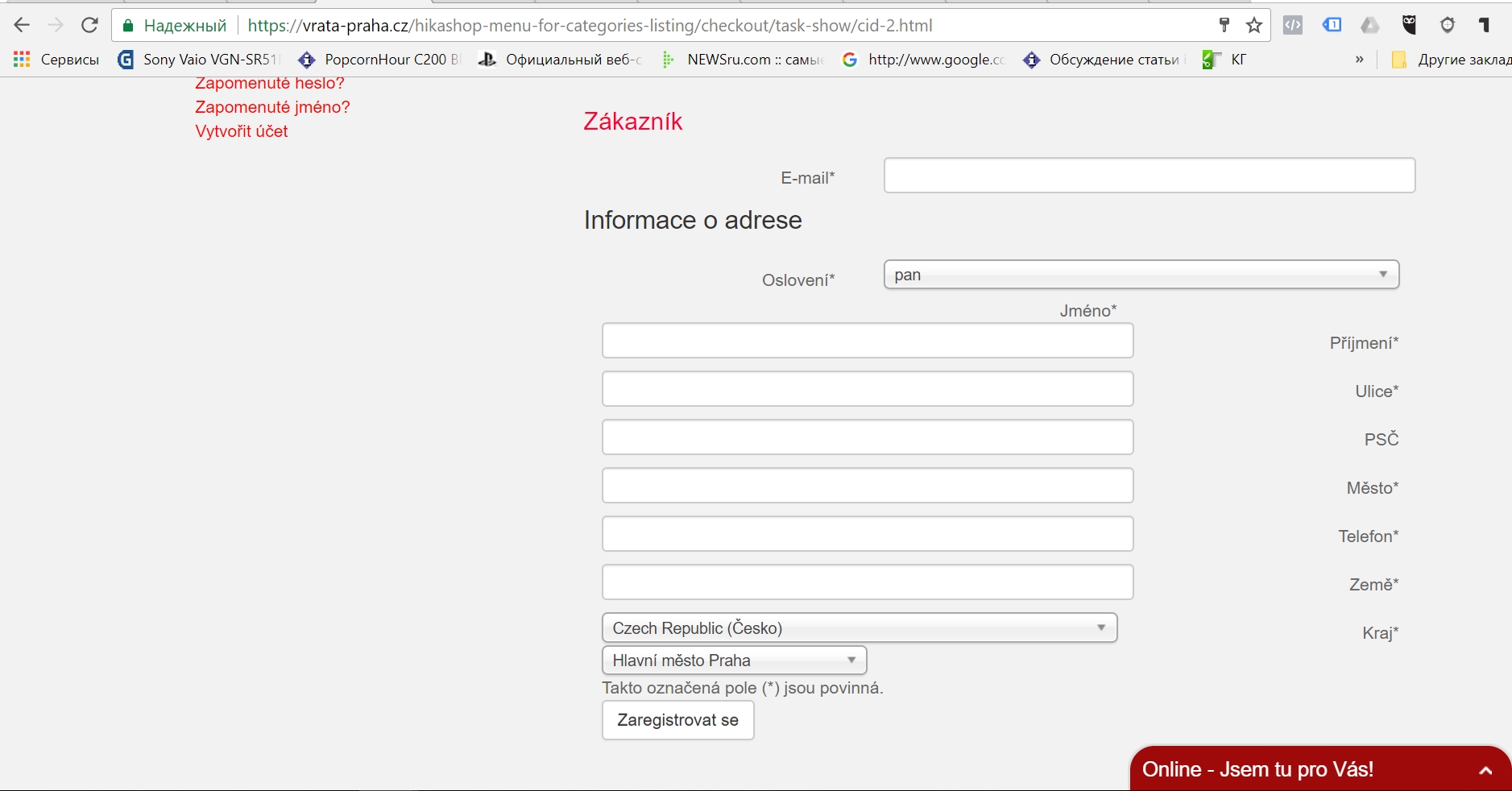
Hello, I have made this change but nothing happens - the same problem with wrapped fields names.
Please Log in or Create an account to join the conversation.
9 years 1 month ago #277980
by Jerome
Jerome - Obsidev.com
HikaMarket & HikaSerial developer / HikaShop core dev team.
Replied by Jerome on topic After upgrad on 3.1.1. customer adress fields are mixed up
Hello,
Please download HikaShop 3.2.0 to get the patched CSS.
Regards,
Please download HikaShop 3.2.0 to get the patched CSS.
Regards,
Jerome - Obsidev.com
HikaMarket & HikaSerial developer / HikaShop core dev team.
Please Log in or Create an account to join the conversation.
Time to create page: 0.286 seconds