
- Posts: 24
- Thank you received: 2
No menu options
- workingtheweb
-
 Topic Author
- Offline
Less
More
9 years 3 months ago #274855
by workingtheweb
No menu options was created by workingtheweb
-- HikaShop version -- : 3.1.1
-- Joomla version -- : 3.7.4
-- PHP version -- : 7.0.21
-- Browser(s) name and version -- : Firefox 54.0.1
-- Error-message(debug-mod must be tuned on) -- : na
I am having a really bad hikashop day. Posted this message a couple of minutes ago. System said it was posted, and then it just didn't exist.
So, here once again is my problem:
I've just upgraded to hikashop 3.1.1_2017_7_27 and there are no menu options when setting up the menus.
Screenshot attached.
Many thanks
Jo
-- Joomla version -- : 3.7.4
-- PHP version -- : 7.0.21
-- Browser(s) name and version -- : Firefox 54.0.1
-- Error-message(debug-mod must be tuned on) -- : na
I am having a really bad hikashop day. Posted this message a couple of minutes ago. System said it was posted, and then it just didn't exist.
So, here once again is my problem:
I've just upgraded to hikashop 3.1.1_2017_7_27 and there are no menu options when setting up the menus.
Screenshot attached.
Many thanks
Jo
Please Log in or Create an account to join the conversation.
- workingtheweb
-
Topic Author
- Offline
Less
More
- Posts: 24
- Thank you received: 2
9 years 3 months ago - 9 years 3 months ago #274880
by workingtheweb
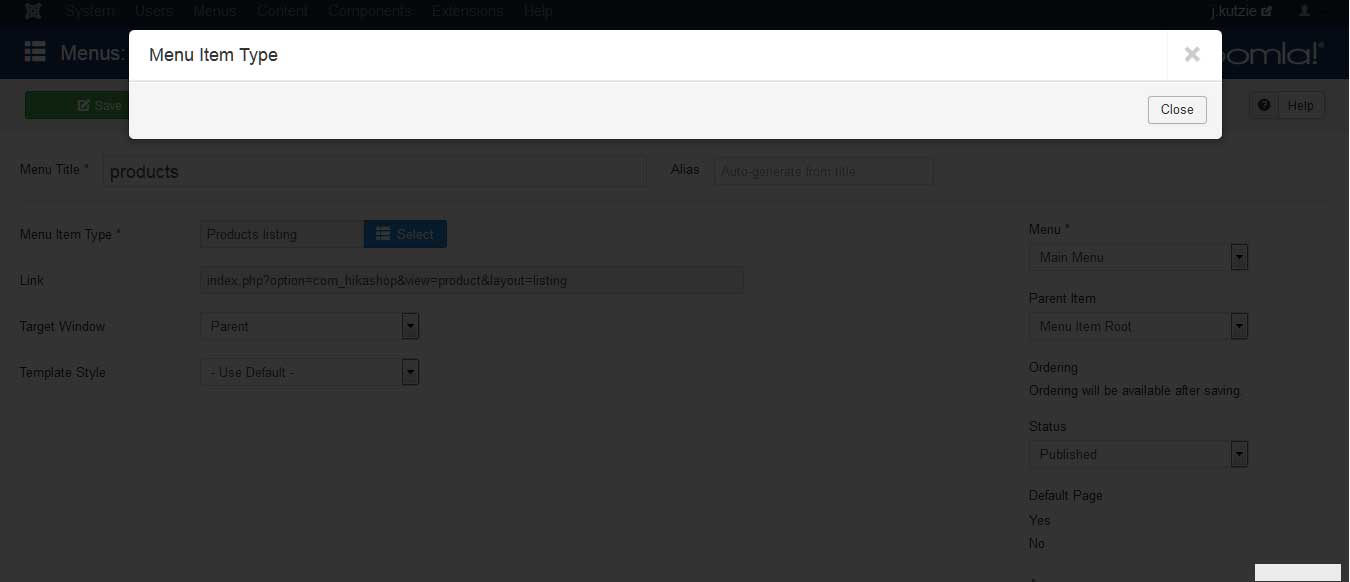 I have tried reverting to older versions. But every time I set up a menu link, all options disappear.
Please see the further attached screenshot that shows when I choose to change the 'menu item type', the dialogue box is empty.
Replied by workingtheweb on topic No menu options
Please see the further attached screenshot that shows when I choose to change the 'menu item type', the dialogue box is empty.
Last edit: 9 years 3 months ago by workingtheweb. Reason: forgot attachment
Please Log in or Create an account to join the conversation.

9 years 3 months ago #274858
by Jerome
Jerome - Obsidev.com
HikaMarket & HikaSerial developer / HikaShop core dev team.
Replied by Jerome on topic No menu options
Hello,
Can you please take a look at your browser console ?
I think that you have a JS issue which stop the processing of the page and do not let the Joomla tab be initialized (as the boolean yes/no that we can also see in your screenshot)
Regards,
PS : The very first message in the forum need to be validated by a moderator.
Can you please take a look at your browser console ?
I think that you have a JS issue which stop the processing of the page and do not let the Joomla tab be initialized (as the boolean yes/no that we can also see in your screenshot)
Regards,
PS : The very first message in the forum need to be validated by a moderator.
Jerome - Obsidev.com
HikaMarket & HikaSerial developer / HikaShop core dev team.
Please Log in or Create an account to join the conversation.
- workingtheweb
-
Topic Author
- Offline
Less
More
- Posts: 24
- Thank you received: 2
9 years 3 months ago - 9 years 3 months ago #274893
by workingtheweb
Replied by workingtheweb on topic No menu options
Hi Jerome
Can you please take a look at the web console screenshot. I'm afraid, I don' t know where to begin reading this.
Many thanks
Jo
Can you please take a look at the web console screenshot. I'm afraid, I don' t know where to begin reading this.
Many thanks
Jo
Last edit: 9 years 3 months ago by workingtheweb. Reason: typos
Please Log in or Create an account to join the conversation.

9 years 3 months ago - 9 years 3 months ago #274920
by Philip
Replied by Philip on topic No menu options
Hello,
I process some tests and don't have your issue on the Joomla 3.7.4, can you provide you build version ?
You will find it in your Main HikaShop configuration in Main tab :
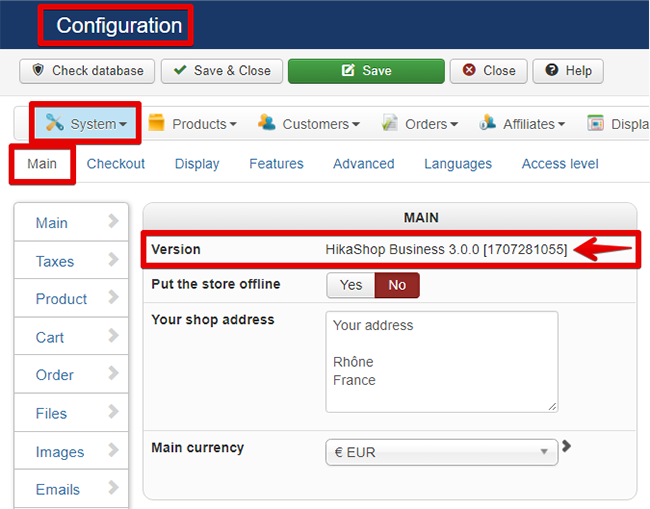
Maybe a recent version of HikaShop can solve this (has on my side it works AND as their are many patch in last build), if you update your HikaShop be sure to purge your cache in order to see if that solve your issue.
Awaiting news from you.
regards
I process some tests and don't have your issue on the Joomla 3.7.4, can you provide you build version ?
You will find it in your Main HikaShop configuration in Main tab :
Maybe a recent version of HikaShop can solve this (has on my side it works AND as their are many patch in last build), if you update your HikaShop be sure to purge your cache in order to see if that solve your issue.
Awaiting news from you.
regards
Last edit: 9 years 3 months ago by Philip.
Please Log in or Create an account to join the conversation.
- workingtheweb
-
Topic Author
- Offline
Less
More
- Posts: 24
- Thank you received: 2
9 years 3 months ago #274976
by workingtheweb
Replied by workingtheweb on topic No menu options
Thanks Philip
Here's my build version: HikaShop Starter 3.1.1 [1707241513]
I am using the latest version. I have cleared my cache and deleted expired cache.
Still no joy
Many thanks for the help
Jo
Here's my build version: HikaShop Starter 3.1.1 [1707241513]
I am using the latest version. I have cleared my cache and deleted expired cache.
Still no joy
Many thanks for the help
Jo
Please Log in or Create an account to join the conversation.
9 years 3 months ago #275051
by Jerome
Jerome - Obsidev.com
HikaMarket & HikaSerial developer / HikaShop core dev team.
Replied by Jerome on topic No menu options
Hello,
The issue you're describing is exactly the same as that one :
www.hikashop.com/forum/install-update/88...ategory-listing.html
And we modified the jquery JS files in HikaShop in order to avoid that specific issue.
Regards,
You mean your website cache or your browser cache ?I have cleared my cache and deleted expired cache.
The issue you're describing is exactly the same as that one :
www.hikashop.com/forum/install-update/88...ategory-listing.html
And we modified the jquery JS files in HikaShop in order to avoid that specific issue.
Regards,
Jerome - Obsidev.com
HikaMarket & HikaSerial developer / HikaShop core dev team.
Please Log in or Create an account to join the conversation.

9 years 3 months ago - 9 years 3 months ago #275333
by river
Replied by river on topic No menu options
OK I had the same problem
Updated from Joomla 3.6.5 to 3.7.4
And from hikashop 3.0 to 3.1.1
Just cleaned my Google Chrome browser log and it works fine.
tnx
Updated from Joomla 3.6.5 to 3.7.4
And from hikashop 3.0 to 3.1.1
Just cleaned my Google Chrome browser log and it works fine.
tnx
Last edit: 9 years 3 months ago by river.
The following user(s) said Thank You: nicolas
Please Log in or Create an account to join the conversation.
Time to create page: 0.072 seconds