
1054 Unknown column 'mjd.remaining' in 'field list'

9 years 2 months ago #275776
by renem
1054 Unknown column 'mjd.remaining' in 'field list' was created by renem
-- HikaShop version -- : 3.1.1
-- Joomla version -- : 3.7.4
-- PHP version -- : 7.0
I try to re-import Mijoshop so al the data is sync but i get this error:
1054 Unknown column 'mjd.remaining' in 'field list'
-- Joomla version -- : 3.7.4
-- PHP version -- : 7.0
I try to re-import Mijoshop so al the data is sync but i get this error:
1054 Unknown column 'mjd.remaining' in 'field list'
Please Log in or Create an account to join the conversation.

9 years 2 months ago #275777
by Jerome
Jerome - Obsidev.com
HikaMarket & HikaSerial developer / HikaShop core dev team.
Replied by Jerome on topic 1054 Unknown column 'mjd.remaining' in 'field list'
Hello,
Can you please indicate which Mijoshop version is installed in the website ?
Regards,
Can you please indicate which Mijoshop version is installed in the website ?
Regards,
Jerome - Obsidev.com
HikaMarket & HikaSerial developer / HikaShop core dev team.
Please Log in or Create an account to join the conversation.
9 years 2 months ago #275795
by renem
Replied by renem on topic 1054 Unknown column 'mjd.remaining' in 'field list'
Hi Jerome i'm using 3.2.1 (the latest version)
Please Log in or Create an account to join the conversation.

9 years 2 months ago #275810
by nicolas
Replied by nicolas on topic 1054 Unknown column 'mjd.remaining' in 'field list'
Hi,
Apparently something changed in the mijoshop_download table in your database since normally that column shouldn't be missing.
Could you check that table in your database via your phpmyadmin ? What do you have there ?
As a quick fix, you can remove the code:
from the file administrator/components/com_hikashop/helpers/import/mijo.php and that will remove the problem when you launch the import. That query is only to retrieve the number of downloads from orders in MijoShop so in most cases it's actually not needed at all.
Apparently something changed in the mijoshop_download table in your database since normally that column shouldn't be missing.
Could you check that table in your database via your phpmyadmin ? What do you have there ?
As a quick fix, you can remove the code:
Code:
$sql = 'INSERT IGNORE INTO `#__hikashop_download` (`'.implode('`,`',array_keys($data)).'`) '.
'SELECT '.implode(',',$data).' FROM `#__mijoshop_download` AS mjd '.
'INNER JOIN `#__mijoshop_download_description` mjdd ON mjd.download_id = mjdd.download_id '.
'INNER JOIN `#__hikashop_file` AS hkf ON ( CONVERT(hkf.file_name USING utf8) = CONVERT(mjdd.name USING utf8) )'.
'INNER JOIN `#__mijoshop_product_to_download` AS mjpd ON mjd.download_id = mjpd.download_id '.
'INNER JOIN `#__mijoshop_order_product` AS mjop ON mjpd.product_id = mjop.product_id '.
'INNER JOIN `#__hikashop_order` AS hko ON hko.order_mijo_id = mjop.order_id '.
'WHERE mjd.download_id > '.$this->options->last_mijo_pfile;
$this->db->setQuery($sql);
$this->db->query();
$total = $this->db->getAffectedRows();
Please Log in or Create an account to join the conversation.
9 years 2 months ago #275826
by renem
Replied by renem on topic 1054 Unknown column 'mjd.remaining' in 'field list'
Hi Nicolas, the error is gone now.
Re-import seems to work correct now, only the order date is not correct an example: 2106-02-07 06:28.
Because we work with downloadable products this date may be important for us.
Regards
Re-import seems to work correct now, only the order date is not correct an example: 2106-02-07 06:28.
Because we work with downloadable products this date may be important for us.
Regards
Please Log in or Create an account to join the conversation.
9 years 2 months ago #275829
by Jerome
Jerome - Obsidev.com
HikaMarket & HikaSerial developer / HikaShop core dev team.
Replied by Jerome on topic 1054 Unknown column 'mjd.remaining' in 'field list'
Hello,
In which field exactly the date is incorrect ?
I checked the code for the import of orders and it copy the value directly from Mijo ; so I assume that it is (or was) using timestamp like we do.
Regards,
In which field exactly the date is incorrect ?
I checked the code for the import of orders and it copy the value directly from Mijo ; so I assume that it is (or was) using timestamp like we do.
Regards,
Jerome - Obsidev.com
HikaMarket & HikaSerial developer / HikaShop core dev team.
Please Log in or Create an account to join the conversation.
9 years 2 months ago - 9 years 2 months ago #275854
by renem
Replied by renem on topic 1054 Unknown column 'mjd.remaining' in 'field list'
Hi Jerome,
See screenshots from the same orders at first MijoShop and the second sho ti from HikaShop:
In HikaShop all the date's are the same....
See screenshots from the same orders at first MijoShop and the second sho ti from HikaShop:
In HikaShop all the date's are the same....
Last edit: 9 years 2 months ago by renem.
Please Log in or Create an account to join the conversation.
9 years 2 months ago #275856
by Jerome
Jerome - Obsidev.com
HikaMarket & HikaSerial developer / HikaShop core dev team.
Replied by Jerome on topic 1054 Unknown column 'mjd.remaining' in 'field list'
Hello,
Sorry, I think that I was not clear enough.
What are the exact field names and what is the exact content that you can see in the database ?
Please understand that with your current screenshot we can't understand what is wrong except that we can see a date in a far future we can't even know if the rest of the date is good, or completely wrong. So please be extremely precise.
Regards,
Sorry, I think that I was not clear enough.
What are the exact field names and what is the exact content that you can see in the database ?
Please understand that with your current screenshot we can't understand what is wrong except that we can see a date in a far future we can't even know if the rest of the date is good, or completely wrong. So please be extremely precise.
Regards,
Jerome - Obsidev.com
HikaMarket & HikaSerial developer / HikaShop core dev team.
Please Log in or Create an account to join the conversation.
9 years 2 months ago - 9 years 2 months ago #275981
by renem
Replied by renem on topic 1054 Unknown column 'mjd.remaining' in 'field list'
Hi Jerome your'e absolutely right.
I made two screenshots from the same orders:
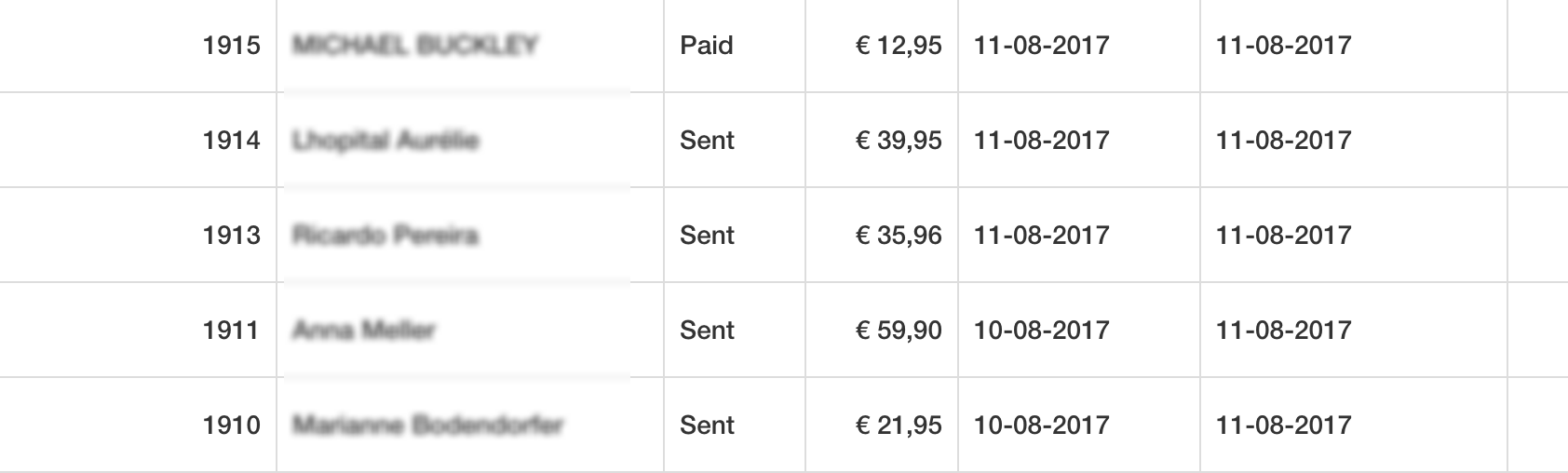

As you can see the date's are totally different after importing from Mijoshop.
I made two screenshots from the same orders:
As you can see the date's are totally different after importing from Mijoshop.
Last edit: 9 years 2 months ago by renem.
Please Log in or Create an account to join the conversation.
9 years 2 months ago #275983
by Jerome
Jerome - Obsidev.com
HikaMarket & HikaSerial developer / HikaShop core dev team.
Replied by Jerome on topic 1054 Unknown column 'mjd.remaining' in 'field list'
Hello,
So it means that Mjioshop do not use anymore "timestamp" but switch to "date" fields.
And you cannot put a date into a timestamp, the result is (as you can see) chaotic.
In the Mijoshop import file, you will find these lines
And you need to replace them by
And
Regards,
So it means that Mjioshop do not use anymore "timestamp" but switch to "date" fields.
And you cannot put a date into a timestamp, the result is (as you can see) chaotic.
In the Mijoshop import file, you will find these lines
Code:
'order_created' => 'mjo.date_added',
Code:
'order_modified' => 'mjo.date_modified',
And you need to replace them by
Code:
'order_created' => 'UNIX_TIMESTAMP(mjo.date_added)',
Code:
'order_modified' => 'UNIX_TIMESTAMP(mjo.date_modified)',
Regards,
Jerome - Obsidev.com
HikaMarket & HikaSerial developer / HikaShop core dev team.
Please Log in or Create an account to join the conversation.
9 years 2 months ago - 9 years 2 months ago #276029
by renem
Replied by renem on topic 1054 Unknown column 'mjd.remaining' in 'field list'
Hi Jerome,
Yes this did the trick! Awesome support!
Regards René
Yes this did the trick! Awesome support!
Regards René
Last edit: 9 years 2 months ago by renem.
Please Log in or Create an account to join the conversation.
Time to create page: 0.082 seconds