

- Posts: 12
- Thank you received: 0
No Shipping Method Found
9 years 2 months ago #276156
by jackshoo2
No Shipping Method Found was created by jackshoo2
-- HikaShop version -- : 3.1.1
-- Joomla version -- : 3.7.4
-- PHP version -- : 5.6
-- Browser(s) name and version -- : Chrome 60.0.3112.101
-- Error-message(debug-mod must be tuned on) -- : No Shipping Method Found
Hi there -
I am stuck with the 'No Shipping Method Found error' with USP, FedEX and even Manual Shipping method. I have tried everything i.e.
- confirmed that shipping is added in checkout layout.
- added/removed product weight and dimensions
- added/removed warehouses
- added removed zones etc
but even with manual shipping it is not working.
Could you please let me know what I am doing wrong. A test product is 'pepper' that can be used and I can also provide credentials if need be.
Your help with this will be much appreciated.
thanks and best regards,
-- Joomla version -- : 3.7.4
-- PHP version -- : 5.6
-- Browser(s) name and version -- : Chrome 60.0.3112.101
-- Error-message(debug-mod must be tuned on) -- : No Shipping Method Found
Hi there -
I am stuck with the 'No Shipping Method Found error' with USP, FedEX and even Manual Shipping method. I have tried everything i.e.
- confirmed that shipping is added in checkout layout.
- added/removed product weight and dimensions
- added/removed warehouses
- added removed zones etc
but even with manual shipping it is not working.
Could you please let me know what I am doing wrong. A test product is 'pepper' that can be used and I can also provide credentials if need be.
Your help with this will be much appreciated.
thanks and best regards,
Please Log in or Create an account to join the conversation.

Less
More
- Posts: 12953
- Thank you received: 1778
9 years 2 months ago #276159
by Mohamed Thelji
Replied by Mohamed Thelji on topic No Shipping Method Found
Hello,
Following each step of the "Shipping methods" section of the FAQ will probably help you :
www.hikashop.com/support/faq#ship
Following each step of the "Shipping methods" section of the FAQ will probably help you :
www.hikashop.com/support/faq#ship
Please Log in or Create an account to join the conversation.
9 years 2 months ago #276224
by jackshoo2
Replied by jackshoo2 on topic No Shipping Method Found
Thanks Muhammad,
I have followed all the steps listed here and tried to apply different combinations but still to no avail.
I have followed all the steps listed here and tried to apply different combinations but still to no avail.
Please Log in or Create an account to join the conversation.
Less
More
- Posts: 12953
- Thank you received: 1778
9 years 2 months ago #276230
by Mohamed Thelji
Replied by Mohamed Thelji on topic No Shipping Method Found
Hello,
In that case can you show us some screenshots of how you configured your shipping methods but also the products that you have added on your cart ?
Thank you.
In that case can you show us some screenshots of how you configured your shipping methods but also the products that you have added on your cart ?
Thank you.
Please Log in or Create an account to join the conversation.
9 years 1 week ago #280766
by jackshoo2
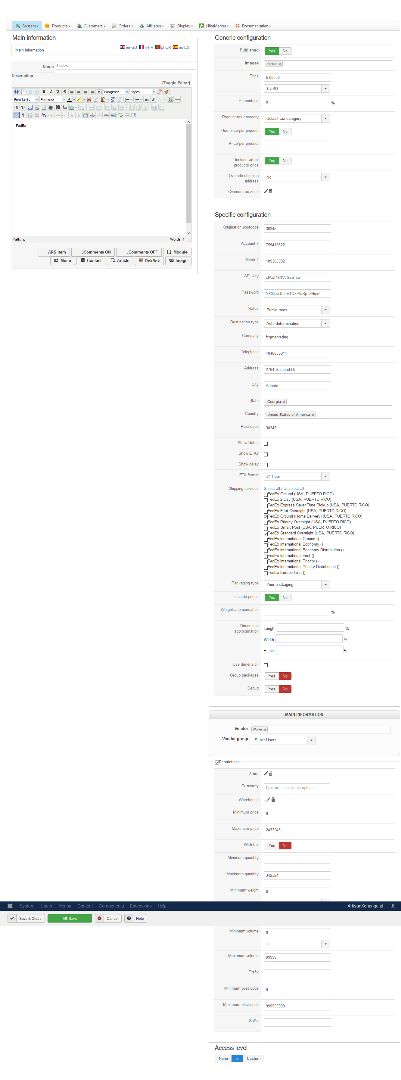
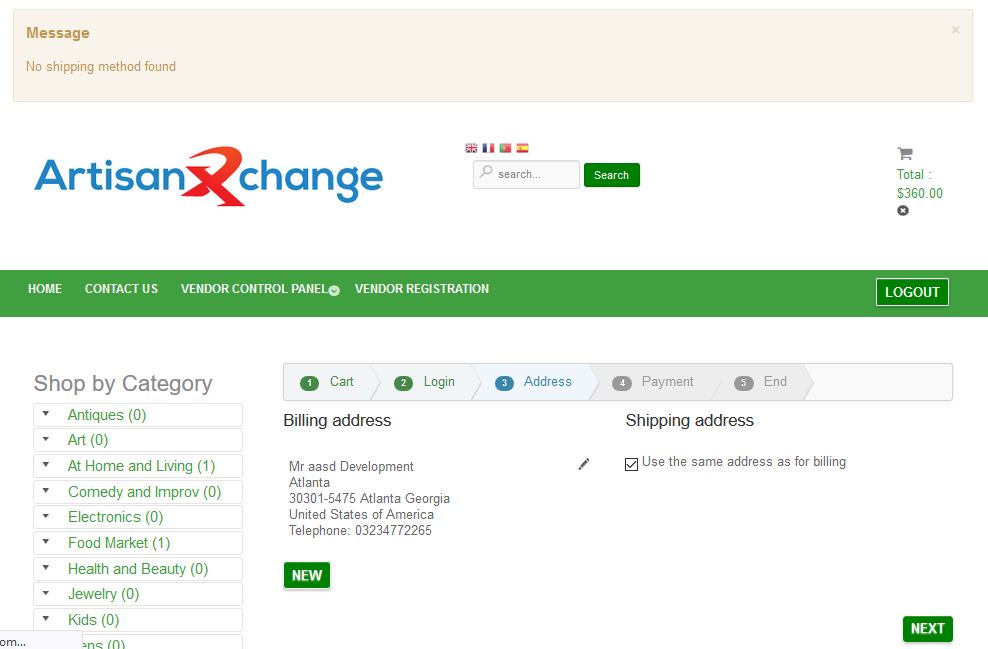
Hello,
Sorry for responding late, this task was put in pending tasks so now I'm actively working on it I've no clue to fix this issue kindly help me my boss is putting pressure on me deadline is ahead, kindly fix this issue for me respond as soon as possible.
Replied by jackshoo2 on topic No Shipping Method Found
Hello,
Sorry for responding late, this task was put in pending tasks so now I'm actively working on it I've no clue to fix this issue kindly help me my boss is putting pressure on me deadline is ahead, kindly fix this issue for me respond as soon as possible.
Please Log in or Create an account to join the conversation.
9 years 1 week ago #280767
by jackshoo2
Replied by jackshoo2 on topic No Shipping Method Found
This is URL of beta site
beta.artisanxchange.com
beta.artisanxchange.com
Please Log in or Create an account to join the conversation.

9 years 1 week ago #280768
by nicolas
Replied by nicolas on topic No Shipping Method Found
Hi,
Unfortunately, we can't read much in the screenshot of the settings. For some reason, it's all blurred. Could you try again ?
Unfortunately, we can't read much in the screenshot of the settings. For some reason, it's all blurred. Could you try again ?
Please Log in or Create an account to join the conversation.
9 years 1 week ago #280795
by jackshoo2
Replied by jackshoo2 on topic No Shipping Method Found
kindly see it after zooming in
Please Log in or Create an account to join the conversation.
9 years 1 week ago #280797
by jackshoo2
Replied by jackshoo2 on topic No Shipping Method Found
kindly download and then see it after zooming in as on this site you can't zoom image
Please Log in or Create an account to join the conversation.
Less
More
- Posts: 12953
- Thank you received: 1778
9 years 1 week ago #280796
by Mohamed Thelji
Replied by Mohamed Thelji on topic No Shipping Method Found
Hello,
I'm sorry but I can't see it even if I zoom in, could you send us a screenshot of a better quality ?
Thank you !
I'm sorry but I can't see it even if I zoom in, could you send us a screenshot of a better quality ?
Thank you !
Please Log in or Create an account to join the conversation.
9 years 1 week ago #280833
by jackshoo2
Replied by jackshoo2 on topic No Shipping Method Found
Hello
Thank you for your response, below is URLs of images kindly see these images and guide where I'm doing wrong.
oogloo.us/clients/lighting/tls/wp-content/uploads/2017/10/1.jpg
oogloo.us/clients/lighting/tls/wp-conten...on-Plugin-fedex2.png
Thank you for your response, below is URLs of images kindly see these images and guide where I'm doing wrong.
oogloo.us/clients/lighting/tls/wp-content/uploads/2017/10/1.jpg
oogloo.us/clients/lighting/tls/wp-conten...on-Plugin-fedex2.png
Please Log in or Create an account to join the conversation.

9 years 1 week ago #280841
by Philip
Replied by Philip on topic No Shipping Method Found
Hello,
Impossible to see what's going on, but I noticed that you don't provide your test product configuration page as Mohamed asked for it, this can be useful to progress on your issue.
Awaiting news from you.
Regards
Impossible to see what's going on, but I noticed that you don't provide your test product configuration page as Mohamed asked for it, this can be useful to progress on your issue.
Awaiting news from you.
Regards
Please Log in or Create an account to join the conversation.
9 years 4 days ago #280954
by jackshoo2
Replied by jackshoo2 on topic No Shipping Method Found
Kindly suggest me what should I do.
Please Log in or Create an account to join the conversation.
9 years 4 days ago #280956
by jackshoo2
Replied by jackshoo2 on topic No Shipping Method Found
Here is the URL of image showing product configuration
oogloo.us/clients/lighting/tls/wp-conten...tration-Products.png
kindly visit and let know what's wrong in it.
oogloo.us/clients/lighting/tls/wp-conten...tration-Products.png
kindly visit and let know what's wrong in it.
Please Log in or Create an account to join the conversation.
Less
More
- Posts: 12953
- Thank you received: 1778
9 years 4 days ago #280975
by Mohamed Thelji
Replied by Mohamed Thelji on topic No Shipping Method Found
Hello,
Can you test it again :
- After setting dimensions through your product page
- By enabling every services through your FedEx/UPS shipping method configuration page
Thank you.
Can you test it again :
- After setting dimensions through your product page
- By enabling every services through your FedEx/UPS shipping method configuration page
Thank you.
Please Log in or Create an account to join the conversation.
9 years 3 days ago #281099
by jackshoo2
Replied by jackshoo2 on topic No Shipping Method Found
Hello
I enabled all services now this message is showing "The FedEx request failed with the message: Customer not eligible for service." Kindly tell me why it is so and how to deal with it?
I enabled all services now this message is showing "The FedEx request failed with the message: Customer not eligible for service." Kindly tell me why it is so and how to deal with it?
Please Log in or Create an account to join the conversation.
9 years 2 days ago #281146
by jackshoo2
Replied by jackshoo2 on topic No Shipping Method Found
Please reply soon I'm waiting
Please Log in or Create an account to join the conversation.
Less
More
- Posts: 12953
- Thank you received: 1778
9 years 1 day ago #281139
by Mohamed Thelji
Replied by Mohamed Thelji on topic No Shipping Method Found
Hello,
As it's said on the FedEx error message your account is actually not eligible for the services you enabled through your FedEx shipping method configuration page.
You should try it with different FedEx services and directly contact the FedEx support about that issue.
As it's said on the FedEx error message your account is actually not eligible for the services you enabled through your FedEx shipping method configuration page.
You should try it with different FedEx services and directly contact the FedEx support about that issue.
Please Log in or Create an account to join the conversation.
Time to create page: 0.683 seconds