

- Posts: 61
- Thank you received: 1
How to delete "All Statuses" iOS
9 years 2 months ago #276588
by miwhel
How to delete "All Statuses" iOS was created by miwhel
-- HikaShop version -- : 3.1.1
-- Joomla version -- : 3.7.5
-- PHP version -- : 7
-- Browser(s) name and version -- : iOS
Hello,
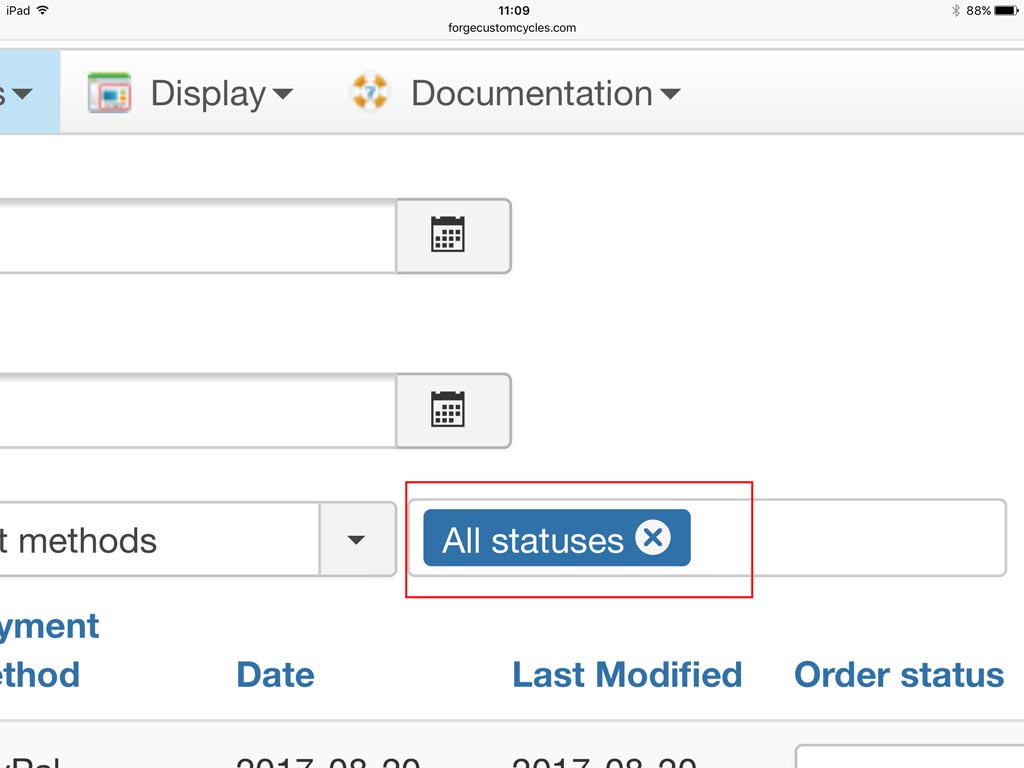
Is there a way to remove All Statuses from the search panel in the orders list when using iOS?
It works as expected on desktop and haven't tested on Android, however tapping the X doesn't clear it on iPad.
Thanks
Mike
-- Joomla version -- : 3.7.5
-- PHP version -- : 7
-- Browser(s) name and version -- : iOS
Hello,
Is there a way to remove All Statuses from the search panel in the orders list when using iOS?
It works as expected on desktop and haven't tested on Android, however tapping the X doesn't clear it on iPad.
Thanks
Mike
Please Log in or Create an account to join the conversation.

9 years 2 months ago #276594
by Philip
Replied by Philip on topic How to delete "All Statuses" iOS
Hello,
Can you provide a screenshot in order to better understand the context, because I'm not sure to follow your needs.
Regards
Can you provide a screenshot in order to better understand the context, because I'm not sure to follow your needs.
Regards
Please Log in or Create an account to join the conversation.
9 years 2 months ago #276647
by miwhel
Replied by miwhel on topic How to delete "All Statuses" iOS
Thanks for the reply, please see image attached, on a pc/mac the X can be clicked to remove it and therefore only show the specific options chosen, however on iOS the All Statuses remains and so all the orders remain and don't get sorted.
Thanks
Mike
Thanks
Mike
Please Log in or Create an account to join the conversation.

9 years 2 months ago #276701
by nicolas
Replied by nicolas on topic How to delete "All Statuses" iOS
Hi,
Instead of clicking on the "x" icon, click on the right of the label and select the status you want to filter with and it should work.
Instead of clicking on the "x" icon, click on the right of the label and select the status you want to filter with and it should work.
Please Log in or Create an account to join the conversation.
Time to create page: 0.193 seconds