

- Posts: 966
- Thank you received: 11
Quantity Dropdown to Match Quantity of Product
9 years 4 weeks ago #277901
by MyWorld
Quantity Dropdown to Match Quantity of Product was created by MyWorld
-- HikaShop version -- : 3.1.1
-- Joomla version -- : 3.7.5
Is it possible to have the quantity dropdown display the amount of quantity available for that item?
Currently the dropdown is always showing 15. Example, if I have 3 bags, then it should only go up to 3, if I have 5 earrings then it only goes up to 5, etc...
Thanks!!
-- Joomla version -- : 3.7.5
Is it possible to have the quantity dropdown display the amount of quantity available for that item?
Currently the dropdown is always showing 15. Example, if I have 3 bags, then it should only go up to 3, if I have 5 earrings then it only goes up to 5, etc...
Thanks!!
Please Log in or Create an account to join the conversation.

9 years 3 weeks ago #277902
by Jerome
Jerome - Obsidev.com
HikaMarket & HikaSerial developer / HikaShop core dev team.
Replied by Jerome on topic Quantity Dropdown to Match Quantity of Product
Hello,
We would need more details about the context, the quantity layout you're using, your HikaShop configuration (legacy or not), the product you're talking about and it's settings.
Regards,
We would need more details about the context, the quantity layout you're using, your HikaShop configuration (legacy or not), the product you're talking about and it's settings.
Regards,
Jerome - Obsidev.com
HikaMarket & HikaSerial developer / HikaShop core dev team.
Please Log in or Create an account to join the conversation.
9 years 3 weeks ago #277988
by MyWorld
So if they click on small, it will show:
1
2
If they click on large, it will show:
1
2
3
4
5
Etc....
Replied by MyWorld on topic Quantity Dropdown to Match Quantity of Product
What is legacy? I assume mine is not legacy unless it was set as the default.your HikaShop configuration (legacy or not)
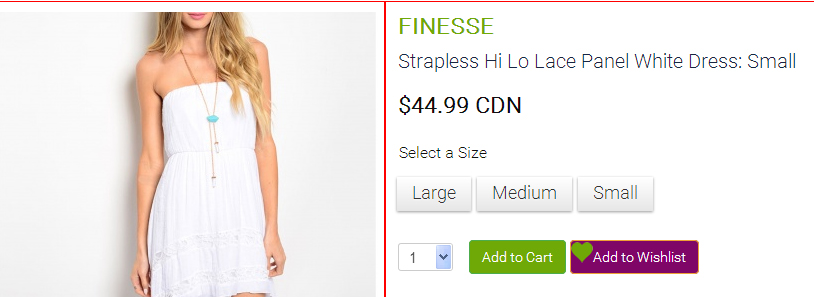
I am talking about all products that will have a dropdown. I would like the dropdown to show the quantity of that product or product option. For example, say the item below has 2 small, 3 medium, and 5 large, when the user clicks on a size the quantity of that size will show in the dropdown.The product you're talking about and it's settings.
So if they click on small, it will show:
1
2
If they click on large, it will show:
1
2
3
4
5
Etc....
Please Log in or Create an account to join the conversation.

9 years 3 weeks ago #277993
by nicolas
Replied by nicolas on topic Quantity Dropdown to Match Quantity of Product
Hi,
Try adding the code:
before the code:
in the file "show_quantity" via the menu Display>Views.
Try adding the code:
Code:
if($this->row->product_quantity > 0)
$max_quantity = min($max_quantity, $this->row->product_quantity);
Code:
$min_quantity = max((int)$min_quantity, 1);
$max_quantity = max((int)$max_quantity, 0);
Please Log in or Create an account to join the conversation.
9 years 2 weeks ago #278743
by MyWorld
Replied by MyWorld on topic Quantity Dropdown to Match Quantity of Product
Did I do something wrong because it's not working. This is what I have.
Etc....
Thanks!
Code:
<?php
$quantity_counter = $this->getQuantityCounter();
$id = 'hikashop_product_quantity_field_'.$quantity_counter;
if($this->params->get('show_quantity_legacy', false)) {
$i = (int)$this->params->get('i', 0);
if($i > 0) $id = 'hikashop_product_quantity_field_'.$i;
}
$name = 'quantity';
if(!empty($this->row->quantityFieldName)){
$name = $this->row->quantityFieldName;
}
if(isset($this->row) && isset($this->row->product_min_per_order)) {
$min_quantity = ($this->row->product_min_per_order || empty($this->element->main)) ? $this->row->product_min_per_order : $this->element->main->product_min_per_order;
$max_quantity = ($this->row->product_max_per_order || empty($this->element->main)) ? $this->row->product_max_per_order : $this->element->main->product_max_per_order;
if($this->row->product_quantity > 0)
$max_quantity = min($max_quantity, $this->row->product_quantity);
$min_quantity = max((int)$min_quantity, 1);
$max_quantity = max((int)$max_quantity, 0);
} else {
$min_quantity = max((int)$this->params->get('min_quantity', 0), 1);
$max_quantity = max((int)$this->params->get('max_quantity', 0), 0);
}
Thanks!
Please Log in or Create an account to join the conversation.
9 years 2 weeks ago #278801
by nicolas
Replied by nicolas on topic Quantity Dropdown to Match Quantity of Product
Hi,
This works fine on our end. Please provide a link to a product page with the issue and a backend access so that we can check your settings.
www.hikashop.com/support/contact-us.html
This works fine on our end. Please provide a link to a product page with the issue and a backend access so that we can check your settings.
www.hikashop.com/support/contact-us.html
Please Log in or Create an account to join the conversation.
9 years 2 weeks ago #278875
by nicolas
Replied by nicolas on topic Quantity Dropdown to Match Quantity of Product
Hi,
Thanks for the access. I was able to find the issue. The code to use has to be a bit more complex:
I've made the change for you and it seems to be working now. It will be integrated in the next version.
Thanks for the access. I was able to find the issue. The code to use has to be a bit more complex:
Code:
if($this->row->product_quantity > 0) {
if($max_quantity > 0)
$max_quantity = min($max_quantity, $this->row->product_quantity);
else
$max_quantity = $this->row->product_quantity;
}
Please Log in or Create an account to join the conversation.
9 years 1 week ago #279167
by MyWorld
Replied by MyWorld on topic Quantity Dropdown to Match Quantity of Product
Thank you for this. Really appreciate it!!
Please Log in or Create an account to join the conversation.
Time to create page: 0.239 seconds