
- Posts: 4
- Thank you received: 0
css problem after updating
- furdoszobasziget
-
 Topic Author
- Offline
Less
More
8 years 11 months ago - 8 years 11 months ago #280332
by furdoszobasziget
css problem after updating was created by furdoszobasziget
Hello!
I have hikashop business 3.2.0 version and external It trendyshop template (icetheme.com)
In the Hikashop update 3+ you completely changed frontend css amongst other things. www.icetheme.com/themes/it-trendyshop
"IT_Trendyshop does not support the latest release of Hikashop V.3.x."
Product image zoom and fade effect not working after hikashop updating. : www.furdoszobasziget.hu
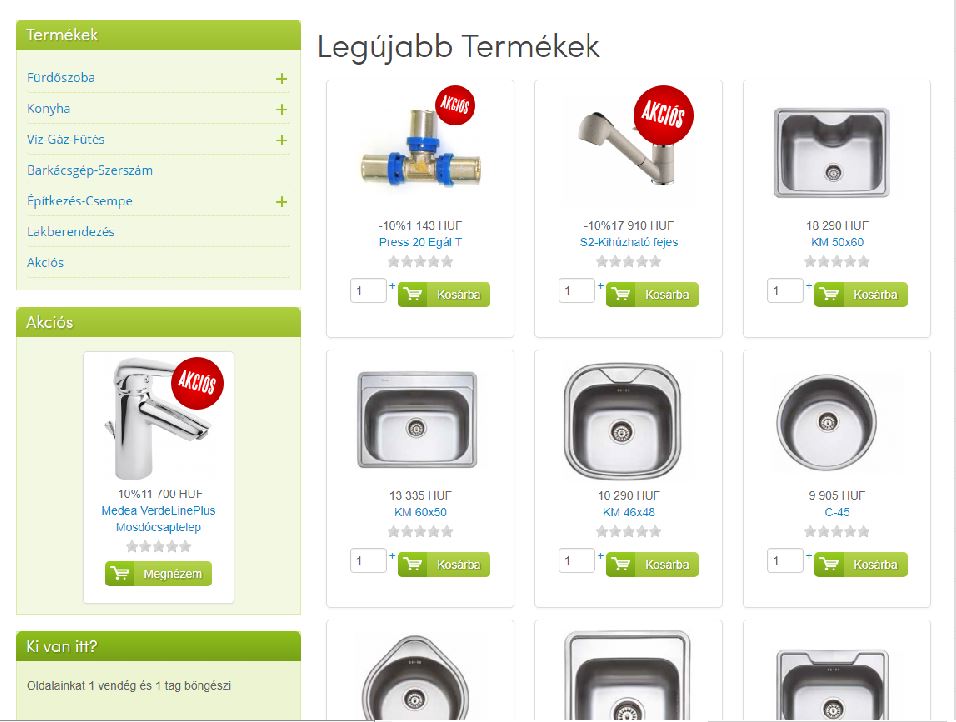
And image zoom and fade effect working after hikashop 2.6.4. version.: furdoszoba.vilagweb.hu
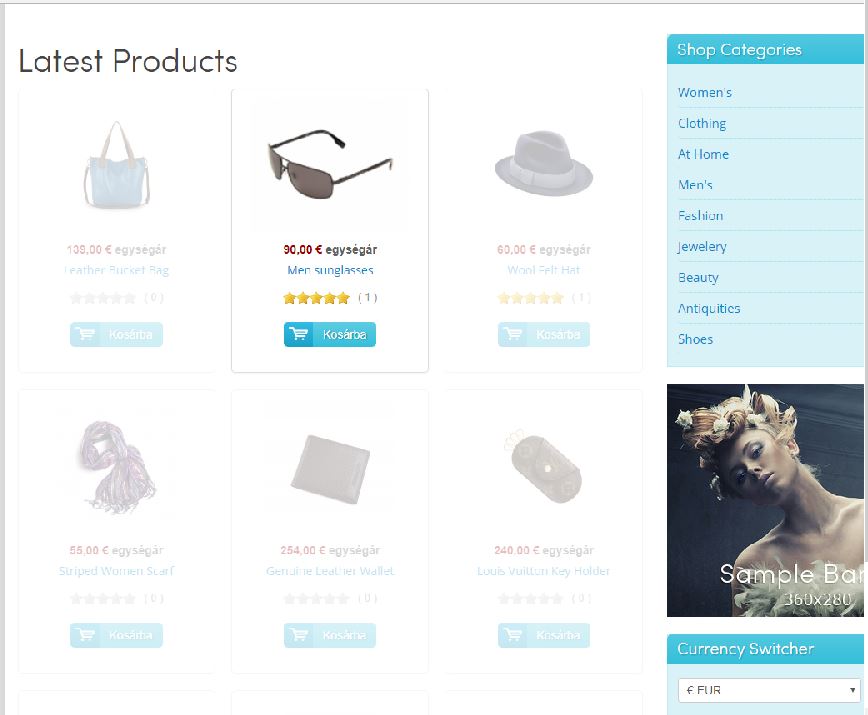
Can i get help?
I have hikashop business 3.2.0 version and external It trendyshop template (icetheme.com)
In the Hikashop update 3+ you completely changed frontend css amongst other things. www.icetheme.com/themes/it-trendyshop
"IT_Trendyshop does not support the latest release of Hikashop V.3.x."
Product image zoom and fade effect not working after hikashop updating. : www.furdoszobasziget.hu
And image zoom and fade effect working after hikashop 2.6.4. version.: furdoszoba.vilagweb.hu
Can i get help?
Last edit: 8 years 11 months ago by furdoszobasziget. Reason: Hibás volt néhány szó, rosszul írtam egy mondatot.
Please Log in or Create an account to join the conversation.

8 years 11 months ago #280337
by nicolas
Replied by nicolas on topic css problem after updating
Hi,
We can't help with that.
We don't know how these effects are added by your template. Normally, it's up to the template developer to add support for such changes. If they say that the template is not compatible with newer versions of HikaShop, then you shouldn't update HikaShop or you should switch to another template.
All we can propose is to request a download for HikaShop 2.6.4 via our contact page, with your order number, so that you install install it and perform the downgrade back to HikaShop 2.6.4.
www.hikashop.com/support/contact-us.html
We can't help with that.
We don't know how these effects are added by your template. Normally, it's up to the template developer to add support for such changes. If they say that the template is not compatible with newer versions of HikaShop, then you shouldn't update HikaShop or you should switch to another template.
All we can propose is to request a download for HikaShop 2.6.4 via our contact page, with your order number, so that you install install it and perform the downgrade back to HikaShop 2.6.4.
www.hikashop.com/support/contact-us.html
Please Log in or Create an account to join the conversation.
- furdoszobasziget
-
Topic Author
- Offline
Less
More
- Posts: 4
- Thank you received: 0
8 years 11 months ago #280361
by furdoszobasziget
Replied by furdoszobasziget on topic css problem after updating
Thanks. Unfortunately, the developer does not support it, which is strange to me. However, the hikashop has been used on many websites for many years, and we always want to use the latest one. I'm not a programmer, it's probably just a tiny php change and I've been waiting for you for help. But if you can not help, is there any way to buy or upgrade a similar effect?
Please Log in or Create an account to join the conversation.
8 years 11 months ago #280365
by nicolas
Replied by nicolas on topic css problem after updating
Hi,
That exact effect can be done with some CSS and javascript. The best I think is to contact our partners and request a quote to add such effect on the normal product listing of HikaShop:
www.hikashop.com/home/our-partners.html
That exact effect can be done with some CSS and javascript. The best I think is to contact our partners and request a quote to add such effect on the normal product listing of HikaShop:
www.hikashop.com/home/our-partners.html
Please Log in or Create an account to join the conversation.
Time to create page: 0.196 seconds