
- Posts: 32
- Thank you received: 0
Unable to Edit Products after update
- Freakmode999
-
 Topic Author
- Offline
Less
More
8 years 11 months ago #282722
by Freakmode999
Unable to Edit Products after update was created by Freakmode999
-- HikaShop version -- : 3.2.1
-- Joomla version -- : 3.8.2
-- PHP version -- : 7.0.25
-- Browser(s) name and version -- : Chrome
Hi
Recently had to update Joomla and Hikashop to the latest versions and at the same time our host updated the php version on the server.
After this was done everything seems to work fine until you try to edit an existing product. If you click on an existing product the layout becomes screwed like in the attachment.
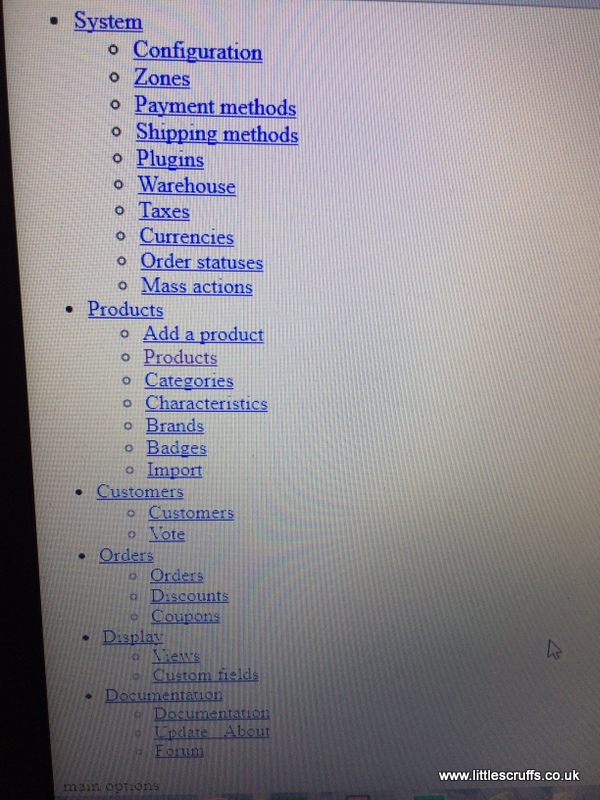
Any ideas how to fix this issue? All other parts of Hikashop seem to be working fine just the product edit layout that is screwed.
Thank you.
-- Joomla version -- : 3.8.2
-- PHP version -- : 7.0.25
-- Browser(s) name and version -- : Chrome
Hi
Recently had to update Joomla and Hikashop to the latest versions and at the same time our host updated the php version on the server.
After this was done everything seems to work fine until you try to edit an existing product. If you click on an existing product the layout becomes screwed like in the attachment.
Any ideas how to fix this issue? All other parts of Hikashop seem to be working fine just the product edit layout that is screwed.
Thank you.
Please Log in or Create an account to join the conversation.

8 years 11 months ago #282723
by Jerome
Jerome - Obsidev.com
HikaMarket & HikaSerial developer / HikaShop core dev team.
Replied by Jerome on topic Unable to Edit Products after update
Hello,
You have a PHP fatal error.
So you have to get the corresponding PHP error message in order to understand what is the issue and know how to solve it.
As usual : PHP error log AND/OR set "error reporting level" to "maximum" in your Joomla global configuration.
Regards,
You have a PHP fatal error.
So you have to get the corresponding PHP error message in order to understand what is the issue and know how to solve it.
As usual : PHP error log AND/OR set "error reporting level" to "maximum" in your Joomla global configuration.
Regards,
Jerome - Obsidev.com
HikaMarket & HikaSerial developer / HikaShop core dev team.
Please Log in or Create an account to join the conversation.
- Freakmode999
-
Topic Author
- Offline
Less
More
- Posts: 32
- Thank you received: 0
8 years 11 months ago #282745
by Freakmode999
Replied by Freakmode999 on topic Unable to Edit Products after update
Hi
I just set the error reporting level to maximum and now the site will not load on either the front or back end.
Gives the error
This site can’t be reached
The webpage at www.miniaturemohairbears.co.uk/administr...hp?option=com_config might be temporarily down or it may have moved permanently to a new web address.
ERR_CONTENT_DECODING_FAILED
I just set the error reporting level to maximum and now the site will not load on either the front or back end.
Gives the error
This site can’t be reached
The webpage at www.miniaturemohairbears.co.uk/administr...hp?option=com_config might be temporarily down or it may have moved permanently to a new web address.
ERR_CONTENT_DECODING_FAILED
Please Log in or Create an account to join the conversation.
- Freakmode999
-
Topic Author
- Offline
Less
More
- Posts: 32
- Thank you received: 0
8 years 11 months ago #282752
by Freakmode999
Replied by Freakmode999 on topic Unable to Edit Products after update
Here is the line in the server error log
miniaturemohairbears.co.uk [Sun Nov 19 14:18:40 2017] [error] [client 86.177.231.45:51018] AH01215: PHP Notice: Only variables should be assigned by reference in /home/cluster-
miniaturemohairbears.co.uk [Sun Nov 19 14:18:40 2017] [error] [client 86.177.231.45:51018] AH01215: PHP Notice: Only variables should be assigned by reference in /home/cluster-
Please Log in or Create an account to join the conversation.
- Freakmode999
-
Topic Author
- Offline
Less
More
- Posts: 32
- Thank you received: 0
8 years 11 months ago #282775
by Freakmode999
Replied by Freakmode999 on topic Unable to Edit Products after update
OK fixed this one = turns out it was a problem with JCE not loading on the product editing page. Switched editors and it loaded so just updated JCE to a newer version. Works fine now.
Please Log in or Create an account to join the conversation.
Time to create page: 0.105 seconds