

- Posts: 57
- Thank you received: 0
1052 column 'product_id' in where clause is ambiguous
8 years 9 months ago #286238
by Igor_UA
1052 column 'product_id' in where clause is ambiguous was created by Igor_UA
-- url of the page with the problem -- :
panda-ua.com/мужчинам/мужские-кошельки-портмоне
-- HikaShop version -- : 3.2.2
-- Joomla version -- : 3.8.3
-- PHP version -- : 7.0
-- Browser(s) name and version -- : Google Chrome 63.0.3239.132
-- Error-message(debug-mod must be tuned on) -- : 1052 COLUMN 'PRODUCT_ID' IN WHERE CLAUSE IS AMBIGUOUS
After the component version update, error 1052 COLUMN 'PRODUCT_ID' IN WHERE CLAUSE IS AMBIGUOUS appeared.
How to fix it? The fix of the Joomla database did not help. Checking the Hikashop database also did not reveal anything ...
-- HikaShop version -- : 3.2.2
-- Joomla version -- : 3.8.3
-- PHP version -- : 7.0
-- Browser(s) name and version -- : Google Chrome 63.0.3239.132
-- Error-message(debug-mod must be tuned on) -- : 1052 COLUMN 'PRODUCT_ID' IN WHERE CLAUSE IS AMBIGUOUS
After the component version update, error 1052 COLUMN 'PRODUCT_ID' IN WHERE CLAUSE IS AMBIGUOUS appeared.
How to fix it? The fix of the Joomla database did not help. Checking the Hikashop database also did not reveal anything ...
Please Log in or Create an account to join the conversation.

8 years 9 months ago #286240
by Jerome
Jerome - Obsidev.com
HikaMarket & HikaSerial developer / HikaShop core dev team.
Replied by Jerome on topic 1052 column 'product_id' in where clause is ambiguous
Hello,
Please activate temporally the Joomla debug mode in order to have the call stack.
The full SQL query and the file where that query is generated will be required in order to understand the issue.
Regards,
Please activate temporally the Joomla debug mode in order to have the call stack.
The full SQL query and the file where that query is generated will be required in order to understand the issue.
Regards,
Jerome - Obsidev.com
HikaMarket & HikaSerial developer / HikaShop core dev team.
Please Log in or Create an account to join the conversation.
8 years 9 months ago #286265
by Igor_UA
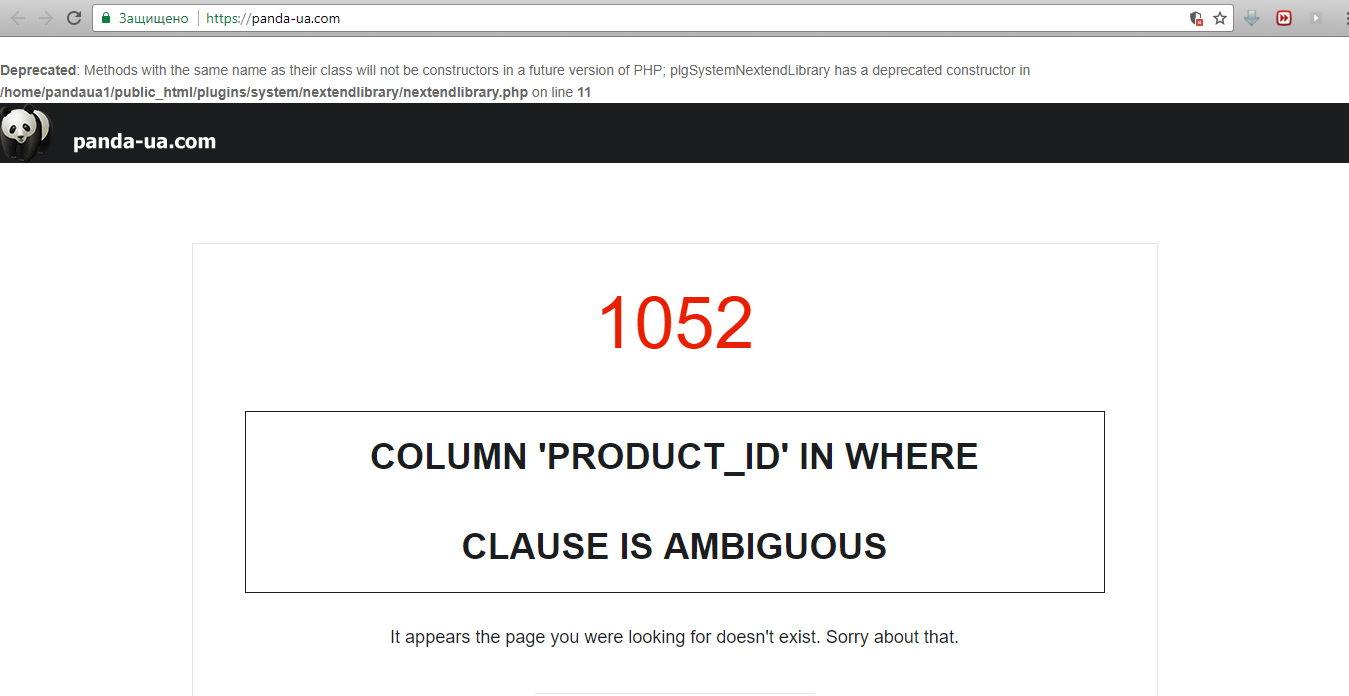
Replied by Igor_UA on topic 1052 column 'product_id' in where clause is ambiguous
Please Log in or Create an account to join the conversation.
8 years 9 months ago #286268
by Jerome
Jerome - Obsidev.com
HikaMarket & HikaSerial developer / HikaShop core dev team.
Replied by Jerome on topic 1052 column 'product_id' in where clause is ambiguous
Hello,
Unfortunately, there is not the full SQL query which would allow us to understand where and what that query is.
Please try to use the default Joomla template and check again your settings for the Joomla debug mode.
Regards,
Unfortunately, there is not the full SQL query which would allow us to understand where and what that query is.
Please try to use the default Joomla template and check again your settings for the Joomla debug mode.
Regards,
Jerome - Obsidev.com
HikaMarket & HikaSerial developer / HikaShop core dev team.
Please Log in or Create an account to join the conversation.

8 years 8 months ago #287398
by renem
Replied by renem on topic 1052 column 'product_id' in where clause is ambiguous
Same problem here. It has something to do with the HikaShop Content Module. When i disable this module the problem is gone.
This is since i updated from version 3.2.1 to version 3.2.2 any clue?
This is since i updated from version 3.2.1 to version 3.2.2 any clue?
Please Log in or Create an account to join the conversation.

8 years 8 months ago #287405
by nicolas
Replied by nicolas on topic 1052 column 'product_id' in where clause is ambiguous
Hi,
In the file /libraries/joomla/database/exception/executing.php change the line:
parent::__construct($message, $code, $previous);
to:
parent::__construct($message.' '.$query, $code, $previous);
That should provide the full MySQL query which will help understand the problem.
In the file /libraries/joomla/database/exception/executing.php change the line:
parent::__construct($message, $code, $previous);
to:
parent::__construct($message.' '.$query, $code, $previous);
That should provide the full MySQL query which will help understand the problem.
Please Log in or Create an account to join the conversation.
8 years 8 months ago #287426
by renem
Replied by renem on topic 1052 column 'product_id' in where clause is ambiguous
Hi Nicolas this is the Query
Kind regards René
Code:
1052
FOUT: 1052
Column 'product_id' in where clause is ambiguous SELECT DISTINCT b.* FROM jos_hikashop_product_category AS a LEFT JOIN jos_hikashop_product AS b ON a.product_id=b.product_id WHERE (b.product_published = 1) AND (b.product_type = 'main') AND (a.category_id IN (2)) AND (product_id = 0) AND (b.product_quantity!=0) AND ((b.product_access = 'all' OR b.product_access LIKE '%,9,%')) ORDER BY a.ordering ASC LIMIT 0, 4
Kind regards René
Please Log in or Create an account to join the conversation.
8 years 8 months ago #287435
by nicolas
Replied by nicolas on topic 1052 column 'product_id' in where clause is ambiguous
Hi,
Great. Edit the file components/com_hikashop/views/product/view.html.php and change the line:
to:
That should fix the problem.
Great. Edit the file components/com_hikashop/views/product/view.html.php and change the line:
Code:
$filters[] = 'product_id = 0';
Code:
$filters[] = 'b.product_id = 0';
Please Log in or Create an account to join the conversation.
8 years 8 months ago #287437
by nicolas
Replied by nicolas on topic 1052 column 'product_id' in where clause is ambiguous
Note that you probably want to turn off the "discount only" setting in your products listings menu item/module.
Because this means that you have a listing of products without any products that will display because there are no discounts for the products of the listing.
Because this means that you have a listing of products without any products that will display because there are no discounts for the products of the listing.
Please Log in or Create an account to join the conversation.
8 years 8 months ago #287440
by renem
Replied by renem on topic 1052 column 'product_id' in where clause is ambiguous
Hi Nicolas,
I turned off "Discount Only" and that solved the problem.
Kind regards René
I turned off "Discount Only" and that solved the problem.
Kind regards René
Please Log in or Create an account to join the conversation.
8 years 8 months ago #287701
by Igor_UA
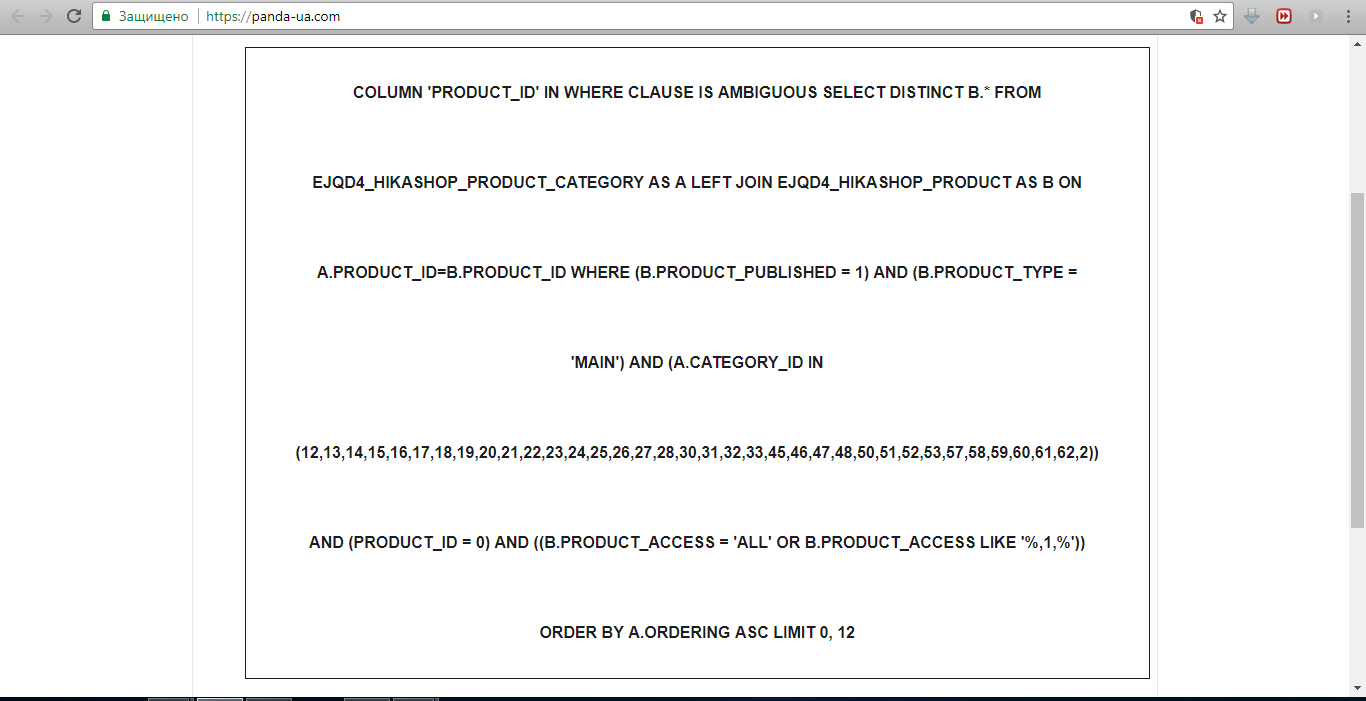
Replied by Igor_UA on topic 1052 column 'product_id' in where clause is ambiguous
Please Log in or Create an account to join the conversation.
8 years 8 months ago #287702
by Jerome
Jerome - Obsidev.com
HikaMarket & HikaSerial developer / HikaShop core dev team.
Replied by Jerome on topic 1052 column 'product_id' in where clause is ambiguous
Hello,
You have three solutions.
1 - Update to HikaShop 3.3.0 which already contain a patch for that..
2 - Do than renem wrote
3 -edit the file "components/com_hikashop/view/product/view.html.php" and replace
By
Regards,
You have three solutions.
1 - Update to HikaShop 3.3.0 which already contain a patch for that..
2 - Do than renem wrote
I turned off "Discount Only" and that solved the problem.
3 -edit the file "components/com_hikashop/view/product/view.html.php" and replace
Code:
if(!$matchingDiscount) {
$filters[] = 'product_id = 0';
}
Code:
if(!$matchingDiscount) {
$filters[] = 'b.product_id = 0';
}
Regards,
Jerome - Obsidev.com
HikaMarket & HikaSerial developer / HikaShop core dev team.
Please Log in or Create an account to join the conversation.
Time to create page: 0.103 seconds