

- Posts: 281
- Thank you received: 3
discount is not displayed
8 years 5 months ago - 8 years 5 months ago #293448
by francota
discount is not displayed was created by francota
-- HikaShop version -- : 3.4.0
-- Joomla version -- : 3.8.7
Hello
I have setted a discount to a category of products, but it is not displayed, the price is not discounted
What could be the problem?
thanks
FRank
the url:https://bit.ly/2H85q5v
this is the setting
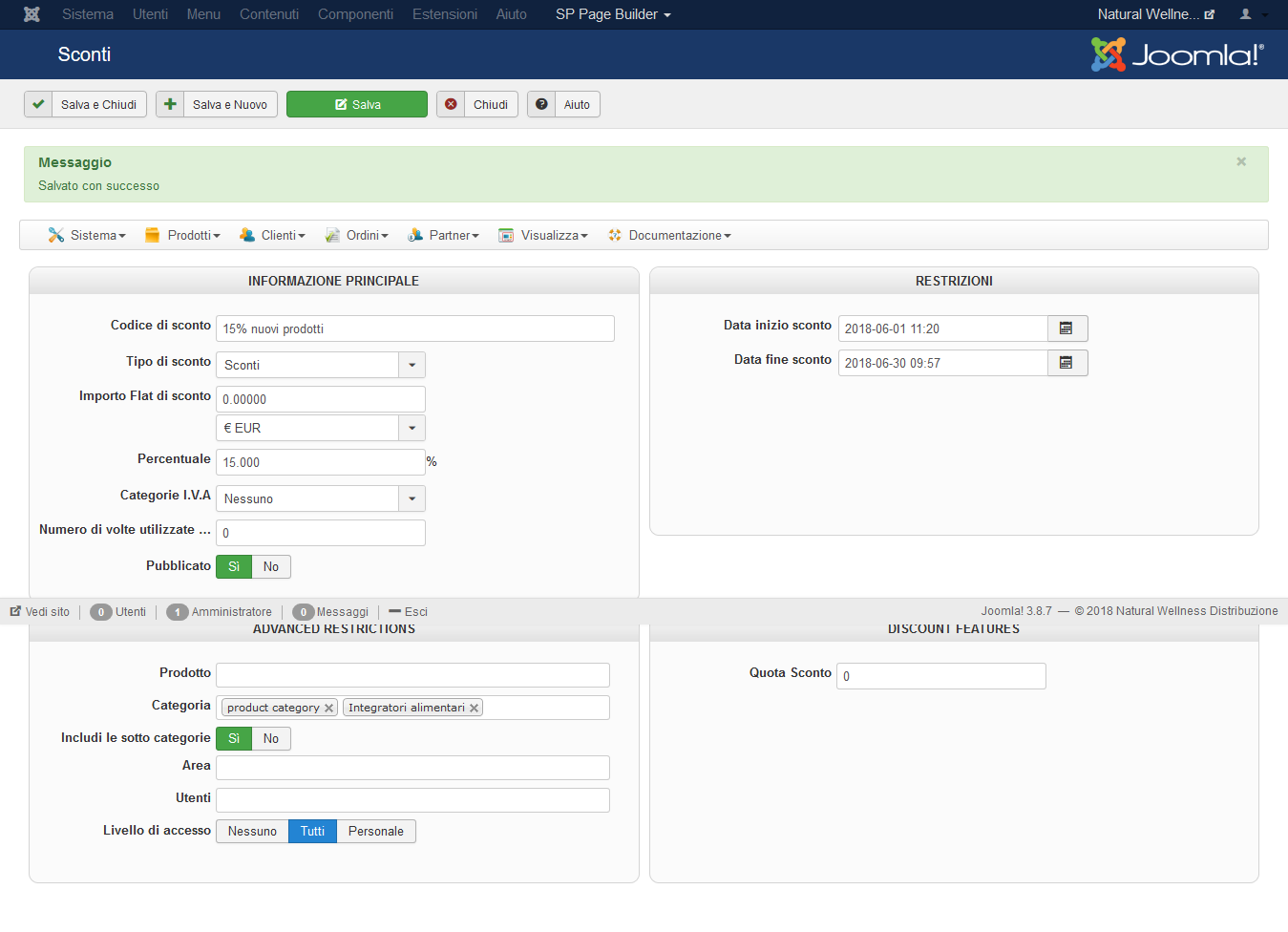
-- Joomla version -- : 3.8.7
Hello
I have setted a discount to a category of products, but it is not displayed, the price is not discounted
What could be the problem?
thanks
FRank
the url:https://bit.ly/2H85q5v
this is the setting
Last edit: 8 years 5 months ago by francota.
Please Log in or Create an account to join the conversation.
8 years 5 months ago #293456
by francota
Replied by francota on topic discount is not displayed
OK I solved
the problem was in the start date, the day must be before than the present day!
Can I show the price after the discount price in a new line??
Thanks
Frank
the problem was in the start date, the day must be before than the present day!
Can I show the price after the discount price in a new line??
Thanks
Frank
Please Log in or Create an account to join the conversation.

8 years 5 months ago #293450
by nicolas
Replied by nicolas on topic discount is not displayed
Hi,
It's probably an issue with the starting date and the way the timezone is configured on your website/web server.
Try removing the starting date.
Also, please note that only one discount can be applied to a product. If you already have another discount applied on that product then it could explain why this one is not showing.
It's probably an issue with the starting date and the way the timezone is configured on your website/web server.
Try removing the starting date.
Also, please note that only one discount can be applied to a product. If you already have another discount applied on that product then it could explain why this one is not showing.
Please Log in or Create an account to join the conversation.
8 years 5 months ago #293457
by nicolas
Replied by nicolas on topic discount is not displayed
Hi,
With a bit of CSS it should be possible.
www.hikashop.com/support/documentation/1...ize-the-display.html
With a bit of CSS it should be possible.
www.hikashop.com/support/documentation/1...ize-the-display.html
Please Log in or Create an account to join the conversation.
8 years 5 months ago #293488
by francota
Replied by francota on topic discount is not displayed
About moving the price...I found an old post where you sayd to add <br/> in PRICE_DISCOUNT_END (language file)
But it doesn't work... so I need change the css right??
It is the only solution??
Thanks
But it doesn't work... so I need change the css right??
It is the only solution??
Thanks
Please Log in or Create an account to join the conversation.

8 years 5 months ago - 8 years 5 months ago #293515
by Philip
Replied by Philip on topic discount is not displayed
Hello,
It depends on the context, with the Css you have always several way to get what you want, on the other hand, use the add "</br>" can't work on any context.
If you need more advice, provide an url to understand situation.
Regards
It depends on the context, with the Css you have always several way to get what you want, on the other hand, use the add "</br>" can't work on any context.
If you need more advice, provide an url to understand situation.
Regards
Last edit: 8 years 5 months ago by Philip.
Please Log in or Create an account to join the conversation.
8 years 5 months ago #293570
by francota
Replied by francota on topic discount is not displayed
Hello
the url is this one: bit.ly/2H85q5v
I am using this css code
.hikashop_product_price{
display:block;
}
But in this way I have the "cad" in new line too:
-15%20,50€
17,43 €
cad.
while I wuold like to have:
-15%20,50€
17,43 € cad.
How can I reach that??
Thanks
Frank
the url is this one: bit.ly/2H85q5v
I am using this css code
.hikashop_product_price{
display:block;
}
But in this way I have the "cad" in new line too:
-15%20,50€
17,43 €
cad.
while I wuold like to have:
-15%20,50€
17,43 € cad.
How can I reach that??
Thanks
Frank
Please Log in or Create an account to join the conversation.
8 years 5 months ago - 8 years 5 months ago #293596
by Philip
Replied by Philip on topic discount is not displayed
Hello,
Ok, by the way there is some possibilities in Css custom, but there is a lot more simple to do by using HikaShop Override Views (learn more, here )
In order to guide you, edit the product/listing_price view as to group your span in a div parent as on this schema, this will required some html knowledge to correctly add the div tag.
image missing https://cdn.pbrd.co/images/HosP5Co.png
Hope you will achieved this.
Regards
Ok, by the way there is some possibilities in Css custom, but there is a lot more simple to do by using HikaShop Override Views (learn more, here )
In order to guide you, edit the product/listing_price view as to group your span in a div parent as on this schema, this will required some html knowledge to correctly add the div tag.
image missing https://cdn.pbrd.co/images/HosP5Co.png
Hope you will achieved this.
Regards
Last edit: 8 years 5 months ago by Philip.
Please Log in or Create an account to join the conversation.
8 years 5 months ago #293644
by francota
Replied by francota on topic discount is not displayed
I am having some problem to change the file listing_price.php, i dont understand what modifiy there :oops:
Please Log in or Create an account to join the conversation.
8 years 4 months ago - 8 years 4 months ago #293661
by Philip
Replied by Philip on topic discount is not displayed
Hello,
You have to add 2 <div></div> html tag to bordered your <span></span>
From the start, you have this :
image missing https://cdn.pbrd.co/images/HoBUYrR.png
You have to analyse your view to find the 4 <span> from their class name, "hikashop_product_discount", "hikashop_product_price_before_discount" etc and bordered them 2 per 2 with div in order to create 2 lines.
image missing https://cdn.pbrd.co/images/HosP5Co.png
Hope this will help you.
Regards
You have to add 2 <div></div> html tag to bordered your <span></span>
From the start, you have this :
image missing https://cdn.pbrd.co/images/HoBUYrR.png
You have to analyse your view to find the 4 <span> from their class name, "hikashop_product_discount", "hikashop_product_price_before_discount" etc and bordered them 2 per 2 with div in order to create 2 lines.
image missing https://cdn.pbrd.co/images/HosP5Co.png
Hope this will help you.
Regards
Last edit: 8 years 4 months ago by Philip.
Please Log in or Create an account to join the conversation.
8 years 4 months ago #293704
by francota
Replied by francota on topic discount is not displayed
thanks for your help but I dont find these classes "hikashop_product_discount", "hikashop_product_price_before_discount in the file listing_price.php
Are you sure that is the right file??
Frank
Are you sure that is the right file??
Frank
Please Log in or Create an account to join the conversation.
8 years 4 months ago #293715
by nicolas
Replied by nicolas on topic discount is not displayed
Please Log in or Create an account to join the conversation.
8 years 4 months ago #294006
by francota
Replied by francota on topic discount is not displayed
I did
thank you for the help )
thank you for the help
) Please Log in or Create an account to join the conversation.
Time to create page: 0.585 seconds