
- Posts: 608
- Thank you received: 13
Populating Variant Custom Fields
- mohairbears
-
 Topic Author
- Offline
Less
More
8 years 3 months ago #294522
by mohairbears
Populating Variant Custom Fields was created by mohairbears
-- HikaShop version -- : 3.4
-- Joomla version -- : 3.8.10
-- PHP version -- : 5.3
-- Browser(s) name and version -- : Firefox
Hi, Can you advise of a way to auto populate variant custom fields in products? when making changes to fields like product code in product this auto updates the variants but making changes to custom fields does not even populate the variant custom fields never mind make changes?
thanks
-- Joomla version -- : 3.8.10
-- PHP version -- : 5.3
-- Browser(s) name and version -- : Firefox
Hi, Can you advise of a way to auto populate variant custom fields in products? when making changes to fields like product code in product this auto updates the variants but making changes to custom fields does not even populate the variant custom fields never mind make changes?
thanks
Please Log in or Create an account to join the conversation.

Less
More
- Posts: 12953
- Thank you received: 1778
8 years 3 months ago #294524
by Mohamed Thelji
Replied by Mohamed Thelji on topic Populating Variant Custom Fields
Hello,
There is no option to automatically populate variant custom fields. However, you can eventually use mass actions via "Hikashop->System->Mass actions", to apply values to custom fields of your product variants.
www.hikashop.com/support/documentation/167-massaction-form.html
Best regards,
Mohamed Thelji.
There is no option to automatically populate variant custom fields. However, you can eventually use mass actions via "Hikashop->System->Mass actions", to apply values to custom fields of your product variants.
www.hikashop.com/support/documentation/167-massaction-form.html
Best regards,
Mohamed Thelji.
Please Log in or Create an account to join the conversation.
- mohairbears
-
Topic Author
- Offline
Less
More
- Posts: 608
- Thank you received: 13
8 years 3 months ago #294595
by mohairbears
Replied by mohairbears on topic Populating Variant Custom Fields
Hi Mohamed,
Ok so that's not possible! therefore as the variants would only be replicated as to the populated custom fields on the main product page, is there a way to display what is in the custom fields in the main page instead of the variants?
Rgds
Ok so that's not possible! therefore as the variants would only be replicated as to the populated custom fields on the main product page, is there a way to display what is in the custom fields in the main page instead of the variants?
Rgds
Please Log in or Create an account to join the conversation.

8 years 3 months ago #294612
by nicolas
Replied by nicolas on topic Populating Variant Custom Fields
Hi,
If you don't enter anything in the custom field of the variants, it will automatically use the value from the main product instead. There is nothing particular to do for that besides not filling the custom fields in the variants.
If you don't enter anything in the custom field of the variants, it will automatically use the value from the main product instead. There is nothing particular to do for that besides not filling the custom fields in the variants.
Please Log in or Create an account to join the conversation.
- mohairbears
-
Topic Author
- Offline
Less
More
- Posts: 608
- Thank you received: 13
8 years 3 months ago #294649
by mohairbears
Replied by mohairbears on topic Populating Variant Custom Fields
Hi Nicolas,
Let me try to explain what I am trying to do.
I have created a custom field,SKU. This is used to populate the manufacturer's SKU as we use our own which is in the 'product code'.
The 'product code' works fine correctly populating in the products variants. Even though the SKU is populated it does not show in the variants and would have to be entered manually which is very time consuming. If the SKU in the main product was read by the 'order' then that would be ok as its the same SKU that would be on all of the variants. At present it seems only the empty (or populated) SKU in the variant is shown in the backend order.
What I am trying to achieve is for the custom field SKU in the 'main' product page to be shown in the order instead of the variant SKU.
I have attached files and hope this is a little more clear.
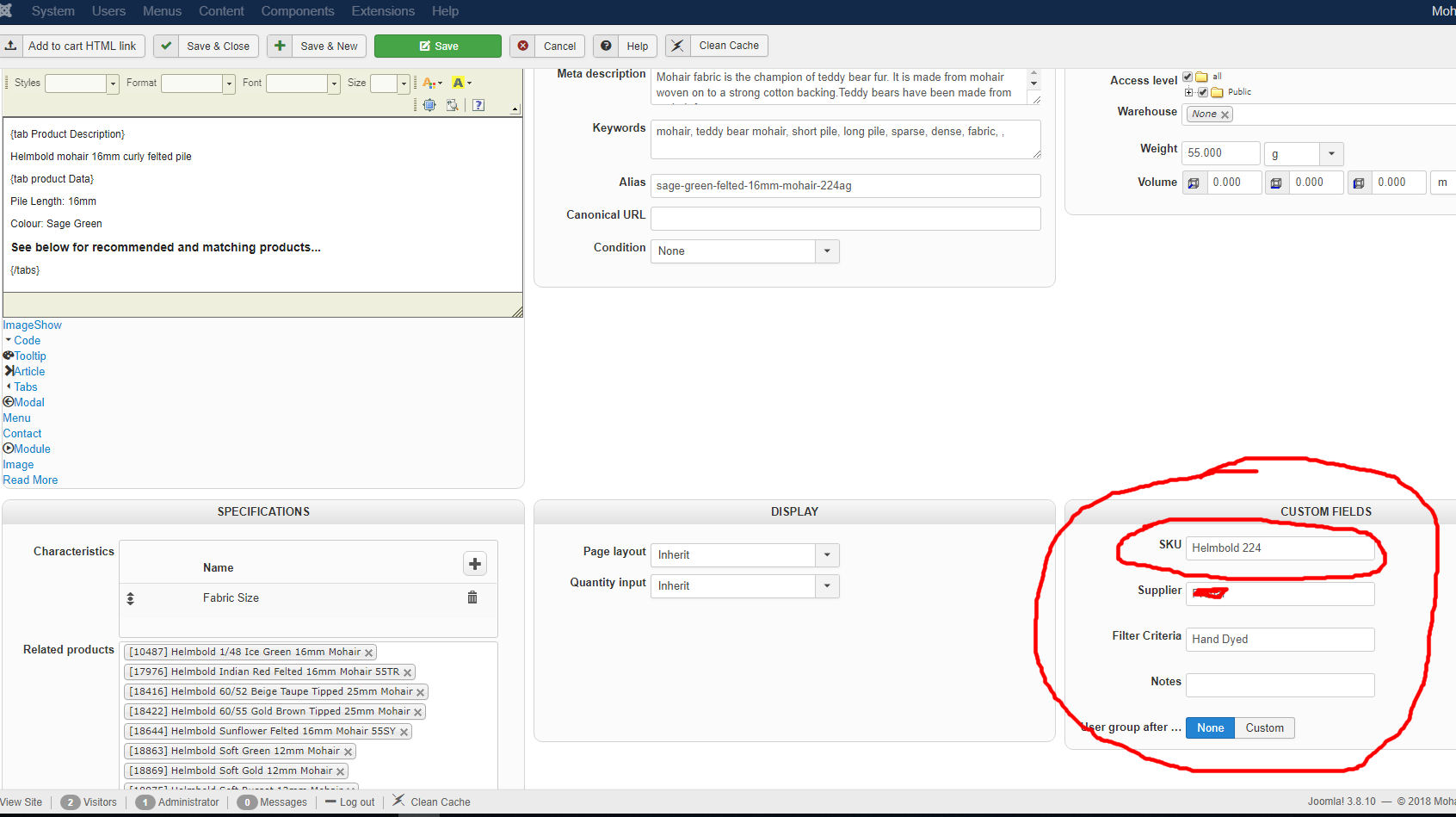
Let me try to explain what I am trying to do.
I have created a custom field,SKU. This is used to populate the manufacturer's SKU as we use our own which is in the 'product code'.
The 'product code' works fine correctly populating in the products variants. Even though the SKU is populated it does not show in the variants and would have to be entered manually which is very time consuming. If the SKU in the main product was read by the 'order' then that would be ok as its the same SKU that would be on all of the variants. At present it seems only the empty (or populated) SKU in the variant is shown in the backend order.
What I am trying to achieve is for the custom field SKU in the 'main' product page to be shown in the order instead of the variant SKU.
I have attached files and hope this is a little more clear.
Please Log in or Create an account to join the conversation.
8 years 3 months ago #294651
by nicolas
Replied by nicolas on topic Populating Variant Custom Fields
HI,
That does happen on the product page on the frontend, where you usually want to display the product custom fields.
In the order/invoice however, it's the direct value of the variant itself which is used. So if you have the value in the main product, it won't be used there.
That's the normal behavior.
If you want to change that, you need to edit the code of the view which displays the custom field in the order and modify the code to load the data of the main product with a MySQL query, etc. A PHP developer can change that for you.
That does happen on the product page on the frontend, where you usually want to display the product custom fields.
In the order/invoice however, it's the direct value of the variant itself which is used. So if you have the value in the main product, it won't be used there.
That's the normal behavior.
If you want to change that, you need to edit the code of the view which displays the custom field in the order and modify the code to load the data of the main product with a MySQL query, etc. A PHP developer can change that for you.
Please Log in or Create an account to join the conversation.
Time to create page: 0.219 seconds