

- Posts: 22
- Thank you received: 2
Hikashop installed but not showing product on frontend
7 years 6 months ago #304878
by damihyph
Hikashop installed but not showing product on frontend was created by damihyph
I am new to HikaShop. I have followed instructions for installing HikaShop and I can see it listed under Components:
HikaShop > Products | Categories | Users | Orders | Configuration | Discounts | Help | Update / About
I have entered one product as part of the installation but It is not appearing on the website frontend. Do I need to do some more configuation before it appears?
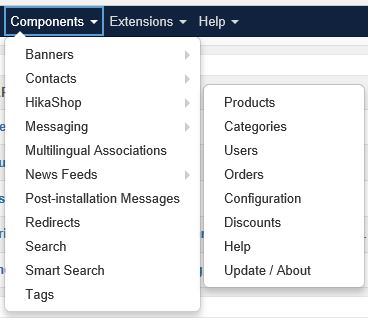
HikaShop > Products | Categories | Users | Orders | Configuration | Discounts | Help | Update / About
I have entered one product as part of the installation but It is not appearing on the website frontend. Do I need to do some more configuation before it appears?
Please Log in or Create an account to join the conversation.
7 years 6 months ago #304887
by damihyph
Replied by damihyph on topic Hikashop installed but not showing product on frontend
I have made some progress. I found in Joomla's Extensions > Modules page that the HikaShop modules had not been published. I have now published some of them and can see them on the frontend. It's a bit messy and I need to try to improve its appearance and functionality.
Please Log in or Create an account to join the conversation.

7 years 6 months ago #304879
by nicolas
Replied by nicolas on topic Hikashop installed but not showing product on frontend
Hi,
Normally, at the end of the installation process, you have a wizard where you can select how you want to display your products on the frontend (and enter your country, etc). When you do that, it will move pre created menu items from the HikaShop default menus menu to your main menu so that you can see them to access your products and/or enable modules.
If you skipped that wizard or didn't get it for some reason, don't worry. Just go in the menu manager and move the menu items yourself and/or go in the Joomla modules manager and enable the HikaShop modules you want.
And even if the precreated menu items/module instances were not created for some reason, you can create them yourself. We have some documentation about HikaShop menu items modules here:
www.hikashop.com/support/documentation/3...splay-front-end.html
Normally, at the end of the installation process, you have a wizard where you can select how you want to display your products on the frontend (and enter your country, etc). When you do that, it will move pre created menu items from the HikaShop default menus menu to your main menu so that you can see them to access your products and/or enable modules.
If you skipped that wizard or didn't get it for some reason, don't worry. Just go in the menu manager and move the menu items yourself and/or go in the Joomla modules manager and enable the HikaShop modules you want.
And even if the precreated menu items/module instances were not created for some reason, you can create them yourself. We have some documentation about HikaShop menu items modules here:
www.hikashop.com/support/documentation/3...splay-front-end.html
Please Log in or Create an account to join the conversation.
Time to create page: 0.152 seconds