
- Posts: 4
- Thank you received: 0
Images don't show correct in product editing
- KaterKarlo
-
 Topic Author
- Offline
Less
More
7 years 3 months ago #308782
by KaterKarlo
Images don't show correct in product editing was created by KaterKarlo
-- HikaShop version -- : 4.2.0
-- Joomla version -- : 3.9.10 Stable
-- PHP version -- : 7.2.19-he.0
-- Browser(s) name and version -- : Firefox 69.0b4
Hello,
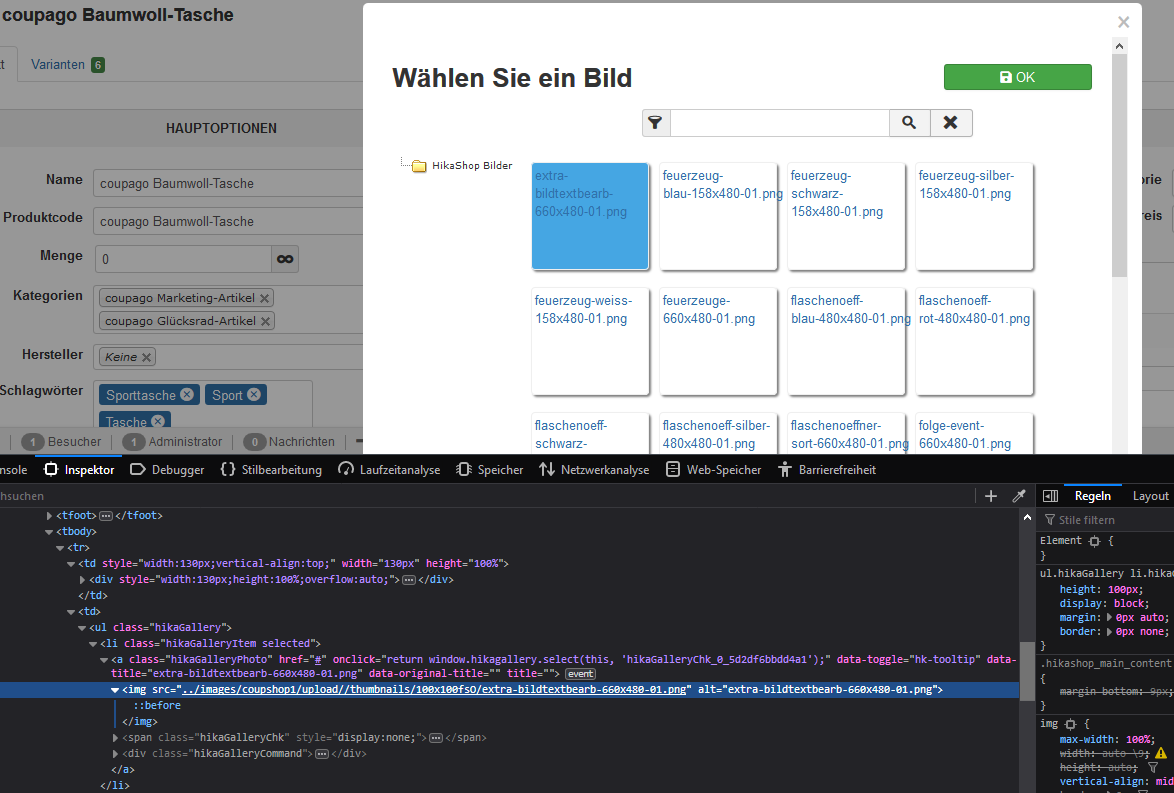
when editing products and try to add an image, in the popup and in frontend images are not shown. In Hikashop it inserts in image path a backslash wrong. Please can you tell me, what in which file I have to change? I cannot find it
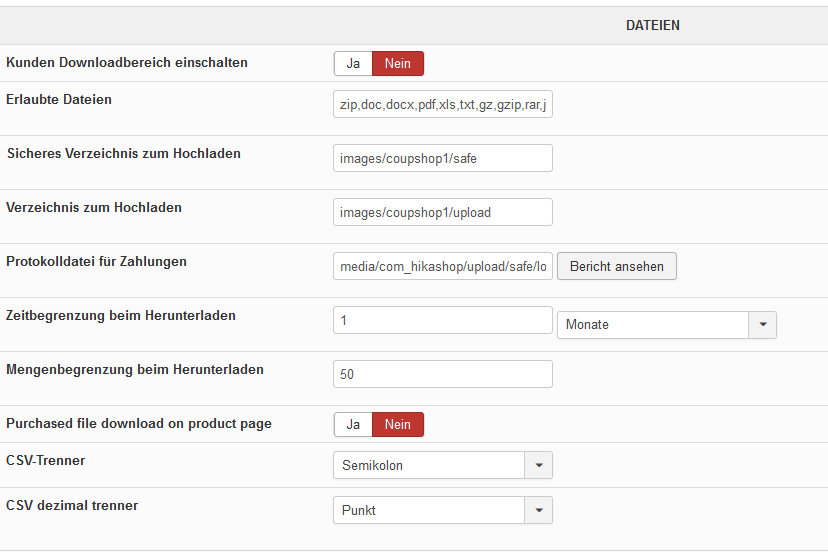
Please see in attachments the screenshots: I think that all what is to configure is done right....
Thank you very much for helping,
Regards,
Karl
-- Joomla version -- : 3.9.10 Stable
-- PHP version -- : 7.2.19-he.0
-- Browser(s) name and version -- : Firefox 69.0b4
Hello,
when editing products and try to add an image, in the popup and in frontend images are not shown. In Hikashop it inserts in image path a backslash wrong. Please can you tell me, what in which file I have to change? I cannot find it
Please see in attachments the screenshots: I think that all what is to configure is done right....
Thank you very much for helping,
Regards,
Karl
Please Log in or Create an account to join the conversation.

7 years 3 months ago - 7 years 3 months ago #308806
by Philip
Replied by Philip on topic Images don't show correct in product editing
Hello,
I can tell you the folder, but not sure that can help you though
You will find all your HikaShop images here : "YourWebsite\images\com_hikashop\upload"
If you are unable to solve your issue, you can send us some backend access via our Contact us form (add an url link to this topic to your message) in order to see by ourself the context and process some tests.
Regards
I can tell you the folder, but not sure that can help you though
You will find all your HikaShop images here : "YourWebsite\images\com_hikashop\upload"
If you are unable to solve your issue, you can send us some backend access via our Contact us form (add an url link to this topic to your message) in order to see by ourself the context and process some tests.
Regards
Last edit: 7 years 3 months ago by Philip.
Please Log in or Create an account to join the conversation.
- KaterKarlo
-
Topic Author
- Offline
Less
More
- Posts: 4
- Thank you received: 0
7 years 3 months ago #308829
by KaterKarlo
Replied by KaterKarlo on topic Images don't show correct in product editing
Hello,
thank you for your answer. I'm sorry, but this didn't help me. Please have a look at the screenshots which I sent you. There you can see that Hikashop produces the html tag like "<img src='../images/coupshop1/upload//thumbnails/100x100fsO/aktionsheft-produktbild-685x480-07.png' >" which contains after ...upload... two backslashes. when I delete one of them in firefox inspector, the images are shown correctly. So please can you tell me in which file I can make changes in code that one of the backslashes is deleted?
Thank you very much for help.
Regards,
Karl
thank you for your answer. I'm sorry, but this didn't help me. Please have a look at the screenshots which I sent you. There you can see that Hikashop produces the html tag like "<img src='../images/coupshop1/upload//thumbnails/100x100fsO/aktionsheft-produktbild-685x480-07.png' >" which contains after ...upload... two backslashes. when I delete one of them in firefox inspector, the images are shown correctly. So please can you tell me in which file I can make changes in code that one of the backslashes is deleted?
Thank you very much for help.
Regards,
Karl
Please Log in or Create an account to join the conversation.

7 years 3 months ago #308851
by nicolas
Replied by nicolas on topic Images don't show correct in product editing
Hi,
Make sure that you end the path in the HikaShop configuration with a /
Then it should be fine.
Make sure that you end the path in the HikaShop configuration with a /
Then it should be fine.
Please Log in or Create an account to join the conversation.
- KaterKarlo
-
Topic Author
- Offline
Less
More
- Posts: 4
- Thank you received: 0
7 years 3 months ago #308865
by KaterKarlo
Replied by KaterKarlo on topic Images don't show correct in product editing
Hello,
Sorry, this also did not help. I had tried before with and without "/". This is not the problem.
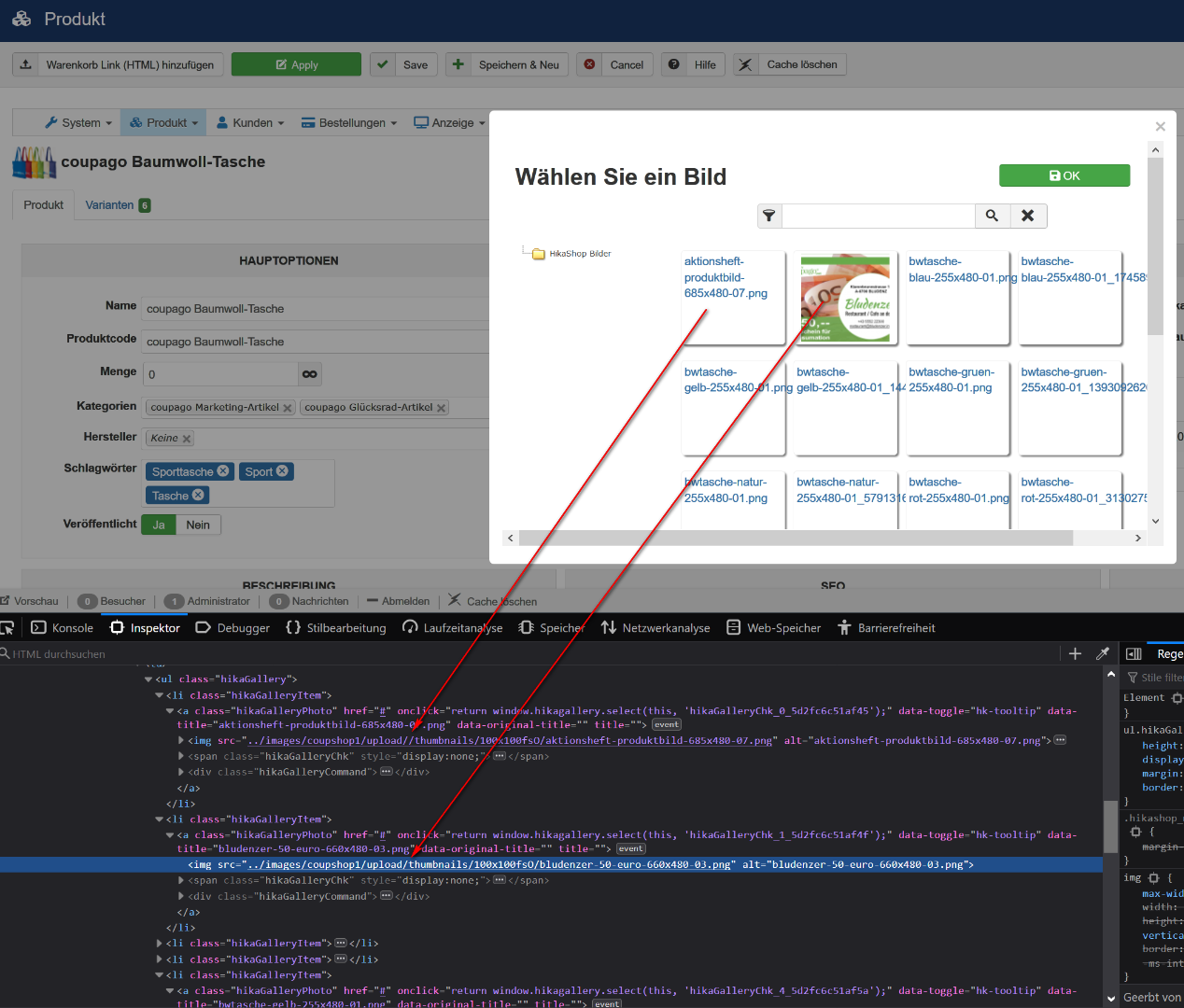

Again: Please look at the screenshots! I can't find out where the url is constructed. I think that there is the problem. The paths in configuration are correct. The images in shop frontend are shown. But the images in the popup when editing (adding or changing images) are not shown. And when I have a lot of images and I can see only part of the names of them, it is too hard to find some pics without to see it real.
Thank you for your time to help,
regards,
Karl
Sorry, this also did not help. I had tried before with and without "/". This is not the problem.
Again: Please look at the screenshots! I can't find out where the url is constructed. I think that there is the problem. The paths in configuration are correct. The images in shop frontend are shown. But the images in the popup when editing (adding or changing images) are not shown. And when I have a lot of images and I can see only part of the names of them, it is too hard to find some pics without to see it real.
Thank you for your time to help,
regards,
Karl
Please Log in or Create an account to join the conversation.
7 years 3 months ago #308907
by nicolas
Replied by nicolas on topic Images don't show correct in product editing
Hi,
I did some debugging today and found the issue.
Add the line:
$dir = trim($dir,'/').'/';
after the line:
$dir = str_replace(DS, '/', $dir);
in the file administrator/components/com_hikashop/helpers/gallery.php and that will fix the problem.
We'll also add that patch on our end.
I did some debugging today and found the issue.
Add the line:
$dir = trim($dir,'/').'/';
after the line:
$dir = str_replace(DS, '/', $dir);
in the file administrator/components/com_hikashop/helpers/gallery.php and that will fix the problem.
We'll also add that patch on our end.
Please Log in or Create an account to join the conversation.
- KaterKarlo
-
Topic Author
- Offline
Less
More
- Posts: 4
- Thank you received: 0
7 years 3 months ago #308912
by KaterKarlo
Replied by KaterKarlo on topic Images don't show correct in product editing
Hi,
thank you very much for your code.
That did it perfectly! Now everything works great!
Thank's a lot,
Regards,
Karl
thank you very much for your code.
That did it perfectly! Now everything works great!
Thank's a lot,
Regards,
Karl
Please Log in or Create an account to join the conversation.
Time to create page: 0.343 seconds