

- Posts: 637
- Thank you received: 26
Mollie payment plugin not empty shopping cart after payment
6 years 5 months ago #317787
by Lumiga
Kind regards,
Lumiga
-- HikaShop version -- : 4.2.3
Hi Support,
Today I have test the new plugin from Mollie:
www.hikashop.com/marketplace/product/cid-153.html
But when I paid en came back to my shop I saw that the shopping cart was not empty.
You can try it by your self, we have a test API so you can walk true the whole proces.
For example with this product: basis-hikashop.lucians.eu/webshop/product/laptop-hp-z12
Hope you can fix it.
Kind regards,
Lumige
Hi Support,
Today I have test the new plugin from Mollie:
www.hikashop.com/marketplace/product/cid-153.html
But when I paid en came back to my shop I saw that the shopping cart was not empty.
You can try it by your self, we have a test API so you can walk true the whole proces.
For example with this product: basis-hikashop.lucians.eu/webshop/product/laptop-hp-z12
Hope you can fix it.
Kind regards,
Lumige
Kind regards,
Lumiga
Please Log in or Create an account to join the conversation.

6 years 5 months ago #317794
by nicolas
Replied by nicolas on topic Mollie payment plugin not empty shopping cart after payment
Hi,
This might not be linked to that payment plugin.
Check the setting "Clean cart when order is" in the HikaShop configuration.
If it's set to "confirmed", it's normal that the cart is not empty if you come back from the payment gateway without finishing the payment.
Otherwise, it's probably something to be modified in the plugin to redirect to the after_end URL of HikaShop after the payment.
In that case, you want to contact skyspider.com.au/#contact the developer of the plugin so that he can have a look at the issue.
This might not be linked to that payment plugin.
Check the setting "Clean cart when order is" in the HikaShop configuration.
If it's set to "confirmed", it's normal that the cart is not empty if you come back from the payment gateway without finishing the payment.
Otherwise, it's probably something to be modified in the plugin to redirect to the after_end URL of HikaShop after the payment.
In that case, you want to contact skyspider.com.au/#contact the developer of the plugin so that he can have a look at the issue.
Please Log in or Create an account to join the conversation.
6 years 5 months ago #317819
by Lumiga
Kind regards,
Lumiga
Replied by Lumiga on topic Mollie payment plugin not empty shopping cart after payment
Thanks Nicolas,
The configuration was set clean cart when order is created.
See screenshot, so I will contact skyspider.
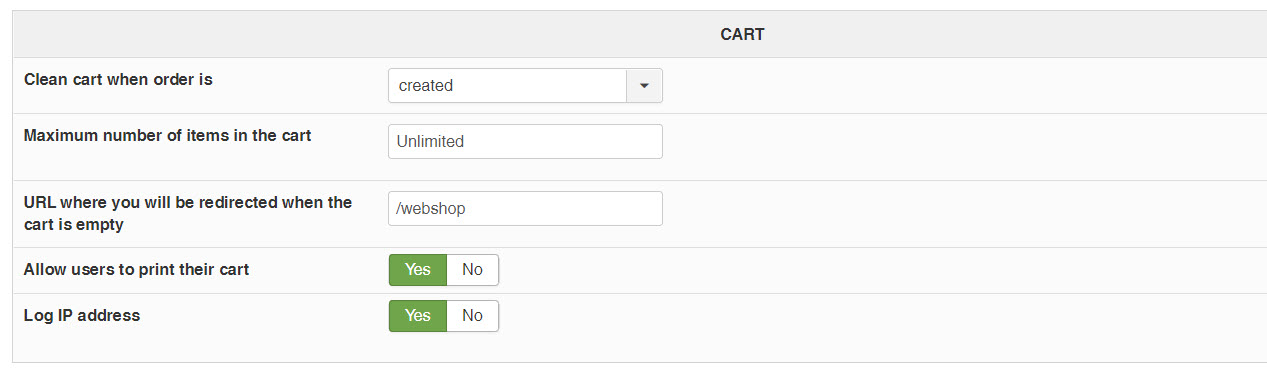
Kind regards,
Lumiga
The configuration was set clean cart when order is created.
See screenshot, so I will contact skyspider.
Kind regards,
Lumiga
Kind regards,
Lumiga
Please Log in or Create an account to join the conversation.

6 years 5 months ago - 6 years 5 months ago #317863
by Healyhatman
Replied by Healyhatman on topic Mollie payment plugin not empty shopping cart after payment
Hi, developer here.
I've tested on my site and my cart appears to be cleared correctly, and this is the first I'm hearing of this bug in two years. Have there been any updates to the way Hikashop determines that an order status should be changed?
OP I asked you on Facebook but have yet to receive a response, are you using any custom return URLs? Additionally I can't test on your site there's a problem with your MyParcel API, either that or I'm just entering in a bad address. Can you give me an address I could enter in to test?
I've tested on my site and my cart appears to be cleared correctly, and this is the first I'm hearing of this bug in two years. Have there been any updates to the way Hikashop determines that an order status should be changed?
OP I asked you on Facebook but have yet to receive a response, are you using any custom return URLs? Additionally I can't test on your site there's a problem with your MyParcel API, either that or I'm just entering in a bad address. Can you give me an address I could enter in to test?
Last edit: 6 years 5 months ago by Healyhatman.
Please Log in or Create an account to join the conversation.
6 years 5 months ago #317869
by Lumiga
Kind regards,
Lumiga
Replied by Lumiga on topic Mollie payment plugin not empty shopping cart after payment
Hi,
Here you can see the configuration:
The return url is: basis-hikashop.lucians.eu/betaling-gelukt
I have turned off the MyParcel plugin, so no you can use fake addresses.
Hope you can find something.
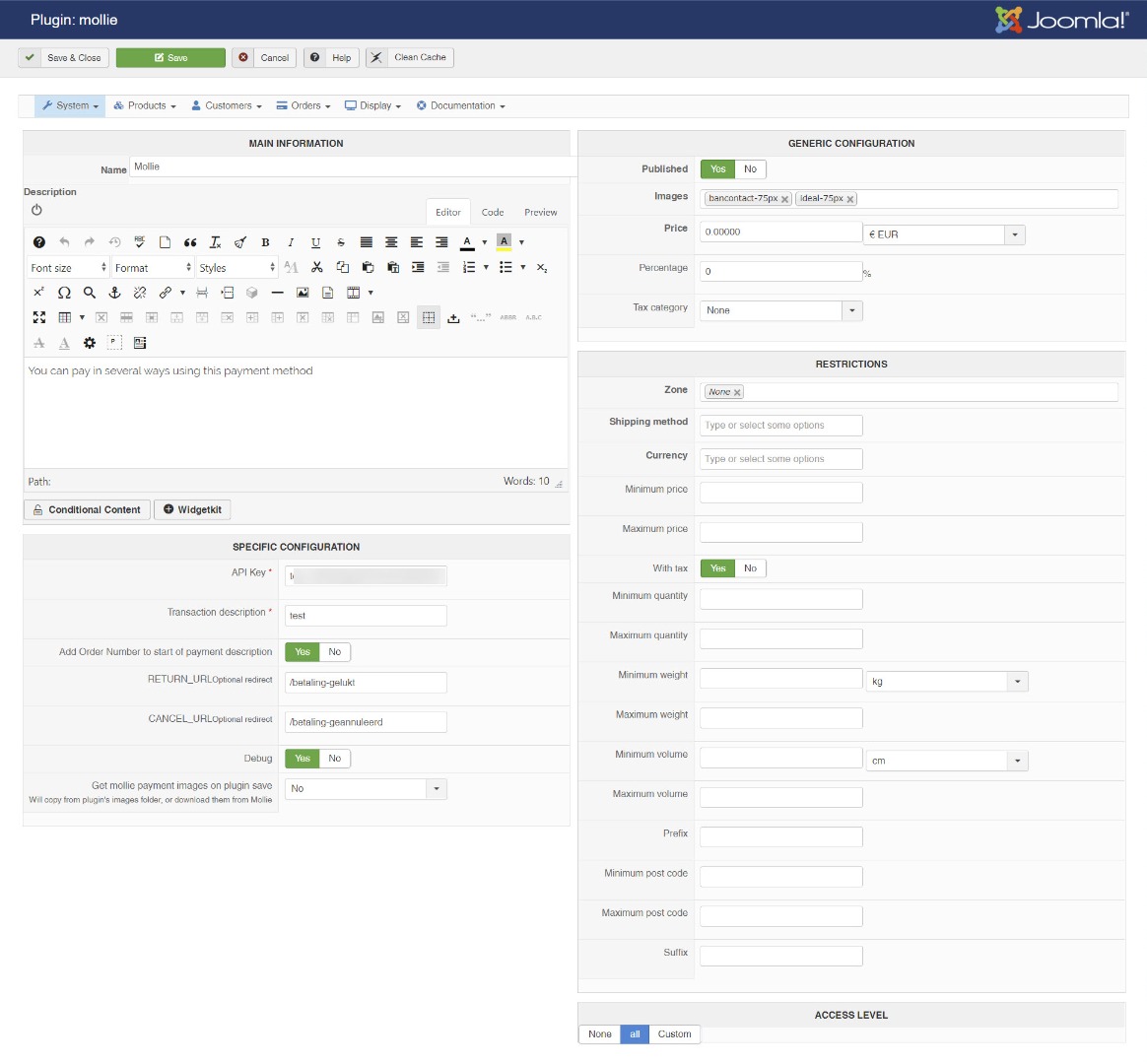
Here you can see the configuration:
The return url is: basis-hikashop.lucians.eu/betaling-gelukt
I have turned off the MyParcel plugin, so no you can use fake addresses.
Hope you can find something.
Kind regards,
Lumiga
Please Log in or Create an account to join the conversation.
6 years 5 months ago #317895
by nicolas
Replied by nicolas on topic Mollie payment plugin not empty shopping cart after payment
Hi,
With the "clean cart when order is" setting set to "created", the cart is cleared following the creation of the order, before the redirection to the payment gateway. So if you still have a cart when you come back from the payment gateway it means that it's not the same cart.
You must have had several carts linked to your user account while doing your tests, and thus when one cart is cleared, the next one in line becomes the current cart, and if you have several carts with the same thing, then you think that the cart wasn't cleared.
First, delete the carts linked to your test user account in the menu Customers>Carts of your backend.
Then, test again and hopefully you won't be able to reproduce the problem.
With the "clean cart when order is" setting set to "created", the cart is cleared following the creation of the order, before the redirection to the payment gateway. So if you still have a cart when you come back from the payment gateway it means that it's not the same cart.
You must have had several carts linked to your user account while doing your tests, and thus when one cart is cleared, the next one in line becomes the current cart, and if you have several carts with the same thing, then you think that the cart wasn't cleared.
First, delete the carts linked to your test user account in the menu Customers>Carts of your backend.
Then, test again and hopefully you won't be able to reproduce the problem.
Please Log in or Create an account to join the conversation.
6 years 5 months ago #317900
by Lumiga
Kind regards,
Lumiga
Replied by Lumiga on topic Mollie payment plugin not empty shopping cart after payment
Hi Nicoals,
Thanks for the hint, but that's not the problem.
Because when I test with an other payment plugin (ROPayments form Roland) it's working perfect.
And here you can see I have no carts open in the menu Customers>Carts,
And everytime I start my test with an empty cart and I have tested with differents products.
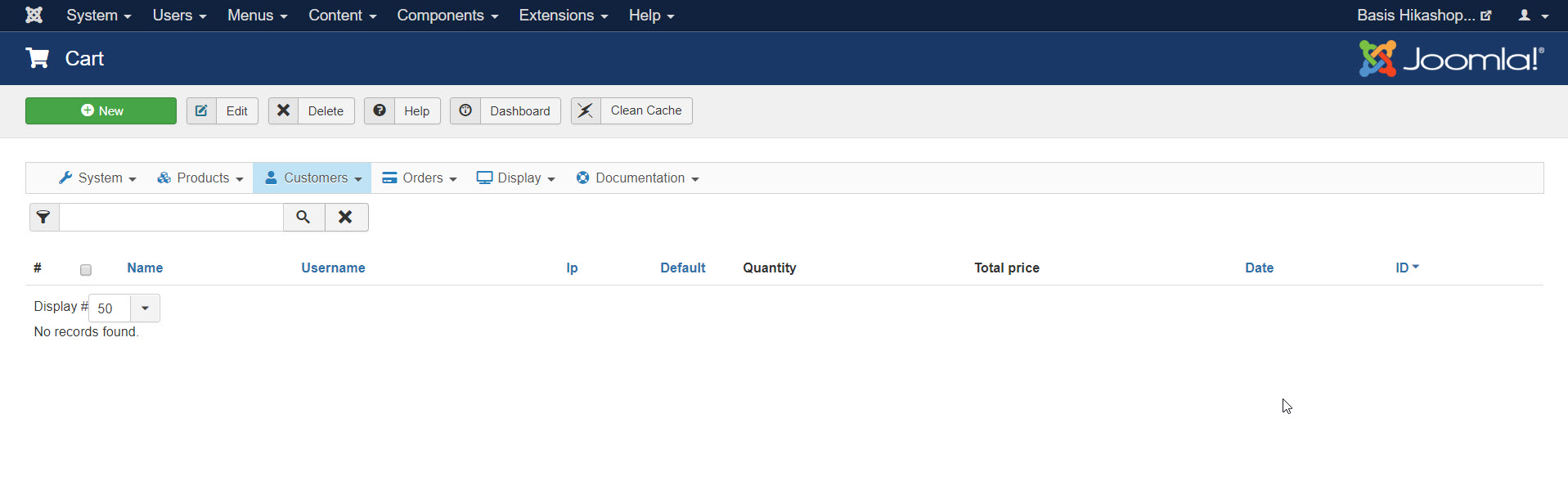
Thanks for the hint, but that's not the problem.
Because when I test with an other payment plugin (ROPayments form Roland) it's working perfect.
And here you can see I have no carts open in the menu Customers>Carts,
And everytime I start my test with an empty cart and I have tested with differents products.
Kind regards,
Lumiga
Please Log in or Create an account to join the conversation.
6 years 5 months ago #317907
by nicolas
Replied by nicolas on topic Mollie payment plugin not empty shopping cart after payment
Hi,
I checked your website, but I don't see why that wouldn't empty the cart if the "clean cart when order is" setting is really set to "created".
Also, even if the cart is not cleared before the redirection to the payment gateway, if the payment plugin properly redirects back to the "after_end" URL of HikaShop (which then redirects to the "return URL" of the payment method), HikaShop will clear the cart too.
So I don't see how it could work for RO payments and not SkySpider's, that's strange.
I checked your website, but I don't see why that wouldn't empty the cart if the "clean cart when order is" setting is really set to "created".
Also, even if the cart is not cleared before the redirection to the payment gateway, if the payment plugin properly redirects back to the "after_end" URL of HikaShop (which then redirects to the "return URL" of the payment method), HikaShop will clear the cart too.
So I don't see how it could work for RO payments and not SkySpider's, that's strange.
Please Log in or Create an account to join the conversation.
6 years 5 months ago - 6 years 5 months ago #317930
by Lumiga
Kind regards,
Lumiga
Replied by Lumiga on topic Mollie payment plugin not empty shopping cart after payment
For me it's also a mystery!
Al my shops are configured with clear cart when order is created, they all work perfect with RO payments.
I only want to test Sky Spider as an alternative option in case of.
I have turned on both Payment plugins so you can test with both.
See also the configuration from RO Payments.
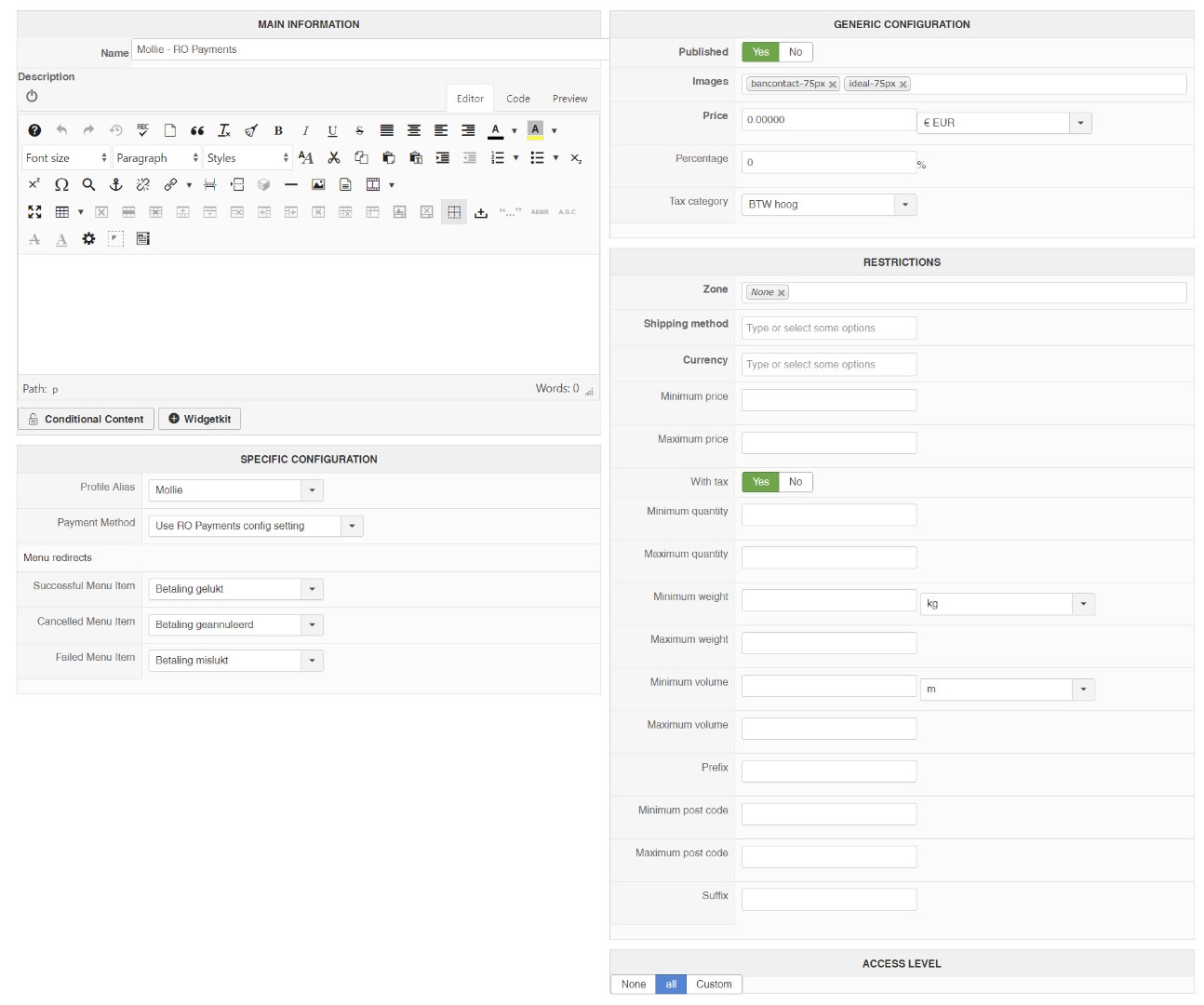
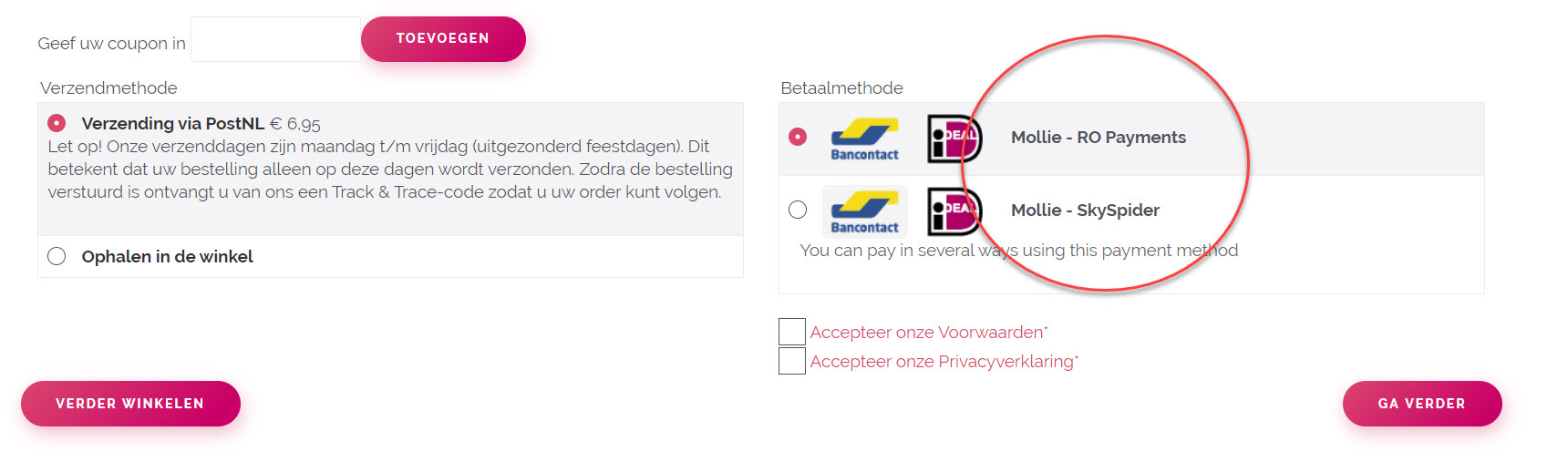
Al my shops are configured with clear cart when order is created, they all work perfect with RO payments.
I only want to test Sky Spider as an alternative option in case of.
I have turned on both Payment plugins so you can test with both.
See also the configuration from RO Payments.
Kind regards,
Lumiga
Last edit: 6 years 5 months ago by Lumiga.
Please Log in or Create an account to join the conversation.
6 years 5 months ago #317937
by Healyhatman
Replied by Healyhatman on topic Mollie payment plugin not empty shopping cart after payment
Does it work if you leave the return URL setting empty?
Please Log in or Create an account to join the conversation.
6 years 5 months ago #318004
by Lumiga
Kind regards,
Lumiga
Replied by Lumiga on topic Mollie payment plugin not empty shopping cart after payment
When I turn off the RETURN URL then the cart is gone. So that works fine.
But I will then be sent back to this URL: basis-hikashop.lucians.eu/betaling-mislukt (payment failed)
But the payment was successful and the order is confirmed.
But I will then be sent back to this URL: basis-hikashop.lucians.eu/betaling-mislukt (payment failed)
But the payment was successful and the order is confirmed.
Kind regards,
Lumiga
Please Log in or Create an account to join the conversation.
6 years 5 months ago #318460
by Lumiga
Kind regards,
Lumiga
Replied by Lumiga on topic Mollie payment plugin not empty shopping cart after payment
Is there any news yet?
Kind regards,
Lumiga
Please Log in or Create an account to join the conversation.
6 years 5 months ago #318490
by Healyhatman
Replied by Healyhatman on topic Mollie payment plugin not empty shopping cart after payment
I ran through it and it showed me the correct payment status. And then I sent you a message on our Facebook chat requesting access to your site so I could look into it a bit more.
Please Log in or Create an account to join the conversation.
6 years 5 months ago #318472
by nicolas
Replied by nicolas on topic Mollie payment plugin not empty shopping cart after payment
Hi,
If you don't set any "return URL" in the plugin, you're supposed to be redirected to the after_end URL of HikaShop. But it's that's not the case, then I can only think that the payment plugin is redirecting elsewhere, or you have some redirection mechanism (like there is in sh404SEF) to redirect the after_end URL elsewhere.
If you don't set any "return URL" in the plugin, you're supposed to be redirected to the after_end URL of HikaShop. But it's that's not the case, then I can only think that the payment plugin is redirecting elsewhere, or you have some redirection mechanism (like there is in sh404SEF) to redirect the after_end URL elsewhere.
Please Log in or Create an account to join the conversation.
Time to create page: 0.305 seconds