
- Posts: 36
- Thank you received: 1
Major Admin Issue
- ImageVillage
-
 Topic Author
- Offline
Less
More
6 years 5 months ago - 6 years 5 months ago #318561
by ImageVillage
Major Admin Issue was created by ImageVillage
-- HikaShop version -- : 4.3.0
-- Joomla version -- : 3.9.18
-- PHP version -- : eaPHP7.2
-- Browser(s) name and version -- : ALL
-- Error-message(debug-mod must be tuned on) -- : Cannot see any edit functions or icons
Hi guys I have a MAJOR issue, for some reason there is some kind of incompatibility issue with something on my clients site that has caused all admin button icons to vanish and some editable buttons to completely disappear. I think there is some kind of JQuery/Bootstrap issue or something of that nature but my client cannot use the site!
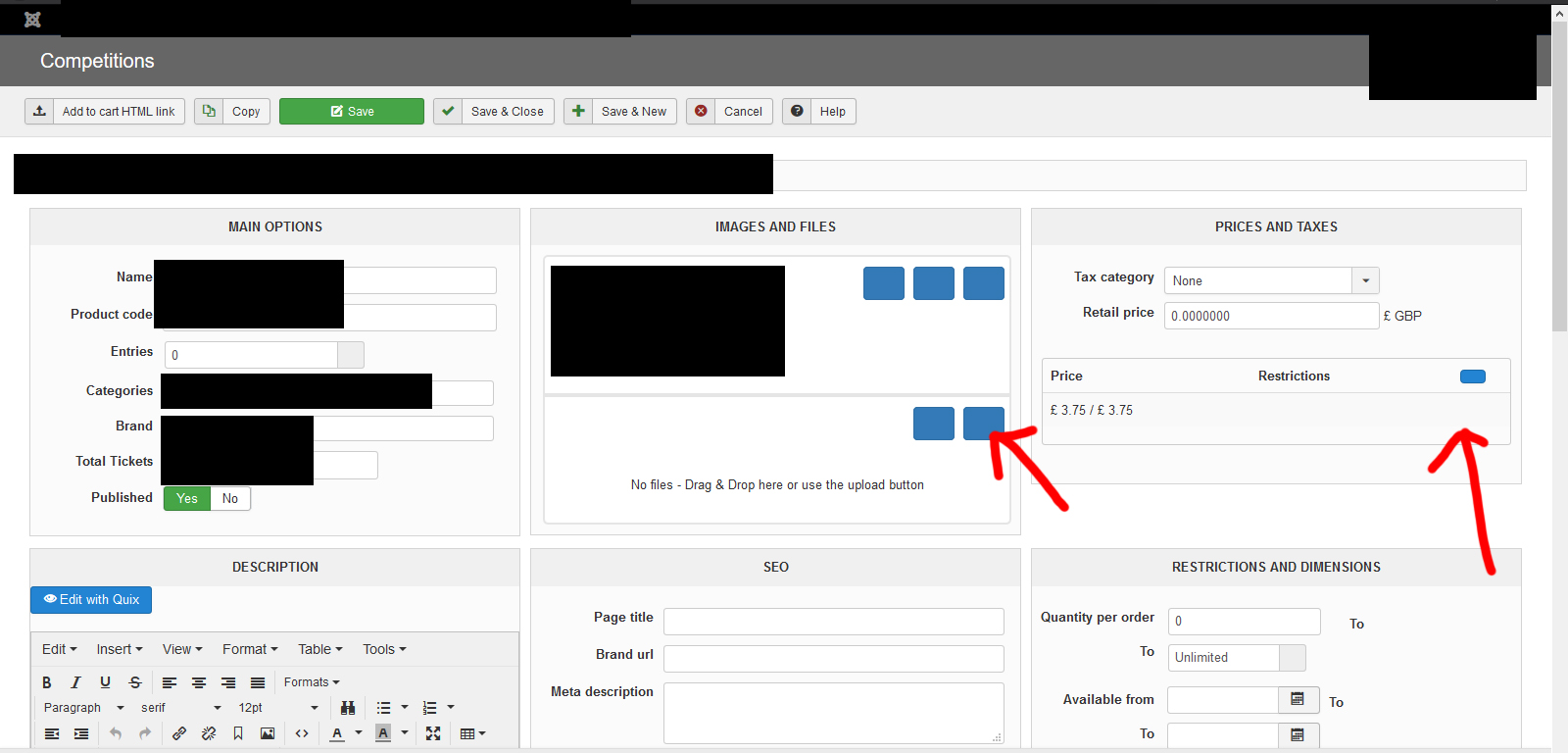
Please see screenshot attached!
-- Joomla version -- : 3.9.18
-- PHP version -- : eaPHP7.2
-- Browser(s) name and version -- : ALL
-- Error-message(debug-mod must be tuned on) -- : Cannot see any edit functions or icons
Hi guys I have a MAJOR issue, for some reason there is some kind of incompatibility issue with something on my clients site that has caused all admin button icons to vanish and some editable buttons to completely disappear. I think there is some kind of JQuery/Bootstrap issue or something of that nature but my client cannot use the site!
Please see screenshot attached!
Last edit: 6 years 5 months ago by ImageVillage.
Please Log in or Create an account to join the conversation.

6 years 5 months ago #318572
by Ch3vr0n
Replied by Ch3vr0n on topic Major Admin Issue
Saw a similar post yesterday i think, can't find it. Something is blocking HikaShop's "FontAwesome" library from loading which is reponsible for the icons.
The following user(s) said Thank You: ImageVillage
Please Log in or Create an account to join the conversation.

6 years 5 months ago #318564
by nicolas
Replied by nicolas on topic Major Admin Issue
Hi,
That's an issue with the library font-awesome which is used by HikaShop for its icons.
We would need a backend access in order to check the situation, to be able to say what to do.
You can provide that along with a link to this thread via our contact form:
www.hikashop.com/support/contact-us.html
That's an issue with the library font-awesome which is used by HikaShop for its icons.
We would need a backend access in order to check the situation, to be able to say what to do.
You can provide that along with a link to this thread via our contact form:
www.hikashop.com/support/contact-us.html
The following user(s) said Thank You: ImageVillage
Please Log in or Create an account to join the conversation.
- ImageVillage
-
Topic Author
- Offline
Less
More
- Posts: 36
- Thank you received: 1
6 years 5 months ago #318597
by ImageVillage
Replied by ImageVillage on topic Major Admin Issue
Yep, looks like outdated FontAwesome conflict?
Email sent.
While we are at it does anyone know why the HIkashop content display module doesn't align content centre on a page, it has some random large margin to the right?
 ?
?
Email sent.
While we are at it does anyone know why the HIkashop content display module doesn't align content centre on a page, it has some random large margin to the right?
Please Log in or Create an account to join the conversation.
6 years 5 months ago #318612
by nicolas
Replied by nicolas on topic Major Admin Issue
Hi,
The backend access you provided didn't work. Please double check it.
Regarding your issue with the column width, I checked your frontend, and you apparently have view overrides in your template based on old versions of HikaShop. That's what's causing the issue.
If you rename the folder templates/YOUR_TEMPLATE/html/com_hikashop/product/ via FTP it should fix the problem. Now you'll loose the customizations you had for your products, so you want to keep that folder, and then rename the files in it one by one to identify the one causing the issue.
The backend access you provided didn't work. Please double check it.
Regarding your issue with the column width, I checked your frontend, and you apparently have view overrides in your template based on old versions of HikaShop. That's what's causing the issue.
If you rename the folder templates/YOUR_TEMPLATE/html/com_hikashop/product/ via FTP it should fix the problem. Now you'll loose the customizations you had for your products, so you want to keep that folder, and then rename the files in it one by one to identify the one causing the issue.
Please Log in or Create an account to join the conversation.
6 years 5 months ago #318620
by nicolas
Replied by nicolas on topic Major Admin Issue
Hi,
The access is now working.
From what I can see, HikaShop is not loading font-awesome at all on your backend.
This indicates that either you (or someone else with access to your backend) modified the PHP code of HikaShop to not load font-awesome (in that case, reinstalling the Hikashop install package on your website will solve the issue), or you've added an entry with the namekey "font-awesome" or "font-awesome-type" in the hikashop_config table via your phpmyadmin with a value which removes the font-awesome library from your backend.
The access is now working.
From what I can see, HikaShop is not loading font-awesome at all on your backend.
This indicates that either you (or someone else with access to your backend) modified the PHP code of HikaShop to not load font-awesome (in that case, reinstalling the Hikashop install package on your website will solve the issue), or you've added an entry with the namekey "font-awesome" or "font-awesome-type" in the hikashop_config table via your phpmyadmin with a value which removes the font-awesome library from your backend.
Please Log in or Create an account to join the conversation.
- ImageVillage
-
Topic Author
- Offline
Less
More
- Posts: 36
- Thank you received: 1
6 years 5 months ago #318628
by ImageVillage
Replied by ImageVillage on topic Major Admin Issue
HI Nicolas,
I have not modified anything, I know there was a conflict in the front end with a component a while ago but the backend was working fine. I have tried installing latest Hikashop update (.3) not made any difference and it's still not working?
I have not modified anything, I know there was a conflict in the front end with a component a while ago but the backend was working fine. I have tried installing latest Hikashop update (.3) not made any difference and it's still not working?
Please Log in or Create an account to join the conversation.
- ImageVillage
-
Topic Author
- Offline
Less
More
- Posts: 36
- Thank you received: 1
6 years 5 months ago - 6 years 5 months ago #318629
by ImageVillage
Replied by ImageVillage on topic Major Admin Issue
Ok the issue is my template is loading FA4.7 but Hikashop is using latest FA5.2, the conflict is causing the loading issue of the library and this is in turn effecting everything on my site using the FA library including the backend, THAT is the issue here. I need to somehow work our how to override the template loading FA4.7 and just use Hikashops FA5.0 library.
FA 5.0:
/media/com_hikashop/css/font-awesome.css?v=5.2.0
FA 4.7.0:
/templates/jd_shop/css/font-awesome.min.css
FA 5.0:
/media/com_hikashop/css/font-awesome.css?v=5.2.0
FA 4.7.0:
/templates/jd_shop/css/font-awesome.min.css
Last edit: 6 years 5 months ago by ImageVillage.
Please Log in or Create an account to join the conversation.
6 years 5 months ago #318640
by nicolas
Replied by nicolas on topic Major Admin Issue
Hi,
Well, this doesn't explain why the font-awesome library is not loaded in the backend.
Even with a conflict with the template, it should only mess the icons on the frontend.
So I can only suppose that something has been modified to remove font-awesome from HikaShop.
I would recommend to revert that, and instead, to add an entry with the namekey font-awesome-type and the value admin in the hikashop_config table. That way, font-awesome will only be loaded by HikaShop in the backend and not in the frontend, avoiding the conflict with your template.
Well, this doesn't explain why the font-awesome library is not loaded in the backend.
Even with a conflict with the template, it should only mess the icons on the frontend.
So I can only suppose that something has been modified to remove font-awesome from HikaShop.
I would recommend to revert that, and instead, to add an entry with the namekey font-awesome-type and the value admin in the hikashop_config table. That way, font-awesome will only be loaded by HikaShop in the backend and not in the frontend, avoiding the conflict with your template.
Please Log in or Create an account to join the conversation.
- ImageVillage
-
Topic Author
- Offline
Less
More
- Posts: 36
- Thank you received: 1
6 years 5 months ago - 6 years 5 months ago #318662
by ImageVillage
Replied by ImageVillage on topic Major Admin Issue
No I have not changed anything and I have no idea how to do what you suggest so I am left with a website that is now totally unusable!
AWESOME!
If anyone has done this or knows or sees this could post a "How To" that would be helpful to the community as clearly no-one here wishes to actually resolve issues rather just highlight what has already been said!!!!!!
AWESOME!
If anyone has done this or knows or sees this could post a "How To" that would be helpful to the community as clearly no-one here wishes to actually resolve issues rather just highlight what has already been said!!!!!!
Last edit: 6 years 5 months ago by ImageVillage.
Please Log in or Create an account to join the conversation.
6 years 5 months ago #318665
by nicolas
Replied by nicolas on topic Major Admin Issue
Hi,
You're saying that I don't wish to resolve the issue, but I can't with just a backend access and I'm still not sure why this is happening so I wouldn't even be able to provide a "how to" since to provide a solution you first need to know the exact cause of the problem.
I was assuming in my previous message that something had been changed on your website to fix a font-awesome conflict in the frontend generating that problem in the backend. So that's why I wrote this hoping you would know.
Well, if you don't know, then we can have a look.
Please provide a FTP and a database access so that we can check the files of HikaShop are well as the tables of HikaShop.
As I said, this can only happen if something has been modified in the files or the database. If it's not you, then it might be your template provider or the template itself modifying something during its installation, update, or something like that.
You're saying that I don't wish to resolve the issue, but I can't with just a backend access and I'm still not sure why this is happening so I wouldn't even be able to provide a "how to" since to provide a solution you first need to know the exact cause of the problem.
I was assuming in my previous message that something had been changed on your website to fix a font-awesome conflict in the frontend generating that problem in the backend. So that's why I wrote this hoping you would know.
Well, if you don't know, then we can have a look.
Please provide a FTP and a database access so that we can check the files of HikaShop are well as the tables of HikaShop.
As I said, this can only happen if something has been modified in the files or the database. If it's not you, then it might be your template provider or the template itself modifying something during its installation, update, or something like that.
Please Log in or Create an account to join the conversation.
- ImageVillage
-
Topic Author
- Offline
Less
More
- Posts: 36
- Thank you received: 1
6 years 5 months ago - 6 years 5 months ago #318745
by ImageVillage
Replied by ImageVillage on topic Major Admin Issue
Are you serious?
Here's an idea,
1.Ask for access to the site from the customer reporting an issue
2.Evaluate the issue based on your skillset and knowledge
3.Notify the customer of the problem/solution
4.Establish if the issue should be resolved by Hikashop or not
5.Inform the customer if issues caused by another plugin/component in Joomla so they may reach out to the developer(s)
6.If an issue is caused by Hikashop a:Fix in update b:Post "How-to"
Nice and simple way to encourage customers to have faith in the product they are investing in, to trust you as developers, to educate people and to develop a strong brand and product that people will recommend.
Sorry but I find Hikashop a HUGE letdown in support, so many questions get left unanswered and unresolved in here and in speaking with other friends in the industry the other night they all had the same opinion and had pretty poor experiences with Hikashop.
Your support needs a major rethink!
I reported a problem days ago, under investigation there are others facing the SAME issues and STILL have no solution, YOU have done NOTHING to help just want to split hairs regarding what question was asked or pointing the finger at customers who may use the wrong terminology or have a lesser understanding of all this than you, I find your attitude and responses patronising and it's a MASSIVE letdown on your part.
Some people don't have the knowledge you do, so how about you show some understanding and step up and help!
If you can be anything in this world, BE KIND!
Here's an idea,
1.Ask for access to the site from the customer reporting an issue
2.Evaluate the issue based on your skillset and knowledge
3.Notify the customer of the problem/solution
4.Establish if the issue should be resolved by Hikashop or not
5.Inform the customer if issues caused by another plugin/component in Joomla so they may reach out to the developer(s)
6.If an issue is caused by Hikashop a:Fix in update b:Post "How-to"
Nice and simple way to encourage customers to have faith in the product they are investing in, to trust you as developers, to educate people and to develop a strong brand and product that people will recommend.
Sorry but I find Hikashop a HUGE letdown in support, so many questions get left unanswered and unresolved in here and in speaking with other friends in the industry the other night they all had the same opinion and had pretty poor experiences with Hikashop.
Your support needs a major rethink!
I reported a problem days ago, under investigation there are others facing the SAME issues and STILL have no solution, YOU have done NOTHING to help just want to split hairs regarding what question was asked or pointing the finger at customers who may use the wrong terminology or have a lesser understanding of all this than you, I find your attitude and responses patronising and it's a MASSIVE letdown on your part.
Some people don't have the knowledge you do, so how about you show some understanding and step up and help!
If you can be anything in this world, BE KIND!
Last edit: 6 years 5 months ago by ImageVillage.
Please Log in or Create an account to join the conversation.
6 years 5 months ago - 6 years 5 months ago #318748
by nicolas
Replied by nicolas on topic Major Admin Issue
Hi,
My messages were no t meant to be patronising. Sorry if you took it that way. I only wanted to help and try to understand the situation.
We're still in step 1 and 2 here, trying to understand where the problem comes from.
Only two people reported that issue over the thousands using HikaShop so it's likely not a problem in HikaShop and we can't reproduce it either on our end.
So the only solution for us to be able to achieve point 3 is to get the necessary backend (which you provided) and FTP access (which you didn't provided yet).
We can't move forward on the issue without the necessary accesses to check on the situation.
My messages were no t meant to be patronising. Sorry if you took it that way. I only wanted to help and try to understand the situation.
We're still in step 1 and 2 here, trying to understand where the problem comes from.
Only two people reported that issue over the thousands using HikaShop so it's likely not a problem in HikaShop and we can't reproduce it either on our end.
So the only solution for us to be able to achieve point 3 is to get the necessary backend (which you provided) and FTP access (which you didn't provided yet).
We can't move forward on the issue without the necessary accesses to check on the situation.
Last edit: 6 years 5 months ago by nicolas.
Please Log in or Create an account to join the conversation.
Time to create page: 0.155 seconds