

- Posts: 220
- Thank you received: 10
Filter by additional field is not saved
6 years 4 months ago #320099
by ilyaminsk
Replied by ilyaminsk on topic Filter by additional field is not saved
Hello, thanks I will write now to the developer. Tell me, regarding the display of the button. I asked you above how to make it appear so?
Please Log in or Create an account to join the conversation.

6 years 4 months ago #320122
by nicolas
Replied by nicolas on topic Filter by additional field is not saved
Hi,
Well, to have the button stick to the bottom of the screen, that's just a bit of CSS:
And if you want to make it glow like in the video, it's possible with a bit more CSS:
stackoverflow.com/questions/41686503/css...inite-animation-loop
Well, to have the button stick to the bottom of the screen, that's just a bit of CSS:
Code:
a#hikashop_compare_button {
position: fixed;
bottom: 0px;
z-index: 99;
right: 10%;
}
stackoverflow.com/questions/41686503/css...inite-animation-loop
The following user(s) said Thank You: ilyaminsk
Please Log in or Create an account to join the conversation.
6 years 4 months ago - 6 years 4 months ago #320148
by ilyaminsk
Replied by ilyaminsk on topic Filter by additional field is not saved
Hello. Thanks. Tell me, if you add for example 3-5 products for comparison. The comparison page becomes non-responsive for the mobile version. How to adapt it for mobile?
Last edit: 6 years 4 months ago by ilyaminsk.
Please Log in or Create an account to join the conversation.
6 years 4 months ago #320168
by nicolas
Replied by nicolas on topic Filter by additional field is not saved
Hi,
I don't know. I don't see how it would be possible to compare more than 2 products on a smartphone screen where space is quite limited.
More than a customization issue, I would say it's a practical issue.
I don't know. I don't see how it would be possible to compare more than 2 products on a smartphone screen where space is quite limited.
More than a customization issue, I would say it's a practical issue.
The following user(s) said Thank You: ilyaminsk
Please Log in or Create an account to join the conversation.
6 years 4 months ago #320179
by ilyaminsk
Replied by ilyaminsk on topic Filter by additional field is not saved
Hello. Thanks for the help.
Please Log in or Create an account to join the conversation.
6 years 4 months ago - 6 years 4 months ago #320324
by ilyaminsk
Replied by ilyaminsk on topic Filter by additional field is not saved
Hello. Tell me, in the mobile version, related products are not adapted for mobile? How to make them adaptable?
This message contains confidential information
Last edit: 6 years 4 months ago by ilyaminsk.
Please Log in or Create an account to join the conversation.
6 years 4 months ago #320329
by nicolas
Replied by nicolas on topic Filter by additional field is not saved
Hi,
Related products should be adapted for mobile by default.
I tried to check on the situation on your link but it doesn't work:
monosnap.com/file/nlWa77ZdqegYfTRXhORJNW7lxj1E2S
Could you check the URL and provide it again ?
Related products should be adapted for mobile by default.
I tried to check on the situation on your link but it doesn't work:
monosnap.com/file/nlWa77ZdqegYfTRXhORJNW7lxj1E2S
Could you check the URL and provide it again ?
Please Log in or Create an account to join the conversation.
6 years 4 months ago #320368
by ilyaminsk
Replied by ilyaminsk on topic Filter by additional field is not saved
Hello. try this one:
ilsandoors.by/katalog/product/dver-mezhk...orta-23-1-tsvet.html
Please Log in or Create an account to join the conversation.
6 years 4 months ago - 6 years 4 months ago #320374
by ilyaminsk
Replied by ilyaminsk on topic Filter by additional field is not saved
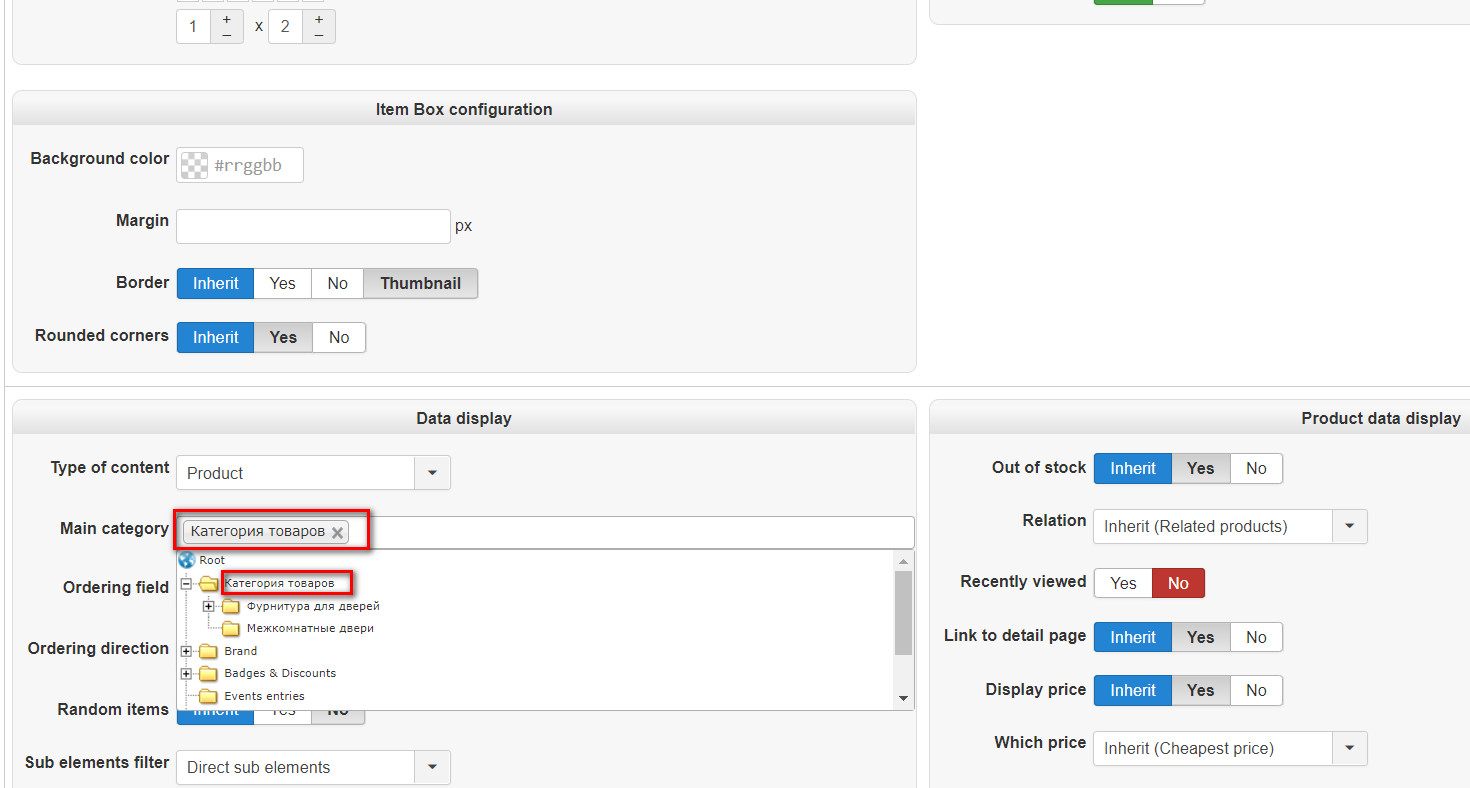
Tell me how to display all categories in a module? I choose the parent category, but the module does not work?
Last edit: 6 years 4 months ago by ilyaminsk.
Please Log in or Create an account to join the conversation.
6 years 3 months ago #320389
by nicolas
Replied by nicolas on topic Filter by additional field is not saved
Hi,
1. The issue is that you've activated the "carousel" setting in the related products module (via the Joomla modules manager) AND that you have the "carousel legacy" setting activated in the Advanced tab of the HikaShop configuration.
Because of that, even though you only have one slide of products on that page, it makes the listing there nor responsive as the old carousel system doesn't support it.
I would recommend turning off that legacy setting, and maybe even the carousel setting of the module if you don't need a carousel.
2. In "type of content" you need to select "categories" not "products". Otherwise, it will display a listing of the products directly under that category.
Also, make sure that the "synchronize" setting is turned off as you want to display the same categories listing regardless of the page you're on.
1. The issue is that you've activated the "carousel" setting in the related products module (via the Joomla modules manager) AND that you have the "carousel legacy" setting activated in the Advanced tab of the HikaShop configuration.
Because of that, even though you only have one slide of products on that page, it makes the listing there nor responsive as the old carousel system doesn't support it.
I would recommend turning off that legacy setting, and maybe even the carousel setting of the module if you don't need a carousel.
2. In "type of content" you need to select "categories" not "products". Otherwise, it will display a listing of the products directly under that category.
Also, make sure that the "synchronize" setting is turned off as you want to display the same categories listing regardless of the page you're on.
The following user(s) said Thank You: ilyaminsk
Please Log in or Create an account to join the conversation.
6 years 3 months ago #320408
by ilyaminsk
Replied by ilyaminsk on topic Filter by additional field is not saved
Hello.
1.It worked. It helped.
2. Thanks
1.It worked. It helped.
2. Thanks
Please Log in or Create an account to join the conversation.
6 years 3 months ago - 6 years 3 months ago #320410
by ilyaminsk
Replied by ilyaminsk on topic Filter by additional field is not saved
module forms an invalid url
page where module: ilsandoors.by
url module:
How to fix it?
page where module: ilsandoors.by
url module:
This message contains confidential information
How to fix it?
Last edit: 6 years 3 months ago by ilyaminsk.
Please Log in or Create an account to join the conversation.
6 years 3 months ago - 6 years 3 months ago #320427
by ilyaminsk
Replied by ilyaminsk on topic Filter by additional field is not saved
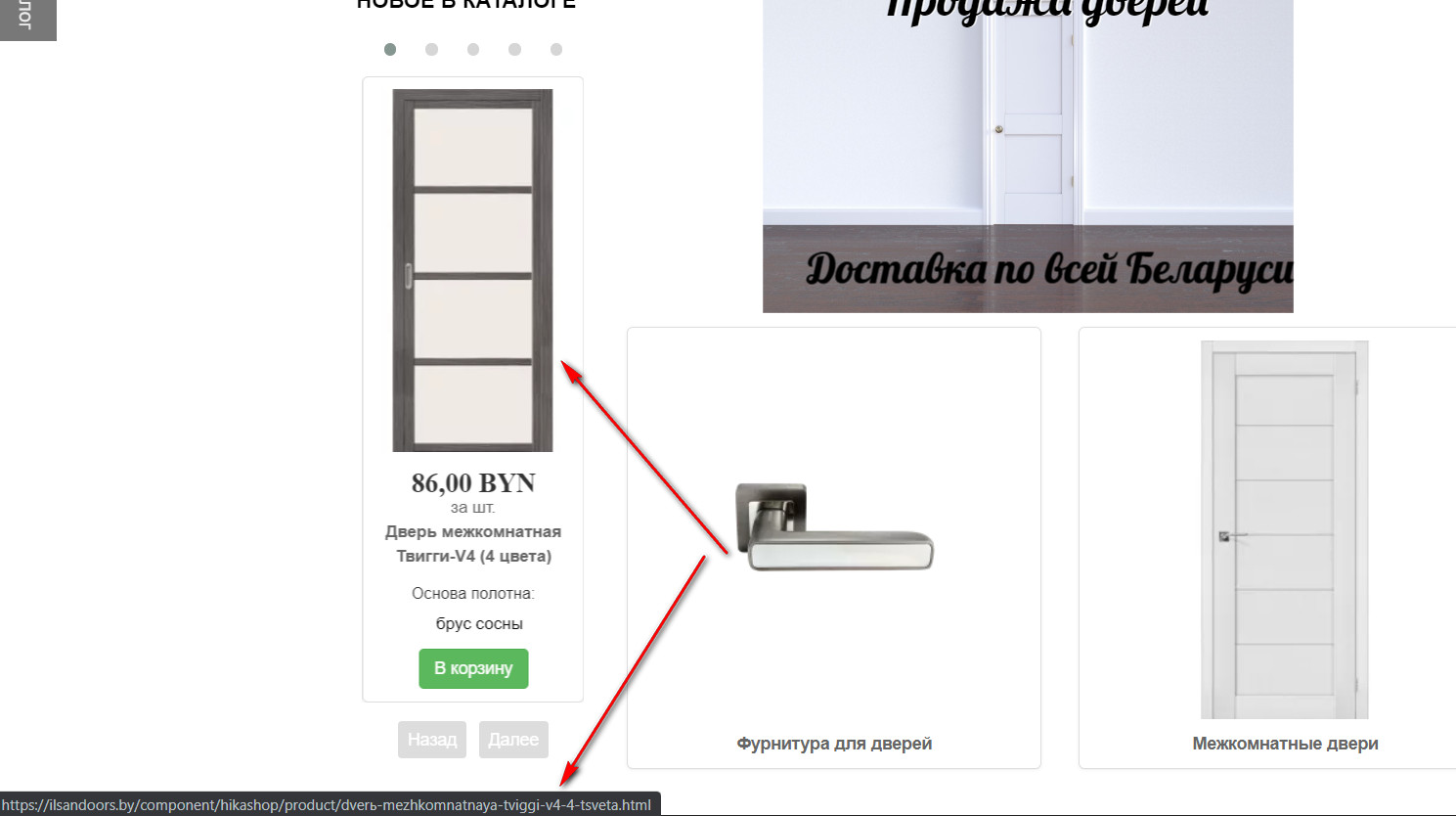
1.The category module also does not work correctly, url is not correct
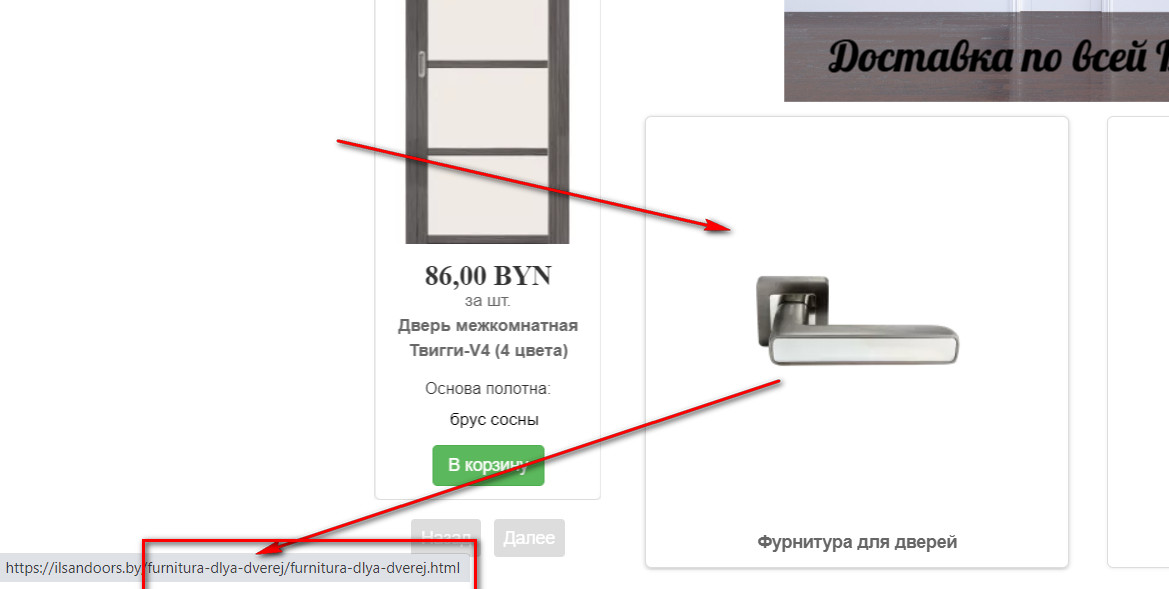
2. For some reason url is duplicated.
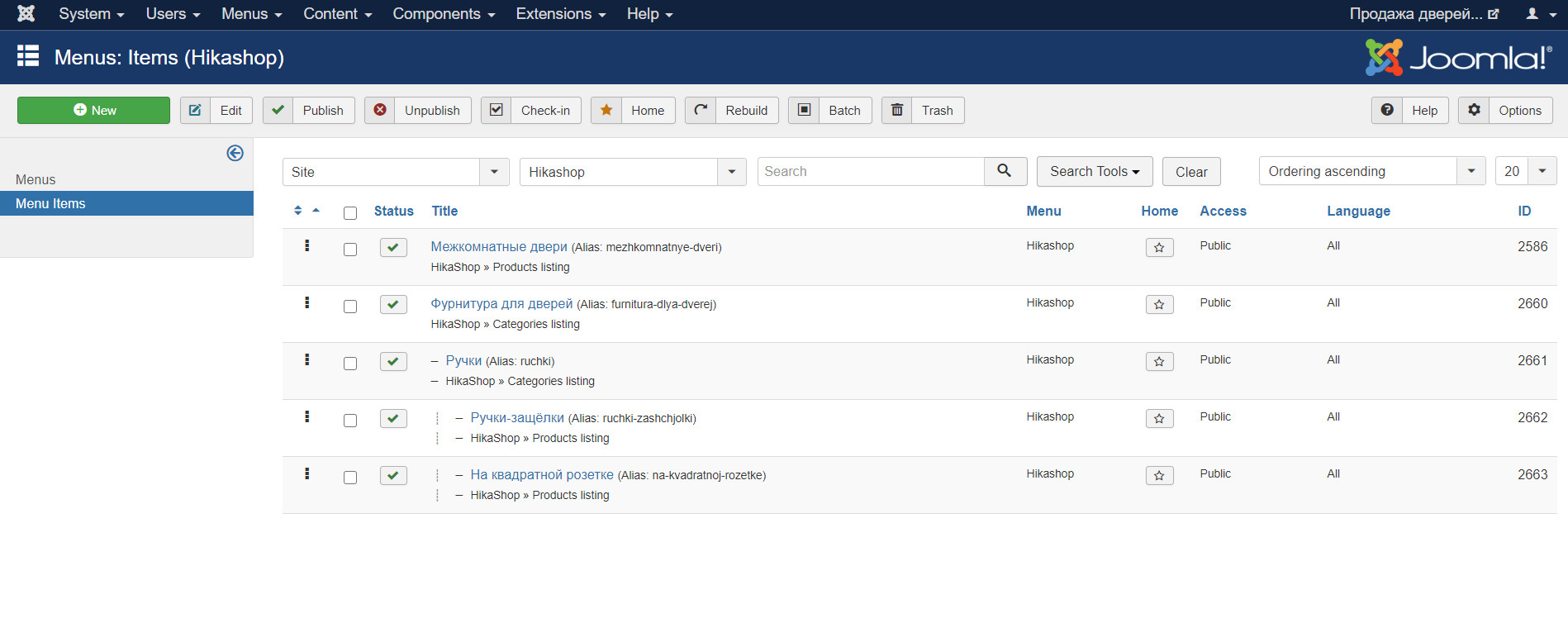
Menu structure:
2. For some reason url is duplicated.
Menu structure:
Last edit: 6 years 3 months ago by ilyaminsk.
Please Log in or Create an account to join the conversation.
6 years 3 months ago - 6 years 3 months ago #320412
by nicolas
Replied by nicolas on topic Filter by additional field is not saved
Hi,
I don't get any error when I use that URL.
So I suppose that you men that you don't want the "component/hikashop" part of the URL maybe ?
That's because you need to select a products / categories listing menu item in the "menu" setting of your module.
Then, Joomla's SEF will replace component/hikashop with the alias of that menu item.
If you don't want to display the sub categories, then you need to edit the menu item via the Joomla menu manager and change its type to a products listing menu item instead of a categories listing menu item.
I don't get any error when I use that URL.
So I suppose that you men that you don't want the "component/hikashop" part of the URL maybe ?
That's because you need to select a products / categories listing menu item in the "menu" setting of your module.
Then, Joomla's SEF will replace component/hikashop with the alias of that menu item.
If you don't want to display the sub categories, then you need to edit the menu item via the Joomla menu manager and change its type to a products listing menu item instead of a categories listing menu item.
Last edit: 6 years 3 months ago by nicolas.
The following user(s) said Thank You: ilyaminsk
Please Log in or Create an account to join the conversation.
6 years 3 months ago #320467
by ilyaminsk
Replied by ilyaminsk on topic Filter by additional field is not saved
Big Thanks
Please Log in or Create an account to join the conversation.
6 years 3 months ago - 6 years 3 months ago #320478
by ilyaminsk
Replied by ilyaminsk on topic Filter by additional field is not saved
found the answer.
Last edit: 6 years 3 months ago by ilyaminsk.
Please Log in or Create an account to join the conversation.
Time to create page: 0.329 seconds