

- Posts: 72
- Thank you received: 5
Problem at step 3
6 years 5 days ago #324356
by mlehr
Problem at step 3 was created by mlehr
-- url of the page with the problem -- :
www.megiq.com/shop
Concerns the Megiq webshop: www.megiq.com/shop
We are experiencing a problem at step 3 (Address).
Customers regularly e-mail us that they cannot proceed at step 3 if they click on the “Next” button. Nothing happens then. Then they try it in another browser and nothing happens there either. No error message is shown. So it is impossible to go to step 4.
Do you have an idea how we can solve this problem?
Could it possibly be a cache problem?
Thanks in advance for your help.
Concerns the Megiq webshop: www.megiq.com/shop
We are experiencing a problem at step 3 (Address).
Customers regularly e-mail us that they cannot proceed at step 3 if they click on the “Next” button. Nothing happens then. Then they try it in another browser and nothing happens there either. No error message is shown. So it is impossible to go to step 4.
Do you have an idea how we can solve this problem?
Could it possibly be a cache problem?
Thanks in advance for your help.
Please Log in or Create an account to join the conversation.

6 years 5 days ago - 6 years 5 days ago #324361
by Philip
Replied by Philip on topic Problem at step 3
Hello,
Are you able to reproduce this issue on your side ? We process some tests and everything seems to work as expected.
In order to progress on your subject, can you provide these elements :
- Your Checkout configuration screenshot
- Have you noticed any points in common between the customers having experienced this bug ?
- Maybe use one of the customer that experience this bug can leads us to better get the root issue.
- For your cache question, that's possible but before going in this direction, there are other point to check.
Awaiting news from you to progress on your subject.
Regards
Are you able to reproduce this issue on your side ? We process some tests and everything seems to work as expected.
In order to progress on your subject, can you provide these elements :
- Your Checkout configuration screenshot
- Have you noticed any points in common between the customers having experienced this bug ?
- Maybe use one of the customer that experience this bug can leads us to better get the root issue.
- For your cache question, that's possible but before going in this direction, there are other point to check.
Awaiting news from you to progress on your subject.
Regards
Last edit: 6 years 5 days ago by Philip.
Please Log in or Create an account to join the conversation.
5 years 11 months ago #324664
by mlehr
Replied by mlehr on topic Problem at step 3
Attached a screenshot of the configuration.
We looked at the problem extensively with a customer, but nothing remarkable came out.
The only similarity we see now is that customers all seem to be from Germany. But if I test myself with a German address, it just works fine.
Hopefully you can help us further.
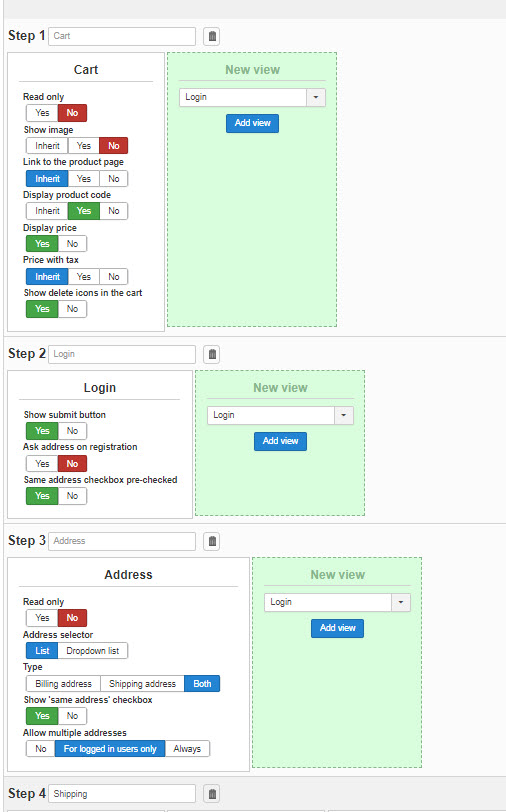
We looked at the problem extensively with a customer, but nothing remarkable came out.
The only similarity we see now is that customers all seem to be from Germany. But if I test myself with a German address, it just works fine.
Hopefully you can help us further.
Please Log in or Create an account to join the conversation.

5 years 11 months ago #324665
by nicolas
Replied by nicolas on topic Problem at step 3
Hi,
It would be great to have screenshots of all the settings under the checkout tab of the HikaShop configuration.
Also, are users with the issue using the guest checkout or a normal user account ? Or it doesn't matter ?
I also wasn't able to reproduce the problem on my end when I tried on your website so hard to say what it could be.
However, I see you have quite an early build of HikaShop 4.3.0 (from May). It might actually be something we fixed in the 4.4.0 that we released a week ago:
www.hikashop.com/support/documentation/5...ashop-changelog.html
So I would recommend to update your HikaShop to the 4.4.0 and see if you still have the issue before going further.
Note that the new release's auto update is not activated yet. So you need to manually download the install package on our website and install it on your website to get the update instead of going through the Joomla updater.
It would be great to have screenshots of all the settings under the checkout tab of the HikaShop configuration.
Also, are users with the issue using the guest checkout or a normal user account ? Or it doesn't matter ?
I also wasn't able to reproduce the problem on my end when I tried on your website so hard to say what it could be.
However, I see you have quite an early build of HikaShop 4.3.0 (from May). It might actually be something we fixed in the 4.4.0 that we released a week ago:
www.hikashop.com/support/documentation/5...ashop-changelog.html
So I would recommend to update your HikaShop to the 4.4.0 and see if you still have the issue before going further.
Note that the new release's auto update is not activated yet. So you need to manually download the install package on our website and install it on your website to get the update instead of going through the Joomla updater.
Please Log in or Create an account to join the conversation.
5 years 11 months ago #324717
by mlehr
Replied by mlehr on topic Problem at step 3
The update does not solve the problem.
We now know where the problem is. It has to do with the entry of the VAT number. And then very specific for people from Germany.
If someone from Germany does not enter a VAT number, it will be fine.
If someone from Germany enters a correct VAT number, things do not go well. Then it is impossible to go to step 4.
I have also tried to set the VAT check to no in the configuration. But that doesn't help. Normally, the VAT check is on online check.
If a German does not enter a VAT number at all, it will be fine. He can go to step 4.
If a Dutch person enters a correct VAT number, it will also be fine.
If a German enters a non-existent VAT number, he will receive an error message.
The problem is therefore very specific with Germans who enter a correct VAT number. It may be in more countries, but I have not been able to test that.
This is a correct VAT number from Germany: DE322326233
Do you have enough information?
We now know where the problem is. It has to do with the entry of the VAT number. And then very specific for people from Germany.
If someone from Germany does not enter a VAT number, it will be fine.
If someone from Germany enters a correct VAT number, things do not go well. Then it is impossible to go to step 4.
I have also tried to set the VAT check to no in the configuration. But that doesn't help. Normally, the VAT check is on online check.
If a German does not enter a VAT number at all, it will be fine. He can go to step 4.
If a Dutch person enters a correct VAT number, it will also be fine.
If a German enters a non-existent VAT number, he will receive an error message.
The problem is therefore very specific with Germans who enter a correct VAT number. It may be in more countries, but I have not been able to test that.
This is a correct VAT number from Germany: DE322326233
Do you have enough information?
Please Log in or Create an account to join the conversation.
5 years 11 months ago #324763
by Philip
Replied by Philip on topic Problem at step 3
Hello,
Please can you complete the bottom of your checkout settings page as Nicolas previously asked, please.
Regards
Please can you complete the bottom of your checkout settings page as Nicolas previously asked, please.
Regards
Please Log in or Create an account to join the conversation.
5 years 11 months ago #324765
by mlehr
Replied by mlehr on topic Problem at step 3
Additional information.
I have tried a dozen other countries with VAT numbers, but they do not cause any problems.
I also found out that some German VAT numbers apparently do work. This one example: DE142109211.
I would like to hear from you!
I have tried a dozen other countries with VAT numbers, but they do not cause any problems.
I also found out that some German VAT numbers apparently do work. This one example: DE142109211.
I would like to hear from you!
Please Log in or Create an account to join the conversation.
5 years 11 months ago #324766
by mlehr
Replied by mlehr on topic Problem at step 3
The screenshots.
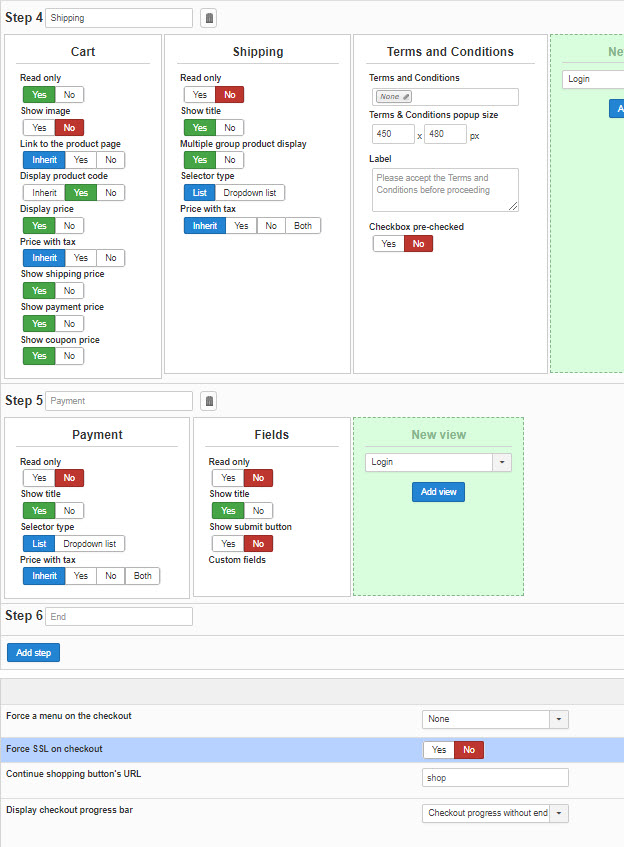
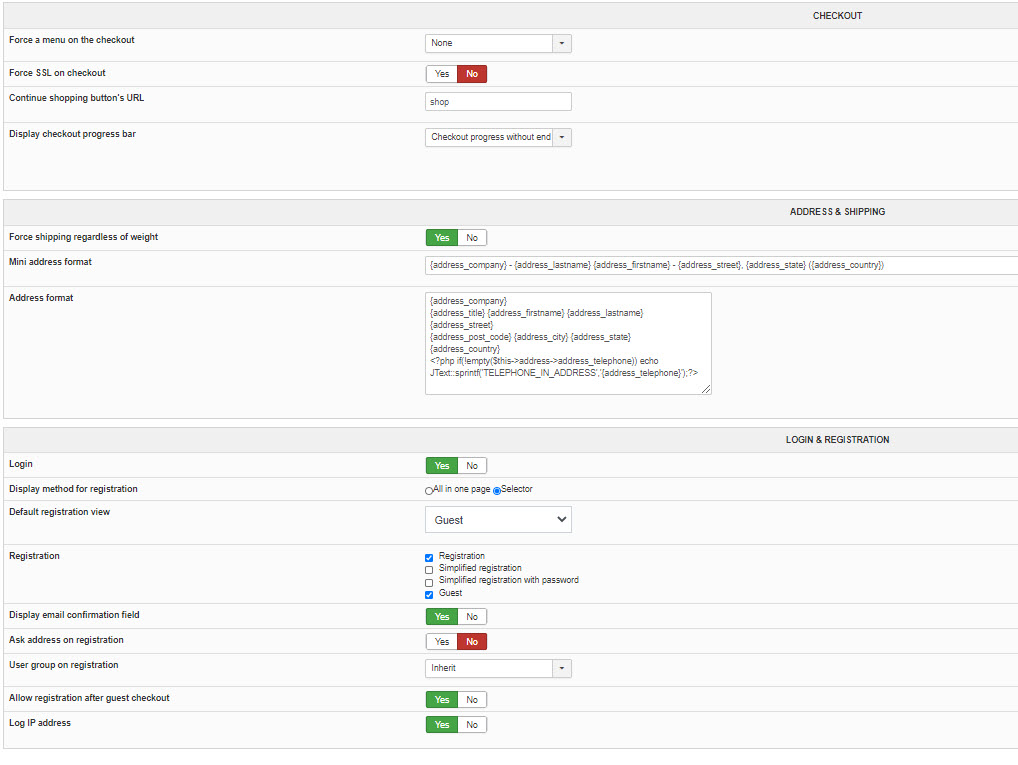
Please Log in or Create an account to join the conversation.
5 years 11 months ago #324777
by nicolas
Replied by nicolas on topic Problem at step 3
Hi,
The problem you have doesn't seem to be linked to the VAT number.
I tried with:
monosnap.com/file/UBwnGK2RxBp0k70I5RXePrsDz20tXj
So no VAT number, and a real french address, and I get the same issue on your website.
And I don't have any issue with an address in Germany with your VAT number, or that address, when I try on a test website on our end.
It might be an issue linked to a custom plugin you might have, or a shipping plugin, or a payment plugin.
Hard to say.
What shipping and payment plugins are you using ?
I also see that you're using HikaShop 4.4.0. Maybe some third party extension integrated with HikaShop has some issue with the changes we've added in the 4.4.0? I don't see why that would be the case, but you never know. Are you using such an extension ?
The problem you have doesn't seem to be linked to the VAT number.
I tried with:
monosnap.com/file/UBwnGK2RxBp0k70I5RXePrsDz20tXj
So no VAT number, and a real french address, and I get the same issue on your website.
And I don't have any issue with an address in Germany with your VAT number, or that address, when I try on a test website on our end.
It might be an issue linked to a custom plugin you might have, or a shipping plugin, or a payment plugin.
Hard to say.
What shipping and payment plugins are you using ?
I also see that you're using HikaShop 4.4.0. Maybe some third party extension integrated with HikaShop has some issue with the changes we've added in the 4.4.0? I don't see why that would be the case, but you never know. Are you using such an extension ?
Please Log in or Create an account to join the conversation.
5 years 11 months ago - 5 years 11 months ago #324778
by nicolas
Replied by nicolas on topic Problem at step 3
Ah, looking at my screenshot again, it might come from the state custom field.
Try to deactivate it.
Maybe for addresses created before you disabled the states, the state is still in the database, while for the new addresses, that field would be empty.
And maybe something on your website is using the state field, and since it's empty for new addresses, it might reject them and not old addresses which have something saved in the database for the field.
Try to deactivate it.
Maybe for addresses created before you disabled the states, the state is still in the database, while for the new addresses, that field would be empty.
And maybe something on your website is using the state field, and since it's empty for new addresses, it might reject them and not old addresses which have something saved in the database for the field.
Last edit: 5 years 11 months ago by nicolas.
Please Log in or Create an account to join the conversation.
5 years 11 months ago #324966
by mlehr
Replied by mlehr on topic Problem at step 3
When I deactivate the field "State" it goes well indeed.
I have set it to unpublished now. Can you please check whether you are now are able to go further then step 3 (address)? In your earlier post you indicated that this was not possible.
But why does it not go well only when the VAT number has been entered? Because all addresses, even in Germany, without a VAT number go well. And when I enter VAT number DE322326233, for example, it goes wrong when the State field is on.
And how can I solve this problem with the database?
I have set it to unpublished now. Can you please check whether you are now are able to go further then step 3 (address)? In your earlier post you indicated that this was not possible.
But why does it not go well only when the VAT number has been entered? Because all addresses, even in Germany, without a VAT number go well. And when I enter VAT number DE322326233, for example, it goes wrong when the State field is on.
And how can I solve this problem with the database?
Please Log in or Create an account to join the conversation.
5 years 11 months ago #325000
by nicolas
Replied by nicolas on topic Problem at step 3
Hi,
It now goes well and I'm able to process to step 4.
I did again some tests on your website and I can proceed to step 4 whether my address is in France or Germany and whether I enter a VAT number or no VAT number.
The only way I'm blocked is if the VAT number is invalid, with an error message indicating that the VAT number is incorrect.
Are you able to reproduce the problem still ?
If so, it might be because the state field is not empty for the address you're trying to use. Try with a new user account, and you should be able to get the same result than me. And in that case, you can run a mass action on the "address" data with an action "update the values" on the address_state column with the string value empty and that will fix old addresses with the issue if there is such an issue with the address_state.
It now goes well and I'm able to process to step 4.
I don't know what you're talking about. The VAT number had nothing to do with your problem as I explained previously.But why does it not go well only when the VAT number has been entered? Because all addresses, even in Germany, without a VAT number go well. And when I enter VAT number DE322326233, for example, it goes wrong when the State field is on.
I did again some tests on your website and I can proceed to step 4 whether my address is in France or Germany and whether I enter a VAT number or no VAT number.
The only way I'm blocked is if the VAT number is invalid, with an error message indicating that the VAT number is incorrect.
Are you able to reproduce the problem still ?
If so, it might be because the state field is not empty for the address you're trying to use. Try with a new user account, and you should be able to get the same result than me. And in that case, you can run a mass action on the "address" data with an action "update the values" on the address_state column with the string value empty and that will fix old addresses with the issue if there is such an issue with the address_state.
Please Log in or Create an account to join the conversation.
5 years 11 months ago #325031
by mlehr
Replied by mlehr on topic Problem at step 3
I have reactivated the address_state.
Then with a completely new address in Germany and new user tried again.
If I do not enter a VAT number, it will be fine.
If I enter this VAT number DE322326233, it will go wrong.
This convinces me that it is a combination of the address_state field in combination with some VAT numbers. At least in some cases.
Then with a completely new address in Germany and new user tried again.
If I do not enter a VAT number, it will be fine.
If I enter this VAT number DE322326233, it will go wrong.
This convinces me that it is a combination of the address_state field in combination with some VAT numbers. At least in some cases.
Wich trigger and wich filter should I choose?And in that case, you can run a mass action on the "address" data with an action "update the values" on the address_state column with the string value empty and that will fix old addresses with the issue if there is such an issue with the address_state.
Please Log in or Create an account to join the conversation.
5 years 11 months ago #325065
by nicolas
Replied by nicolas on topic Problem at step 3
Hi,
You can leave the filters and triggers area empty.
You can leave the filters and triggers area empty.
Please Log in or Create an account to join the conversation.
5 years 11 months ago #325121
by mlehr
Replied by mlehr on topic Problem at step 3
Mass action works, but only once. For example, if I go back to the address and save it again, it will no longer work. Also when I try with a new user, is does not work anymore after the first time. If I then do that mass action again, it works again.
What can go wrong here? Is this a bug?
And in this case is it not wise to enable an automatic trigger? If yes which one?
What can go wrong here? Is this a bug?
And in this case is it not wise to enable an automatic trigger? If yes which one?
Please Log in or Create an account to join the conversation.
5 years 11 months ago #325124
by nicolas
Replied by nicolas on topic Problem at step 3
Hi,
You mean that even with the state address field turned off, you have that problem ?
If you have that field turned on, I would recommend to keep turned it off. Then, with the address state field emptied by the mass action, you should not have the problem anymore even after editing an address.
You can add the trigger "after an address is updated" to the mass action.
That way, it should auto correct the issue if that's not enough to turn off the address state field.
You mean that even with the state address field turned off, you have that problem ?
If you have that field turned on, I would recommend to keep turned it off. Then, with the address state field emptied by the mass action, you should not have the problem anymore even after editing an address.
You can add the trigger "after an address is updated" to the mass action.
That way, it should auto correct the issue if that's not enough to turn off the address state field.
Please Log in or Create an account to join the conversation.
5 years 11 months ago #325315
by mlehr
Replied by mlehr on topic Problem at step 3
Thanx Nicolas. Looks like problem is solved now.
The following user(s) said Thank You: Philip
Please Log in or Create an account to join the conversation.
Time to create page: 0.297 seconds