
After filtering the price range filter is gone....

5 years 11 months ago - 5 years 11 months ago #326626
by renem
After filtering the price range filter is gone.... was created by renem
-- HikaShop version -- : 4.4.0
-- Joomla version -- : 3.9.23
-- PHP version -- : 7.4
-- Browser(s) name and version -- : Chrome 87
Hi some strange behaviour with the filters please watch this video:
filter problem
And why is the filter module not collapsed on mobile view (it's enabled in the module) ?
Any clue?
Kind regards René
-- Joomla version -- : 3.9.23
-- PHP version -- : 7.4
-- Browser(s) name and version -- : Chrome 87
Hi some strange behaviour with the filters please watch this video:
filter problem
And why is the filter module not collapsed on mobile view (it's enabled in the module) ?
Any clue?
Kind regards René
Last edit: 5 years 11 months ago by renem. Reason: added question
Please Log in or Create an account to join the conversation.

5 years 11 months ago #326641
by nicolas
Replied by nicolas on topic After filtering the price range filter is gone....
Hi,
Ok. Let's try something.
Remove the code:
from the file administrator/components/com_hikashop/classes/filter.php
And in that same file, add the code:
just after the code:
And I think it should fix the problem which is apparently that the javascript to reinitialize the cursor selector is lost when the cursor is refreshed after a filter is used.
Please let us know how it goes so that we can validate the fix.
Ok. Let's try something.
Remove the code:
Code:
$doc = JFactory::getDocument();
$doc->addScriptDeclaration("\n<!--\n".$js."\n//-->\n");
And in that same file, add the code:
Code:
if(!empty($js))
$html .= '<script>'.$js.'</script>';
Code:
$html = '<div style="'.$cursorWidth.' '.$float.' margin: 10px 20px;" id="slider_'.$filter->filter_namekey.'_'.$divName.'" data-container-div="hikashop_filter_form_'.$divName.'">'.$html.'</div>';
Please let us know how it goes so that we can validate the fix.
Please Log in or Create an account to join the conversation.
5 years 11 months ago #326906
by renem
Replied by renem on topic After filtering the price range filter is gone....
Sorry for the delayed reply. I edit the filter code and this seems to work now ok.
Other question about this filter module.
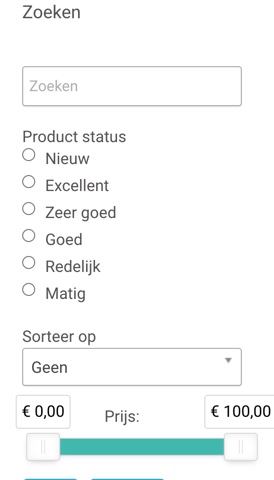
In the sidebar the filter has more options than in the category top
Sidebar:
Category Top:

Kind regards René
Other question about this filter module.
In the sidebar the filter has more options than in the category top
Sidebar:
Category Top:
Kind regards René
Please Log in or Create an account to join the conversation.
5 years 11 months ago #326907
by nicolas
Replied by nicolas on topic After filtering the price range filter is gone....
Hi,
In the settings of the filter module, you have a setting you can use to select which filters you want to appear in the module.
So you can remove some if you don't want them in the module.
In the settings of the filter module, you have a setting you can use to select which filters you want to appear in the module.
So you can remove some if you don't want them in the module.
Please Log in or Create an account to join the conversation.
5 years 11 months ago #326930
by renem
Replied by renem on topic After filtering the price range filter is gone....
Hi,
So there is one search module used for the sidebar and the category filter (i have selected inherit).
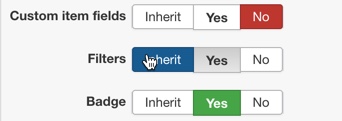
I can't explain why the Status field is not displayed in the category view (see previous post for the screenshots)
And can you explain why the filters are not collapsed?

Kind regards and thanxs for your fast support.
So there is one search module used for the sidebar and the category filter (i have selected inherit).
I can't explain why the Status field is not displayed in the category view (see previous post for the screenshots)
And can you explain why the filters are not collapsed?
This message contains confidential information
Kind regards and thanxs for your fast support.
Please Log in or Create an account to join the conversation.
5 years 11 months ago #326975
by nicolas
Replied by nicolas on topic After filtering the price range filter is gone....
Hi,
Could you provide a screenshot of the settings of the "product status" filter ?
To me, it seems that if you don't see it at the top of the listing, it's because of its settings.
Regarding the fact that the filter area is not collapsed at the top of the products listing, I suppose it is because you have a view override based on an old version of HikaShop which doesn't contain the necessary modifications for the collapse system, which was only added last year.
So check the folder templates/YOUR_TEMPLATE/html/com_hikashop/product via FTP.
Try renaming it and see if that helps. If it does, then it means that it comes from one of the view files in that folder and probably the "filter.php" view file.
Could you provide a screenshot of the settings of the "product status" filter ?
To me, it seems that if you don't see it at the top of the listing, it's because of its settings.
Regarding the fact that the filter area is not collapsed at the top of the products listing, I suppose it is because you have a view override based on an old version of HikaShop which doesn't contain the necessary modifications for the collapse system, which was only added last year.
So check the folder templates/YOUR_TEMPLATE/html/com_hikashop/product via FTP.
Try renaming it and see if that helps. If it does, then it means that it comes from one of the view files in that folder and probably the "filter.php" view file.
Please Log in or Create an account to join the conversation.
5 years 11 months ago #326977
by renem
Replied by renem on topic After filtering the price range filter is gone....
Hi Nicolas,
Yes and Yes! Thank you very much!
Kind regards René
Yes and Yes! Thank you very much!
Kind regards René
Please Log in or Create an account to join the conversation.
Time to create page: 0.071 seconds